Ask ten media buyers how to handle the meta learning phase and nine will give you the same answer: leave the ad set alone until it clears 50 events. That advice survives because it's roughly right, not because it's complete.
The threshold Meta publishes is a guideline. The status label in the Delivery column is a symptom rather than a diagnosis. And the number that moves cost per result is the share of the account's budget sitting inside Learning or Learning Limited.
An account burning most of its spend on ad sets that never exit doesn't have an editing-discipline problem. It has a volume problem dressed up as a setup problem, and no amount of patience fixes a budget that can't produce 50 events a week at the target CPA. This is a working model of what resets learning, which edits are worth the reset, and how to read your own exposure before you decide whether to wait, merge or rebuild.
Table of Contents
- How the Learning Phase Works and When It Ends
- Reset Triggers That Send Ad Sets Back to Learning
- Controlling Advantage+ Creative Enhancements
- How to Read the 14-Day Learning Spend Metric
- How to Consolidate Fragmented Ad Sets
- Deciding Whether to Wait, Consolidate or Restructure
- Set Up Stable Learning Before You Scale
How the Learning Phase Works and When It Ends
Most buyers know the number and misread the unit. Meta's learning-phase guidance for government and advocacy advertisers, published in 2025, states that ad sets typically stabilize after around 50 optimization events within a seven-day period. The count belongs to the ad set, and it counts events rather than days.
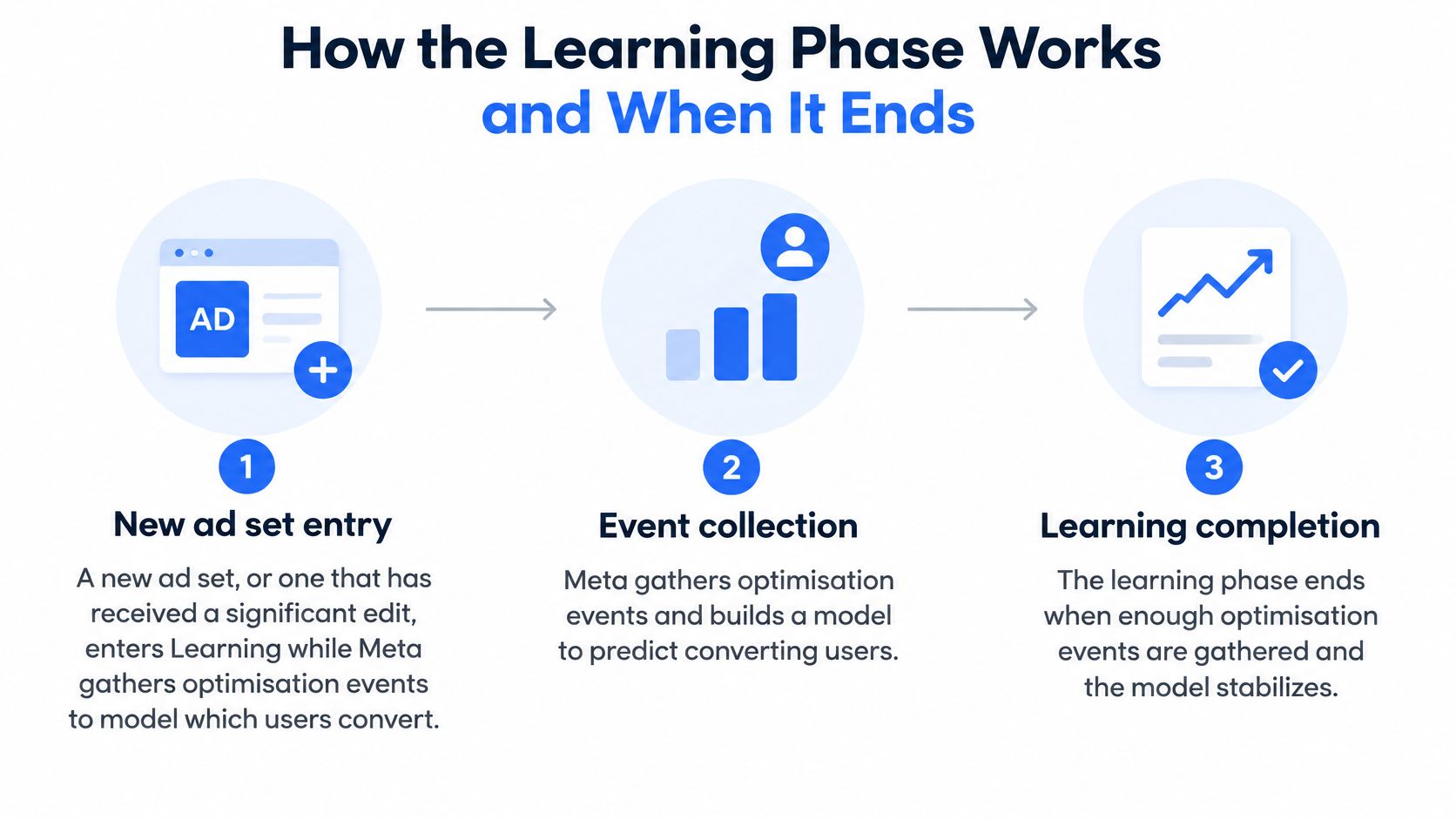
A new ad set, or one that has taken a significant edit, sits in Learning until Meta has enough of its own conversion data to model who buys.
That modeling is the point of the phase. Meta is fitting a prediction of which users convert for this specific combination of audience, creative, placement and event. Change the combination materially and the fit is discarded, which is why the window restarts after a significant edit instead of continuing from where it stopped. Treat it like a thermostat that needs a run of readings before it settles on a setpoint. Move the setpoint and the readings start again.
Three statuses appear in the Delivery column, and each describes a different problem.
| Status | What it signals | Exit condition | Delivery effect |
|---|---|---|---|
| Learning | Inside the exit window after launch or a significant edit | About 50 optimization events within 7 days of the last significant edit | Less stable delivery, usually higher cost per result |
| Learning Limited | Not on track to reach exit volume at the current budget and event rate | Not on track to reach about 50 events in 7 days at the current budget and event rate | Learning continues without exit; cost per result often stays high |
| Active | Exit threshold reached | Reached within the 7-day window | Stable delivery; cost per result typically lower |
A seven-day walkthrough
Run the arithmetic in reverse to see where an ad set lands. Fifty events across seven days is about seven a day. An ad set averaging eight a day clears the bar on day seven with 56 events and flips to Active. One averaging four reaches 28 in the same window and gets flagged Learning Limited, which isn't a penalty and isn't a moral failing, just a statement that the current budget and event rate can't produce the volume.
The cost consequence bites before the label does. While an ad set is learning, delivery is less stable and cost per result usually runs higher, so a Learning Limited ad set isn't only unproven, it's likely paying a premium for every result it does get.
The five-minute check
Pull up the ad set and do three things. Check the Delivery column and note whether it reads Learning, Learning Limited or Active. Add the Last significant edit column so the date sits next to spend instead of buried in the change history. Count the events inside the window since that date, not since launch.
If the ad set has been Active for weeks, leave it alone. Editing a stable ad set to "improve" it is the most expensive habit in the account.
The same calibration discipline shows up outside Meta. Teams running search alongside social apply it when they optimize paid search campaigns in Google Ads, where the ratio of budget to conversion volume decides whether a campaign ever leaves its exploratory state.
Reset Triggers That Send Ad Sets Back to Learning
The edit that catches experienced buyers is the one made above the ad set. Meta's documentation on significant edits and the learning phase lists changes to targeting, ad creative and optimization event as significant edits that return an ad set to learning. It also flags a campaign-level case: under Advantage+ campaign budget (labelled Campaign budget, or Budget with Advantage+ on, in the current UI), changing the campaign bid strategy can push multiple ad sets back into learning at once, because the change lands at campaign level and every ad set inherits it.
That's the difference between a one-ad-set experiment and an account-wide reset. A buyer cycling bid strategies inside a CBO campaign can wipe out a week of learning on six ad sets with a single dropdown.
| Change | Resets learning? | Control note |
|---|---|---|
| Targeting change | Yes | Treat as a significant edit; log the date |
| Ad creative change | Yes | Swaps and replacements count; batch them into one edit |
| Optimization event change | Yes | The ad set must reach around 50 events on the new event |
| Campaign bid strategy change under Advantage+ campaign budget | Yes, may reset several ad sets | Change at most once per campaign per window |
| Budget change | Only when the change is large | Test on one ad set before applying across the account |
| Adding a new ad to an existing ad set | Treat as yes | Test on a duplicate ad set first |
A few of those rows deserve more than a yes.
Creative swaps are the sneaky one. Replacing an image inside an existing ad, not just adding a new ad, counts. A designer sending "final v3" on a Tuesday costs you the window.
The optimization event change is the most expensive. Switching from purchase to add-to-cart doesn't just restart the clock, it restarts it on an event with different economics, so the 50 events you now need are cheaper to collect and worth less once you have them.
Campaign-level bid strategy changes reset several ad sets at once, which makes them the one edit worth scheduling rather than doing on impulse.
Batch edits, don't sequence them
Five small changes spread across five days can cost five resets. The same five made in one session cost one, and the ad set then has a single clean date to recover from. The practical version of that guidance is to separate genuine strategic changes from routine housekeeping, and to avoid stacking several structural edits when delivery stability matters.
The working rule is one significant change per ad set per window. Log the date in the ad set name or a shared sheet, then schedule the next change for after the window closes. If a change is urgent enough to break that rule, it should be urgent enough to justify the reset in writing.
Controlling Advantage+ Creative Enhancements
Creative is where settings drift without anyone deciding to change them. Advantage+ creative can apply automated modifications to the images and videos you upload, and Meta's documentation on Advantage+ creative enhancements lists what that can include: brightness and contrast adjustment, CTA enhancement, AI-generated media text, music, image generation and Flex media. Which ones are available depends on ad format, placements selected and whether a catalog is in play.

Some of those arrive switched on. Meta notes that enhancements may be enabled by default and can be individually turned off in the ad-creative setup, which means an untouched ad set can ship creative you never approved.
The risk isn't aesthetic, it's measurement. If Meta adjusts contrast, rewrites a CTA or overlays generated text between two versions of what you consider the same asset, your test compares different creatives rather than the variable you meant to isolate. Meta's own walkthrough of creative automation is a reasonable primer before you set account defaults.
A workflow that holds
- Open the ad-creative setup and find the Enhancements section. It sits inside the ad, not at campaign level, so each ad gets checked individually.
- Note the active enhancement count next to each ad. Anything above zero is your review list.
- Preview every variation as it renders in Feed, Stories and Reels. The same enhancement can look acceptable in one placement and destroy a product shot in another.
- Disable anything that alters brand color, on-image copy or product detail. Those three break both brand rules and comparison tests.
- Save, then reopen the ad to confirm the settings held. Defaults have a habit of reapplying.
- Record the final configuration in your test log beside the creative name, so later comparisons use the same state.
The mistake isn't the enhancement itself, it's assuming the test is clean because the file you uploaded was clean. The AI marketing content guide for founders covers the volume side of this well: automation multiplies output, and version control has to keep pace with it.
For a closer look at which enhancements to leave on and how they interact with placements, this breakdown of Advantage+ creative enhancements covers the combinations worth keeping.
Log it like a version: the enhancement state is part of the creative, not a setting you can ignore between tests.
How to Read the 14-Day Learning Spend Metric
A single ad set status tells you about one ad set. The account-level picture comes from a different number.
The Meta Business Help Center describes a learning-phase spending metric that measures the estimated share of an account's recent ad spend going to ads marked Learning or Learning Limited. Read it as the portion of budget currently paying the learning premium. That's the figure to argue about in a budget meeting, not the color of a cell in the ad set table.
Pull it in six steps.
- Open the account-level view and read the spend-share percentage. That's your exposure baseline for the week.
- Sort ad sets by spend within Learning and Learning Limited. Exposure concentrates; usually three or four ad sets carry most of it.
- Split the list by edit recency. Ad sets whose last significant edit falls inside the measurement window are mid-calibration. Ones that have been stable for longer are structural cases.
- For the stable group, compare weekly event volume against the cost per result you can accept. If the volume can't reach the exit threshold at a workable CPA, the budget or the event is wrong, and no amount of patience fixes the math.
- For the recently edited group, check the edit log before changing anything. Most of these resolve on their own.
- Write down the account share and the top three ad sets by learning spend. That's the baseline for the next review, and the list you work through first.
The split in step three is where the reading happens. A high share driven by fresh edits is a temporary cost of iteration. A high share driven by stable ad sets means the structure itself cannot generate enough conversions at the budgets attached to it, which is a volume problem before it's a configuration problem.
Three ways to misread it
- Judging by a single day's status. The status moves day to day; the spend share smooths that noise. Read the share.
- Treating every Learning Limited flag as a setup fault. Some ad sets are configured correctly and cannot hit the required volume at the budget attached to them. The fix there is consolidation or a cheaper optimization event, not another targeting tweak.
- Changing settings while the share is falling. If the figure is already coming down, the last round of changes is working. Another edit resets the evidence and muddies which change caused the improvement.
Two accounts can show the same number of Learning Limited ad sets and need opposite responses. In one, a few large ad sets carry most of the spend in learning and the answer is restructuring. In the other, learning spend is scattered thin across small ad sets and the answer is budget concentration. The dashboard label is identical in both. The spend share, broken down by ad set, is what separates them.
The threshold that matters: when most of the account's spend sits in learning across a sustained period, you have a structural problem, and no single ad set is the cause.
How to Consolidate Fragmented Ad Sets
Fragmentation is a volume tax. Meta states that an ad set generally needs around 50 optimized conversion events before it exits learning, and its guidance on fragmented account structures makes the consequence explicit: running too many ad sets at once gives each one fewer opportunities to learn and fewer results. Every extra ad set divides the same budget across more counters that each need the same volume.
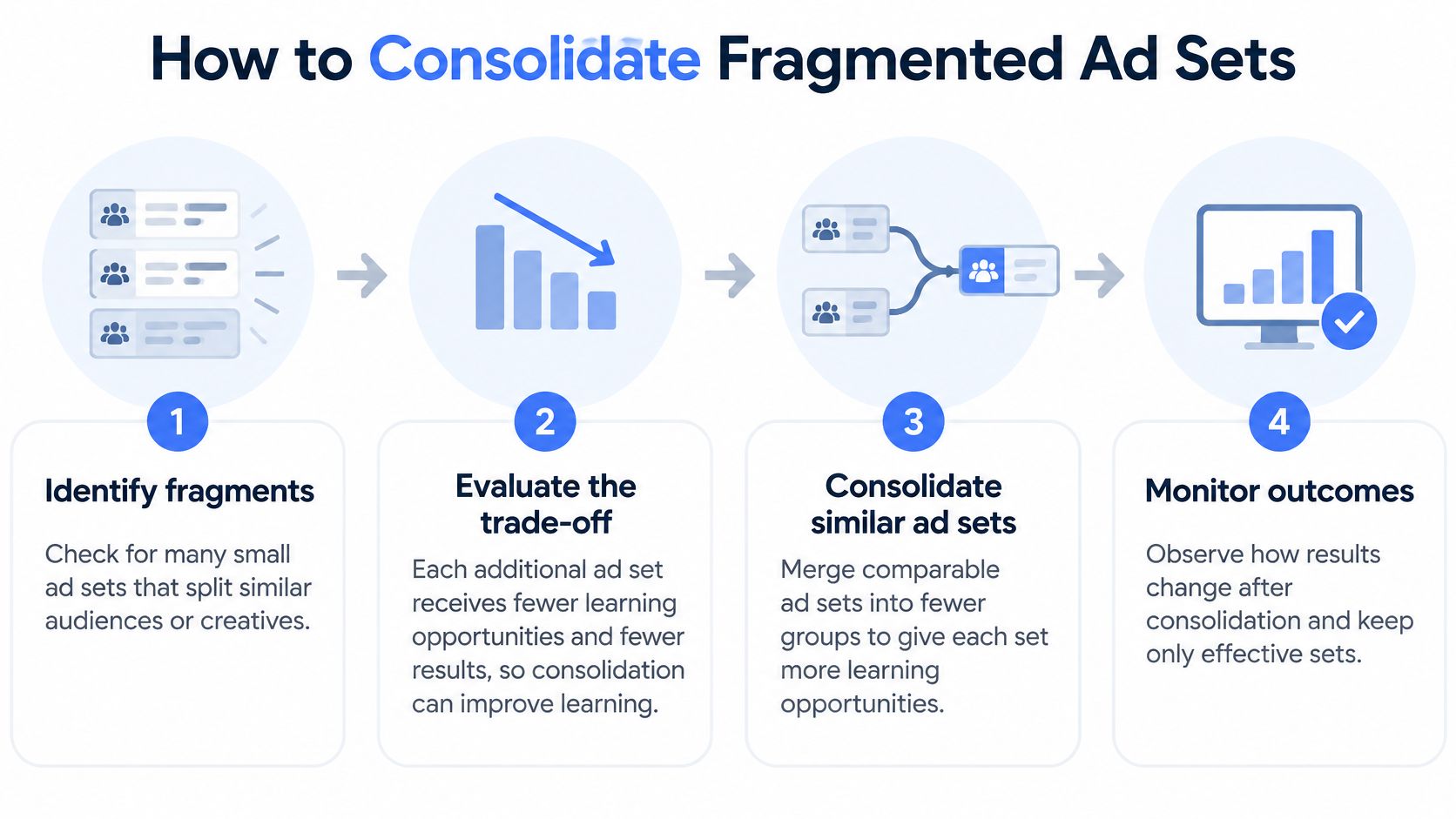
That trade-off is real for anyone testing audiences, placements or creative families simultaneously. Isolation reads better and starves faster. This workflow keeps the reading without the starvation.
- Export 14 days of ad set performance and group by optimization event and bid strategy. Merging is only safe inside a compatible group; dropping an add-to-cart ad set into a purchase group feeds Meta two conflicting signals and the merged ad set learns neither.
- Flag ad sets sharing an audience definition, placement set or creative family. Overlap is the tell that two ad sets are bidding for the same impressions, which raises auction overlap and splits the events.
- Merge the lowest-volume members of each group into one ad set and keep the strongest creative. Lead with the asset that already has the better cost per result rather than a fresh upload.
- Pause the source ad sets only after the merged ad set is live. Reversing the order leaves a gap where spend goes nowhere and the merge starts its window from a standing start.
- Set a reminder for the exit window and record the merge date as the new baseline. Without a baseline, the first comparison after a merge compares two different structures.
- Compare cost per result against the pre-merge baseline once the window closes. Judge on a full window, not on the first good day.
Which groups to merge first
Start with the groups whose ad sets sit in Learning Limited and hold the most spend. That combination of high exposure and low volume pays back fastest. Groups already running close to the volume threshold can wait; merging them buys a reset you don't need.
Success isn't a single cost-per-result snapshot. It's lower learning exposure and steadier daily spend. If the account spends its budget in bursts because half the ad sets can't exit, consolidation shows up as a flatter delivery curve before it shows up as a lower CPA.
The structural logic carries into budget handling, which is why the rules for campaign budget optimization matter as much as the merge itself. And if you're building structure from scratch rather than repairing it, this guide to structure Facebook campaigns for COD covers the cash-on-delivery case where order volume is the only event that matters.
Deciding Whether to Wait, Consolidate or Restructure
The question worth more than any setup audit is whether exiting learning is the right goal this quarter. Meta's guidance on the learning phase and budget structure puts the exit point at about 50 optimization events in the seven days after the last significant edit, and notes that delivery is less stable and cost per result usually higher while an ad set is learning. It also treats that event count as a guideline rather than a universal performance threshold, which is the part most audits skip.
The two numbers that matter more than the label
| Comparison | Direction of the difference | What it means |
|---|---|---|
| Ad sets that exit learning vs ad sets that do not | Cost per result tends to run lower once an ad set exits | Exit is worth pursuing when event volume is real |
| Accounts with little spend in learning vs accounts where learning holds the majority | Lower learning exposure tracks with cheaper, more stable delivery | The share of spend in learning matters more than the status label |
Read the second row twice. Exiting learning correlates with cheaper results, but how much of the budget is exposed to learning at all separates accounts far more sharply than whether any single ad set clears the bar. An account where 15 ad sets each carry a fraction of the budget will spend most of every week relearning, no matter how clean the setup is. That is a budget-structure finding, not a targeting finding.
The one-line test: if the event you optimize for can't reach 50 in a week at a CPA you'd accept, the fix is the event or the budget, not the ad set.
A worked example at a $40 CPA
Take an account producing 12 purchases a week at a $40 CPA. Reaching 50 purchases at the same CPA means about 4.2 times the current volume, which is roughly $2,000 a week against $480 now. Nothing about targeting, creative or campaign structure changes that arithmetic. You either fund the volume, find an event that produces it, or accept that the ad set stays flagged.
That acceptance can be the right call. If the CPA holds and profit per conversion is positive, a Learning Limited flag costs less than a rebuild that resets counters across the account. The flag is expensive when it concentrates spend: an ad set stuck in learning that still absorbs a large share of the budget delivers unstable volume exactly where stability matters most.
The decision runs on four inputs: expected event volume per week, acceptable CPA, available budget, and the quality of any proxy event you'd switch to.
- Wait when volume is close to the threshold and CPA is holding. A week of patience is cheaper than a rebuild.
- Consolidate when several ad sets are splitting the same volume. Nothing about the offer changes; the counters stop competing.
- Restructure when the optimization event is too rare to reach 50 a week at any workable budget. Test a higher-volume proxy event, then check downstream purchase quality rather than assuming the cheaper signal is free.
Learning Limited gets described as a setup error. Just as often it is an accurate report that the offer, the price point or the funding behind it produces too few conversions to model. Judge the account by the share of spend stuck in learning, fix the volume problem underneath it, and the label usually corrects itself the following week.
Set Up Stable Learning Before You Scale
Thirty ad sets on an account that produces 200 conversions a week is not a targeting problem. It is an arithmetic problem, and no amount of creative testing fixes it. Three setup decisions stop the resets from returning.
One optimization event per campaign family. Splitting conversions across purchase and add-to-cart campaigns halves the volume each one can reach, and neither clears the threshold. Pick the event that can fund 50 conversions a week and give it the whole family.
A naming convention that carries the test variable. Audience, placement set, creative family and enhancement state all belong in the ad set name, so the 14-day learning-spend review can be read by ad set without opening twenty tabs. A convention nobody enforces is decoration, so set it at launch, in the tool that does the launching, rather than in a document nobody opens.
An ad set count matched to weekly event volume. If the account produces 200 events a week, it supports roughly four ad sets reaching 50 each, and that assumes an even split. Thirty ad sets at that volume means thirty Learning Limited flags, and the fix is merging them before launch, not waiting for the labels to appear.
Bulk tooling removes the manual part of that. Rapid Ads takes a mixed batch of creatives in one launch, and AI sorts them into ad sets while applying budgets, locations and ages, with Flexible Ads support so Meta can test winning combinations inside a single ad. One caution applies: check the auto-generated ad set count against weekly event volume before publishing. Automated sorting will happily rebuild the fragmentation you just merged away, and the tool will not know your weekly event count unless you do.
The exit criterion deserves the same discipline. Stop watching the dashboard label and start watching the share of spend sitting in learning. A stable account keeps most of its budget in ad sets that have exited the phase; a fragile one keeps paying learning prices on the majority of its spend even when individual ad sets occasionally clear. Structure decides which of those two accounts you run.
Once the structure holds, scaling becomes a budget-sequencing question rather than a settings question, and the sequencing for how to scale Facebook ads without re-triggering the phase follows directly from the consolidation logic above.
Run the 14-day learning-spend check before the next budget increase. Total the spend still in learning, divide it by total spend, and decide whether to wait, consolidate or restructure based on that share rather than on the count of flagged ad sets.
Rapid Ads handles the part of this that does not scale by hand: dropping a mixed batch of creatives into one launch, letting AI group them into ad sets with budgets, locations and ages applied, then publishing the whole set in one click instead of an afternoon of Ads Manager tabs. Its auto-disable feature keeps Advantage+ creative enhancements switched off so the creative you approved is the creative that runs, and custom naming conventions keep reporting readable when you are launching 100 or more ads across markets. Start on the forever-free plan with 10 uploads at Rapid Ads and watch how much of the learning-phase bookkeeping disappears.