
If you're in Meta Ads Manager on a Monday morning, you already know the pattern. Reels variants are still in review, the ads that spent hardest over the weekend are the same ones now dragging CPA up, and someone wants an answer before lunch.
That pressure is what short form video ads changed. The hard part isn't getting another concept approved internally. The hard part is turning a pile of hooks, edits, aspect ratios, captions, and placement variants into clean launches inside a workflow that was originally tolerable for static images and a handful of ad refreshes.
Short form video is now too big to treat casually. One 2026 summary put global short form video ad spend at about $111.01 billion in 2025, with projections reaching $145.8 billion by 2028 and $219.71 billion by 2030, depending on the market model used. The same summary also notes one estimate that the category rose from $4.6 billion in 2018 to over $88 billion in 2023, which captures how fast it became a serious media channel instead of a social side project (Kapwing short form video statistics).
For performance teams, that scale matters less than the operational consequence. Short form wins attention fast, but it also exposes every weak point in your launch process.
Table of Contents
- Why Short Form Video Ads Break Most Meta Workflows
- What Short Form Video Ads Actually Are in Meta
- Specs Compared Across Reels, Shorts, TikTok, and Feed
- The Creative Framework That Wins in Under 15 Seconds
- Benchmarks and KPIs That Actually Predict Scale
- Production and Editing Workflow for High Volume
- Testing and Scaling With Bulk Launch Automation
- Checklist and Measurement FAQ for Scaling Short Form Video Ads
Why Short Form Video Ads Break Most Meta Workflows
The old workflow assumed creative was relatively stable. You built a campaign structure around audiences, rotated a few images, and spent your time on bids, exclusions, and budget movement. That breaks down when the account depends on a constant flow of fresh vertical edits.
The real bottleneck isn't targeting
Many teams still talk about scaling as if the media buyer's main job is audience architecture. In practice, the work shifts elsewhere once Reels and Stories become major spend drivers.
What slows the account is usually this:
- Creative supply stalls: The next batch of hooks isn't edited, captioned, and rendered when the current winners soften.
- Placement routing gets messy: A 9:16 cut lands in Feed without intention, or a square asset gets stretched into inventory where it doesn't belong.
- QA becomes the choke point: Text overlays clip under Reels UI, captions drift too low, or an enhancement changes the ad after upload.
- Naming falls apart: Winning angles disappear inside vague labels like "UGC v3 new final final".
Practical rule: In a short form account, creative operations are part of media buying. If upload, naming, and routing are weak, the ad account looks like it has a targeting problem when it really has an execution problem.
Why short form punishes sloppy process
Platform behaviour changed before a lot of team processes did. A 2026 marketing summary reported that 77% of marketers say short form videos under 60 seconds deliver the highest ROI of any video format, and another finding in the same summary says short form accounted for roughly half of all video ad spend in 2026 (ReelFLOOD short form marketing statistics).
That doesn't mean every short clip works. It means the format is now a core budget line, so weak ops get expensive faster.
Three patterns show up repeatedly in large Meta accounts:
- Static-era campaign structures survive too long. Teams keep adding more audiences when they really need more creative angles.
- Ads Manager friction compounds. One-by-one uploads are survivable for five ads, not for a testing cycle built around dozens of hook variants.
- Creative intent drifts after launch. Aspect ratio mismatches, auto enhancements, and poor naming create reporting noise that hides what drove CPA.
A senior buyer stops treating creative as decoration at that point. The creative library, upload method, and asset routing become part of the media plan.
What Short Form Video Ads Actually Are in Meta
Meta uses overlapping labels, so it's worth being precise. In practical buying terms, short form video ads are video creatives under 60 seconds, usually built for vertical or square delivery, and served across placements such as Reels, Stories, Feed video, and related mobile-first inventory.
Placement matters more than the label
Reels ads aren't a separate objective. They're a placement outcome.
If the ad is built to fit that inventory and the placement is enabled, Meta can deliver into Reels. If the asset doesn't fit cleanly, delivery shifts elsewhere or performance suffers because the format doesn't match the surface.
The working definition inside Meta usually comes down to these conditions:
- Duration is short: The creative is built for fast consumption, often in the 6 to 30 second range.
- Format is mobile-native: Vertical 9:16 is the default for Reels and Stories, while 1:1 often serves better in Feed.
- The ad is placement-compatible: The creative, ratio, and text layout allow Meta to route it into short form inventory.
What counts and what doesn't
Short form video ads are not the same thing as in-stream video ads. In-stream interrupts longer content. Short form inventory sits inside swipe-driven consumption environments where the viewer is already primed for rapid decisions.
They also aren't the same thing as Collection ads. Collection ads can use video, but the unit is built around a storefront-style experience rather than a simple short clip competing in-feed.
Meta's own practical constraints around ratio matter here. Independent placement guides note that 1:1 (1080×1080) is commonly used for Feed and carousel-style placements, while 9:16 (1080×1920) is the standard for Stories and Reels (Meta aspect ratio guide).
If you're uploading one "universal" video and hoping Meta handles the rest, you're usually giving up control over the exact placement where short form performance is won or lost.
Why this changed Meta buying
A large-scale field study found that mobile vertical video ads increased consumer interest and engagement compared with horizontal video ads, which lines up with what buyers see in mobile-first placements when the creative fits the screen naturally (SAGE study on mobile vertical video ads).
That matters because short form performance isn't just about making things shorter. It's about matching the device, placement, and user behaviour with a format that feels native to the screen.
Specs Compared Across Reels, Shorts, TikTok, and Feed
Production teams waste a lot of time fixing assets after the fact because nobody agreed on a master delivery spec. The cleanest approach is to produce for vertical first, then create planned derivatives for Feed instead of improvising crops during upload.
The practical spec difference
For Meta short form inventory, 9:16 vertical is the default language of Reels and Stories. Feed is less strict, but that doesn't mean every feed placement should inherit the same cut.
Independent Meta-spec guidance consistently recommends 9:16 vertical creative for Reels and keeps the runtime short. One source states 15 seconds is the recommended length, while another frames prospecting Reels around 6 to 15 seconds (Stackmatix Meta video ads guide).
Here is the side-by-side production view teams need:
Short Form Video Ad Specs by Placement
| Placement | Aspect Ratio | Resolution | Length | Safe Zone | File / Audio |
|---|---|---|---|---|---|
| Meta Reels | 9:16 | 1080×1920 | Short cuts are the default. Keep creative concise for rapid consumption | Keep text away from top and lower UI-heavy areas | Common delivery formats include .mp4 or .mov |
| Meta Stories | 9:16 | 1080×1920 | Built for short segments | Keep captions and CTA text centred away from UI edges | Match Reels-style export settings where possible |
| Meta Feed video | 1:1 commonly used, sometimes vertical variants depending on setup | 1080×1080 for square | Can run longer than Reels, but short edits often hold better | More forgiving than Reels, but text still needs margin | Use platform-safe exports and check preview manually |
| YouTube Shorts | 9:16 | 1080×1920 | Under 60 seconds | Keep primary text central and visible on mobile | Export clean masters suitable for vertical reposting |
| TikTok In-Feed | 9:16 | Vertical standard | Short edits fit the environment best | Protect lower-screen copy from interface overlap | Burned-in captions are often the safer choice |
What actually breaks in production
The asset usually fails in one of three places:
- Safe area discipline collapses: Editors put the strongest line too low, and the CTA disappears under action buttons.
- Square and vertical assets get mixed without intent: The same scene works in 9:16 but feels cramped in 1:1 unless reframed.
- Audio and captions aren't treated as deliverables: One version is mixed correctly and another comes out inconsistent after export.
For short form video ads, the point isn't just meeting technical eligibility. It's protecting the first seconds of the ad from bad crops, unreadable text, and placement mismatch.
The Creative Framework That Wins in Under 15 Seconds
The shortest high-performing ads don't feel compressed. They feel decisive. The message lands early, the viewer understands the value fast, and the CTA doesn't arrive after attention has already collapsed.
A benchmark source found that ads under 15 seconds averaged 79.4% completion, compared with 51.8% for ads over 30 seconds. The same source says the 6 to 10 second range produced the highest unaided brand recall at 68.7% (video ad completion benchmarks).
That doesn't mean every winner should be six seconds. It means brevity works when the ad front-loads the useful part.
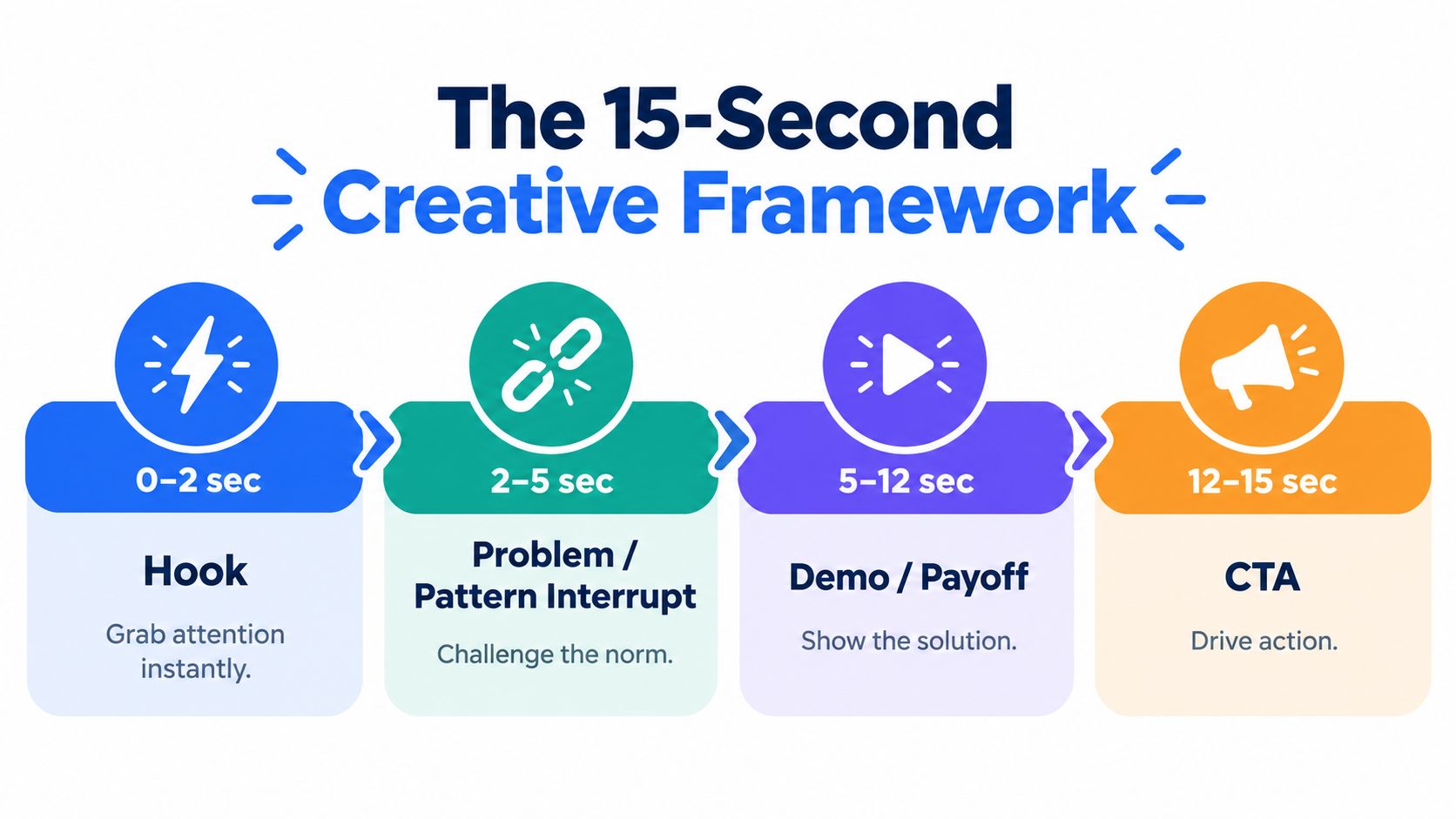
The 0 to 2 second hook
The hook has one job. Stop the swipe without making the viewer work.
Good hooks usually do one of these:
- State the problem bluntly
- Show the result before the explanation
- Create visual disruption immediately
- Call out a familiar mistake in the market
Weak hooks waste time on setup, branding, or context the audience didn't ask for.
The cleanest opening line is usually the one a founder wants to cut because it feels too direct.
The 2 to 5 second pattern interrupt
The ad proves it's not just another generic UGC clip. The best versions either challenge a common assumption or sharpen the pain point enough that the viewer wants the answer.
Useful structures here include:
- A quick before-and-after contrast
- A “most brands do this wrong” turn
- A visual swap from frustration to solution context
The text should stay high enough to avoid interface clutter and short enough to read in one glance.
A visual breakdown helps when you're scripting these beats across a batch of edits:
The 5 to 12 second demo
This is the section too many ads under-build. They get the click-stopping opening, then drift into vague claims.
The middle should do one of two things clearly:
Show the mechanism
Product in use, workflow on screen, transformation visible.Show the proof pattern
Not invented numbers. Just visible cause and effect, comparison, or outcome.
If you have to choose between polish and clarity, choose clarity.
The 12 to 15 second CTA
The CTA should feel like the logical next step, not a tacked-on instruction. Keep it specific to the buyer's stage.
Examples that usually work better than generic asks:
- Shop the product
- See how it works
- Start your order
- Compare options
For prospecting, stacked hook variants usually outperform one clever concept. Keep the body and CTA stable, rotate the first lines aggressively, and let the account tell you which angle earns more attention.
Benchmarks and KPIs That Actually Predict Scale
Many teams either overvalue top-of-funnel engagement or ignore it completely. Both mistakes are expensive. Short form video ads need leading indicators early and business metrics later.
What to trust at each stage
In the first review window, I care more about whether the ad earns attention than whether day-one ROAS looks clean. After that, attention metrics alone stop being useful.
A 2026 research summary notes a persistent measurement gap: short form often wins on engagement and completion, while longer or less immediate formats can outperform on recall or downstream persuasion. The same summary also claims vertical video completion rates are about 22 points higher than horizontal, reinforcing that format choice changes the metric pattern before it changes the business outcome (Kapwing video marketing statistics).
Short Form Video Ad Benchmarks by Funnel Stage
| Metric | Prospecting Target | Retargeting Target | Scale Signal |
|---|---|---|---|
| Hook rate | Strong early retention relative to the rest of the batch | Should hold at least as well as prospecting if the offer is clear | Stable attention across placements without CPA deterioration |
| Thumbstop ratio | Useful as an early filter | Less important than action quality | Good only if clicks and downstream behaviour stay efficient |
| Hold rate | Confirms the middle of the ad isn't collapsing | Should remain solid with more direct product context | Suggests the hook isn't the only thing working |
| 15-second completion | Helpful for short cuts and Reels-style creative | More forgiving if the ad drives action earlier | Strong when paired with conversion efficiency |
| CPA | Secondary in the earliest testing phase | Primary once intent traffic is established | Must remain controllable as spend rises |
| ROAS | Too noisy at very low data volume | Core scale metric for purchase campaigns | Only meaningful if attribution is interpreted carefully |
What fails the scale test
The common failure pattern is a great top line with no commercial weight. High attention, cheap clicks, weak conversion quality.
Watch for these signs:
- Reels looks strong but only because Feed is carrying purchases
- CTR rises while landing page behaviour worsens
- Completion looks healthy but CPA drifts beyond tolerance
- One hook wins impressions but loses every decision metric that matters
Watch for this: A short form winner isn't the ad with the prettiest engagement profile. It's the one that keeps buying intent intact after spend moves.
Production and Editing Workflow for High Volume
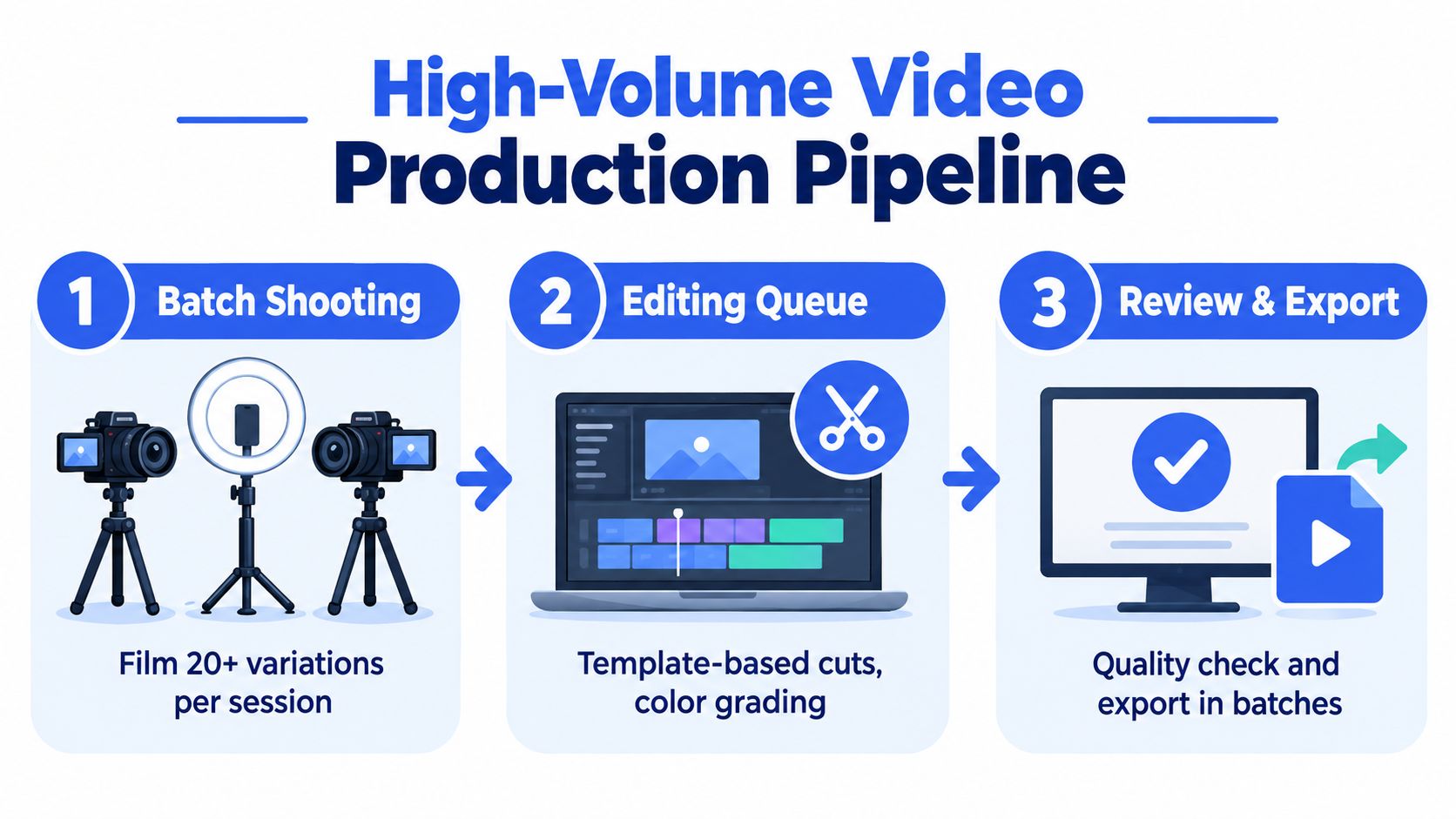
Creative volume doesn't come from asking editors to work faster inside chaos. It comes from reducing the number of decisions that have to be made per asset.
Build the batch before anyone starts filming
The cleanest production system starts with a simple brief template. Every video should already have its hook angle, offer, CTA, target placement, and required variants defined before the camera turns on.
A useful handoff sheet includes:
- Hook family: Problem, claim reversal, founder take, comparison, testimonial
- Offer tag: Discount, bundle, feature, urgency, education
- Placement target: Reels and Stories first, Feed derivative if needed
- Cut notes: Captions burned in, product close-up, demo sequence, CTA card
That structure matters more than cinematic quality when you're shipping lots of ads.
Keep the edit system boring on purpose
Batch shooting works best when the variables are limited. Consistent lighting, repeatable framing, and a known caption style make the editing queue much easier to manage.
A dependable workflow usually looks like this:
Shoot vertical first
Don't frame horizontally and promise to crop later.Capture modular lines
Record several hook opens, one or two middle demos, and multiple CTAs so editors can recombine them.Apply one caption system
Pick your font, text size, placement margin, and highlight style once.Mask safe areas during editing
Editors should see where Reels and Stories UI will sit before export.Render to standard masters
Deliver the approved 9:16 version first, then create 1:1 variants intentionally.
Naming is part of the production process
Most reporting headaches start before upload. If the export names don't describe the angle, nobody can read performance later without manual detective work.
A practical file naming format:
- Brand_offer_hook_variant_ratio
- Product_problem-solution_founder-voice_v2_916
- SKU_bundle_before-after_v1_11
Media buying teams don't need artistic filenames. They need labels that survive scale, handoff, and reporting.
Testing and Scaling With Bulk Launch Automation
A common failure looks like this. Ten new short form ads go live on Monday, three are square crops, seven are vertical masters, two inherit Meta enhancements nobody meant to keep on, and by Thursday the team is arguing about creative when the problem was setup. Scale breaks in the launch layer long before it breaks in the idea.
Start with one variable and protect the read
The first job is getting a clean signal.
I usually test hooks first because they change thumb-stop rate faster than almost anything else. Keep the body, offer, and CTA stable long enough to see whether the opening earns more qualified traffic or just cheap views. If hooks, bodies, captions, ratios, and placements all change at once, the result is noise dressed up as analysis.
A disciplined first pass usually means:
- Hold audience and optimization steady
- Test several hook variants against the same core edit
- Keep 1:1 and 9:16 versions separated when placement control matters
- Judge winners at the placement level before consolidating spend
That last point gets missed a lot. A blended winner can hide the fact that Reels is carrying the ad while Feed is dragging down CPA.
Use Meta's format options with intent
Meta's Flexible ad format can help, but only if the files were built for that workflow. Neutral implementation guides describe it as a way to supply multiple creative variations, including 1:1 and 9:16 images or videos, so Meta can choose the version that fits the placement or user context best (guide to Meta Flexible ad format).
The trade-off is control. Flexible delivery saves time and can improve distribution, but it also makes it easier to miss asset drift. If the square version is a lazy crop, or the vertical cut relies on text that gets covered in another placement, Meta will still spend into it if the ad is eligible. The auction does not care that the file came from the same edit session.
The same issue shows up with enhancements. Independent setup guides note that Advantage+ creative enhancements are controlled at the ad level, and buyers often need to switch settings off one by one because they do not always carry cleanly across new ads (how to disable Meta Advantage+ creative enhancements). On a five-ad test, that is annoying. On a fifty-ad launch, it changes the result set.
Build the launch layer so scale does not corrupt the test
Creative volume only helps if the launch process keeps variables readable after upload.
Meta's native workflow can handle a decent amount of volume, but the friction climbs fast once several accounts, repeated naming rules, and mixed aspect ratios are in play. What matters here is not elegance. It is whether the team can answer basic questions fast: which hook won, which ratio held CPA, which ads shipped with the wrong enhancement setting, and which assets are safe to duplicate into the next spend tier.
A practical setup includes:
Naming that survives reporting
Example:YYMMDD_Audience_HookAngle_VariationLengthBatch upload grouped by creative logic
Distinct hooks, shared body, and ratio-specific files routed on purposeAd-level enhancement checks before publish
Every ad, not just the first one in the batchPlacement-aware asset routing
Vertical masters should reach Reels and Stories intentionally, not by accident
For teams launching across several accounts, tools such as Rapid Ads can reduce manual work around bulk uploads, naming conventions, multi-account management, and keeping Advantage+ creative enhancements disabled across large video batches.
Bulk Launch Naming Convention and Testing Stages
| Stage | Naming Pattern | Spend Trigger to Move |
|---|---|---|
| Initial hook test | Date_audience_hook_ratio | Move when one or more hooks separate clearly on attention and click quality |
| Placement validation | Date_audience_hook_placement | Move when Reels, Stories, or Feed behaviour is clear enough to route spend intentionally |
| Expansion | Date_winner-angle_new-body_variant | Move when the original winner holds efficiency with fresh edits |
| Scale | Date_scaled-winner_offer-market | Move only when CPA remains acceptable after budget increases |
The point of automation is not speed for its own sake. It is preserving test integrity while volume goes up. If naming stays clean, asset routing stays intentional, and ad-level settings stay consistent, scaling gets much less dramatic. You cut losers faster, duplicate winners with fewer mistakes, and spend more time on the next angle than on cleanup.
Checklist and Measurement FAQ for Scaling Short Form Video Ads
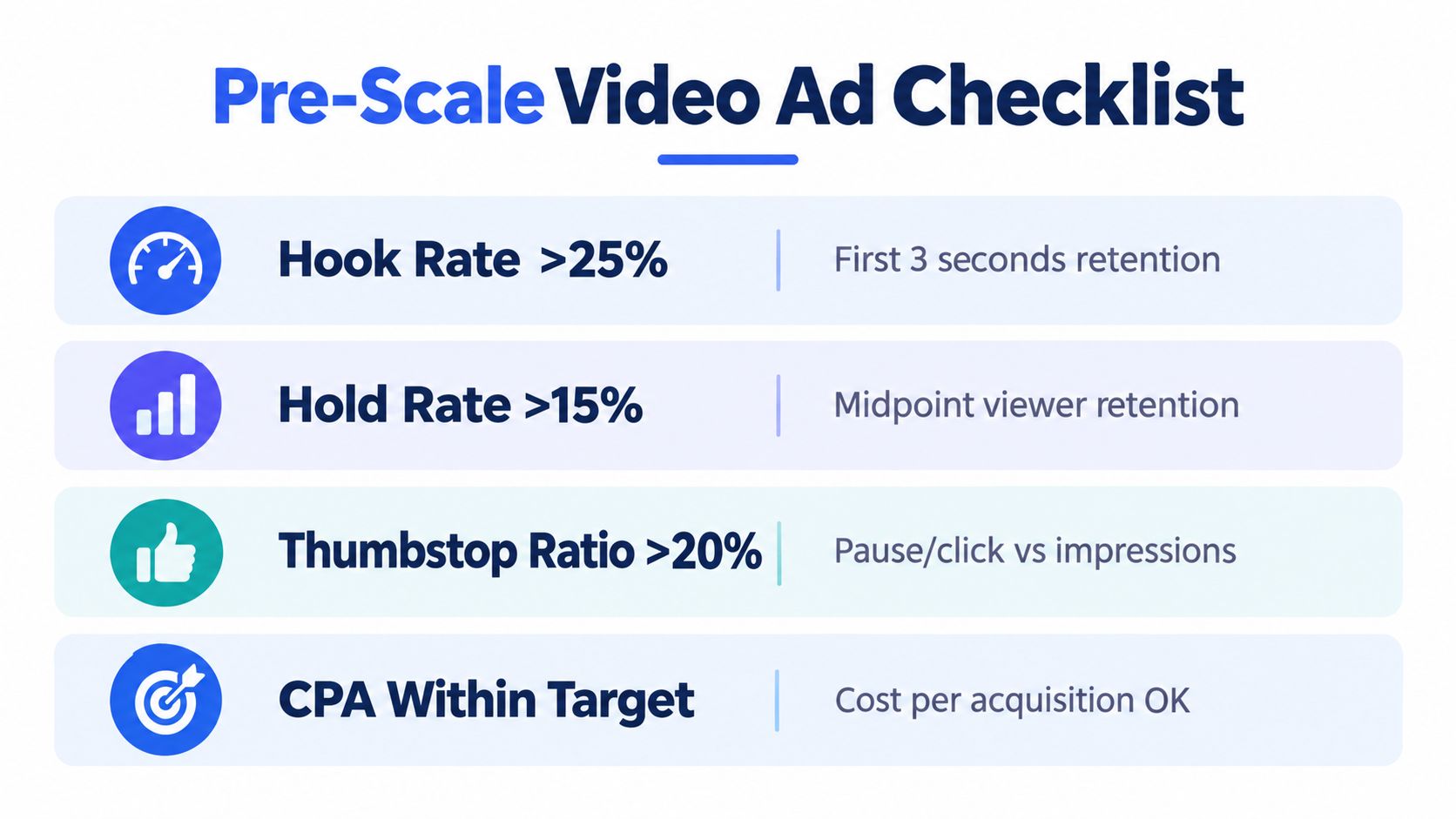
A lot of short form budgets get pushed too early because the ad "looks like a winner." The disciplined move is to clear a pre-scale checklist before spend rises.
Pre-scale checklist
- Check the opening: The first seconds should still hold up at the placement level, not just in blended reporting.
- Check the middle: If the ad gets attention but viewers abandon once the demo starts, the hook is carrying dead weight.
- Check the format versions: Captions need to stay readable inside 9:16 safe areas, and square derivatives can't feel like compromised crops.
- Check the business metric that matters: If CPA is already outside tolerance at the current spend level, more budget usually makes the weakness clearer, not smaller.
Measurement FAQ buyers actually ask
Does high completion rate mean the ad is ready to scale?
No. Completion is useful, especially in short cuts, but it isn't a substitute for efficient conversion behaviour.
Should Reels and Feed be judged together?
Usually not at first. Pull placement-level breakdowns. A blended result can hide the fact that one surface is doing the work.
Is shorter always better?
Not automatically. Short cuts often win on attention and delivery efficiency, but some offers need more explanation. The right question is whether the extra seconds improve the decision, not whether the edit looks more polished.
Can Meta's default reporting answer everything?
No. Ads Manager shows enough to make decisions, but not enough to remove judgment. You still need to reconcile attention metrics with conversion quality, placement behaviour, and what happened after the click.
Good short form media buying looks boring from the outside. Clear asset routing, clean naming, disciplined breakdowns, and fast retirement of weak variants.
If you can do that consistently, short form video ads stop feeling chaotic. They become one of the most controllable creative systems in the account.
Rapid Ads gives Meta buyers a faster way to launch short form video ads in bulk, keep naming conventions clean, route mixed aspect ratios more deliberately, and avoid ad-level Advantage+ setting drift across large batches. If your team is spending too much time uploading, checking toggles, and cleaning up reporting after launch, visit Rapid Ads and see whether the workflow fits how you test and scale.