Acquiring a new customer typically costs 5 to 25 times more than retaining an existing one. The fastest way to reduce customer acquisition cost in a scaled Meta operation is to improve both media efficiency and execution discipline, so fewer dollars and fewer working hours disappear between upload, delivery, and a paying customer.
Lower CPC alone won't solve the problem. A cheaper click can still produce poor-quality leads, weak cohorts, or a campaign structure nobody can audit after launch. The practical question is whether your fully loaded cost of acquiring a paying customer is falling while retained revenue and payback quality hold up.
Table of Contents
- Rethinking Customer Acquisition Cost Efficiency
- Mastering Naming Conventions for Scale
- Preventing Advantage+ Setting Drift
- Benchmarking Your Automation ROI
- When to Automate Bulk Creative Testing
- Building Your CAC Reduction Checklist
Rethinking Customer Acquisition Cost Efficiency
The retention benchmark changes the way a media buyer should think about CAC. Research commonly attributed to Bain & Company puts new customer acquisition at 5 to 25 times the cost of retaining an existing customer. The same benchmark family reports that a 5% improvement in retention can raise profits by 25% to 95%, which makes retention a CAC lever, not merely a customer success metric. DataPartners summarises the retention economics and segment variation.
That doesn't mean every Meta account should immediately move budget out of prospecting. It means platform CPA is only one layer of the calculation. The better question is whether an acquisition cohort buys again, refers others, pays back quickly, and remains profitable after people, tools, creative production, and operational overhead are included.
A useful definition and formula are available in this CAC glossary entry. In practice, I separate the metric into three views:
- Paid CAC: media spend divided by new paying customers. Useful for immediate channel decisions.
- Channel CAC: paid spend plus directly attributable execution costs, separated by campaign, audience, and cohort.
- Fully loaded CAC: sales and marketing labour, tools, creative production, media, and allocated overhead divided by net new paying customers.
The third number is the one that exposes waste. If a team reports cost per lead while a significant share of leads never becomes reachable, the spreadsheet is flattering the campaign. One source notes that if a third of emails bounce, real CAC can be 50% or more higher than the reported figure, and it also stresses that salaries, tools, and overhead belong in the calculation. Prospeo explains why deliverability and full operating costs affect real CAC.
Two levers, one operating model
The first lever is media efficiency. Referral marketing is benchmarked at roughly $15 to $50 CAC, organic search at $70 to $120, content marketing at around $92, paid social at $150 to $300, and paid search at $200 to $350. These are directional benchmarks, not targets to copy into a forecast, but they show why a blended channel model matters. GrowSurf provides the channel comparison and the commonly used 3:1 LTV:CAC sustainability threshold.
The second lever is structural efficiency. Manual uploads, inconsistent names, incorrect URLs, accidental audience changes, and Advantage+ settings that revert can all create spend that looks like media cost but is execution waste. A campaign can have acceptable CTR and still lose money because the wrong variant was published, the winning ad can't be identified, or a lead route broke after launch.
Practical rule: Treat every untraceable ad as a measurement liability, not just an untidy asset.
The strongest CAC programmes join both levers. Improve the conversion economics of the traffic you buy, then remove the operational friction that prevents you from learning which traffic deserves more budget.
Mastering Naming Conventions for Scale
You can't optimise hundreds of ads if the account structure turns every report into an investigation. A naming convention should identify the variables that matter before an ad enters Ads Manager, not after the first conversion arrives.
Start with a master spreadsheet. Each row should represent one ad variation and map the variation to the exact fields required for upload:
- Ad name: the structured identifier used in Ads Manager.
- Creative file name: the source image or video filename.
- Headline: the exact headline assigned to the variation.
- Primary text: the matching copy block.
- Description and CTA: the selected supporting fields.
- Destination URL: the landing page, including tracking parameters where required.
- Audience and ad set: the intended segment and delivery group.
- Test variable: hook, offer, format, angle, or copy version.
Industry guidance for bulk Meta launches recommends mapping these fields in a master sheet so every variation remains traceable after upload. It also recommends structured asset tokens for product, creative type, angle, version, and aspect ratio. AdStellar's bulk-launching tutorial covers the spreadsheet mapping and asset naming approach.
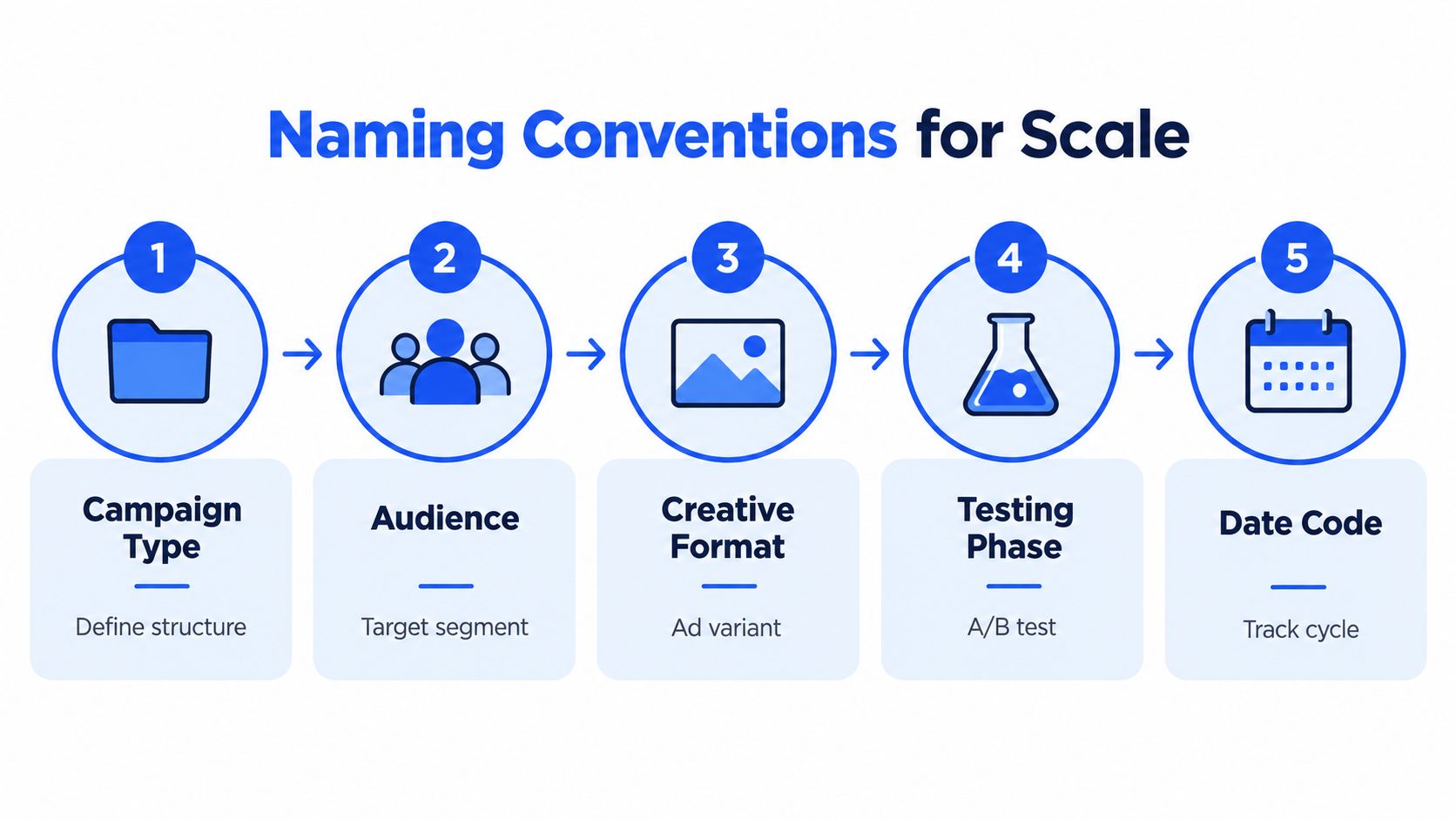
Build the name from stable tokens
A practical ad name might follow this pattern:
PROD_FORMAT_ANGLE_VER_ASPECT_DATE
For example, a skincare account could use:
SERUM_VIDEO_BENEFIT_V03_9x16_202610
The exact tokens are less important than consistency. Use the same order at campaign, ad set, and ad level. Keep audience information in the ad set name when the audience is controlled there, and keep creative information in the ad name. Don't put every possible variable into every field. Overloaded names become difficult to scan and increase the chance of mismatches.
The spreadsheet should also contain validation columns. Check that the creative filename exists, the URL matches the intended market, the CTA is approved, and the aspect ratio belongs in the planned placement group. This catches errors before Ads Manager introduces its own friction.
Preserve the test design
A clean naming system only works if the experiment is clean. Keep the audience, budget, placement controls, and bid strategy stable when testing creative. Move the test into a new ad set only when the hypothesis concerns a different audience, geographic constraint, placement group, budget rule, or bid strategy. Rapid Ads' guide to ad set-level testing explains when the variable belongs at ad level and when a new ad set is justified.
For bulk testing, a common structure is one campaign for each major offer or product, one ad set for each audience segment, and 3 to 5 ads per ad set. A small pilot of 3 to 5 ads gives you a chance to verify names, URLs, previews, and delivery settings before a larger upload. AdStellar documents this campaign, ad set, and ad structure for multiple Meta ads.
The payoff isn't cosmetic. When a report shows that a particular hook, format, and audience combination is producing qualified customers, you can scale the actual winner instead of scaling an ambiguous ad set.
Preventing Advantage+ Setting Drift
Advantage+ creative enhancements can change how an approved asset is presented. That may be useful when you want Meta to adapt creative dynamically, but it creates a problem when the test depends on preserving the original hook, crop, text treatment, or visual hierarchy.
The dangerous part is the control location. The relevant enhancement settings are handled at the ad level, not as a universal campaign or account switch. Turning an option off in one ad doesn't guarantee that every other ad in the batch has the same state.
Use an ad-level QA sequence
Before publishing, work through the same sequence for every creative batch:
- Open the ad creation flow and reach the Enhance/Optimize Media step.
- Review each enhancement applied to the ad.
- Switch off the options that conflict with the test design.
- Check the Advanced preview, because some variants aren't obvious in the first preview surface.
- Compare the rendered placements with the source creative.
- Record the intended state in the upload sheet or QA log.
- Publish only after the ad-level settings match the approved variation.
The control can be switched off per ad in Ads Manager, and the relevant setting appears in the Enhance/Optimize Media stage. Some enhancements require an additional check in Advanced preview, so a single visible toggle isn't a complete QA process. AdsUploader documents the ad-level control and the Advanced preview requirement.
Protect the experiment, not every enhancement
Disabling every automated feature by reflex isn't a strategy. The right decision depends on what you're testing. If the hypothesis is whether Meta's delivery system can select a better presentation, enhancements may belong in the test. If the hypothesis is whether a specific edit, crop, or claim drives conversion, uncontrolled transformations contaminate the result.
I use a simple control question: Can the buyer see the same treatment that the spreadsheet says we launched? If the answer is no, the test isn't clean enough to interpret.
Account standardisation matters when several buyers or clients use the same process. Define the default enhancement policy, document exceptions, and add a pre-publish check to the launch workflow. For agencies, the QA record should include the account, campaign, ad set, ad name, intended setting state, and reviewer. That makes silent drift visible instead of relying on memory.
This is also where bulk workflows need care. A fast upload that preserves bad settings is faster waste. Automation only reduces CAC when it removes repetitive error while keeping the decision points visible.
Benchmarking Your Automation ROI
Operational changes deserve the same scrutiny as a bid or creative change. The relevant question isn't whether a workflow feels faster. It's whether standardisation changes cost per qualified action, conversion quality, and blended CAC without damaging downstream performance.
Recent paid-media case studies report the following improvements after structured optimisation:
| Metric | Improvement |
|---|---|
| Cost per lead | 47% YoY decrease |
| Click-through rate | 36% increase |
| Demo conversion rate | 2.4× increase |
| Blended CAC | 31% decrease |
| Trial-to-paid conversion | 38% increase |
The figures come from the reported case studies, not from a universal expectation for every account. GrowthSpree's paid acquisition case study reports the cost per lead, CTR, demo conversion, blended CAC, and trial-to-paid results.
What the pattern tells us
The useful lesson isn't that a particular account achieved a particular lift. It's that the improvement pattern starts with execution controls:
- Standardise architecture: Keep campaign, ad set, and ad roles consistent so delivery data can be compared.
- Enforce clean naming: Make creative variables visible in reporting without opening every ad.
- Batch-test deliberately: Change the creative variable while holding delivery conditions stable.
- Stop setting drift: Verify enhancement and optimisation controls before publication.
- Review customer quality: Connect lead or trial data back to paid customers and retained revenue.
A higher CTR can reduce the cost of generating traffic, but it doesn't automatically reduce CAC. A clickbait hook may win the auction and lose the sales conversation. The meaningful chain is impression to click, click to qualified conversion, qualified conversion to paying customer, then retained revenue.
The operational test is simple: If your team can't explain why a cohort converted, the campaign isn't ready for more budget.
I also separate average CAC from marginal CAC. Average CAC tells you what the period produced. Marginal CAC tells you what the next budget allocation is likely to buy. A saturated audience can show acceptable blended performance while the next tranche of spend becomes uneconomic, so cohort-level reporting should include payback period and retained revenue rather than platform CPA alone.
The 3:1 LTV:CAC threshold is widely used as a sustainability reference, but it only means something when LTV and CAC use compatible definitions. Don't compare a fully loaded CAC with a media-only LTV model and call the result efficient. Keep the cost basis consistent across channels, markets, and reporting periods.
When to Automate Bulk Creative Testing
Manual Ads Manager work is reasonable when the launch is small, the account is simple, and the same person can inspect every field without slowing strategy. It becomes a liability when the team spends more time uploading, renaming, sorting aspect ratios, and correcting settings than analysing the test.
| Manual workflow | Bulk workflow |
|---|---|
| Upload each asset and copy block separately | Map assets and copy in a structured batch |
| Rename ads during setup | Apply naming conventions before publication |
| Sort feed and vertical assets manually | Route assets by aspect ratio and placement logic |
| Check Advantage+ controls repeatedly | Apply a documented default and verify exceptions |
| Duplicate configurations one at a time | Reuse campaign and ad set structures |
| Diagnose errors after launch | Validate fields before publishing |
The native interface can also make the work feel less predictable. Loading screens, mobile preview glitches, popups, and settings that revert create small interruptions that become expensive across a large batch. The cost isn't only the operator's time. Every interruption increases the chance that a URL, name, audience, or enhancement state gets copied incorrectly.

Choose automation by failure mode
Don't buy automation merely to upload more ads. Choose it when a specific bottleneck affects learning or spend:
- Creative volume: You need to test multiple hooks, formats, and copy variations without introducing naming errors.
- Market complexity: You launch related structures across several markets or accounts.
- Aspect-ratio handling: Feed and Reels or Stories assets arrive in the same batch and need separate treatment.
- Flexible Ads usage: You want to bundle multiple images and videos into a Flexible Ads setup rather than configure each asset manually.
- Account management: Several buyers need consistent workflows without sharing Business Manager credentials.
- Tracking discipline: UTMs, copy templates, and destination URLs must follow a repeatable standard.
Rapid Ads is one option for this type of workflow. It supports bulk Meta ad uploads, custom naming at ad and ad set level, aspect-ratio detection, Flexible Ads setup, CSV copy import, UTM attachment, and management across multiple ad accounts. The relevant test is whether those controls reduce errors and return operator time to analysis, not whether the interface only creates more ads.
A manual workflow still wins when the batch is small or when the test requires unusual configuration that needs direct inspection in Ads Manager. Automation wins when repetition, not judgement, consumes the team's capacity.
Before choosing a process, document the time and error points in one complete launch. Count how often someone reopens an ad to fix a name, replaces a destination URL, checks a preview, or disables an enhancement again. Then compare that operational burden with the cost of a bulk workflow. Sarra Pro's ad testing resources are useful for thinking through test design before deciding how much of the launch should be automated.
A short product walkthrough can also help your team assess whether the workflow removes real friction rather than adding another dashboard.
Building Your CAC Reduction Checklist
A reliable CAC reduction process should leave evidence at every handoff. You should be able to trace a paying customer back to a channel, cohort, audience, ad, creative variable, and operating cost without reconstructing the launch from screenshots.
Use this checklist before increasing spend:
- Define the denominator: Count new paying customers, not leads, signups, or unqualified submissions.
- Load the full costs: Include media, salaries, tools, creative work, and relevant overhead.
- Segment the result: Break out CAC by channel, audience, market, offer, and customer cohort.
- Protect the test variable: Keep audience and budget controls stable when the hypothesis is creative.
- Standardise names: Use tokens for product, format, angle, version, aspect ratio, and date.
- Validate the upload sheet: Match every creative, headline, primary text, CTA, and destination URL.
- Audit Advantage+ settings: Check Enhance/Optimize Media and Advanced preview at ad level.
- Measure the customer outcome: Track payback period, retained revenue, and LTV:CAC alongside CPA.
- Watch marginal CAC: A rising next-customer cost can appear before the blended number deteriorates.
- Reinvest recovered time: Use saved operator hours for offer development, cohort analysis, and creative strategy.
The channel decision should follow the economics, not habit. Recent benchmark summaries report new-customer conversion at 5% to 20%, compared with 60% to 70% for existing customers, while one ecommerce benchmark reports acquisition costs increasing 222% over five years. The same coverage says businesses still allocate about 80% of marketing budgets to acquisition, which explains why referrals, email, SEO, partnerships, and retention deserve a deliberate place in the growth model. SearchLab discusses these retention, conversion, and budget-allocation benchmarks.
Paid acquisition shouldn't disappear from the plan. It should earn its place beside owned and earned channels, with each channel judged on customer quality and payback rather than cheap clicks. For a broader B2B view of the metric and its operating implications, this B2B customer acquisition cost guide provides useful additional context.
The practical sequence is straightforward: clean the measurement, lock the experiment, remove repetitive execution errors, then scale only the cohorts that produce durable customer value. That is how you reduce customer acquisition cost without confusing lower platform CPA with a healthier business.
Rapid Ads lets you bulk upload Meta creatives, enforce naming conventions, organise ad sets, attach UTMs, and control Advantage+ creative settings from a repeatable workflow. Visit Rapid Ads to test whether removing upload and QA friction gives your team more time for the decisions that lower blended CAC.