Facebook's potential advertising reach runs into the billions worldwide. That scale makes segmentation necessary: a platform-wide audience is not a campaign audience, and reach alone cannot determine how prospecting or retargeting budgets should be allocated.
Scale does not solve signal loss. Apple's App Tracking Transparency changes affected Meta's ability to measure activity, and Meta's CFO estimated they represented a roughly $10 billion business headwind in 2022, according to Business Insider's review of Apple's privacy changes. Targeting therefore involves three distinct questions: how the auction finds people, which signals inform delivery, and which controls remain available. Changing an interest in Ads Manager addresses only one part of that problem.
Table of Contents
- Targeting Options Compared at a Glance
- How the Auction Decides Who Sees Your Ad
- Sizing Audiences Before You Spend
- Lookalike Expansion and Duplicate Ad Set Traps
- Exclusions and Control Layers After the 2025 Change
- Whether Advantage+ Audience Adds Real Growth
- Confirm Your Targeting Setup Before You Launch
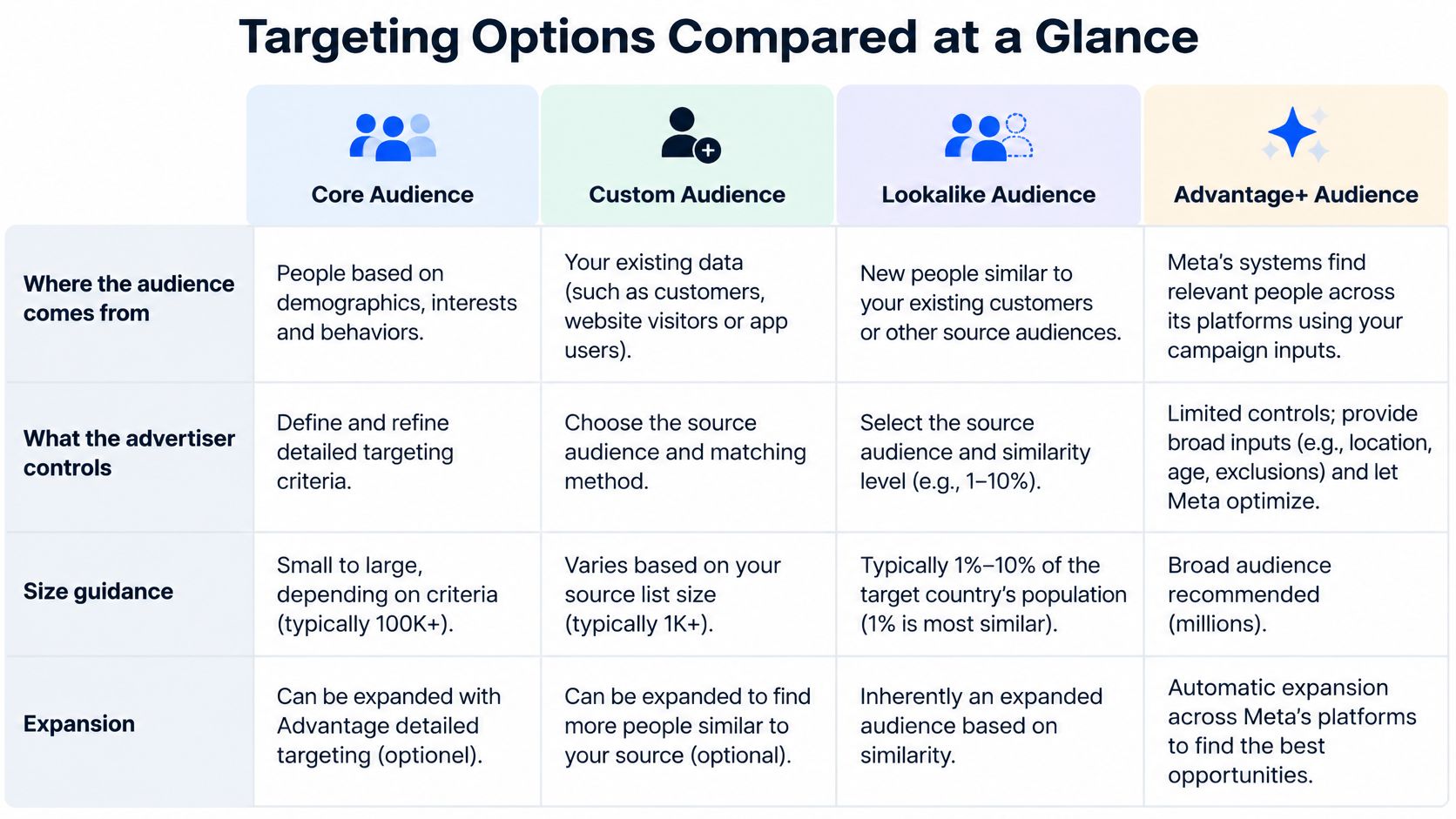
Targeting Options Compared at a Glance
Start with the trade-offs side by side, then assign each option a job. Don't let four audience types compete for the same budget without a reason.
| Option | Built from | What you control | Size guidance | Expansion behaviour |
|---|---|---|---|---|
| Core (interests, behaviours, demographics) | Meta detailed-targeting signals | Age, location, gender, interests, behaviours | No fixed minimum; narrow interest stacks shrink delivery | Advantage+ detailed targeting can widen beyond selected interests |
| Custom Audience | Website, app, engagement or customer list data | Source list and its exclusions | At least 1,000 customers recommended for a customer list | Fixed to its source; does not expand on its own |
| Lookalike 1% to 10% | Seed Custom Audience | Similarity percentage from 1% to 10% | 1% is the closest match; higher percentages widen reach | Advantage+ lookalike can expand beyond the chosen percentage |
| Advantage+ Audience | Meta predictive model using your inputs as suggestions | Optional constraints on location, age and gender | No fixed size | Expands by design when Meta predicts better results |
What Each Option Is Actually For
Core suits cold prospecting when the account has no usable first-party data. It gives Meta the broadest reading of intent, built from demographics, interests and behaviours. Stacking many interests inside one ad set narrows delivery, so you're often constraining the auction before you've given it anything to learn from.
Custom Audience gives you the most certain match. Use it for retargeting, suppression and customer matching, where you know who someone is. That certainty is its value, not scale, and it's why it belongs in defensive roles like excluding existing buyers from acquisition as much as in reaching warm traffic.
Lookalike trades certainty for reach. A 1% lookalike from a high-value purchaser seed suits scaling prospecting once the seed is clean and current. A dirty seed doesn't become useful because the percentage is narrow.
Advantage+ Audience treats your inputs as suggestions and expands when Meta predicts better results. That's useful if you test it against a control, and dangerous if you assume a lower CPA proves new demand.
Starting split: Give prospecting to one clear owner, Advantage+ Audience or a tested lookalike, and give retargeting and suppression to Custom Audiences. Keep a manual core ad set as a control, not as a stack of overlapping interests.
That split only works if each audience can deliver. Once structure is set, pair it with disciplined Meta ad preview workflows so creative variants don't muddy what you're reading as an audience effect. Decide now which option owns prospecting and which owns retargeting, then check size before you spend.
How the Auction Decides Who Sees Your Ad
Targeting is the invitation list. The auction is the door. Getting on the list doesn't decide who gets in, or at what price.
The diagram below maps that separation between eligibility and delivery.
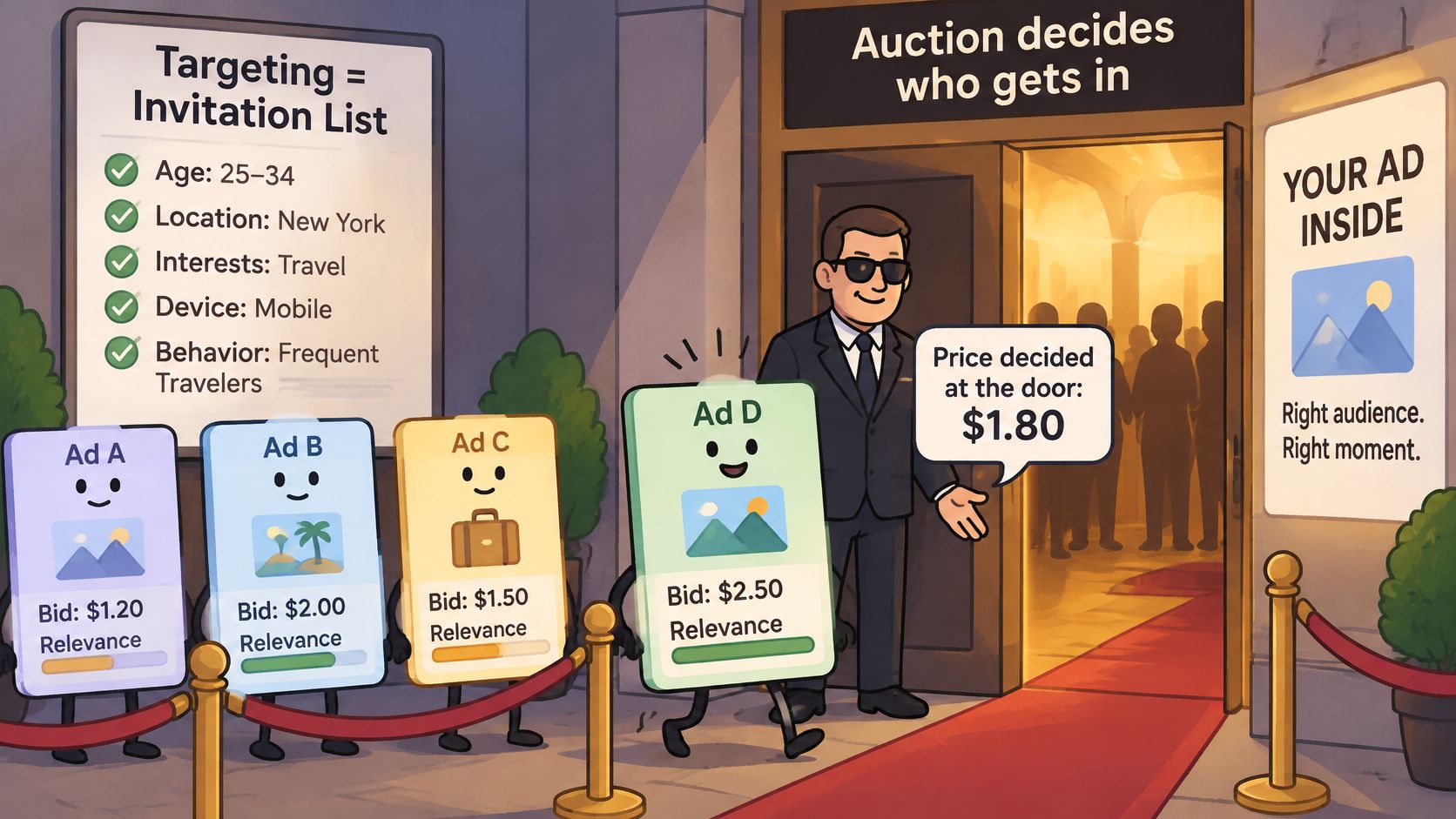
For every eligible impression, Meta evaluates the advertiser's bid, estimated action rate, and ad quality/relevance to select the winning ad, and the winning bid may be lower than the advertiser's maximum bid, as Meta's Facebook ads auction guide explains. That's why Meta Ads targeting is an auction optimisation problem, not a demographic filter. A well-targeted ad with weak relevance loses to a broader ad the system expects to convert.
The Optimisation Event Trains the Audience
Selecting conversions trains delivery toward people more likely to complete that conversion. Selecting clicks trains it toward clickers. You're not just reporting on an outcome, you're choosing who Meta hunts for next.
- Define the highest-value measurable event: Use the deepest event you can measure reliably, not the most convenient proxy.
- Match the bid strategy to value: Your cost or ROAS control should reflect what that event is worth.
- Don't over-constrain early: Narrowing the audience before there's enough conversion data starves exploration.
Delivery learns over time and narrows toward people more likely to take the optimised action, so audience size, budget and duration jointly set how much exploration the system can do. A narrow ad set loses optimisation flexibility as well as reach. Under CBO, Meta shifts spend toward the ad set delivering results, so overlapping audiences compete for the same budget. Under ABO, each ad set holds a fixed budget, so a narrow audience can burn its allocation without ever exploring. Record which structure owns which audience and check overlap first.
The short walkthrough below shows the auction sequence in practice.
Signals Decide How Well It Learns
Run the Conversions API alongside the Pixel or SDK. Meta recommends using Conversions API alongside the Pixel/SDK in a redundant setup and sending events in real time or as close to real time as possible, as set out in Meta's Conversions API guidance. Check deduplication, consistent event names and parameters, and accurate value and currency fields, because duplicated or delayed signals distort both reporting and bidding feedback.
Judge success on cost per correctly optimised business outcome, not the lowest CPM. Change one variable per test, objective, audience, bid or creative, or you won't know which auction effect you're reading.
Sizing Audiences Before You Spend
Meta recommends that a Custom Audience contain at least 1,000 customers because a smaller source may affect ad delivery, according to Meta's guidance on selecting Custom and Lookalike Audiences in Ads Manager. Platform-level reach tells you nothing about whether a single segment can deliver. Run four checks before launch.
- Count matched customers per segment: Pass condition is a matched count for every ad set, not an uploaded row count.
- Compare each count with 1,000: Pass condition is every customer-list segment clears the threshold.
- Merge anything that falls short: Combine by broader lifecycle stage or market. Splitting one file by market, product and lifecycle is how segments end up too small.
- Confirm the lookalike seed: Pass condition is the seed is current and its country matches the ad set.
Our guide to creating a Custom Facebook Audience covers the build itself. If you're sizing for local services with thin lists, the practical constraints behind social media ads for service businesses are useful context for why merging often beats precise splitting.
For lookalikes, a 1% audience is the closest match tier and needs a clean seed. Wider percentages trade similarity per user for reach in the same country, so pair them with a conversion-optimised ad set and watch frequency. Advantage+ Audience has no fixed size, so you can't size it in advance. Compare it against a manual control before scaling it.
Lookalike Expansion and Duplicate Ad Set Traps
A duplicated 1% lookalike isn't necessarily still a 1% lookalike. That's the assumption that breaks prospecting audits.
Advantage+ lookalike can expand delivery beyond the percentage selected when Meta predicts better performance outside the defined lookalike audience, using the underlying Custom Audience as a delivery guide, according to Meta's Advantage+ lookalike help page. It's automatically enabled for new, duplicated and draft campaigns or ad sets using lookalikes created from mobile, website or customer-list Custom Audiences. So when you duplicate a prospecting ad set to test a new creative, the expansion behaviour travels with it, and your effective audience is wider than the label on the ad set suggests.
A Worked Overlap Example
Say an ecommerce brand runs two 1% lookalikes in the same country. One is built from purchasers, the other from add-to-cart visitors. On paper they're different funnel stages. In practice, purchasers almost always passed through add-to-cart, so the two seeds share behavioural characteristics and Meta builds two lookalikes that pull from much the same population.
Once expansion is active on both, the ambiguity gets worse. The same users enter both auctions, frequency rises across the account, and you've bought no new reach for the extra spend. Under CBO the two ad sets fight for the same budget pool. In reporting, both ad sets claim conversions from what's effectively one audience, so neither result tells you which seed works.
Reach and cost per result moving while the nominal lookalike percentage hasn't changed is the clearest sign the audience has drifted beyond what you set.
The Fix Is Labelling and Seed Discipline
- Label every duplicate with its seed and expansion state: If the name doesn't encode both, you can't audit it later.
- Check overlap before scaling: Run overlap checks between ad sets that share a country and funnel stage.
- Keep one seed quality tier per ad set: Don't mix a purchaser seed and a page-view seed and call the result a test.
Seed quality matters more than percentage gymnastics, which is why our first-party data strategy guide is the right starting point before you rebuild seeds. A clean, recent, high-value seed at a wider percentage will usually outperform a stale, mixed-intent seed at 1%. Treat the percentage as a similarity dial, not a guarantee, and treat every duplicate as a new audience until you've verified its settings. If you can't state a duplicated ad set's seed, country and expansion state from its name, it's not ready to scale.
Exclusions and Control Layers After the 2025 Change
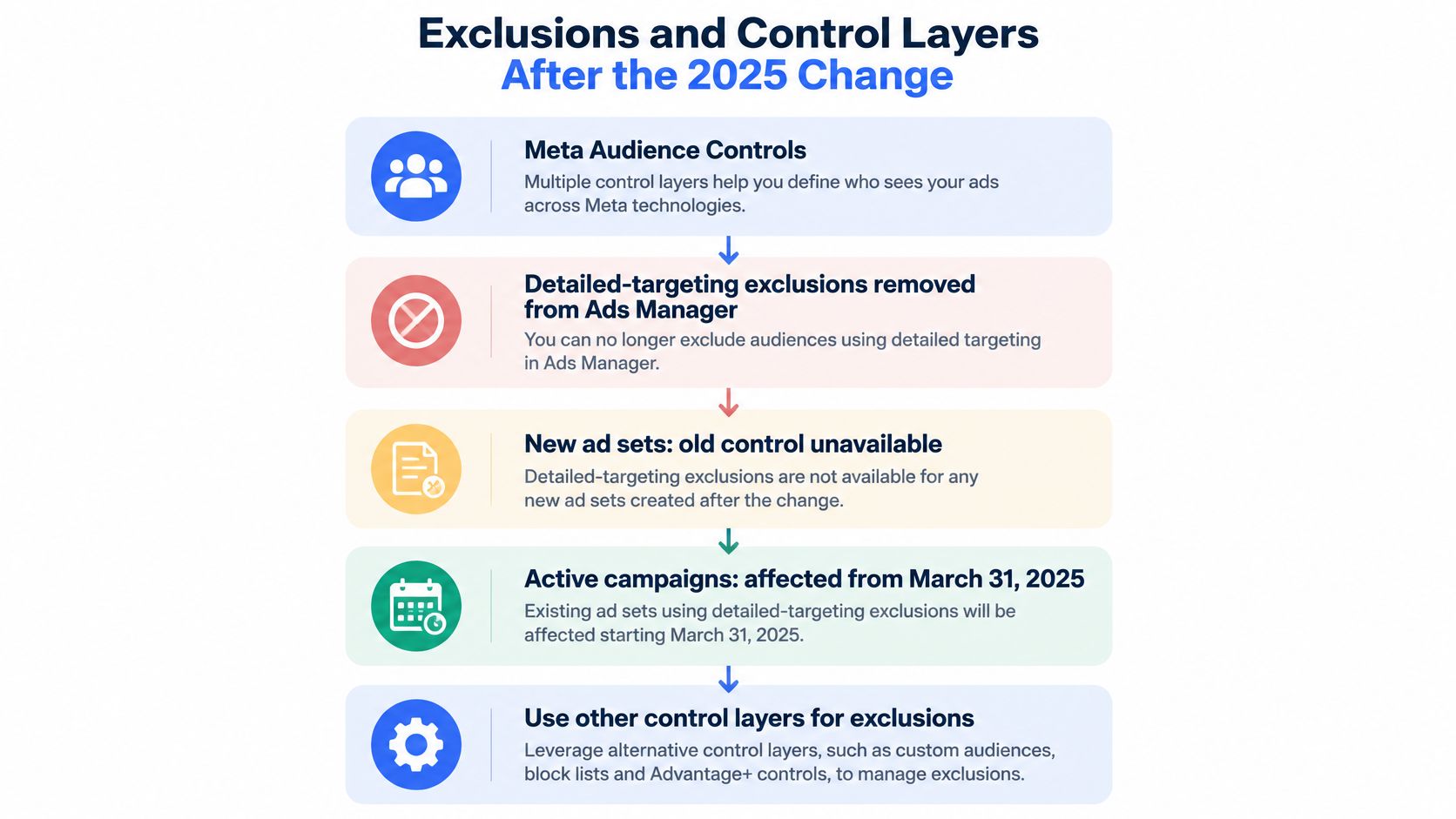
Meta removed detailed-targeting exclusions from Ads Manager beginning March 31, 2025. New ad sets can't use the former control, and existing active campaigns using it were affected from that date, according to Meta's detailed-targeting exclusions help page. An ad set with a detailed-targeting exclusion attached also can't be duplicated and edited or reused as a saved or draft audience until that exclusion is removed. Workflows built around interest-level exclusions need to be updated.
The hierarchy below shows where control now sits.
| Control layer | Setting | Status | Practical use |
|---|---|---|---|
| Hard constraint | Location | Available | Set per ad set to separate markets |
| Hard constraint | Age and gender | Available | Set per ad set, separate from interest expansion |
| Hard constraint | Detailed-targeting exclusions | Removed from March 31, 2025 | Replace with Custom Audience exclusions |
| Exclusion | Custom Audience exclusions | Available, principal in-platform alternative | Suppress existing customers from prospecting |
| Measurement safeguard | Campaign separation and frequency monitoring | Advertiser-controlled | Keep new and existing customer campaigns apart |
Sort Every Setting Into Three Layers
Hard constraints include location, age and gender. Configure them at the ad-set level where they define who may be reached. Treat these as documented boundaries, particularly when a market, client policy or campaign requirement limits eligibility.
Optimisation suggestions include interests and Advantage+ expansion. Test whether relaxing them improves delivery, then check the trade-offs. A reported advertiser test found median cost per conversion was 22.6% lower without exclusions than with them, as noted alongside Meta's exclusion-removal documentation. Lower cost can coincide with greater audience overlap, existing customers receiving acquisition ads, or increased brand-safety exposure. Delivery efficiency alone does not show whether the campaign reached more new customers.
Measurement safeguards are campaign separation, frequency monitoring and post-purchase audience analysis. These controls remain with the advertiser. Use retargeting best practices to inform how you separate prospecting from retargeting and monitor delivery.
Custom Audience exclusions are the principal in-platform alternative to detailed-targeting exclusions. Suppress purchasers from prospecting with first-party audiences, refresh those audiences regularly, and account for imperfect matching. Frequency monitoring can help identify leakage that audience exclusions do not catch.
Customer-list use, sensitive categories and consent rules vary by market. The targeting question is which audience boundaries are legally, commercially and operationally mandatory, and whether your current setup still enforces them after the old exclusion workflow disappeared.
Whether Advantage+ Audience Adds Real Growth
Meta reports lower cost per result with Advantage+ Audience: 14.8% for Awareness, 9.7% for Traffic, Engagement and Leads, and 7.2% for Sales and App Promotion, according to Meta's Advantage+ Audience help page. These are platform-reported averages for attributed results, not proof of incremental revenue in an individual account.
| Objective group | Reported change in cost per result | Verification test |
|---|---|---|
| Awareness | 14.8% lower | Brand lift study against a manual control |
| Traffic, Engagement and Leads | 9.7% lower | Holdout on conversions and cost per qualified lead |
| Sales and App Promotion | 7.2% lower | Geo holdout on blended revenue and contribution margin |
Attributed Is Not Incremental
Advantage+ can lower reported CPA by finding people already close to converting. That is demand capture, not necessarily new demand. Attribution may credit the campaign for conversions that would have happened anyway, so a lower platform-reported cost per result does not establish that the campaign created additional customers.
For a DTC brand, a CPA decline alongside a falling share of new customers is a warning: delivery may be shifting toward existing demand rather than expanding the market. ROAS can improve while the pool of future prospects fails to grow.
A Three-Part Evidence Threshold
Move budget to Advantage+ Audience only when these three conditions hold:
- A holdout or lift test shows incremental conversions at an acceptable contribution margin.
- New-customer share holds, indicating prospecting is still reaching new buyers.
- Blended outcomes agree, with total sales and contribution margin moving in the same direction as Meta attribution.
When results conflict, use the lift result to guide budget decisions and treat Ads Manager as a delivery report. Attribution systems measure different things, so reported efficiency alone cannot settle whether growth is incremental.
For regulated sectors, including audience targeting decisions for law firm ads, expansion also has to fit the applicable audience boundaries. Manual targeting is useful when it enforces a boundary; expansion is useful when narrower settings constrain delivery without adding meaningful control. Judge Advantage+ by the test result, not ROAS alone.
Confirm Your Targeting Setup Before You Launch
Run these seven checks in order. Each one has a pass condition, and launching with a fail means you're testing your own errors.
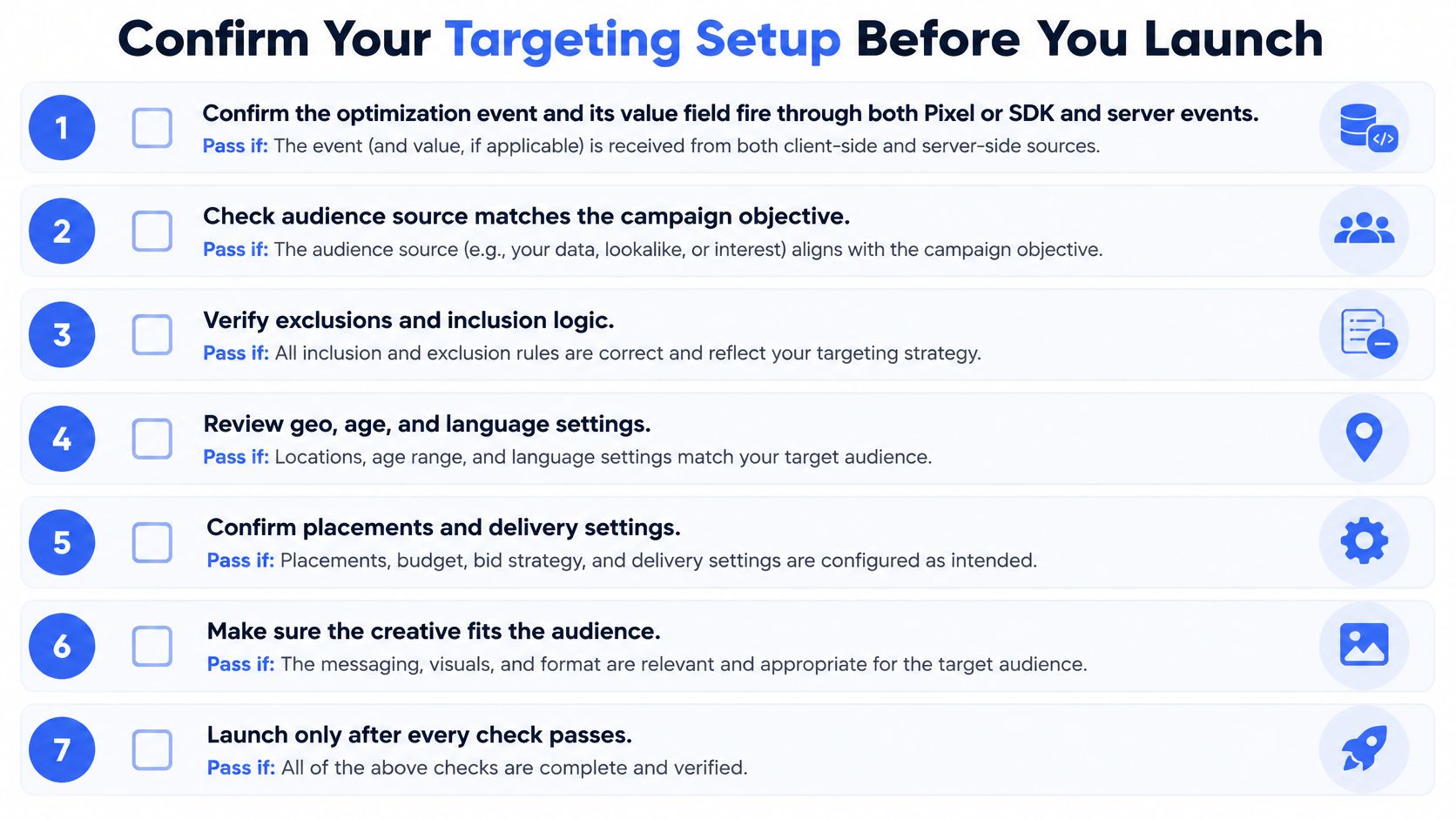
- Optimisation event fires on both channels: Pass if the event and its value field fire through Pixel or SDK and Conversions API, with deduplication passing.
- Every Custom Audience clears 1,000 customers: Pass if each list clears the threshold or has been merged into a segment that does.
- Lookalike settings are verified: Pass if seed, percentage, country and expansion state are confirmed, including on every duplicated ad set.
- Hard constraints are set per ad set: Pass if location, age and gender are explicitly set, not inherited by assumption.
- Existing customers are suppressed: Pass if Custom Audience exclusions are applied and any market where no exclusion is acceptable is recorded.
- One variable changes per test: Pass if the test changes only the objective, audience, bid or creative, not several at once.
- Naming encodes the audience: Pass if each ad set name states objective, audience type, market and seed, so results read cleanly by audience.
When one structure has to repeat across, say, 100 or more ads and several markets, manual setup breaks the consistency this checklist depends on. A bulk tool can sort a dropped-in batch of creatives into ad sets and apply budgets, locations and ages, run naming rules on every ad set and creative, and keep flexible ads supported so Meta mixes the winners among them. Treat that as a way to hold the checklist in place, not a substitute for running it.
If you're launching the same targeting structure across dozens of ad sets and markets, Rapid Ads lets you drop in a batch of creatives, have AI sort them into ad sets with your budgets, locations and ages applied, and enforce naming rules on every ad set and creative before you publish. Build your next Meta Ads targeting test there, run the seven checks once, and launch the whole batch with the structure intact.