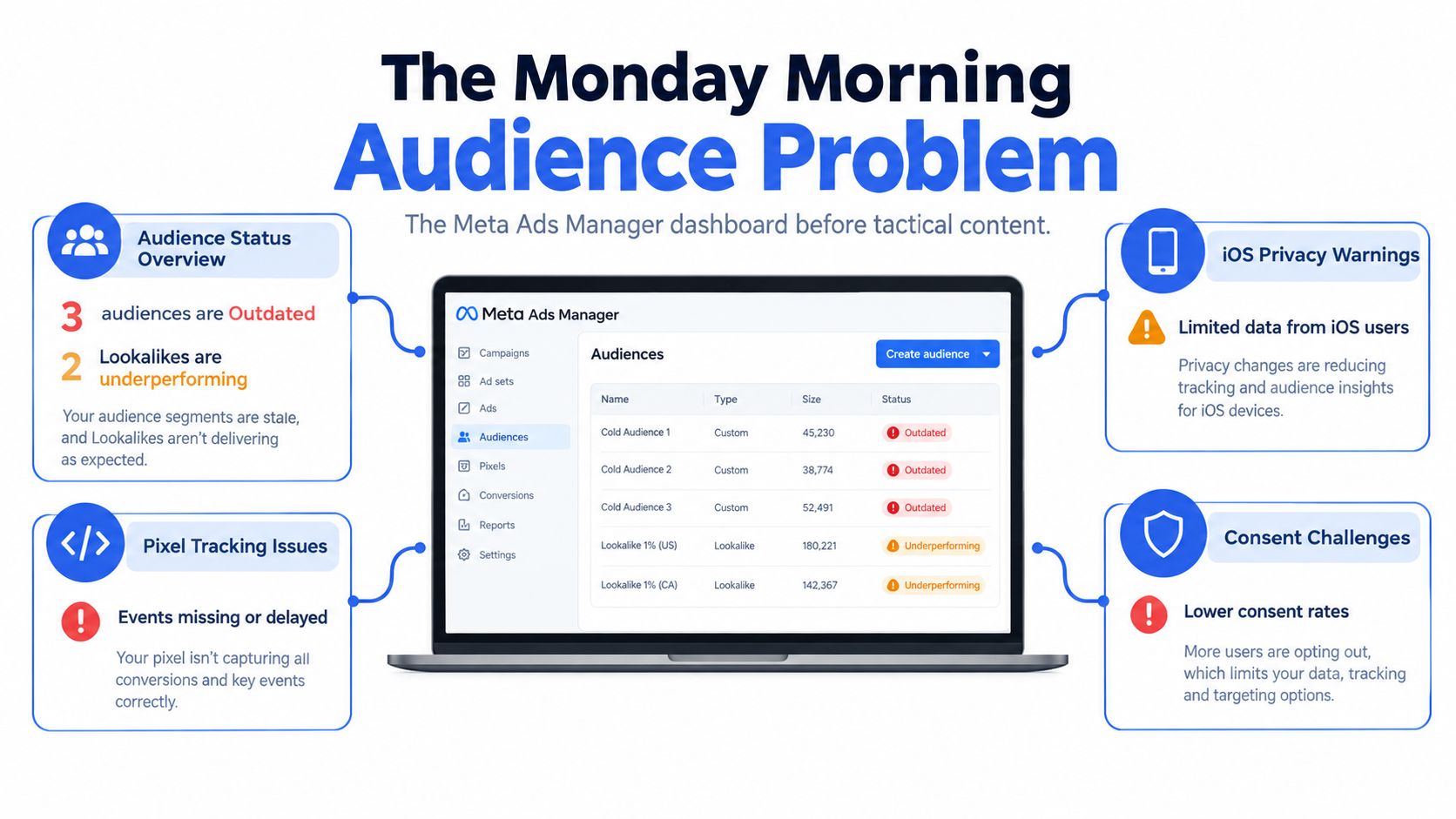
Monday morning in a scaled Meta account rarely starts with a clean slate. Ads Manager shows three audiences marked Outdated, two Lookalikes are bleeding ROAS, and a CRM export is sitting in Downloads with mixed casing, inconsistent country codes, duplicate rows, and no clear consent filter.
The problem isn't the Create Audience button. It's the workflow behind it. A Custom Audience is a first-party asset with a source, event, recency window, consent gate, naming convention, and refresh cadence. If any of those fields are missing, the audience may still appear in Ads Manager, but it won't necessarily be actionable, reportable, or safe to activate.
This is the practical playbook for marketers who need to create a custom Facebook audience without creating another maintenance problem. It covers source selection, CRM hygiene, website signals, match diagnostics, suppression, campaign wiring, Lookalike seeds, and the operational fixes that preserve delivery.
Table of Contents
- The Monday Morning Audience Problem
- Source Categories and What Each One Is Actually For
- Building a Customer List Custom Audience That Matches
- Website Audiences With Pixel and Conversions API
- Match Rate, Audience Size and Why Your Numbers Disagree
- Consent Filtering and the Suppression Hygiene Most Guides Skip
- Naming Conventions and Wiring Audiences Into Campaign Structure
The Monday Morning Audience Problem
The performance lead starts by opening the Audiences tab. Three customer-list audiences show as Outdated, the latest purchaser exclusion hasn't been refreshed, and a Lookalike seeded from a broad lead file is spending inside a prospecting campaign with no obvious explanation for the ROAS decline. In another browser tab, the CRM export contains email addresses in mixed case, phone numbers without country codes, and lifecycle stages that don't match the naming used in the ad account.
Nothing here looks catastrophic in isolation. Together, these small defects distort the entire account. A stale purchaser exclusion can put existing customers back into acquisition campaigns. A broad seed can weaken a Lookalike. A poorly formatted upload can leave the matched audience far smaller than the CRM file suggests.
Meta's Custom Audience system evolved from basic customer-list retargeting into a multi-source framework based on first-party behaviour and meaningful events. Meta described app actions and website actions as audience-building signals in its announcement about re-engaging mobile app users. Current workflows commonly include customer lists, website activity, app activity, catalog interactions, and Facebook or Instagram engagement.
The useful mental model is to treat every audience as a record, not a row in a targeting menu. That record should answer five questions:
- Source: Where did the person come from?
- Event: What action qualifies them?
- Recency: How long should they remain eligible?
- Consent: Is advertising permission current and valid?
- Refresh: When will the audience be rebuilt or synchronized?
| Audience Source | Primary Campaign Job | Typical Size | Refresh Cadence |
|---|---|---|---|
| Customer list | Retention, exclusions, CRM-based retargeting, and Lookalike seeding | Depends on CRM coverage and match quality | At least every 30 days for current status |
| Website activity | Product, cart, checkout, and purchaser segmentation | Depends on site traffic and event coverage | Rolling retention window |
| App activity | Re-engaging installers and in-app users | Depends on app activity and event volume | Rolling event-based refresh |
| Catalog interactions | Product-level retargeting and collection interest | Depends on catalog engagement | Rolling activity refresh |
| Facebook or Instagram engagement | Warm-content, lead-form, video, and profile retargeting | Depends on platform engagement | Rolling engagement refresh |
A reliable account makes those fields visible in the audience name and documentation. A fragile account relies on memory, downloads, and whichever buyer happens to inherit the business next.
Source Categories and What Each One Is Actually For
The five source categories aren't interchangeable. Choose the source according to the commercial job, then choose the event and retention window inside that source.
Customer lists
Customer lists are the strongest fit for CRM-controlled audiences. Use them for purchasers, qualified leads, high-value customers, churned customers, or people who must always be excluded from acquisition. The audience is created from first-party identifiers that Meta attempts to match to user accounts, so freshness and identifier quality matter more than the row count in the export.
A purchaser exclusion and a qualified-lead retargeting pool should not share a file just because both records live in the CRM. Separate lifecycle stages before upload. That keeps the audience useful for reporting, suppression, and Lookalike seeding.
Website activity
Website audiences are built from events such as PageView, ViewContent, AddToCart, InitiateCheckout, and Purchase. They're usually the right choice for warm retargeting because the event reflects a person's recent relationship with the site.
A product-viewer pool can receive product education, while an add-to-cart audience can receive a recovery message. A purchaser audience can support retention or exclusion. Combining all of those behaviours into “website visitors” throws away the commercial distinction.
App activity
App activity is for actions captured inside a mobile app, such as an install, tutorial completion, subscription event, or in-app purchase. It needs app event instrumentation, typically through Meta's SDK or supported server-side app event methods.
Use this source when the app is part of the customer journey. Ignore it for a web-only business. Having an app source available doesn't make it relevant to a campaign.
Catalog interactions
Catalog audiences focus on people who interacted with products or collections. They're useful when the creative and product feed are closely connected, especially for product viewers who haven't purchased.
The limitation is strategic rather than technical. Catalog interaction tells you that someone engaged with a product surface, but not necessarily that they have the same intent as a checkout initiator. Keep the audience's role narrow and exclude purchasers where the campaign is acquisition-focused.
Facebook and Instagram engagement
Engagement audiences capture actions inside Meta, including video views, lead-form interactions, Page activity, Instagram interactions, event engagement, and other supported content actions. They can be valuable when the conversion path starts inside Meta and website coverage is incomplete.
A lead-form opener who didn't submit belongs in a different follow-up sequence from a person who watched a video. Engagement is a useful signal, but it still needs a hierarchy based on depth and recency.
Practical rule: Build the audience around the next commercial action, not around the source that happens to be easiest to select.
Building a Customer List Custom Audience That Matches
Customer-list uploads fail before Ads Manager opens. They fail in the export, where CRM fields are inconsistent, contacts are duplicated, and a buyer assumes that every row will become a targetable Meta user.
Start with a CSV or TXT export containing at least one accepted primary identifier. Email and phone are usually the most useful fields, but Meta also supports related customer fields. Normalize before upload:
- Emails: Lowercase, trim whitespace, and remove accidental formatting characters.
- Phone numbers: Use international E.164 formatting with country codes.
- Names: Split first name and last name into separate columns.
- Country: Keep country in its own field rather than embedding it in a free-text address.
- Lifecycle: Separate purchasers, leads, subscribers, prospects, and suppression records before export.
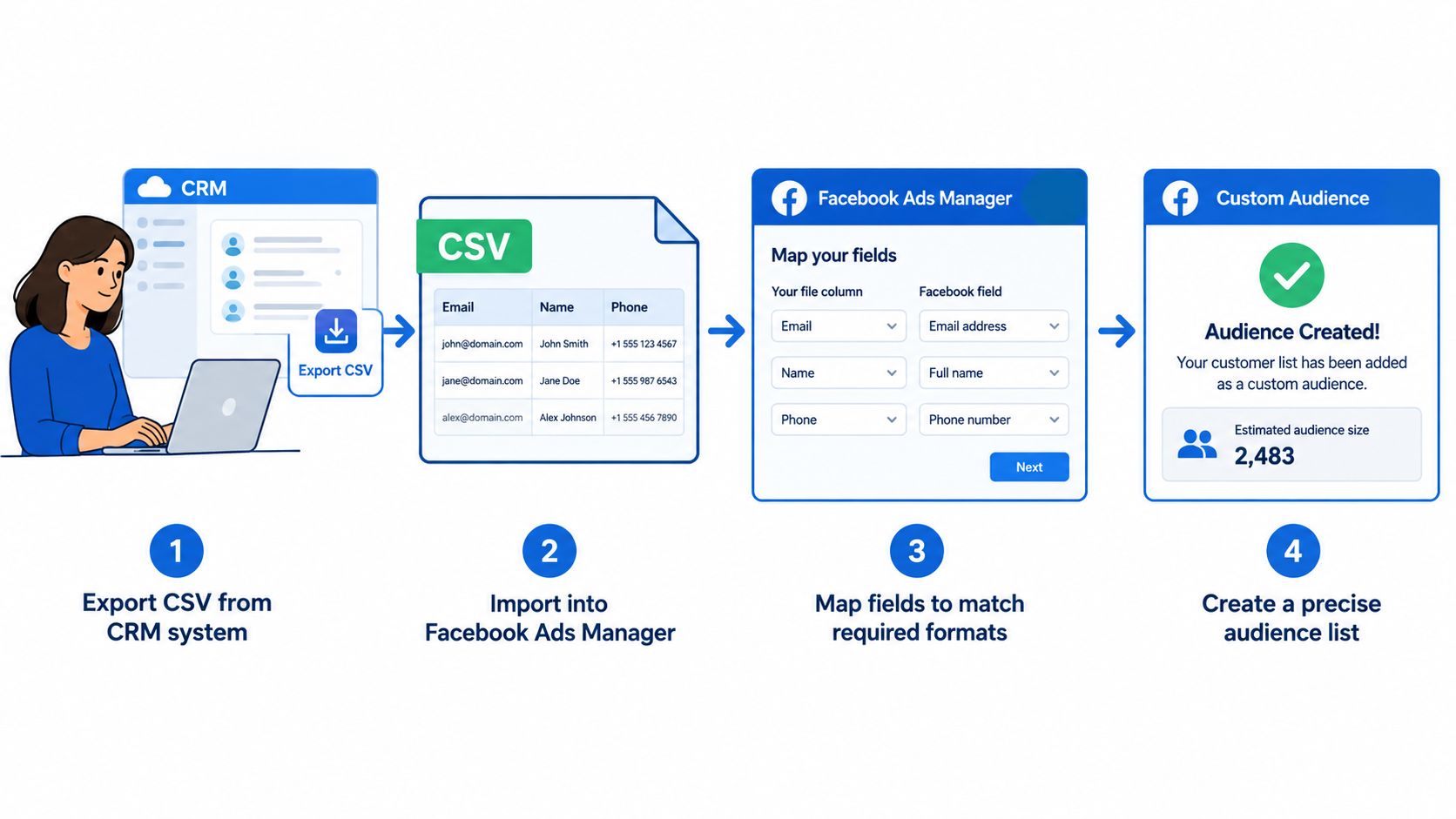
In Ads Manager, open Audiences, select Create Audience, choose Custom Audience, and select Customer List. Upload the file, map each column to Meta's identifier schema, review the estimated audience size and the match score, then complete the certification that confirms you have the required rights and lawful basis for advertising use.
Meta hashes customer information before matching it to profiles. Hashing protects the transfer process, but it doesn't create permission. The advertiser remains responsible for collection notices, advertising permission, opt-outs, and data handling. Meta's Customer List Custom Audiences guidance also warns against sensitive data categories, including children's data, government identifiers, credit-card numbers, health information, and financial information.
The displayed match score is a diagnostic, not a guaranteed reach percentage. A list with multiple clean identifiers may match more effectively than a list with one stale field, but no score guarantees delivery or conversion quality.
The operating rules that keep uploads useful
Keep the audience record specific. “CRM Upload 1” is not a usable naming system. A name such as US Purchasers 180d Exclusion tells the next buyer what the source is, what the segment represents, and how the audience should be used.
Meta warns that customer-list audiences become Outdated when they haven't been updated for more than 30 days, and recommends including at least 1,000 customers for reliable delivery. Those rules make monthly refreshes and lifecycle segmentation operational requirements, not housekeeping preferences, as described in Meta's audience maintenance guidance.
Rapid Ads can reduce the repetitive work around bulk CSV imports, enforced naming conventions, and publishing audience-linked structures across multiple ad accounts. It doesn't repair a dirty CRM export or decide whether a contact has advertising permission. The governance decision still belongs upstream.
Use the creation flow as a quality gate:
- Export the correct lifecycle cohort.
- Normalize identifiers.
- Remove duplicates and withdrawn contacts.
- Map columns carefully.
- Review estimated size and match score.
- Certify lawful use.
- Record the build date and source definition.
- Schedule the next refresh.
Website Audiences With Pixel and Conversions API
Website audiences are where most retargeting logic becomes useful. The setup path is Audiences, Create audience, Custom audience, Website. Choose the relevant Pixel or dataset, select the event, define the retention period, and add inclusion or exclusion rules.
Meta supports website retention windows from 1 to 180 days, so the window should reflect buying intent rather than account convention. A 7-day cart-abandoner pool is designed for immediate recovery. A 180-day visitor pool supports a longer consideration cycle. Putting both into the same ad set usually produces muddled creative, frequency, and reporting. The retention-window mechanics are documented in Meta's website Custom Audience instructions.
A practical audience ladder might contain:
- Recent ViewContent: Product viewers inside a short retention window, excluding purchasers.
- Cart recovery: AddToCart users who haven't reached Purchase.
- Checkout recovery: InitiateCheckout users who haven't purchased.
- Customer exclusion: Recent Purchase users removed from acquisition ad sets.
- Longer-cycle consideration: Broader visitors kept separate from high-intent recovery pools.
Meta allows up to five rules within one website Custom Audience, using Any or All conditions. Use All when every condition must be true, such as people who viewed a product and added it to the cart. Use Any when several events represent the same broad intent, such as product viewers or checkout starters.
Don't create one oversized audience that contains every event and every window. Build distinct pools so the ad set can carry an appropriate message and suppression logic. A buyer who viewed a product page needs different creative from someone who initiated checkout.
Browser-only tracking is increasingly fragile because iOS privacy restrictions and ad blockers can remove parts of the event stream. Pair the browser Pixel with server-side Conversions API signals, use consistent event identifiers, and check that duplicate browser and server events are being resolved rather than counted twice.
Rapid Ads is relevant only after the audience logic is sound. If you need to launch multiple ad sets with different retargeting messages, its bulk creative and ad-set workflow can reduce manual setup while preserving the structure defined in Ads Manager.
Match Rate, Audience Size and Why Your Numbers Disagree
The uploaded file is not the audience. Matched users are the meaningful intermediate measure, and eligible delivery is a further filter. A CRM export can contain duplicates, invalid contact details, stale records, disconnected emails, missing country codes, or contacts that Meta can't resolve.
Run the diagnostic in four passes after every significant upload.
First, compare the uploaded record count with the matched audience size. A large gap points to identity quality, coverage, or permissions. Second, split the source into cohorts by market, lifecycle stage, or identifier availability. That shows whether one country, old lead segment, or phone-only cohort is dragging the result down. Third, test a clean file with one identifier against a file containing multiple normalized identifiers. Fourth, distinguish a matching problem from a scale problem. A clean audience can still be too small for dependable delivery.
| Metric | What It Measures | Action If Low |
|---|---|---|
| Uploaded records | Rows exported from the CRM | Remove duplicates, stale contacts, and invalid fields |
| Matched users | Records Meta can associate with user accounts | Normalize identifiers and add eligible fields |
| Usable audience | People available for campaign delivery after platform constraints | Review size, recency, consent, and campaign setup |
| Conversion quality | The commercial value of people in the segment | Narrow toward recent purchasers, qualified leads, or high-value customers |
A low match score doesn't automatically mean the audience is worthless. It may mean the file contains an older cohort with disconnected email addresses. It may also mean the broader file includes people who should never have been activated. The right response is diagnosis, not blind expansion.
Browser signals need the same discipline. If Pixel events fall because browsers block tracking, the website audience can stop refreshing accurately. Conversions API can preserve server-side event coverage, but only when event setup, deduplication, and consent handling are correct.
A smaller, recent purchaser segment can be more valuable than a broad list with weaker intent and uncertain permission.
Meta's customer-list upload documentation explains the supported file types, identifiers, and hashing process. Use that reference for schema decisions, then validate the resulting audience against CRM cohorts and campaign behaviour rather than treating the upload confirmation as proof of quality.
Consent Filtering and the Suppression Hygiene Most Guides Skip
Most audience guides treat a customer list as ready once the columns are formatted. That is the wrong stopping point. The operational question is whether each contact is eligible for advertising activation at the moment the file is prepared.
Run the CRM through a consent gate before creating the audience. The gate should check the collection point, notice shown, permission purpose, effective date, current opt-out state, retention rule, and any jurisdiction-specific requirement. International teams can't assume one consent standard applies to every market, while Meta's upload certification compresses a complex decision into a platform prompt.
A consent-safe upload checklist
- Source provenance: Record where the contact came from and which system owns the record.
- Purpose wording: Confirm that the notice covered advertising or the relevant marketing use.
- Opt-out status: Remove unsubscribed, withdrawn, and restricted contacts before export.
- Suppression sync: Maintain a separate suppression audience and refresh it whenever CRM status changes.
- Retention: Remove records that exceed the business's permitted retention period.
- Deletion: Document how withdrawn data is removed from future uploads and active audience files.
- Approval: Require a named owner to approve the final segment before activation.
The suppression list should be treated as a live operational control, not a forgotten CSV. If a lead becomes a purchaser, the purchaser exclusion must receive the change. If a person withdraws permission, the next audience refresh must remove them from targetable files and preserve the suppression state so they aren't reintroduced by a later CRM export.
Keep an audit record with the source, filter logic, approval date, permission basis, and upload or build date. That record helps the media buyer explain why the audience exists and helps the data owner reproduce the decision.
The performance impact is direct. Missing suppression logic can create wasted impressions, unnecessary frequency, contradictory messages, and poor customer experience. It can also expose the business to a compliance incident that interrupts campaigns long after the original upload has been forgotten.
Naming Conventions and Wiring Audiences Into Campaign Structure
An audience doesn't create ROAS by itself. It becomes useful when the ad set, campaign objective, exclusion logic, creative angle, and measurement plan all agree about the segment's job.
Use a naming convention that survives handover across markets and accounts. A practical structure is:
Market _ Source or event _ Retention _ Build date _ Role
Examples include UK ViewContent 30d 24012026, US Purchasers 180d Exclusion, and BR LeadForm Engagers HighIntent. The mandatory fields are source or event, retention period where relevant, market, and build or upload date. Funnel stage, campaign phase, and suppression status are useful additions when the account is complex.
Wire the audience to the right campaign role
In ABO, separate ad sets can hold different audience stages and budgets. This gives the buyer control when cart recovery must receive different spend from longer-window website retargeting. In CBO, the campaign can distribute budget across those ad sets, but the audience definitions and exclusions still need to be distinct.
For sequential retargeting, exclude people who have moved to the next stage. A product viewer who adds to cart should leave the product-viewer message. A purchaser should leave acquisition and cart-recovery pools. This prevents the same person from receiving three competing messages across overlapping ad sets.
A strong purchaser or qualified-lead Custom Audience can also seed a Lookalike Audience. Meta describes Lookalikes as people similar to users who already engage with the business or its content, so the source segment should represent the commercial outcome you want to reproduce. Keep the original Custom Audience available for exclusions, retention, and sequential messaging. The Meta Lookalike Audience documentation covers that source-audience relationship.
Rapid Ads can enforce naming at ad and ad-set level, support bulk CSV imports, publish creative structures across multiple ad accounts, and disable unwanted Advantage+ creative settings that revert without notice during manual workflows. Those functions solve operational drift. They don't replace audience QA or campaign strategy.
| Symptom | Root Cause | Fastest Fix |
|---|---|---|
| Audience marked Outdated | No refresh for more than 30 days | Re-upload or rebuild before launch, then add a recurring refresh task |
| Audience too small to deliver | The segment may be below Meta's recommended 1,000-customer floor | Widen the retention window or combine appropriate source files |
| Match score collapse | Formatting errors, missing country codes, duplicates, or a weak cohort | Normalize identifiers and isolate the cohort responsible |
| Overlap and frequency creep | The same people sit in multiple retargeting pools | Use Ads Manager's overlap tools and create dedicated exclusions |
| Event volume drops | Browser Pixel coverage is blocked or incomplete | Enable Conversions API and deduplicate event IDs |
When an audience misbehaves, start with the record. Confirm source, event, retention, market, consent state, and last refresh. Then inspect how the ad set uses it. Most “targeting problems” are either data-definition problems or structure problems, not mysterious delivery behaviour.
The practical Rapid Ads use case is narrow and clear. Use it to remove the manual drag around bulk uploads, enforced naming, multi-account publishing, and Advantage+ auto-disable, while keeping the audience definition and consent approval in your own operating process.
Rapid Ads helps media buyers bulk-import campaign assets, enforce audience-linked naming conventions, and publish structured ad sets across multiple Meta accounts without repeating the same manual setup. Visit Rapid Ads to test whether that workflow can keep your audience operations consistent as the account roster grows.