You've got a campaign that looks simple in the brief and turns into an afternoon of repetitive Ads Manager work. Upload the assets, create ad sets, rename everything, add UTMs, check placements, disable unwanted enhancements, and repeat across accounts. By the time the campaign is live, the team has spent more energy maintaining the launch than deciding which creative deserves more budget.
That operating model is increasingly misaligned with Meta. The platform is taking more responsibility for audience selection, bidding, placement distribution, and creative variation, while buyers remain responsible for supplying useful inputs and judging whether the reported outcome matches commercial reality. This Meta ads guide treats performance as an operational problem with two dominant levers: creative throughput and measurement hygiene.
Table of Contents
- The 2026 Meta Ads Reality for Performance Buyers
- How Big Meta Ads Became and What That Means
- Campaign and Budget Structure That Scales
- Bulk Creative Launch Workflows and Naming
- Advantage+ Creative Drift and How to Control It
- Attribution Windows and CRM Calibration in 2026
- Scaling Spend Without Killing ROAS
- Operator Checklist and Common Questions
The 2026 Meta Ads Reality for Performance Buyers
A mid-size account can lose 6 to 8 hours per launch cycle to manual uploads, naming, UTM tagging, and aspect-ratio variants. That figure comes from the workflow described for Rapid Ads, where a process that usually takes 6 to 8 hours can be reduced to a 5 to 13 minute bulk job per 100 ads. The point isn't the tool comparison. It's that repetitive production now consumes time that should go into offer analysis, creative diagnosis, and budget decisions.
The buyer's job has moved upstream. You need more genuinely different creative concepts, not just cosmetic edits, because Meta's delivery system can test and match assets faster than a team can manually reorganise audiences. It has also moved downstream, because the platform's conversion report isn't the same thing as revenue recognised in Shopify, a CRM, or a closed-won pipeline.
Targeting is no longer the main bottleneck
Broad targeting and Advantage+ audiences have reduced the practical value of maintaining large collections of narrow ad sets. Manual interests, stacked lookalikes, and elaborate exclusions can still have a role when a business has a genuine geographic, regulatory, or customer-value constraint. They shouldn't be treated as the default source of performance.
The stronger operating sequence is:
- Define the commercial outcome. Choose Sales, Leads, App promotion, Traffic, or Engagement based on the event that matters, not the cheapest action Meta can find.
- Build a varied creative input set. Separate hooks, proof points, offers, formats, and creators instead of producing near-duplicates.
- Give Meta clean conversion signals. Use browser and server-side event coverage, consistent UTMs, and CRM reconciliation.
- Set guardrails. Control enhancement settings, naming, account access, and acceptable cost ranges.
- Read performance outside Ads Manager. Compare platform reporting with contribution margin, qualified leads, orders, and pipeline.
Practical rule: Treat targeting as a starting constraint. Treat creative variety and conversion quality as the actual optimisation inputs.
That changes the usual debates. CBO versus ABO matters, but usually less than whether the campaign has enough differentiated assets. Bid strategy matters, but not if the reported conversion event is inflated or poorly matched to the sales cycle. The account that launches and evaluates valid creative tests consistently will usually outperform the account that spends its week adjusting audience knobs.
How Big Meta Ads Became and What That Means
Meta is no longer a niche paid-social channel that buyers use to supplement search. In Q2 2026, Meta generated $59.363 billion in advertising revenue, up 27% year over year, while ad impressions rose 14% and average price per ad increased 12%, according to reported Meta advertising statistics. The same coverage puts the family of apps at 3.60 billion daily active people in June 2026, which explains why auction changes inside Meta affect media plans far beyond social specialists.
The automation layer has expanded alongside that scale. Meta's Advantage+ suite reached a more than $75 billion annualised run rate by Q2 2026, and more than 9 million small businesses were using at least one Meta AI creative tool, as detailed in Facebook advertising statistics and platform trends. Those figures aren't just investor-facing milestones. They describe the environment in which buyers now launch campaigns.
The scale shift
| Metric | 2024 | 2026 | Implication |
|---|---|---|---|
| Meta advertising revenue | Not provided in the verified data | $59.363 billion in Q2 | Meta Ads operates at foundational paid-media scale |
| Ad revenue year-over-year change | Not provided in the verified data | 27% higher | Demand and monetisation have both expanded |
| Advantage+ annualised run rate | Not provided in the verified data | More than $75 billion | Automation is a central commercial product, not a peripheral feature |
| Daily active people across Meta's apps | Not provided in the verified data | 3.60 billion in June | The auction has a very large addressable audience |
The implication for account design is straightforward. Meta increasingly decides which person sees an ad, which placement receives it, which asset variation is served, and where budget moves. A campaign with one carefully constructed audience and weak creative inputs gives the system little to work with.
What the buyer controls now
You still control the objective, budget boundaries, offer, event hierarchy, creative source material, and measurement architecture. You also control whether the account can be audited later by another buyer, finance lead, or client.
That means naming and UTMs are not administrative details. They connect the ad that generated a result to the creative batch and business outcome that explain it. The strategic work is to create enough clean signals for automation while preventing it from optimising toward an outcome that looks efficient in Ads Manager but fails in the CRM.
Campaign and Budget Structure That Scales
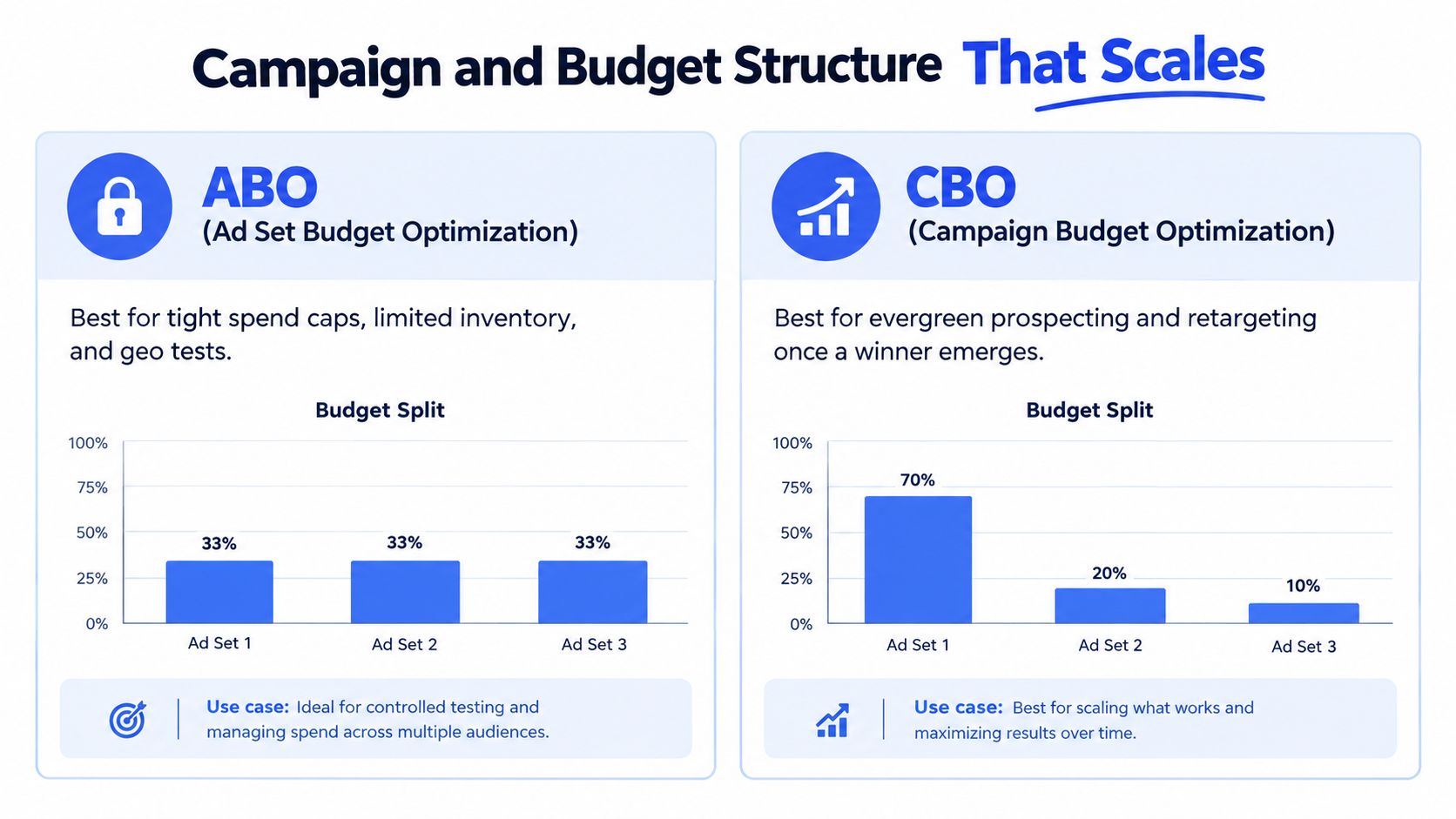
ABO and CBO are useful for different operating conditions. The mistake is treating one as a permanent philosophy instead of selecting the structure that matches the constraint.
| Structure | Use it when | Main trade-off |
|---|---|---|
| ABO | You need tight spend caps, limited inventory control, or a controlled geo test | Spend remains predictable, but budget can stay trapped in weaker ad sets |
| CBO | You're running evergreen prospecting or retargeting after a winner has emerged | Budget can move toward stronger opportunities, but some ad sets may receive little delivery |
| Advantage+ Campaign Budget | You want Meta to reallocate spend across ad sets as creative and conversion signals change | You give up more manual distribution control in exchange for real-time allocation |
ABO is the better choice for a constrained test. Suppose one region has limited inventory or a client requires a fixed spend ceiling for each market. Giving every ad set its own budget makes the test legible. It also prevents Meta from starving a deliberately small segment before you've gathered enough evidence.
CBO becomes more useful once the campaign has validated demand and the ad sets are competing for a shared outcome. Advantage+ Campaign Budget extends that logic by allowing Meta to move spend across ad sets as delivery conditions change. It can be more responsive than manual budget decisions when new creative variants enter and exit every week.
Avoid auction self-competition
The common structural failure is a campaign containing several overlapping broad ad sets, each competing for similar users. That fragmentation makes reporting harder and can force the account to bid against itself. Start with one campaign per objective unless margin, geography, catalogue logic, or creative requirements genuinely differ.
A practical naming pattern might be:
2026Q2-WSO-Prospecting-HookA-Batch03
At ad level, add the creative and placement detail:
2026Q2-WSO-Prospecting-HookA-V03-IG-Reel-9x16
Encode only fields you'll use in reporting. A naming convention that contains objective, audience tier, creative batch, iteration, and placement is useful. A name packed with every internal note becomes difficult to scan and easy to break.
Bulk Creative Launch Workflows and Naming
Bulk launching works when the spreadsheet is treated as a campaign specification, not a dumping ground for assets. One row should represent one ad, with every field required to publish it mapped before the upload begins.
Start with a creative brief that separates concept, hook, format, offer, and destination. Export one row per ad, then map that file into Meta's bulk-import template. Meta documents spreadsheet-based creation for campaigns, ad sets, and ads, including downloading a template or exporting existing ad details for editing and re-uploading through Meta's bulk import workflow.
A launch sequence you can reuse
- Prepare the source sheet. Keep one row per ad. Include campaign name, ad set name, ad name, destination URL, image or video reference, primary text, headline, CTA, and tracking parameters.
- Map fields to Meta's template. Don't improvise column names after the creative team has delivered the file. Create a stable internal template and translate it to Meta's required fields.
- Validate before upload. Check missing URLs, duplicate names, unsupported media references, invalid CTAs, and inconsistent campaign hierarchy. Use Ads Manager's validation or Rules check before publishing.
- Route creative by placement. Keep Feed, Reels, and Stories assets distinct where the composition requires it. A square or 4:5 asset shouldn't be assumed to work as a vertical 9:16 edit.
- Preview the finished ads. Confirm the offer, crop, destination, and enhancement state in Ads Manager before you release spend.
| CSV Column | Meta Ads Manager Field |
|---|---|
| Campaign name | Campaign name |
| Ad set name | Ad set name |
| Ad name | Ad name |
| Destination URL | Website URL |
| Image or video reference | Creative media |
| Primary text | Primary text |
| Headline | Headline |
| CTA | Call to action |
| UTM string | URL parameters |
For creative teams building AI-assisted video variations, Writingmate's guide to AI ads is a useful reference for thinking about production inputs before those assets enter the upload sheet. The operational point is to keep the creative generation process separate from the publishing schema, so the media buyer can reject incomplete or poorly tagged assets without rebuilding the campaign.
Use a consistent UTM structure such as utm_source=meta, utm_medium=paid, utm_campaign={{campaign.name}}, and utm_content={{ad.name}}. If your naming convention changes, update the template and the downstream reporting logic together. Otherwise, the ad can publish successfully while the CRM groups it under an unrecognisable campaign.
Rapid Ads fits this workflow where bulk uploads, naming conventions, aspect-ratio sorting, and multi-account publishing create the bottleneck. It can group images, videos, and copy into ad sets, attach UTMs, support CSV copy import, and publish large batches without rebuilding each ad manually. Meta also documents Flexible as a manual-upload format that can support multiple images or videos, with preview checks available across placements in its Flexible format guidance.
Advantage+ Creative Drift and How to Control It
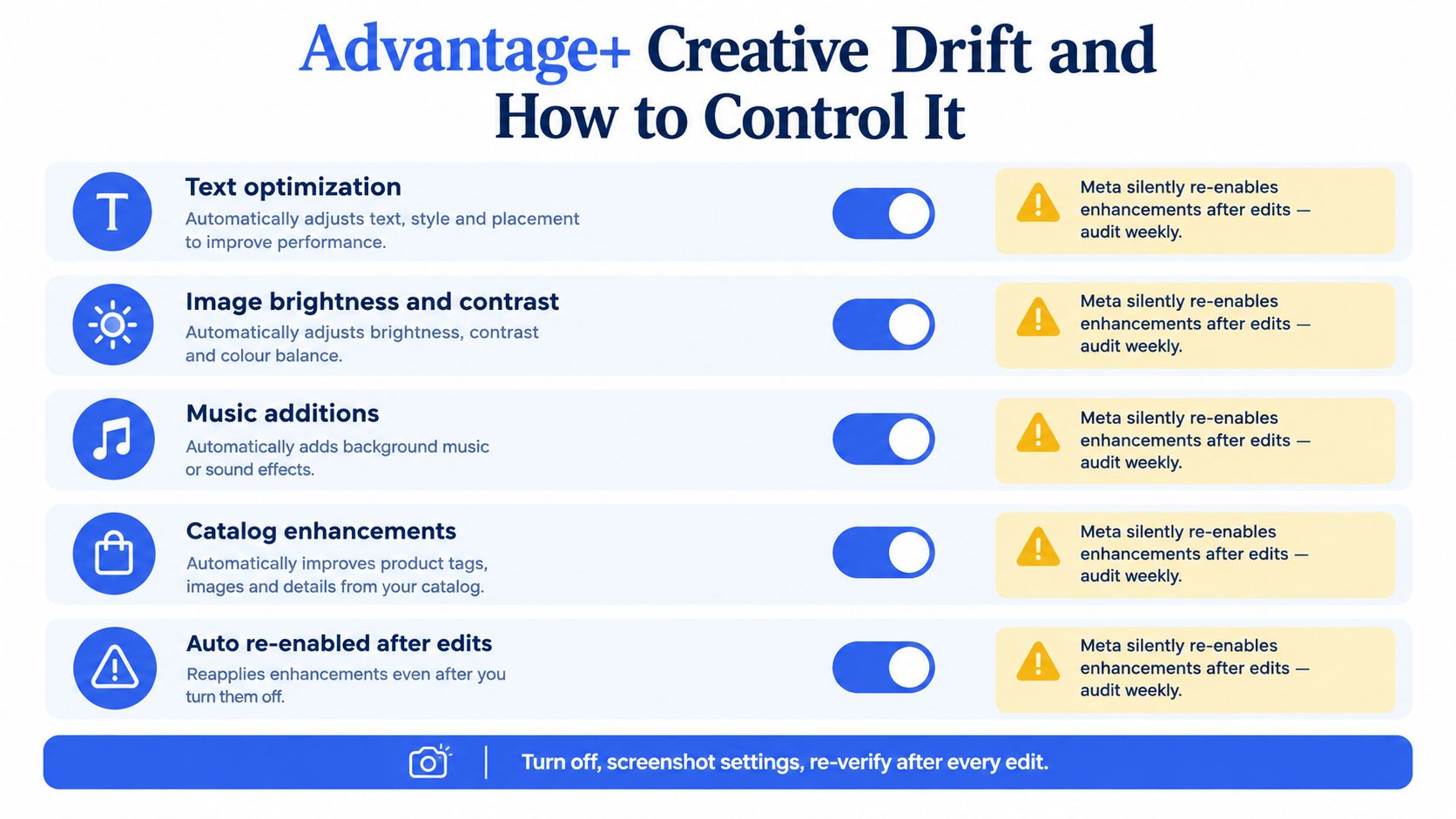
Many buyers think an ad is static once the media file has been uploaded. That assumption fails when Advantage+ creative enhancements are active. Meta says enhancements may be enabled by default and can be switched off individually, including after publication, but the setting needs to be checked at the relevant ad creation and edit stages through Meta's Advantage+ creative documentation.
The risk is creative drift. Text may be modified, image brightness or contrast may change, music may be added, and catalogue-related enhancements may alter how the asset is assembled. Those changes can help delivery, but they can also compromise a regulated claim, an exact product presentation, a price-led offer, or the visual consistency of a brand system.
A control procedure for live ads
Use a four-stage check rather than relying on memory:
- Campaign: Confirm the objective and automation choices still match the commercial goal.
- Ad set: Open the Advantage+ creative section and review every enhancement toggle.
- Ad: Verify the final preview, rendered copy, crop, music, and destination.
- After edits: Reopen the ad and confirm that the settings haven't changed during duplication or publishing.
Meta states that individual enhancements can be disabled at any time, including after an ad is published, through the ad editing flow described in its enhancement controls. That makes a Monday audit practical. It also means “we turned it off last week” isn't a reliable control.
Audit rule: Screenshot the settings for high-risk campaigns, then recheck them after every bulk edit, duplication, or creative replacement.
Manual asset control has a clear benefit. You know exactly which file and copy combination you approved. The cost is lower distribution flexibility and more work when you need to expand across placements. Advantage+ gives Meta more room to adapt, but the buyer must decide which adaptations are acceptable.
A weekly audit should cover text optimisation, image adjustments, music additions, catalogue enhancements, preview rendering, and any ad that was edited since the previous review. If the platform changes the served version, record the change as part of the creative test. Otherwise, your test results won't identify what people really saw.
Attribution Windows and CRM Calibration in 2026
Attribution is where many Meta dashboards become misleading. Recent coverage says Meta permanently removed 7-day view and 28-day view attribution on January 12, 2026, leaving 7-day click plus 1-day view as the standard default, as outlined in the 2026 Meta attribution analysis. The same coverage also highlights that teams should calibrate Meta-reported conversions against CRM records rather than treating platform ROAS as ground truth.
A shorter window can make reported performance look worse even when the business outcome hasn't changed. People who click and convert outside the selected window may no longer appear as Meta-attributed conversions, while view-through activity can still receive credit. The correct response isn't to choose the window that makes the dashboard look strongest. It's to establish a reporting rule that matches the buying cycle and validate it consistently.
Ecommerce calibration
For ecommerce, compare Meta's reported revenue with order records from Shopify or the commerce platform. Align the reporting periods, review order timestamps, remove cancellations and refunds, and separate new-customer revenue from repeat purchases where contribution margin requires it.
Use blended ROAS as the commercial control, meaning recognised revenue divided by total paid-social spend, then compare it with Meta's attributed result. If the gap is persistent, don't “fix” the campaign by changing bids immediately. First identify whether the difference comes from attribution windows, missing browser events, duplicate server events, returns, or revenue assigned to another channel.
Lead-generation calibration
Lead generation needs a different framework because a form submission isn't revenue. Match Meta leads to CRM records, track qualification and sales acceptance, and measure the time from lead creation to pipeline movement. Use self-reported source information as a supporting signal, not a perfect replacement for event tracking.
For longer B2B cycles, judge campaigns on qualified pipeline and eventual revenue, while keeping the shorter Meta window visible for delivery management. The platform can help find people likely to submit a form, but your CRM must determine whether those people fit the business.
Server-side measurement is also important. Pixel-only reporting can miss browser-restricted conversions, while poorly implemented Conversions API events can create duplicates. Deduplicate browser and server events using the appropriate event identifiers before comparing platform data with CRM outcomes.
Measurement rule: Don't change bid strategy because of one dashboard delta. Wait until the business has enough completed conversion cycles to distinguish tracking noise from a real shift.
Scaling Spend Without Killing ROAS
Scaling in 2026 is usually a creative production problem presented as a budget problem. A campaign often weakens because the same small group of ads keeps absorbing delivery, not because the buyer chose the wrong audience setting.
The production rule is explicit: ship at least 8 net-new creative concepts per week per $1,000 per day of spend, as specified in the operating model for this guide. If spend grows while the concept pipeline stays flat, frequency pressure and message fatigue eventually make the account less efficient.
Use controlled scaling rules
Hold a 1.5x-D ROAS kill line for at least 48 hours before pausing an ad, where D is the target or break-even ROAS baseline. This prevents a short reporting window from turning normal auction volatility into an irreversible decision. The rule doesn't mean every ad deserves protection. It means the pause threshold should account for conversion lag and spend distribution.
Increase budgets by 20% no faster than every 72 hours when a winner is stable. Larger or faster changes can alter delivery conditions and make it difficult to separate the effect of the budget change from the effect of learning and auction movement.
| Lever | Rule | Why It Works |
|---|---|---|
| Creative supply | Ship 8 net-new concepts weekly per $1,000 per day | Keeps the auction supplied with fresh messages |
| Kill threshold | Hold the 1.5x-D ROAS line for 48 hours | Reduces reactions to incomplete data |
| Budget changes | Use 20% increases no faster than every 72 hours | Limits abrupt delivery disruption |
| Vertical scaling | Increase spend on validated winners | Concentrates budget where the offer and creative already work |
| Horizontal scaling | Test winners in a new structure or inventory context | Creates a fresh read without relying on the original delivery pattern |
Vertical scaling is efficient when the ad set still has room to spend without deteriorating marginal returns. Horizontal scaling can help when frequency rises or an ad set has exhausted its useful inventory, but duplicating an ad set isn't a magic reset. The creative, offer, and conversion event still determine whether the new delivery has incremental value.
Ignore the $300 learning cap myth. The useful question isn't whether an ad set has crossed an arbitrary spend threshold. Ask whether the next dollar creates incremental contribution after accounting for cannibalisation, discounts, fulfilment, and customer quality. Cost per increment is more informative than CPA in isolation when prospecting and retargeting overlap.
If the team can't produce new concepts at the rate that spend grows, pause the budget expansion. More spend against a stale creative library doesn't create scale. It accelerates decline.
Operator Checklist and Common Questions
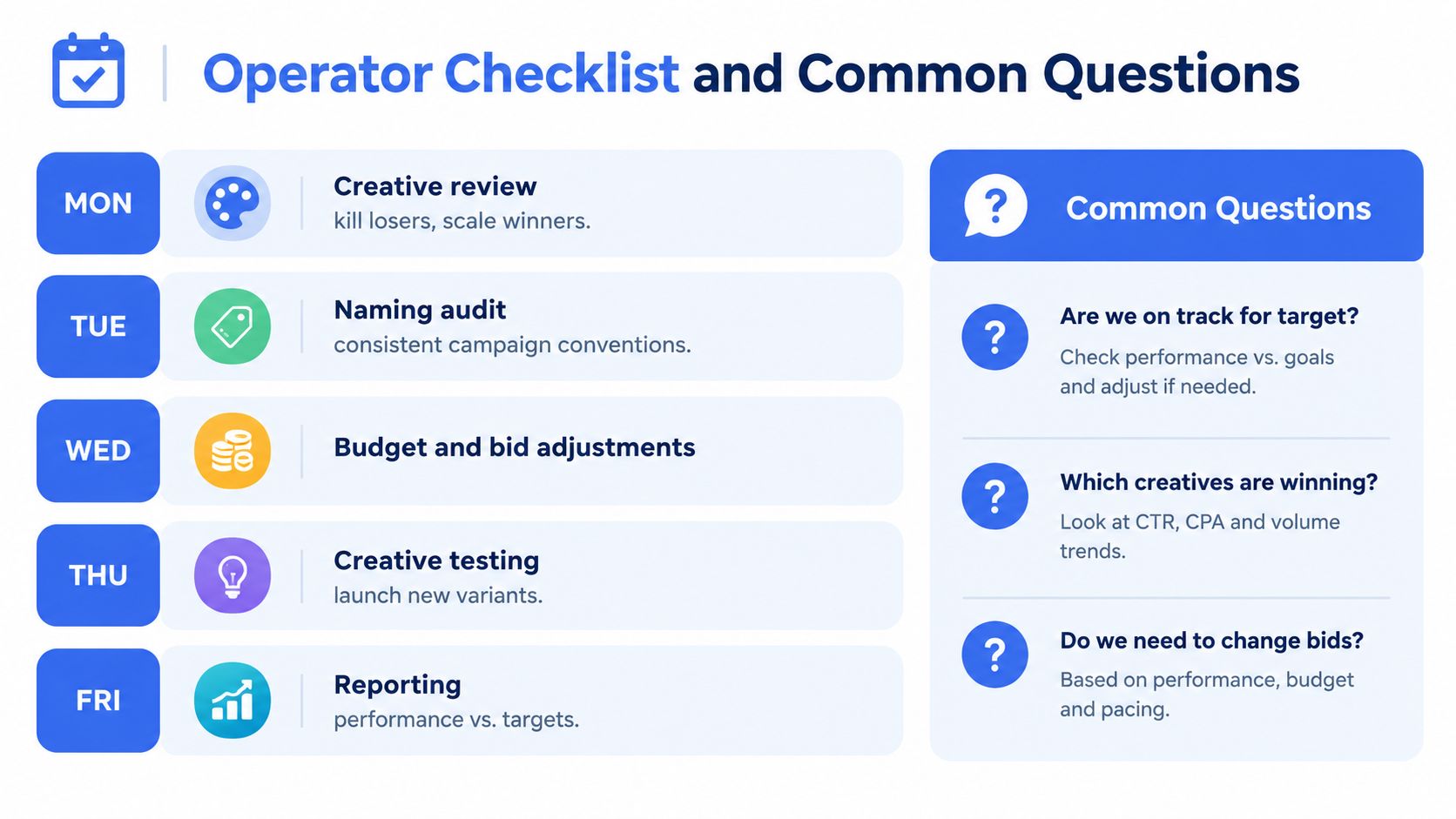
A reliable account needs a weekly rhythm that separates creative, operational, and financial decisions. The following cadence works for a solo buyer, an in-house team, or an agency pod managing several accounts.
- Monday, creative review: Identify fatigue, weak hooks, offer confusion, and assets that deserve more delivery.
- Tuesday, naming audit: Check campaign, ad set, ad names, placement labels, and UTM values against the reporting standard.
- Wednesday, budget and bid adjustment: Review marginal cost, qualified outcomes, and delivery stability before making controlled changes.
- Thursday, creative refresh: Launch new concepts, not only resized versions of existing winners.
- Friday, spend-velocity lookback: Compare planned and actual spend, pacing, conversion lag, and cost per increment.
- Weekend, audience sweep: Review exclusions, retargeting pools, placements, and unexpected delivery concentration.
- Every publish day, QA: Recheck previews, links, event firing, enhancement settings, and naming before spend is released.
Common operator questions
How many ad accounts should sit under one Business Manager?
There isn't a universal safe number in the verified data. Use the smallest account structure that matches legal entities, billing, client ownership, market separation, and access control. Multiple accounts should have a real operational reason, not exist only to multiply tests.
Is Flexible Ads automatically active for every campaign?
No. Meta documents Flexible as a setup option available through Manual upload for supported objectives and formats, and its documentation says the format will no longer be available in Ad setup starting in March 2026. Check the current Ads Manager flow before designing a process around it. The format can use up to 10 images and videos in one ad, with delivery choosing among supported renderings, according to Meta's Flexible format documentation.
How should Reels creative differ from Stories creative?
Both reward vertical, mobile-first assets, but the opening frame, pacing, overlays, and call to action should reflect the placement context. Preview each asset rather than assuming one 9:16 file communicates equally well everywhere.
Will Meta lead forms beat a landing page for high-ticket B2B?
Not automatically. On-Meta forms can reduce friction, but a landing page may qualify intent more effectively. Compare qualified pipeline, sales acceptance, and revenue, not only cost per lead.
How often should UTMs be re-exported?
Whenever naming conventions or campaign taxonomy changes. Keep the spreadsheet template, Ads Manager naming, and analytics parsing rules aligned.
The 2026 winner is the operator who ships the most valid creative tests per dollar, not the operator who tweaks the most toggles.
Rapid Ads helps performance teams turn this operating model into a repeatable launch process, with bulk asset and copy uploads, structured naming, UTM attachment, aspect-ratio routing, multi-account management, and controls for Advantage+ creative settings. If manual publishing is limiting your testing cadence, visit Rapid Ads and evaluate whether its workflow fits your account structure.