You can usually spot the accounts that treat tracking as an afterthought. Ads launch on time, spend starts moving, and then GA4 fills with mush: mixed source names, a chunk of traffic in Unassigned, and campaign breakdowns that don't line up with what the team built in Meta.
That's why Facebook URL parameters aren't a copy-paste admin task. They're a measurement design decision. If your naming rules, GA4 channel logic, and bulk launch workflow don't line up before launch, no dashboard is going to clean it up later.
Table of Contents
- The Six-Hour UTM Grind Most Media Buyers Know Too Well
- How URL Parameters Live in Meta Ads Manager Today
- utmsource, fbclid, and Dynamic Tokens Compared
- Mapping Parameters for Clean GA4 Channel Grouping
- Bulk UTM Workflows That Survive 200-Asset Launches
- Three Tracking Habits That Quietly Drain Your ROAS
- A Pre-Launch Verification Routine You Can Reuse Every Time
The Six-Hour UTM Grind Most Media Buyers Know Too Well
Monday morning. A launch is due, the client wants fresh creative live before lunch, and the campaign build looks harmless at first: a few ad sets, a stack of creatives, one landing page. Then the busywork starts.
Someone is pasting utm_source=facebook into every ad manually. Someone else is tweaking utm_content ad by ad because the names aren't standardized. One person uses paid_social, another uses cpc, and now GA4 is about to split the same traffic into different buckets. Then one destination URL already has a query string on it, another doesn't, and one stray punctuation mistake turns a clean URL into a broken one.

That's the part often underestimated. The problem usually isn't that people don't know what a UTM is. The problem is that manual tagging doesn't survive scale. It breaks when the account has too many ads, too many hands in the build, or too many naming exceptions.
Where the grind usually goes wrong
A few failure points show up over and over:
- Inconsistent medium values: One buyer uses
paid_social, another usescpc, and reporting gets messy fast. - Ad-level typos:
utm_contentis where human error loves to hide because it's often typed manually. - Broken query strings: Landing pages with existing parameters get the wrong separator added.
- Last-minute renames: Campaign names change after tagging logic is already set.
Practical rule: If your team has to remember the tagging logic ad by ad, the system is already fragile.
The fix isn't “paste faster.” The fix is building Facebook URL parameters so they work as a repeatable layer inside Meta Ads Manager, with naming conventions that GA4 can read and bulk workflows that don't collapse the moment the asset count climbs.
What clean setup looks like in real accounts
In practice, the accounts with the cleanest attribution usually do three things well:
- They use dynamic tokens instead of hand-typing campaign metadata repeatedly.
- They choose GA4-friendly source and medium values before launch, not after reporting breaks.
- They treat tagging like part of the build system, not a final QA chore.
That's the difference between a campaign you can audit in five minutes and one that turns into a Slack fire drill.
How URL Parameters Live in Meta Ads Manager Today
Meta Ads Manager treats URL parameters as part of ad setup. At the ad level, the destination stays in Website URL, while tracking rules sit in the separate URL Parameters field under Tracking. That separation gives media buyers a clean landing-page address and a distinct place to manage campaign metadata.
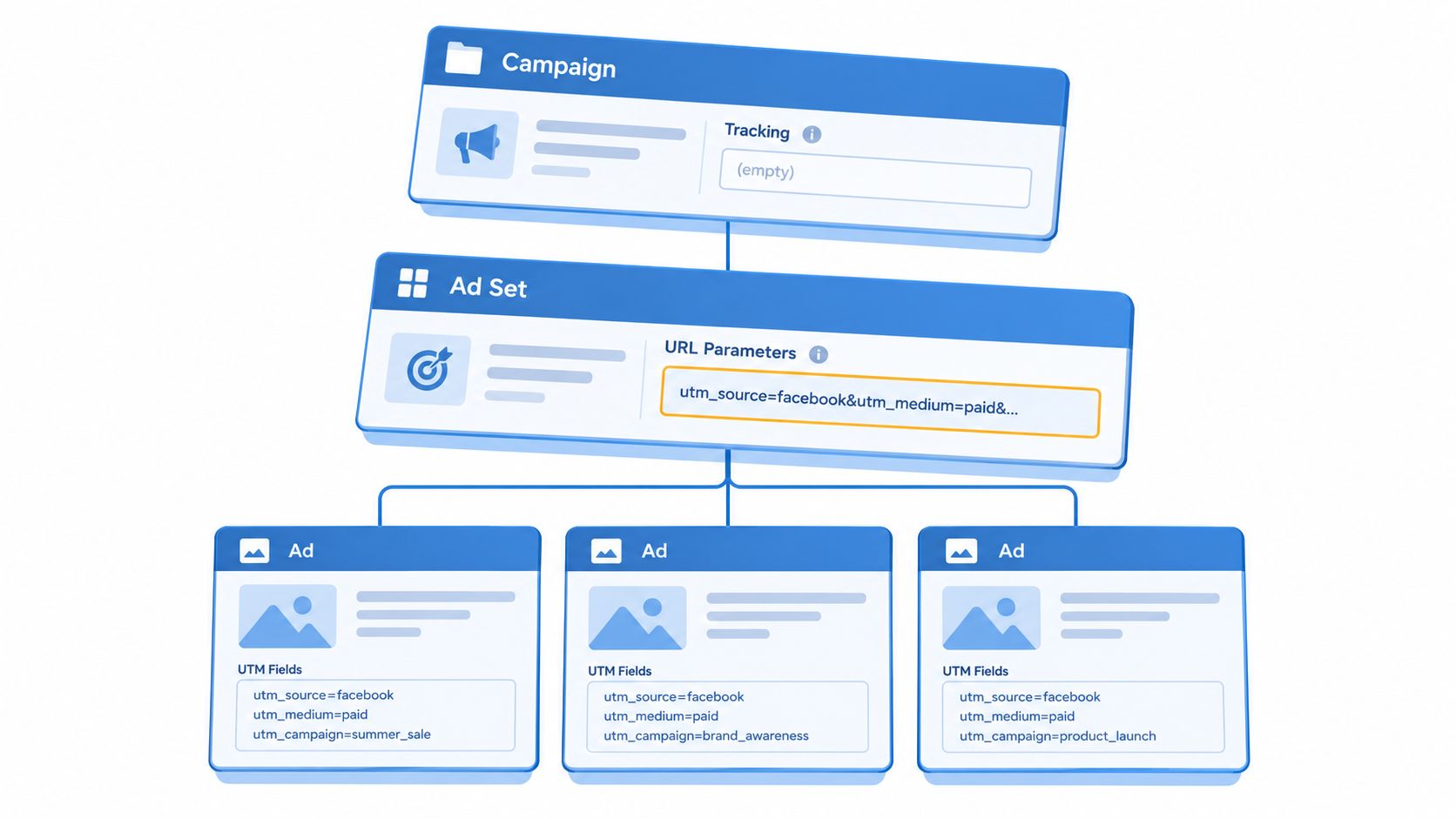
Open an ad in Ads Manager, scroll to Tracking, and enter the query-string rules manually or through Build a URL parameter. The same area supports ads that send visitors to an external website and ads that promote an existing Facebook post, according to Meta's URL parameter setup guidance.
For teams learning the interface before start advertising on Facebook, the important workflow is straightforward:
- Put the complete landing-page address in Website URL.
- Add the UTM string in URL Parameters.
- Review the resulting click URL before publishing.
Keep the two fields separate. A landing page such as https://site.com/offer remains readable, while the tracking field can hold rules such as utm_source, utm_medium, and utm_campaign. If the destination already contains a query string, the parameter formatting must also use the correct separator. Ads Manager handles the field placement, but it does not remove the need to check the final URL and the page's existing parameters.
What Meta can append automatically
Meta documents default values that can be appended to assigned destination URLs. Depending on the setup, these include:
utm_medium=paidutm_sourceset to Facebook or Instagramutm_campaignmapped to campaign IDutm_contentmapped to ad IDutm_termmapped to ad set ID
Meta also supports dynamic insertion for values such as ad set ID and site source name. Its default parameter documentation explains how these values can populate URLs without repeated manual entry.
The built-in builder provides fields for Source, Medium, and Campaign. Meta's examples include utm_source=Facebook, utm_source=CPC, and a campaign structure using campaign, ad set, and ad IDs, as shown in Meta's URL parameter builder help page.
That workflow suits bulk launches because one rule can carry identifiers across many ads. The trade-off is naming control. Dynamic IDs are reliable for matching assets back to Ads Manager, while human-readable campaign names are easier to interpret in GA4. Choose the structure before launch, then test how GA4 groups the resulting traffic.
Meta's destination URL documentation also makes clear that parameter behavior depends on the destination type and ad setup. Before publishing, open a preview, follow the ad, and inspect the final address. Confirm that the landing page loads, the query string remains intact, and the values match the channel-grouping rules used in GA4.
utm_source, fbclid, and Dynamic Tokens Compared
A campaign can have working links and still produce unusable reporting. The problem usually starts when three different identifier types are treated as interchangeable. UTM parameters define the analytics taxonomy. fbclid identifies the Meta click. Dynamic tokens insert account metadata into each URL without manual editing.
Facebook URL parameter families at a glance
| Parameter Family | Example Value | Read By | Primary Job |
|---|---|---|---|
| UTM parameters | utm_source=facebook |
Website analytics tools such as GA4 | Channel grouping and campaign reporting |
fbclid |
Opaque per-click identifier | Meta-side attribution systems | Connect a click back to the originating platform event |
| Dynamic tokens | {{campaign.name}} |
Resolved by Meta at click time | Insert campaign metadata into the final URL automatically |
What each type is for
Meta automatically appends the fbclid query parameter to outbound clicks from Facebook and Instagram surfaces. It is an opaque, click-level identifier that helps connect a site visit with the originating platform event. UTMs serve a separate role: they provide the structured naming layer that analytics tools can classify, as explained in this overview of URL parameters and tracking codes.
UTMs tell GA4 how to interpret the visit. They can identify the source, mark the traffic as paid social through the medium, assign a campaign, and distinguish ads through fields such as utm_content. That structure determines whether Meta traffic appears in the intended channel and campaign reports.
Dynamic tokens let Meta populate those fields from the campaign setup. Meta supports values such as [campaign.id]_[adset.id]_[ad.id] and macros including {{campaign.name}}, {{adset.name}}, {{ad.name}}, and {{placement}}. The Meta URL parameter feature documentation lists these options and makes them useful for bulk tagging across large account structures.
Use the layers together. fbclid supports Meta-side click matching, UTMs give GA4 readable classification, and dynamic tokens reduce manual entry during a multi-ad launch.
What works and what doesn't
Use UTMs for:
- Channel logic in GA4
- Consistent campaign naming
- Ad-level reporting through
utm_content - Audience or ad set labels through
utm_term
Keep fbclid for:
- Meta-side attribution integrity
- Platform click matching
- Downstream Meta measurement
Use dynamic tokens for:
- Per-ad detail without editing every URL
- Placement or source values at click time
- Bulk launches where manual naming creates errors
fbclid alone cannot provide reliable GA4 source or medium classification. GA4 does not natively treat it as those fields, so sessions may be misclassified or left unattributed without UTMs. Removing it too early through redirects or URL cleanup can also interfere with Meta's click matching. The practical setup is to preserve fbclid, define a stable UTM convention, and use tokens only where their resolved values fit that reporting design.
Mapping Parameters for Clean GA4 Channel Grouping
A campaign can look correctly tagged in Meta Ads Manager and still appear under the wrong channel in GA4. That usually happens when buyers choose parameter values for convenience instead of defining how GA4 should classify the session.
Meta's guidance says URL parameters should be interpreted with a website analytics tool. For Meta traffic, GA4 requires utm_source and utm_medium, and recommends utm_campaign and utm_id, as explained in Meta's analytics-tool guidance. The setup question is therefore not whether a URL contains UTMs. It is whether each value supports the channel grouping and reporting views the team uses.
Choose values that match the reporting design
For a consistent paid social grouping, use a small, documented set of values:
utm_source=facebookfor a stable Meta source labelutm_medium=paid_socialto identify the channel typeutm_campaign=mapped to the campaign naming frameworkutm_content=mapped to the ad name or a stable ad identifierutm_term=reserved for audience, ad set, or targeting detail when that information is useful
The exact convention matters less than applying it consistently. If one buyer uses facebook, another uses meta, and a third changes the medium to cpc, GA4 reporting starts reflecting individual preferences rather than a deliberate channel structure.
GA4 channel mapping for Meta Ads
| utm_source | utm_medium | Resulting GA4 Channel | Notes |
|---|---|---|---|
| paid_social | Paid Social | Stable source and medium for Meta traffic | |
| paid_social | Paid Social | Use when platform-level source reporting is intentional | |
| meta | paid_social | Paid Social | Works when the account standardises on Meta |
| cpc | Often inconsistent for social analysis | Avoid if paid social reporting should remain distinct | |
| blank | paid_social | Unreliable or unattributed | A missing source prevents dependable classification |
Keep variation below the channel level
Use the source for the platform family, the medium for the channel type, the campaign for the reporting bucket, the content value for the creative, and the term value for audience or ad set detail. This structure keeps channel grouping stable while preserving the dimensions buyers need for optimisation.
Working rule: Keep
utm_mediumconsistent. Put campaign, creative, and audience differences in their designated fields.
A practical test is to publish one controlled click before launch, then open GA4 Reports > Traffic Acquisition > Session source/medium. Compare the displayed pair with the exact values configured in Meta Ads Manager. If the intended source and medium do not appear there, correct the parameter setup before scaling the campaign.
Bulk UTM Workflows That Survive 200-Asset Launches
Manual tagging usually fails long before the strategy does. The first batch feels manageable. Then creative count climbs, account structure gets wider, and the process becomes a contest between launch speed and typo prevention.
The fix is a template-led workflow.
Start with a tagging schema, not with ad creation
Build the parameter logic before anyone uploads creatives:
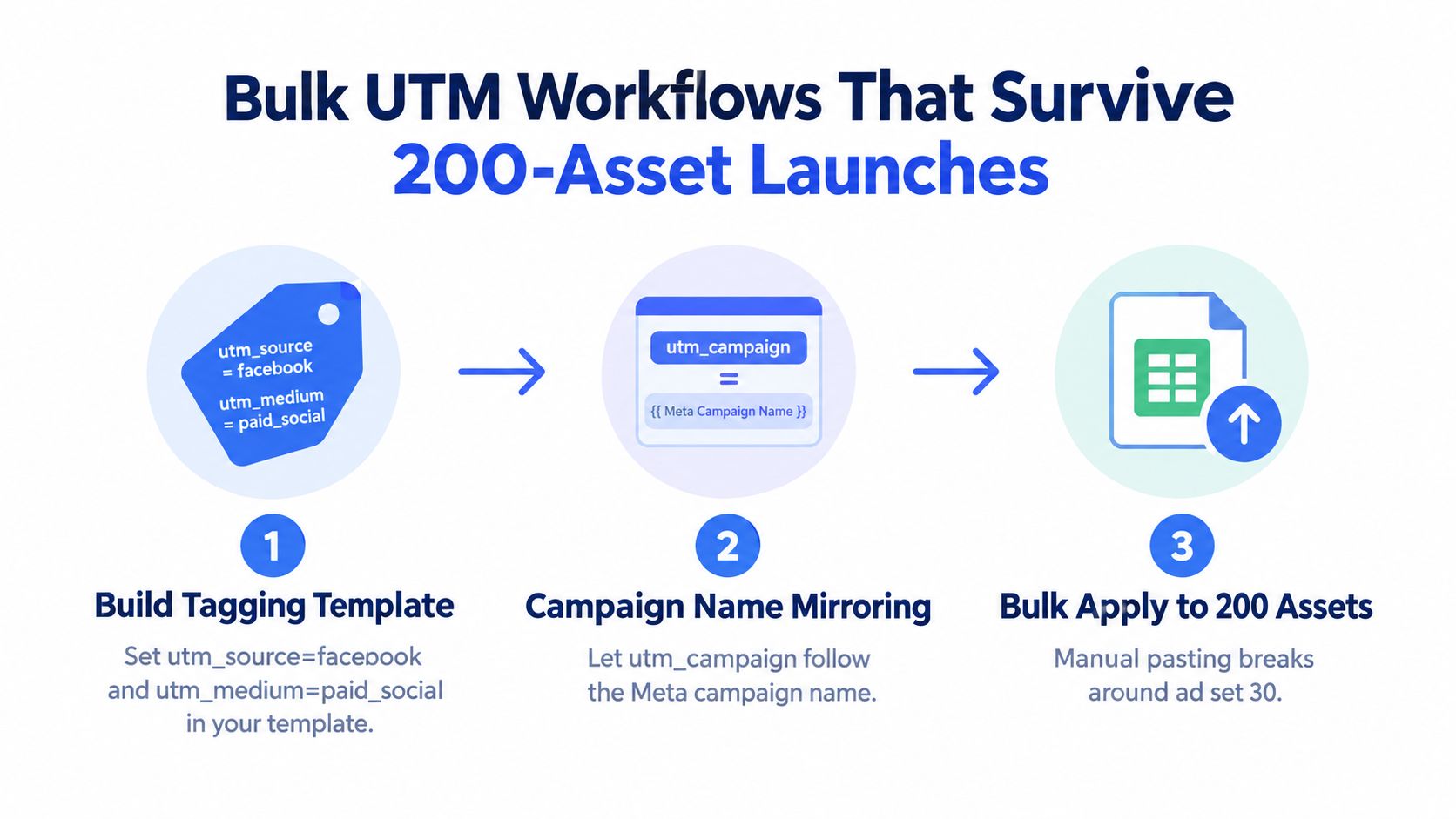
- Source stays fixed:
utm_source=facebook - Medium stays fixed:
utm_medium=paid_social - Campaign mirrors your reporting name: same naming rule across Meta and GA4
- Content tracks the ad: ad name or a stable ad identifier
- Term handles audience detail: ad set label, segment, or targeting note where useful
Then put that logic into a spreadsheet or bulk creation workflow so people aren't rebuilding it from memory every time.
The workflow that scales better than ad-by-ad edits
A practical operating model looks like this:
Define the naming convention first.
Campaign, ad set, and ad names should already follow a pattern that's safe to reuse in UTMs.Prepare the UTM string once.
Build a formula-driven parameter string in a sheet or bulk build template.Feed ad metadata into the template.
Pull in campaign names, ad names, and audience labels from your build sheet or export.Apply and spot-check before publish.
Open a handful of final URLs in a browser and confirm the query string looks right.
A lot of teams try to solve this by making smarter people do more careful copy-pasting. That never lasts. Systems beat memory.
Where automation helps without overcomplicating things
For larger launch volumes, this is one of the few places a workflow tool earns its place. Rapid Ads is useful here because it can attach UTM-tagged URLs during bulk ad creation, keep naming conventions aligned across ad and ad set level, handle multi-account work, and remove a lot of the repetitive setup that usually sits between the creative spreadsheet and the final publish step.
That matters most when the account has constant duplication, renaming, or market-specific versions. Once the parameter logic is templated, structural edits stop breaking tracking quite so easily.
The quality check most teams skip
After any structural edit, re-export or re-open the final setup and inspect live URL output again. Don't assume duplicated ads inherited clean parameters. Verify them.
Five checked URLs before publish beats cleaning up attribution after the spend has landed.
Three Tracking Habits That Quietly Drain Your ROAS
Bad tracking habits rarely stop delivery. That's why they survive. The ads still run, spend still clears, and the reporting damage only shows up later when someone tries to explain where the conversions came from.
Hardcoding fbclid
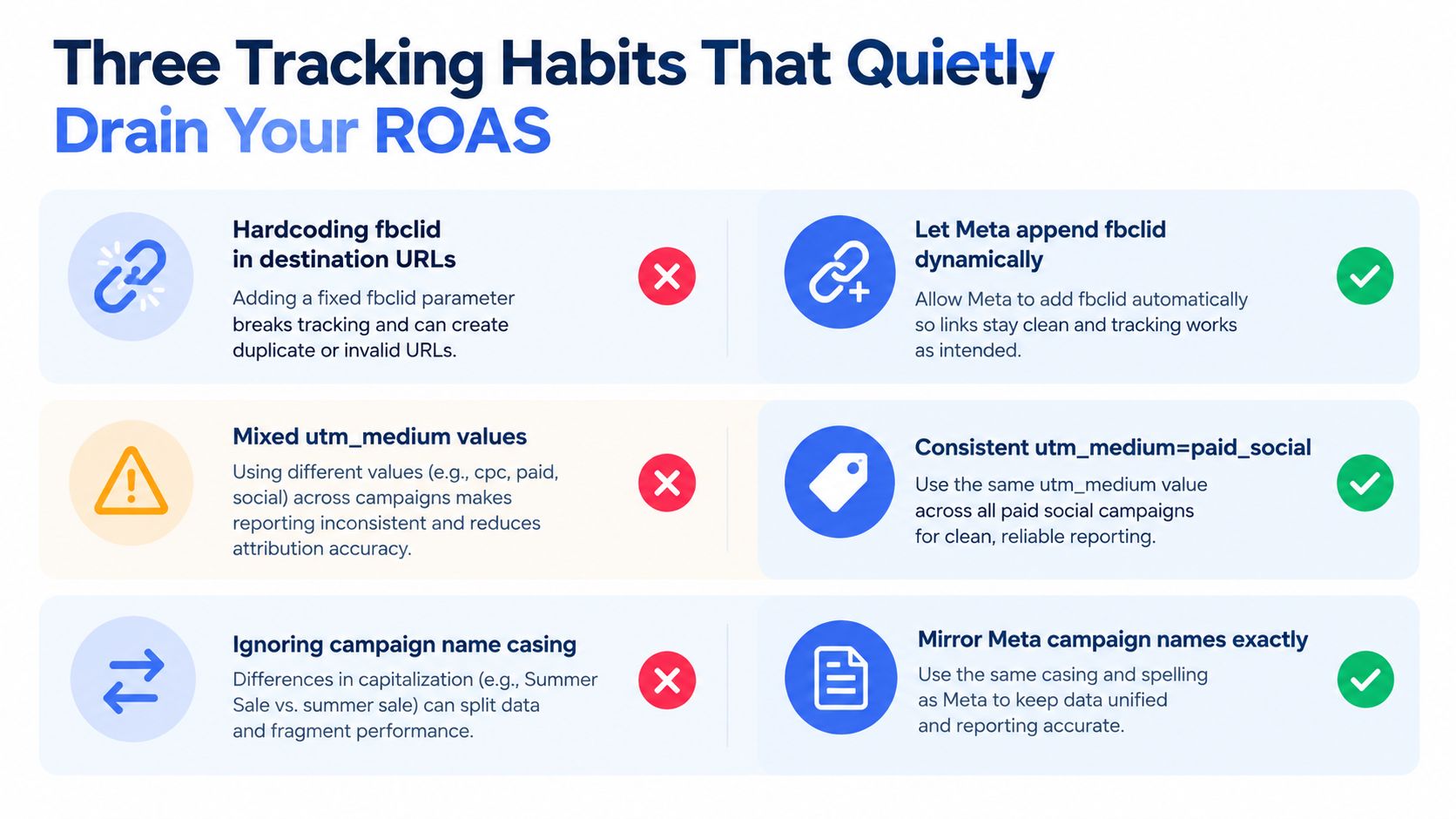
This one should never happen, but it does. fbclid is a per-click identifier, not a value you paste into a static destination URL. Independent tracking literature describes it as a Meta click ID introduced in 2018 and recommends using it alongside UTMs rather than as a substitute for them in this tracking analysis.
If you hardcode it, you're freezing something that's meant to change on every eligible click. That undermines the whole point of the identifier.
Treating campaign-name macros as permanent reporting keys
{{campaign.name}} is convenient. It's also fragile if your team renames campaigns, duplicates structures across ad accounts, or changes naming patterns mid-flight.
Use campaign names because they're readable. But if continuity matters, tie your reporting design to something more stable than a label that can change when the account gets reorganised. A human-set taxonomy or an ID-backed reporting field holds up better than pure name dependency.
Stripping UTMs or click identifiers too early
This one usually comes from overzealous redirects, URL cleanup rules, or analytics teams trying to keep reports tidy before data has been captured.
A cleaner approach is:
- Let the landing URL receive the full parameters
- Preserve UTMs through redirects
- Keep
fbclidintact on landing - Normalise or exclude noisy parameters only in reporting layers after collection
Clean URLs in reports are useful. Broken attribution is not.
If a CDN, redirect chain, or canonical rule strips the query string before GA4 or Meta can read it, you've lost the session context. That's not a cosmetic issue. It changes how the visit gets attributed.
A Pre-Launch Verification Routine You Can Reuse Every Time
A campaign can pass review, spend immediately, and still send incomplete data to GA4. The fix is a repeatable pre-launch check that starts in Meta Ads Manager and ends in the analytics report.
The reusable pre-launch check
Open the ad in Meta Ads Manager
In the live ad, open the Tracking section and confirm that the URL Parameters field contains the intended template. Check the version you are publishing, not only a draft or duplicate.Copy the final destination URL
Use preview or link inspection to retrieve the destination URL. Decode the complete query string so encoded spaces, separators, and token output are visible.Check the rendered values
Confirm the fields your GA4 channel grouping and campaign reporting depend on:utm_sourceutm_mediumutm_campaignutm_contentutm_term, if your account uses it- any dynamic tokens expected to resolve from campaign, ad set, or ad names
Inspect the URL format
Look for unescaped spaces, duplicate keys, malformed separators, unexpected casing, and values that remain blank or show an unresolved token.
Failures to catch before spend
A link can open normally while its measurement fields are wrong.
- Missing campaign identifiers: If your reporting design uses
utm_idfor campaign hygiene in GA4, verify that it is present rather than assuming the template added it. - Blank dynamic output: Confirm that tokens populated in the account structure also render in the final ad configuration.
- Redirect stripping: Follow the complete redirect path and check that UTMs and
fbclidreach the landing page. - Early
fbclidremoval: If the click identifier disappears before landing, Meta-side click matching may be affected.
Cross-check the result in GA4
Send a controlled test click, then open Traffic acquisition in GA4. Inspect the session source and medium pair, along with the campaign value you intended to pass. A successful page load is not enough. If these values are missing or misclassified, fix the Meta field, redirect, or landing-page handling before launch.
Fix attribution before launch, when changing one field takes seconds.
Record the verification
Add a row to the launch sheet or Notion template with the date, campaign name, tested URL, and confirmation status for source, medium, campaign, and click-identifier behavior. Record the final URL or template version as well, so the check can be reproduced after edits.
That audit trail gives the team a concrete reference when GA4 and Ads Manager reports do not align. A routine will not remove every attribution gap, but it prevents the avoidable gaps caused by blank fields, broken redirects, and untested templates.
For high-volume launches, Rapid Ads can apply naming rules, build campaigns in bulk, and attach tracking logic without repeating URL parameter work ad by ad in Ads Manager. It fits when Facebook URL parameters have become an operations task across multiple campaigns or accounts.



