Facebook reported reducing speech-recognition word error rate by more than 20% through a newer technical method, according to VentureBeat's coverage of its captioning announcement. That's an improvement in an error measure, not a guarantee that any particular offer, product name, or price will be transcribed correctly.
For media buyers, Facebook video to text is a quality-control workflow before it's a copy-generation workflow. The useful output isn't whatever the caption engine produces. It's approved language with traceable timestamps, checked names and numbers, and a clear decision about where that language can be reused.
Table of Contents
- Which Facebook Video to Text Method to Use
- When an Automatic Transcript Is Safe to Reuse
- How to Build an SRT Meta Will Accept
- How to Caption One Video Ad in Ads Manager
- Turn Transcript Lines into Ad Copy and SEO
- Choose Review Depth Before the Next Launch
Which Facebook Video to Text Method to Use
Facebook video to text methods compared
| Method | Use it when | Output | Review before launch |
|---|---|---|---|
| Meta auto captions on Pages and ads | One muted autoplay video, accessibility first | Editable on-screen captions | Yes if any claim, price, or CTA is spoken |
| Uploaded SubRip SRT | Wording must match an approved script | Timed caption track with locale suffix | The file itself is the reviewed asset |
| Ads Manager text overlay | A hook or price must sit inside the frame | Timed on-screen text, not a full transcript | Check wording, timing, and safe zone |
| Third-party ASR | Batches, speaker labels, research CSV | TXT, SRT, VTT, and CSV with timestamps, subject to tool support | Always; measure errors and treat recognition output as a draft |
| Canonical transcript then translation | Same offer cut for several markets | One source text plus localized lines | Approve the source; spot-check each language |
Pick the row that matches the asset, not the tool your team already pays for. A product demonstration needing readable speech and an interview feeding a creative-research spreadsheet have different deliverables. Forcing both through the same export process creates avoidable cleanup.
Captioning has a documented viewing benefit: Facebook's internal testing found that captions increased average video-ad view time by 12%, as reported by TechCrunch. That finding supports making speech readable without sound. It doesn't establish a conversion lift, a CPA improvement, or the accuracy of automatically generated wording.
Choose the deliverable before the engine
A caption track answers what viewers need to read while the video plays. A transcript answers what was said. A text overlay answers which selected phrase should appear inside the picture. Those aren't interchangeable assets.
For an approved-script campaign, start with the script but reconcile it against the recording. Talent may change an offer qualifier or omit a phrase during delivery. Uploading perfectly formatted captions that describe the intended performance rather than the actual performance still leaves you with the wrong asset.
For batch work, evaluate whether the transcription tool preserves timestamps, supports speaker labels, and exports editable files. If transcription also feeds cutdowns and channel adaptations, Magic Genie's guide can help you compare video repurposing tools for 2026. Evaluate the handoff between recognition, review, and export rather than choosing on generation speed alone.
Buying rule: Choose the method by the text asset you need to approve, not by how quickly a tool produces words.
Language support belongs in that evaluation, but it isn't a substitute for review. A supported language can still contain regional pronunciation, unfamiliar product terms, or mixed-language speech that needs a reviewer who understands the offer.
When an Automatic Transcript Is Safe to Reuse
Names, numbers, negations, prices, URLs, and calls to action need explicit approval. A transcript can read fluently while getting those tokens wrong. Don't use a good-looking paragraph as evidence that the recognition run succeeded.
Start with the source video you own or have permission to process. Export or download that file, preserve its original sample rate, and extract the audio before recognition. Set the ASR language and supply vocabulary prompts for brand names, product terms, and proper nouns where the engine supports them.
Use this preparation sequence before evaluating the transcript.
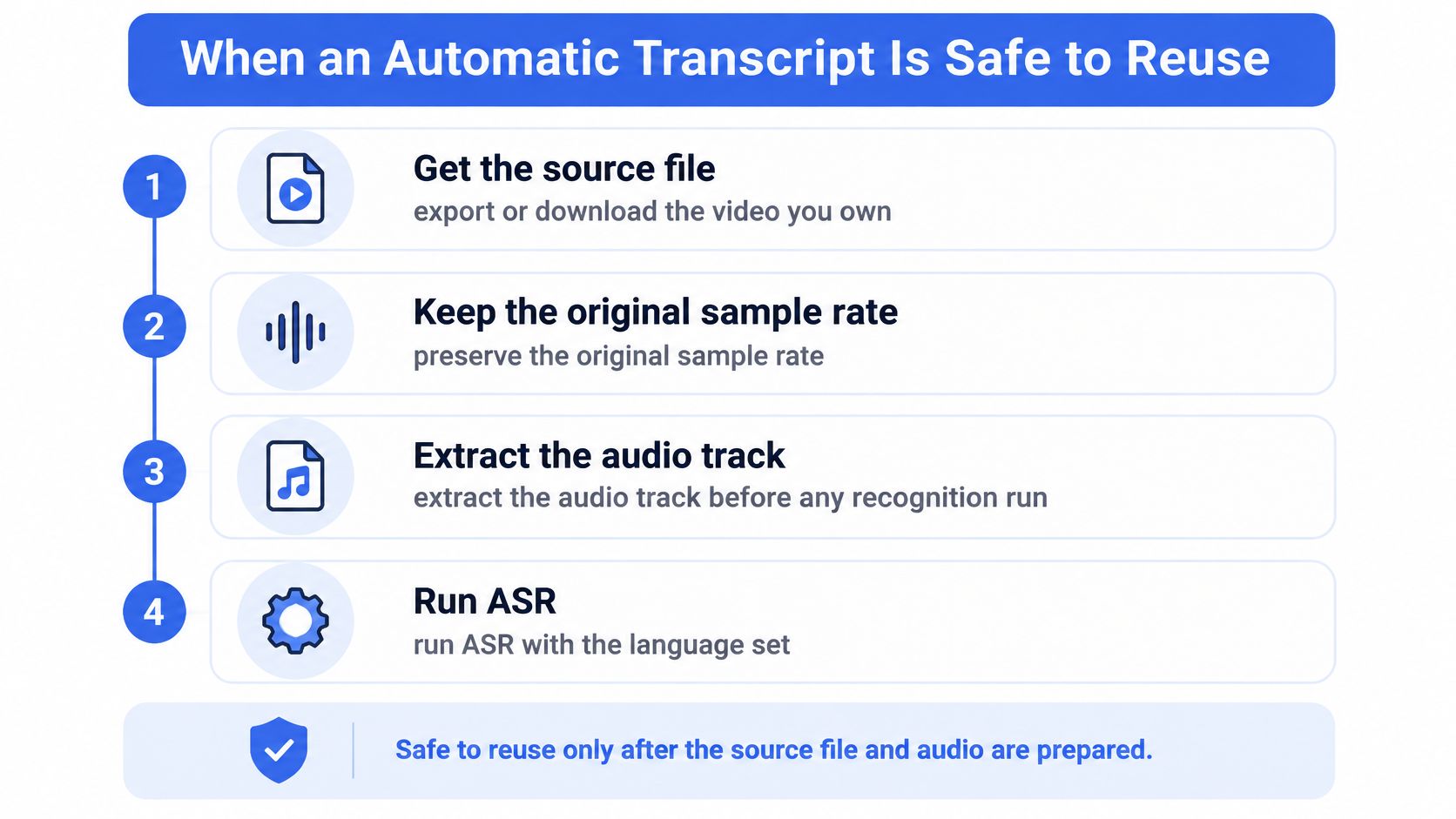
Preparation makes a recognition run usable; it doesn't make its output approved. Keep the raw output separate from the corrected version so reviewers can identify recurring errors rather than overwriting them.
Measure errors without hiding their consequences
Word error rate, or WER, equals substitutions plus deletions plus insertions, divided by the reference-word count. The ACM paper on speech enhancement and recognition describes leading systems commonly reporting roughly 5–20% average WER, with substantial variation by dialect, speaking cadence, microphone quality, music, and background noise; its social-media English evaluation measured relative WER reductions of 8.3% from enhancement preprocessing, 11.2% from enhancement-based training augmentation, and 13.4% from combining them.
Those results justify testing audio preparation before assuming that changing engines will solve the problem. They don't prove that preprocessing always beats an engine change, or that a benchmark average describes your next creative.
Use a human-corrected reference transcript to calculate WER. Then add separate checks for named entities and timing:
- Named-entity accuracy: Compare each brand, product, person, and place against an approved spelling list.
- Claim integrity: Confirm amounts, conditions, exclusions, and words such as not against the audio and approved offer.
- Timestamp drift: Check whether each cue begins and ends with the corresponding speech, especially around cuts.
- Speaker attribution: Confirm who said each line before converting interview language into an endorsement or quotation.
WER treats a harmless article substitution and a changed price as word errors. Your approval process shouldn't treat their business consequences as equal.
Gate reuse by destination
Separate speech from music where practical, normalize loudness, and diarize interviews before reviewing the output. Listen to flagged passages in context, not just isolated words. Punctuation can turn a hesitation into a confident claim, while a misplaced speaker label can attribute a promise to the wrong person.
A low error rate doesn't authorize a high-risk claim.
For marketing and compliance-sensitive passages, require a named human approver. A low-risk exploratory hook can receive a lighter listening pass, but low spend doesn't excuse an incorrect offer.
Retain timestamps and review status with every approved line. That lets an editor repair the originating clip and lets a buyer distinguish reusable language from research-only notes. There's no universal accuracy percentage that makes every transcript safe for every destination.
How to Build an SRT Meta Will Accept
A pasted transcript isn't a caption file. Convert approved speech into SubRip, then validate both the file structure and the viewing experience. Those are separate checks: a file can parse correctly and still display unreadable or misleading captions.
Meta's caption-upload guidance supports using an SRT caption file with the appropriate language-country naming convention. Build the following checks into the producer's export process rather than leaving them for the buyer to discover during upload.
SRT rules that pass a Meta caption upload
| Rule | Required value | What fails if wrong |
|---|---|---|
| Encoding | UTF-8 | Garbled characters or rejection |
| Block order | Unique sequential number per cue | Parser may merge or drop cues |
| Timestamps | hh:mm:ss,fff start and end | Invalid timing or captions detached from speech |
| Separator | One blank line between blocks | Blocks may collapse into one cue |
| Filename | Locale suffix such as filename.en_US.srt | Upload rejection for language-country mismatch |
| Line length | Short lines, limited rapid changes | Poor mobile and Reels readability |
| Non-speech | [music] or [applause] when meaningful | Viewers lose relevant audio context |
| After an edit | Revalidate every cue | Trims, speed changes, intros, or new audio can invalidate timing |
Validate the file before judging the layout
Export from the approved transcript rather than correcting a fresh recognition run inside the caption tool. Otherwise, the team can accidentally create competing versions of the same offer.
Check that cue numbers are unique and sequential, start times precede end times, and the file contains actual subtitle text rather than formatting artifacts. Confirm the locale against the intended language and market. Don't assume that renaming the extension of a plain-text document creates a valid SRT.
For producers selecting an editor, CreativeClaw's overview of AI video subtitle tools is useful for comparing subtitle workflows. Prioritize editable timing and clean exports over decorative presets when the deliverable is an uploadable caption track.
Review the captions as viewers will read them
Play the exported track against the final video. Check speech completeness, punctuation, speaker identification, and meaningful non-speech sounds. Use short, coherent phrases rather than splitting a product name or offer condition across awkward cue boundaries.
- Protect the product: Keep captions from obscuring demonstrations, packaging, or an on-screen price.
- Preserve meaning: Leave qualifying language visible with the claim it modifies.
- Check reading rhythm: Avoid flashing fragments that disappear before viewers can read them.
- Match the final edit: Recheck timing after an intro, trim, speed adjustment, or audio replacement.
A visual-fit check also needs the intended placement. Use the Facebook video ad size guide when preparing the underlying creative so the subtitle review isn't performed only on an unsuitable master.
At scale, automate syntax checks and sample across languages, speaker types, and creative formats. Sampling complements approval of the source wording; it doesn't replace it.
Production rule: Approve the exported file, not just the transcript that existed before export.
How to Caption One Video Ad in Ads Manager
The failure to prevent is a correct caption attached to the wrong video version. Before opening the editor, identify the final creative and its approved caption asset. Keep that pairing intact through upload and preview.
This workflow shows the native setup sequence.
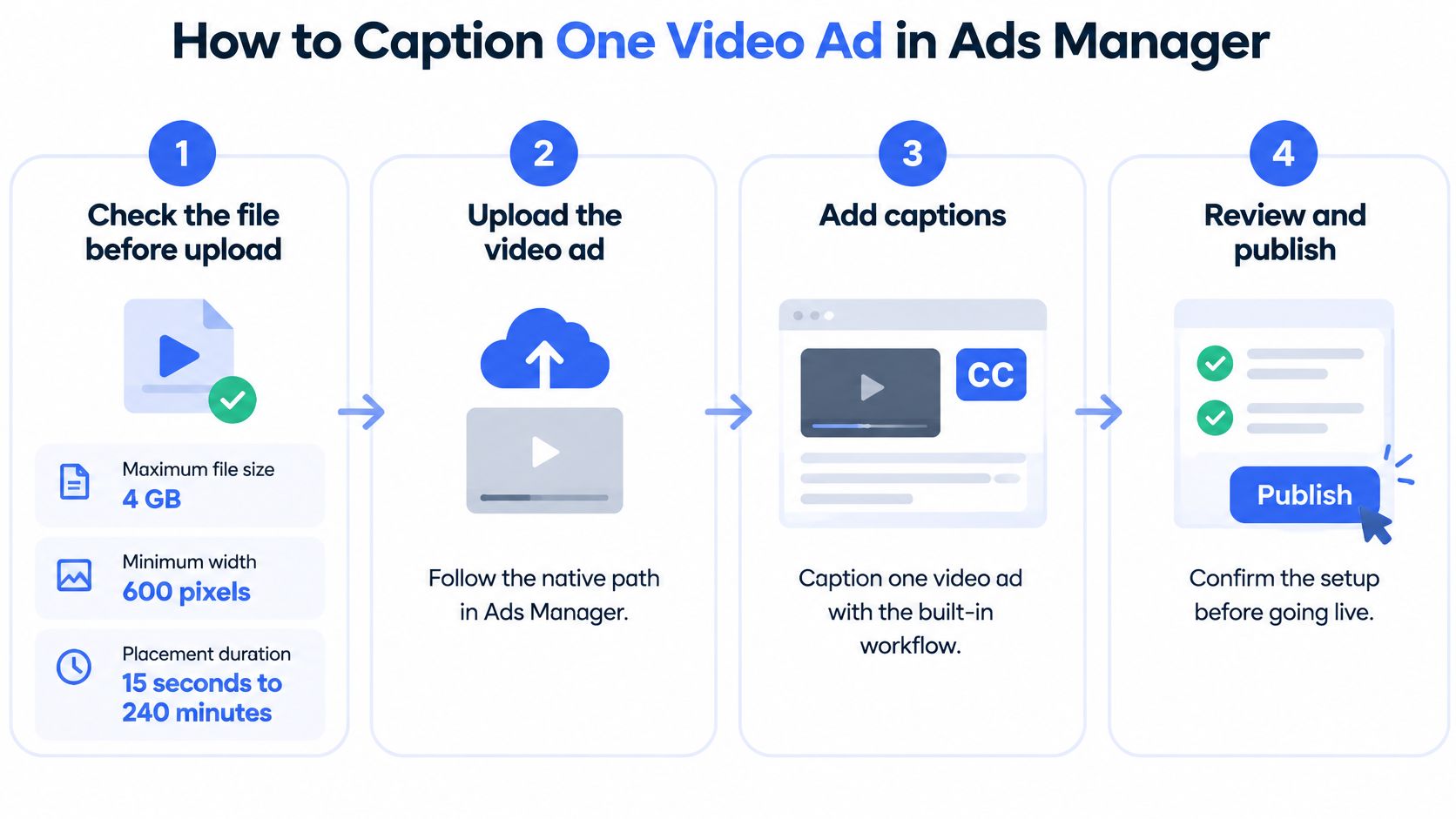
Follow the native path
Check the file before upload. Meta's video-upload requirements specify a maximum file size of 4 GB, a minimum width of 600 pixels, and placement-dependent maximum durations ranging from 15 seconds to 240 minutes. Check the selected placement's aspect ratio and duration requirements rather than treating the longest permitted duration as universal. This prevents a transcription-ready asset from failing at publishing.
Upload the video at the ad level. Choose Single image or video, then select or upload the final file. Generate automatic captions or open the caption controls available for that ad setup. Meta's accessibility guidance describes automatic generation, editing, manual caption creation, and SRT uploads. Confirm which track you're editing before replacing any text.
Use the approved caption file when wording is locked. Upload the reviewed UTF-8 SubRip file rather than accepting a newly generated track. Verify that its locale matches the intended audience and its timing matches this particular edit. The failure to prevent is a script-approved campaign launching with unapproved recognition output.
Add selected in-frame copy separately. Follow Edit media → Edit video → Text overlay. Meta's video-editor instructions allow changes to font, size, color, wording, and start and end times, with multiple text elements available. Give each hook, price, or CTA its own intended display window. An overlay highlights a phrase; it doesn't replace complete captions.
Check the placement safe zone. For 9:16 creative, Meta's safe-zone guidance recommends keeping important text, logos, and other key elements away from edges and provides a Safe zone guardrail displayed as a yellow overlay. Inspect the relevant placement preview rather than assuming that centered text is protected. Interface controls and cropping can cover a line that looked clear in the editing canvas.
Listen, save, and preview muted. Compare the caption track with the audio, resolve any changed price or negation, and save the edit. Then watch the placement without sound. Confirm that a viewer can understand the sequence, identify the offer, and read the CTA without relying on narration.
Inspect the rendered ad, not just the controls
A settings panel can show the intended text while the preview reveals an awkward line break or collision with a product label. Check the opening frame, offer moment, and closing CTA in the rendered placement. Don't sign off solely because the caption toggle is enabled.
Use this video walkthrough alongside the native workflow.
For related creative setup decisions, the Facebook ad creator workflow guide provides broader context. Keep this approval pass narrow: the right video, the right caption track, readable overlays, and a verified preview.
Turn Transcript Lines into Ad Copy and SEO
An approved sentence is source material, not finished primary text. Speech contains repetition, delivery cues, and qualifications that need different treatment across fields. Preserve the offer while adapting the presentation.
Use the following funnel to separate source approval from copy production.
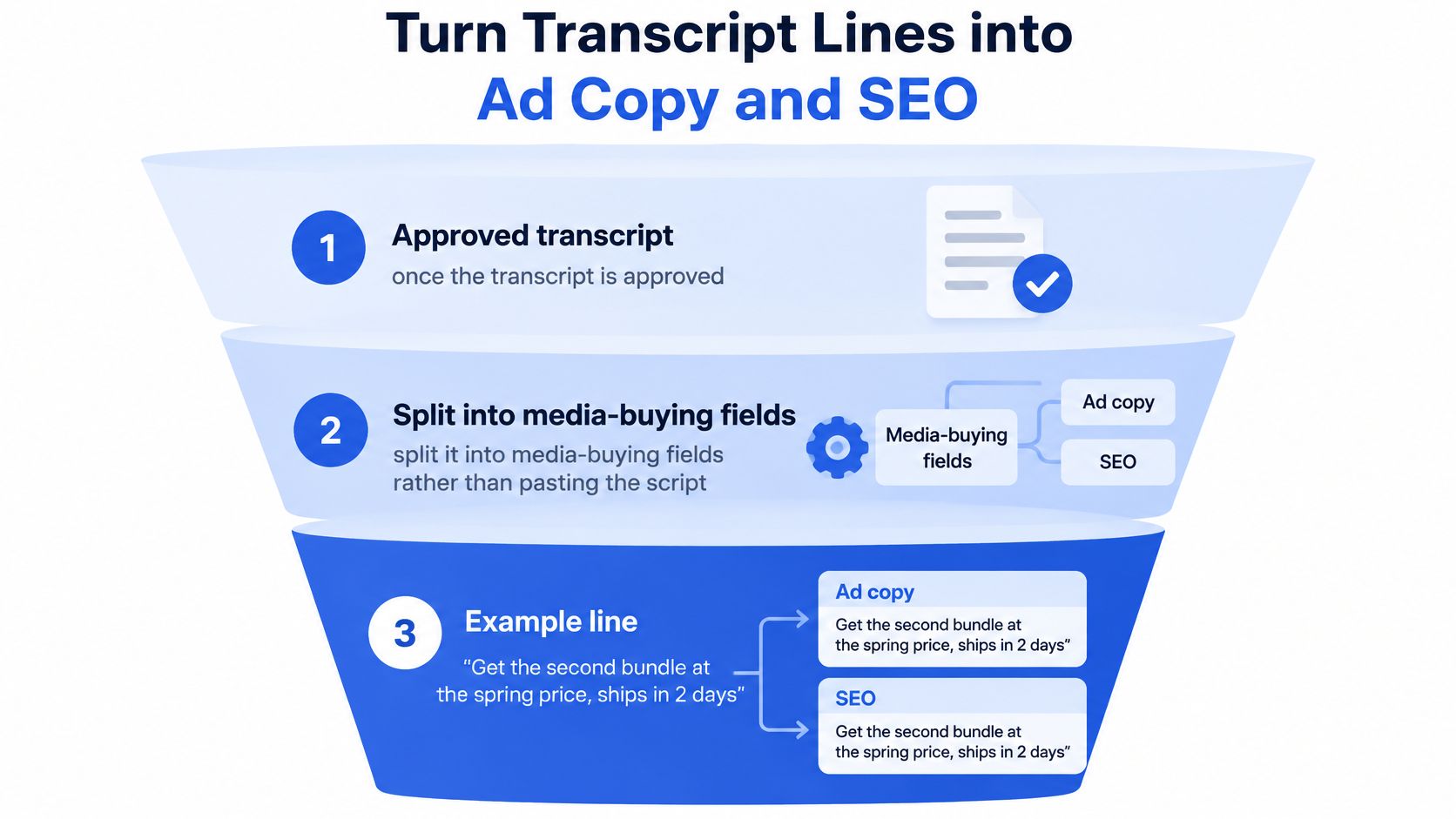
Split the line without changing the offer
Consider a hypothetical approved line: Get the second bundle at the spring price, ships in two days. The shipping statement is part of this example, not a general delivery promise.
| Field | Example adaptation | Approval question |
|---|---|---|
| Primary text | Add a second bundle at the spring price. Ships in two days. | Does the offer apply to the intended customer and destination? |
| Headline | Spring price on your second bundle | Is the second-bundle condition still clear? |
| Description | Shipping eligibility applies | Is this qualifier accurate and supported by the offer? |
| Timed overlay | Spring price on your second bundle | Does it appear with the relevant spoken line? |
| Page heading | How the spring bundle offer works | Does the page actually explain the offer? |
Don't manufacture a qualifier merely to fill the description field. In a live campaign, replace the illustrative description with the actual approved condition, or leave it unused if it adds nothing necessary.
Front-load the primary text with the distinguishing hook. Keep the headline compact enough to survive placement previews, and don't rely on the description to rescue an otherwise misleading headline. Display behavior differs by placement, so a character target isn't an approval test.
For deeper copy development, use the guide to writing effective ad copy to distinguish the hook, benefit, evidence, and CTA. The transcript supplies evidence of what was said, not evidence that every spoken claim is substantiated.
Build a copy matrix with traceability
Create variants by changing the framing, not the underlying facts. A convenience angle and an offer angle can use different openings while retaining identical eligibility conditions.
Store the approved source excerpt alongside each derivative. A practical copy sheet includes:
- Source identity: Creative filename, transcript version, and originating timestamp.
- Copy destination: Primary text, headline, description, overlay, or landing-page passage.
- Testing intent: Hook, angle, audience context, and offer treatment.
- Approval state: Reviewer, unresolved questions, and market restrictions.
Use those fields in naming conventions before bulk publication. Keep account selection, UTMs, and creative-enhancement settings explicit so operational changes don't contaminate a wording test.
Translate the approved meaning, then localize the execution
Meta's supported-subtitle documentation lists languages including Arabic, Brazilian Portuguese, English, Hindi, Indonesian, Latin-American Spanish, Tagalog, Tamil, Telugu, Urdu, and Vietnamese, with availability affected by product surface and account settings. A supported language doesn't establish that a translated offer is commercially equivalent.
For the same recorded offer across markets, use a reviewed canonical transcript to keep claims consistent. For reshot talent or code-switching, transcribe the actual performance independently. A translated master can't capture words that the local speaker added or changed.
Retain the original wording alongside localized copy. Ask a market-aware reviewer to check product names, conditions, idioms, and delivery promises rather than merely approving grammatical fluency.
For SEO, turn genuine viewer questions into useful page headings and FAQs. Don't imply that a transcript automatically improves rankings. Lumi Humanizer's discussion of an AI humanizer for SEO content offers an editing perspective, but readability work must preserve approved claims and add useful context rather than camouflage automated wording.
Choose Review Depth Before the Next Launch
Decide review depth from the consequence of a wrong word. A demo without an offer needs a different approval path from a finance claim or a localized promotional batch. The transcription engine shouldn't make that decision for you.
Review depth by claim risk before launch
| Video claim risk | Review depth | Output | Why |
|---|---|---|---|
| Silent-friendly demo, no price or promise | Meta auto captions plus one listen | Editable on-screen captions | Caption readability is the immediate upside |
| Audio states a price, discount, time limit, health or finance claim | Approved SRT plus human gate | Locale-suffixed SRT | Raw ASR never goes into primary text |
| Repeated variants or localized versions of an approved offer | Canonical transcript approval plus derivative checks and bulk-launch validation | Source-linked caption and copy package | Prevents inconsistent wording and settings across the batch |
Run the claim test before assigning the row. If mishearing a spoken number, negation, condition, or promise would change what customers believe they're buying, choose the stricter path. A familiar speaker or clean recording isn't a reason to downgrade that risk.
Record the decision where operators will use it
Add a review-state field to the creative manifest and a readable status token to the naming convention. Keep the detailed approval record outside the ad name, where reviewers can inspect the source, corrections, and allowed uses.
For a batch of derivatives, approve the common language centrally and check the differences deliberately. Don't require reviewers to rediscover the same approved phrase in every variant, but don't let shared approval cover a changed offer or newly recorded line.
Review the common source once with care, then review every meaningful departure from it.
Assign the approver before the upload queue is ready. Otherwise, launch pressure turns unresolved wording into an operational exception, and someone eventually mistakes that exception for the standard process.
Your decision today is concrete: listen-only, an approved SRT gate, or a canonical transcript with controlled bulk launch. Choose it from the audio's claim risk, record it, and publish only the assets that meet it.
Rapid Ads offers bulk creative and copy uploads, enforced ad and ad set naming conventions, multi-account management, and automatic disabling of unwanted Advantage+ creative enhancements. Once your transcript and derivative copy are approved, visit Rapid Ads to move that reviewed package into a repeatable launch workflow without rebuilding every ad manually.