Adding the Conversions API doesn't make your tracking accurate. That's the most repeated advice in Meta buying right now, and it's incomplete in the way that costs money. A second pipe gives you a second copy of every conversion. If those copies don't share the same event_name and event_id, Meta can count one order twice, report a CPA that never existed, and train delivery on inflated Purchase volume. A strong Event Match Quality score won't save you either, because matching a person and deduplicating an event are different jobs. Treat Facebook Pixel events as an identity problem first and a tag installation problem second.
Table of Contents
- Standard Events Versus Custom Events
- Naming Rules That Survive Multi-Account Reporting
- Parameters That Change CPA and ROAS
- Funnel Setups for Ecommerce and Lead Gen
- Browser and Server Copies Counted Once
- Check Events Before the Next Bulk Launch
Standard Events Versus Custom Events
Map every site action to a standard name before you invent a custom one. Meta already recognises PageView, ViewContent, Search, AddToCart, AddToWishlist, InitiateCheckout, AddPaymentInfo, Purchase, Lead, CompleteRegistration, Contact, Subscribe, and Schedule for optimisation. Use this list as the tracking spec you hand to a developer, not as a menu to rename.
Standard events and when a custom event is justified
| Event | Funnel role | What delivery learns | Use a custom event only if |
|---|---|---|---|
| PageView | Top | Base traffic, weak purchase signal | Almost never; keep it as a diagnostic |
| ViewContent | Upper | Product or offer interest | The view is not a product or offer page |
| Search | Upper | On-site intent | No; Search already covers site search |
| AddToCart | Mid | Commercial intent | No; do not rename cart adds |
| AddToWishlist | Mid | Soft intent | No standard gap for a wishlist |
| InitiateCheckout | Lower mid | Checkout start | No; keep the standard name |
| AddPaymentInfo | Lower | Payment step reached | No; rare to need a custom alias |
| Purchase | Bottom | Order value for ROAS and CPA | Never for a completed web order |
| Lead | Bottom for lead gen | Form or lead submit | Quality split belongs in a later event, not a renamed Lead |
| CompleteRegistration | Lower | Signup when purchase is delayed | The action is not a registration |
| Contact | Lower | Contact or enquiry submitted | Only if the enquiry is a different action from Lead |
| Subscribe | Lower | Subscription start | Only for an action that is not a subscription; free signups use CompleteRegistration |
| Schedule | Post-lead | Booked appointment | No; use it for qualified bookings |
Purchase and Lead stay standard even when several offers share one pixel. Renaming them to PurchaseVIP or Lead_UK creates a new event that doesn't inherit the history, volume, or optimisation understanding attached to the standard name. You then split a thin signal into thinner ones and wonder why ad sets won't exit learning.
Custom events earn their place only where there's no standard equivalent. A quiz completion, a wholesale enquiry, or a configurator finish can justify QuizComplete or WholesaleEnquiry, and that event can feed a custom conversion once volume exists. It doesn't replace the standard event for the same action. If a form submit is a lead, it's Lead, with the variant carried in a parameter.
Practical rule: One action, one standard name first. Add a custom event only when you can name the standard event it isn't.
That discipline matters because the Pixel is now one input into a wider dataset. As Meta's Conversions API platform documentation describes, server events sent through the Conversions API are processed for measurement, reporting, and optimisation in the same way as browser Pixel events, and comparable signals can also come from mobile SDKs, offline sets, and file uploads. The name you choose in the browser is therefore the name both pipes must use. Upper-funnel events describe interest, lower-funnel events carry commercial value, so design for the full funnel rather than only the final purchase. Teams planning market-specific activity can also use context on paid social for Irish businesses to align offer and funnel design before they lock the event set, instead of rebuilding names market by market.
Naming Rules That Survive Multi-Account Reporting
Lock names before the first test. Renaming an event later splits its history, breaks year-on-year comparisons, and forces every custom conversion, audience, and report built on the old name to be rebuilt. Buyers often treat a rename as housekeeping. Delivery treats it as a new signal.
Casing and spelling are not cosmetic
Standard names are case-sensitive and must match Meta's spelling exactly. It's Purchase, not purchase. It's InitiateCheckout, not Initiate_Checkout or Initiate Checkout. A lowercase variant won't merge with the standard event. It creates a separate custom event, splits volume, and can make an account look like it lost conversions overnight when a developer cleaned up a tag.
Apply the same discipline on both sides of a redundant setup. If the browser sends Purchase and the server sends purchase, you've built a deduplication failure into the naming layer before identifiers even enter the conversation.
Keep market and offer out of the event name
Custom names should be short, stable, and written in one documented pattern, such as QuizComplete or WholesaleEnquiry. Don't bake market, campaign, language, or offer codes into them.
- Country belongs in a parameter or breakdown: Use geo targeting, ad set structure, or a parameter to separate the UK from the US.
- Offer belongs in content_name or a lead-type field: Keep one Lead and pass the offer as data attached to it.
- Campaign belongs in Ads Manager naming: Your CBO or ABO structure already carries that split.
A separate Purchase_US and Purchase_UK starves each event of volume and makes a cross-market ROAS comparison needlessly hard. You can't cleanly total what you've deliberately fragmented, and neither event gets the consolidated learning the single Purchase would have had.
One name across every system
One action gets one name across the Pixel, Google Tag Manager, Shopify or your custom server, and the Conversions API. Write that name in a shared spec the media buyer and developer both work from. If GTM calls it Lead and the server calls it FormSubmit, reporting will show two events for one behaviour and optimisation will pick up neither cleanly.
For agencies running several ad accounts, keep the spec per business, not per buyer. A client's Purchase shouldn't be redefined when a different buyer opens a second account for a new market. Document what triggers it, where it fires, and which parameters it must carry, then reuse that definition everywhere.
Campaign, ad set, and ad names sit in a different layer, but they need the same consistency. A clean event under chaotic ad names can't be broken down reliably by creative or market, so your ROAS by angle analysis falls apart even though tracking is correct.
Copy this three-line spec into every brief:
- Standard event: Purchase on order confirmation only
- Custom event if any: None for this action
- Parameters carrying the variant: value, currency, content_ids, market, offer
That format forces the decision early. If someone proposes a new name, they have to say which line it belongs on and why a parameter won't do the job.
Parameters That Change CPA and ROAS
An event that fires isn't the same as an event Ads Manager can price. Parameters decide whether Purchase supports value optimisation, whether catalogue ads can match a product, and whether Meta can tie the action to a person. Get them wrong and CPA moves without any change to creative, audience, or bids.
Event parameters and the reporting mistake each one causes
| Parameter | Send it when | Reporting effect | Usual mistake |
|---|---|---|---|
| value | Purchase and any value-based optimisation | Numerator for ROAS | Cents instead of major units, or cart estimate instead of order total |
| currency | Any event that sends value | Makes value readable as USD, GBP or EUR | Hardcoded USD on a GBP store |
| content_ids and content_type | Catalog and dynamic ads | Product-level results | CMS slug that does not match the catalog |
| contents and num_items | Purchase detail | Average order value checks | Present on AddToCart but missing on Purchase |
| event_id | Pixel and Conversions API together | Dedup key, not a match key | Generated separately in the browser and on the server |
| email, phone, external_id, fbp | Every high-value event, hashed as Meta requires | Event Match Quality from 0 to 10 | Plain-text PII or fbp omitted on the server copy |
For Purchase, send value in major currency units and currency as an ISO code such as USD or GBP. A value sent in cents turns a normal order into apparent four-figure revenue. A dollar value labelled EUR won't reconcile with store revenue. Both errors train value-based delivery on the wrong number, so the algorithm chases users who look like high-value buyers under a fiction.
content_ids and content_type matter when you run catalogue or dynamic ads. They must match the catalogue ID, not the CMS slug, URL handle, or internal SKU if those differ. When they don't match, product-level reporting and dynamic retargeting lose their link to the item viewed or bought. contents and num_items then explain whether a ROAS swing came from basket size or price when finance starts asking questions. Our guide to Meta ads reporting breakdowns covers how to read those splits once the underlying parameters are trustworthy.
Match keys are not commerce data
Customer information parameters are separate from custom data. Hashed email, hashed phone, external_id, and the browser ID fbp help Meta associate an event with an account. According to Meta's Event Match Quality help page, the score ranges from 0 to 10 for website events sent through the Conversions API, reflects both the quality of customer-information parameters and the percentage matched to Meta accounts, covers standard and custom events including PageView, AddToCart, and Purchase, and is calculated using the most recent 48 hours of data.
That 48-hour window has an operational consequence buyers miss. Intermittent server delivery or low volume makes the score stale or unstable, so a blank or jumping score on a quiet event isn't automatically proof your parameters are badly formatted. Send every available lawful matching signal on high-value events, using Meta's normalisation and hashing rules, and keep server delivery steady enough for the score to mean something.
A high match score only means Meta can tie the event to an account. It doesn't mean the browser and server copies were counted once.
Check Event Match Quality and the deduplication or overlap diagnostics in Events Manager as separate controls. Improving one doesn't fix the other. Before you read a CPA swing as a tracking fault, also confirm which attribution window the Purchases column uses in Ads Manager, because a 7-day click report and a 1-day click report will disagree even when your events are clean.
Funnel Setups for Ecommerce and Lead Gen
Say two accounts launch on the same day. One sells products, the other books calls. They shouldn't share an event stack, but they should share the same rules about standard names, parameters, and one event per action.
The diagram below sets the two stacks side by side before you hand either one to a developer.
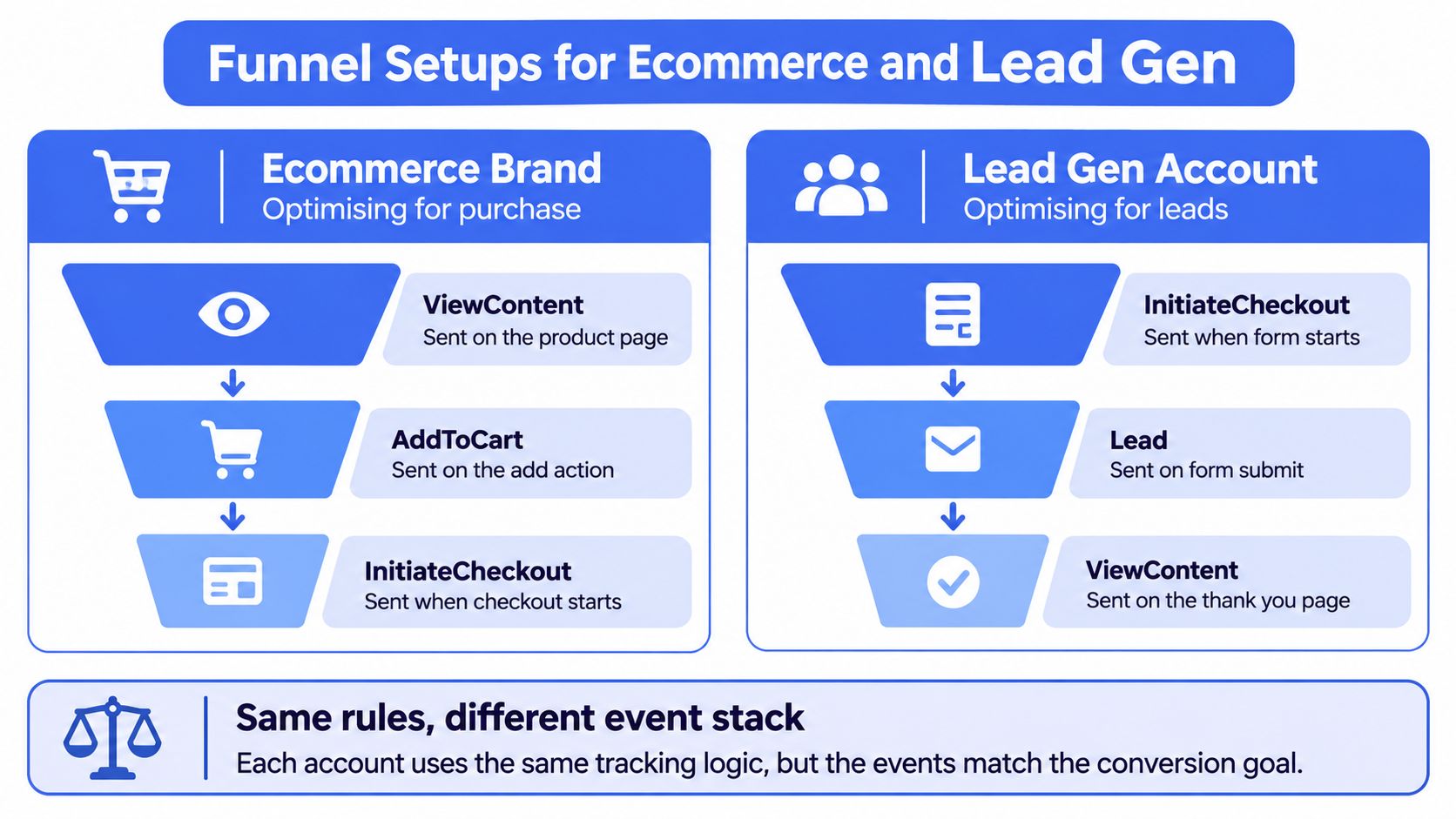
An ecommerce brand optimising for purchase sends ViewContent on the product page, AddToCart on the add action, InitiateCheckout when checkout starts, and Purchase only on the thank-you or order-confirmed state. Value and currency come from the order, not the cart estimate the user saw before shipping, discounts, or a failed upsell changed the total. Don't also fire a custom OrderComplete for the same order. That's a second name for one revenue event, and it invites double counting in any report that sums conversions naively.
While Purchase volume is thin and an ad set is still in learning, you can optimise toward InitiateCheckout as an interim signal. Keep sending Purchase from day one so volume, value, and match data accumulate before you switch the optimisation event. Switching later is then a settings change, not a tracking rebuild.
Event stack by account type
| Event or step | Ecommerce brand | Lead generation account |
|---|---|---|
| ViewContent | Product page | Offer page |
| AddToCart | Add-to-cart action | Not used |
| InitiateCheckout | Checkout start | Not used |
| Lead | Not used | Standard Lead on form submit |
| Purchase | Thank-you or order-confirmed state; order total and currency | Not used |
| Qualified outcome | Not used | Schedule or QualifiedLead, sent from the server, with offer parameter |
| Optimisation while volume is thin | InitiateCheckout | Lead, with raw form fills kept visible |
A lead generation account sends a standard Lead on form submit, then a later server event for the qualified outcome. Use Schedule for a booked appointment or a single custom name such as QualifiedLead when qualification happens in a CRM, with content_name or a lead-type parameter separating offer A from offer B. That structure keeps raw form fills visible for volume and cost checks while giving delivery a cleaner downstream signal. The practical examples in these lead generation insights from Silver Spoon Agency show why that distinction between a submitted form and a usable lead matters before you scale spend.
Move optimisation to the qualified event only after it has enough weekly volume to exit learning. Switching too early trades a noisy but learnable Lead signal for a cleaner signal delivery can't learn from. Our breakdown of sales funnel optimisation by stage is useful here for deciding which stage deserves budget while the qualified event builds history.
The video below walks through how those funnel choices look in a live account, which is worth checking against your own Events Manager setup before launch.
In both stacks, the Pixel describes on-site behaviour and the server describes what the business values. Neither account needs extra invented names to express that difference.
Browser and Server Copies Counted Once
Running the Pixel and the Conversions API together is a redundancy strategy, not an accuracy guarantee. Browser events can be lost to connectivity problems, page errors, consent restrictions, and blockers. Server events are more resilient and can capture later or offline outcomes. Send both and you improve coverage. Send both without shared identity and you manufacture conversions.
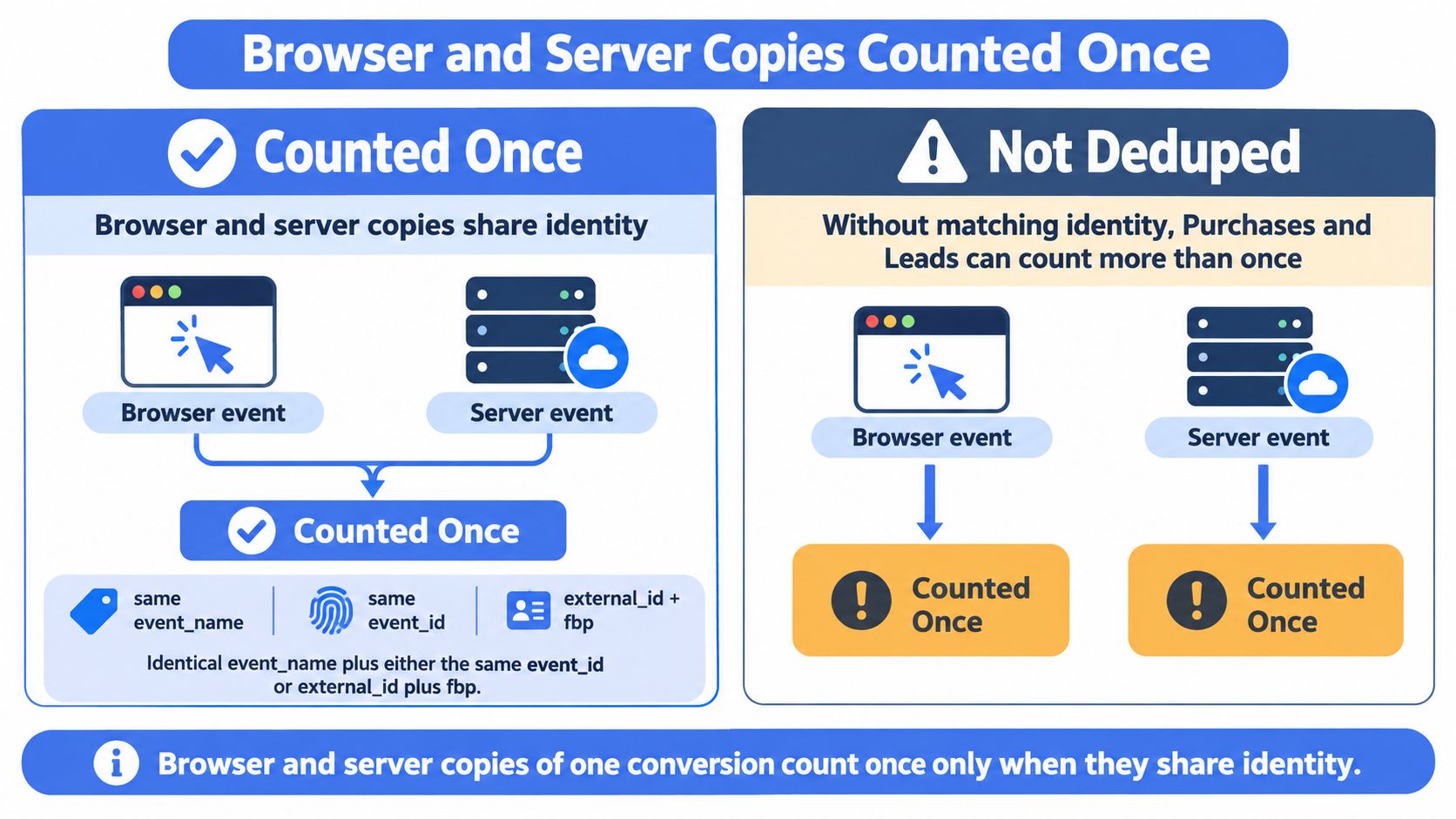
The diagram below shows the only distinction that matters, whether the two copies merge into one counted event or arrive as strangers.
The identity rule
Browser and server copies of one conversion count once only when they share identity. As Meta's omni optimal setup guide sets out, the events must use the identical event_name and either the same unique event_id or the combination of external_id and fbp, with the Pixel receiving the value as eventID and the Conversions API receiving it as event_id. Meta then keeps one event and discards the redundant copy. Separate IDs generated independently in the browser and on the server can duplicate Purchase or Lead events and distort CPA, ROAS, and optimisation.
Read that as an engineering requirement, not a settings preference. The identifier has to survive the journey from the moment of conversion through checkout, the thank-you page, and the server request. If your tag generates one ID on page load and your server generates another when the order posts, deduplication has already failed before Events Manager sees anything. Neither copy is wrong on its own. Together, they're two conversions.
Don't force a shared event_id in the opposite direction either. Deduplication applies only when both events represent the same action. A distinct server-only event, such as an offline sale uploaded later or a CRM qualification that never happened in the browser, shouldn't be given the browser event's ID just to look tidy. Suppressing a genuine second outcome is as damaging as counting one outcome twice, because delivery then undervalues the campaigns that produced qualified revenue. Our guide to the Meta Conversions API setup covers where that browser and server boundary should sit in a redundant implementation.
The seven step deduplication procedure
Run this sequence for every event you send through both pipes, starting with Purchase and Lead because those are the events your budgets follow.
- Generate one event_id at conversion: Create it once, at the moment the order confirms or the form submits, not separately in the tag and the server.
- Pass it to the Pixel as eventID: The browser copy carries that exact value, not a locally generated substitute.
- Send the same value as event_id to the Conversions API: Character for character, with no prefix added by a middleware tool.
- Keep event_name identical, including case: Purchase in the browser means Purchase on the server.
- Open Test Events and confirm deduplication: One copy should be marked as deduplicated rather than both counting.
- Compare browser and server volume: Check PageView, Lead, InitiateCheckout, and Purchase for gaps or near-doubling.
- Confirm the payload agrees: Value, currency, event time, and customer keys should match across both copies.
That last step catches failures the identifier check misses. Two copies can share an event_id and still disagree on value because the browser read the cart total and the server read the settled order. Deduplication may succeed while value optimisation learns from whichever copy Meta keeps, which might not be the number finance recognises.
Test Events is the source of truth
Meta Pixel Helper tells you a tag fired in your browser. It doesn't tell you what Meta received, matched, or deduplicated. Events Manager does. Per Meta's Events Manager help documentation, you can inspect event activity at the parameter level, including the event URL, transmitted parameters, and active errors or warnings, and you should check value and currency alongside firing when validating Purchase. A controlled test conversion inspected in Test Events and Activity Details confirms whether the name, identifier, match keys, and custom data arrived.
Use that workflow before any bulk launch. Trigger one real test order or lead in a controlled session, find both copies, confirm they share the identifier, and check that one is marked deduplicated. Then compare the surviving event's value and currency against the order record in your store or CRM. If those don't agree, your reporting problem isn't attribution. It's payload design.
Diagnostic standard: If you haven't seen one copy marked deduplicated in Test Events, you don't have evidence deduplication works. You have a hope and a green browser extension.
Volume comparison adds the second layer of evidence. Browser volume below server volume on Purchase is expected where blockers and consent loss bite, provided the deduplicated total tracks store orders. Browser and server volumes that sum to roughly double your orders point to failed deduplication. A server total far below browser volume on a high-value event suggests intermittent sending, authentication failures, or events dropped before they reach Meta. Each pattern tells you where to look. None of them is visible from Ads Manager's CPA column alone, which is why buyers who debug from ROAS first usually change bids and budgets for a tracking fault. The operational discipline described in Med Spa Scalers on Meta ads is relevant here because service businesses face the same gap between a form fill, a booking, and a paid appointment, and each stage needs its own verified event rather than one optimistic signal.
Pixel event mismatches, causes and fixes
| What you see | Likely cause | Fix |
|---|---|---|
| Pixel Purchases well below store orders | Blocked browsers, consent loss, or page errors | Send the same Purchase via Conversions API; do not add a second event name |
| Purchases about twice store orders | event_id generated twice, or event_name differs by case | One event_id from checkout to server; identical event_name |
| Custom OrderComplete plus standard Purchase | Tag and app both firing for one order | Keep Purchase only |
| ROAS finance cannot reconcile | Value in cents, wrong ISO currency, or cart value on the thank-you page | Major units, correct currency, order total |
| Event Match Quality blank or jumping | Low volume or intermittent server sends over the 48-hour window | Steady server delivery; do not read the score as a dedup check |
| Both browser and server copies counted | Dedup keys missing in Test Events | Same event_name plus event_id, or external_id plus fbp |
Work the table by symptom, not by guess. Purchases well below store orders mean you're losing browser signals, so the fix is a server copy of the same Purchase, not a new custom event that bypasses the standard name. Purchases near twice store orders mean identity failed, so audit ID generation and casing before you touch audiences. An OrderComplete sitting beside Purchase means two systems fired for one order, and the answer is to keep Purchase only and retire the duplicate, not to build a custom conversion that averages them.
ROAS that finance can't reconcile is usually arithmetic, not attribution. Check cents versus major units, hardcoded currency, and cart value sent from the thank-you page before you argue about click windows. Those three errors are visible in Activity Details in minutes. Attribution debates can run for weeks and still not explain revenue that's off by a factor of one hundred.
Why a good match score can hide double counting
Return to the distinction buyers blur most often. Event Match Quality measures how well Meta can associate an event with an account. Deduplication measures whether two copies of one action collapse into one. You can send beautifully hashed email, phone, external_id, and fbp on both copies, score well on matching, and still count every order twice because the event_id values differ. The account then reports a CPA roughly half the actual figure, CBO shifts budget toward ad sets that appear efficient, and lookalikes build from an audience inflated with duplicate buyers.
The reverse also happens. Deduplication can work perfectly while match quality stays weak because the server copy omits fbp or sends poorly formatted customer data. Conversions count once, but fewer of them tie back to the ad exposure that drove them, so attributed ROAS understates campaigns that are working. You need both diagnostics green for different reasons, and you need to know which one you're looking at before you change anything.
At scale, small distortions stop being rounding errors. An agency running multiple markets and ad accounts can replicate one faulty GTM container or server template across every client build. A defect copied across many ad sets contaminates optimisation and reporting at account scale before anyone notices, because each individual campaign looks plausible. That's why the test belongs before the bulk launch, not after the first week of spend produces numbers nobody can reconcile.
Check Events Before the Next Bulk Launch
Don't publish the next batch until one test Purchase or Lead passes. The decision is binary, and treating it as a judgement call is how broken tracking gets scaled.
- Go: Event name, event_id, value, and currency agree across browser and server, and Events Manager shows one counted conversion.
- No-go: Any field disagrees, both copies count, or the surviving value doesn't match the order record.
If it's a no-go, fix tracking before you touch budgets, bids, or creative. Scaling a broken Purchase event spends against a fake CPA, and every optimisation decision after that inherits the error. A day spent on identifiers is cheaper than a week of CBO budget allocated by duplicated conversions.
Once events are clean, the remaining risk is inconsistent campaign structure. Teams launching 100 to 200 ads across markets lose their breakdown when ad and ad set names are typed by hand, so ROAS by creative becomes unreadable even with perfect events. We're an Official Meta marketing partner, and our Rapid Launch plan includes AI ad set grouping and ad copy, auto-naming conventions, and copy templates with CSV import, so the Ads Manager layer stays as disciplined as your event spec. With that structure in place, 100 ads can go live in under 10 minutes without naming drift creeping back in.
Naming doesn't replace the Pixel. It keeps the reporting layer worthy of the tracking underneath it. Run the test event, check the result, then launch.
With your Facebook Pixel events deduplicated and named properly, Rapid Ads lets you launch bulk Meta campaigns with enforced ad and ad set naming conventions, so creative and market breakdowns stay readable at 100 to 200 ads. Visit us to put your next test batch live in minutes instead of rebuilding it by hand in Ads Manager.