Your store has confirmed orders, Ads Manager shows fewer purchases, and Events Manager still says your data source is active. Meanwhile, a developer has added server events, your ecommerce integration still sends browser events, and nobody can confirm whether the same purchase is being counted twice.
That's the operational problem behind pixel implementation. A working tag isn't the same as trustworthy measurement. You need a defined business event, complementary delivery channels, consistent identifiers, and consent decisions that survive the journey from browser to backend.
Table of Contents
- Why Pixel Implementation Is Now a Two-Signal Problem
- Installing the Browser Pixel and Mapping Standard Events
- When Browser Signals Are Not Enough Anymore
- Building a Server-Side Conversions API Pipeline
- Testing, Debugging, and Monitoring Implementation Health
- Consent Mode and Privacy-Aware Tracking
- Wiring Pixel Data into Ad Workflows and Scaling
Why Pixel Implementation Is Now a Two-Signal Problem
Treat the browser Pixel as an observation point, not the complete conversion ledger. It can capture what happens on the website, but receiving events doesn't prove that you're receiving every eligible conversion or interpreting revenue correctly.
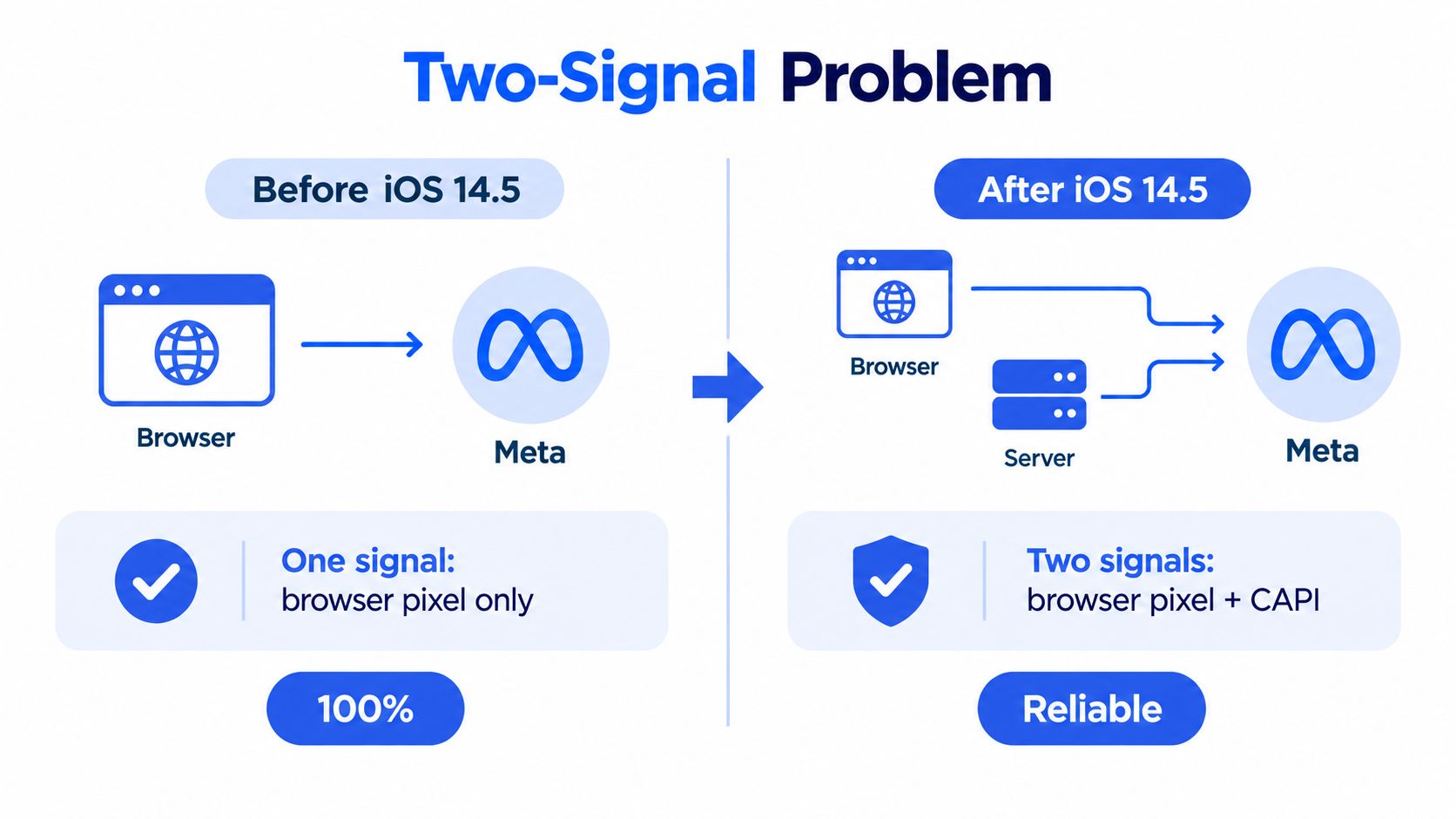
Apple introduced App Tracking Transparency with iOS 14.5 in April 2021, changing the availability of cross-context tracking signals. Under the associated privacy processes, Aggregated Event Measurement limited each website domain to eight conversion events available for campaign optimization and measurement, making event prioritization an operational requirement (iOS privacy changes and measurement constraints).
The architectural shift is easier to understand visually. Treat this comparison as a delivery model, not a promise that historical browser tracking captured every conversion.
Client-Side vs Server-Side Signal Trade-Offs
| Dimension | Meta Pixel (Browser) | Conversions API (Server) |
|---|---|---|
| Observation point | Website interaction | Backend transaction or business record |
| Recommended role | Capture immediate customer actions | Confirm commercially meaningful outcomes |
| Delivery dependency | Browser execution and page lifecycle | Backend processing and integration health |
| Revenue design | Read the confirmed transaction payload | Read the authoritative order record |
| Governance requirement | Apply the visitor's tracking permissions | Apply the same applicable permissions |
| Main implementation risk | Missing or repeated triggers | Repeated sends or inconsistent payloads |
The right design is complementary, not competitive. Keep browser instrumentation close to the customer action and server instrumentation close to the confirmed business outcome. Then define how the system distinguishes another delivery attempt from another purchase.
Start With the Optimization Outcome
Before touching tags, decide which event represents success in the ad set. For ecommerce, that usually means a confirmed purchase rather than a checkout visit. For lead generation, distinguish a submitted enquiry from a commercially qualified opportunity.
Write that definition down with finance, engineering, and the media buyer. Agree on when the event occurs, what its value means, and which system owns the underlying record.
Practical rule: A healthy event stream should let you explain a conversion from the order or lead record through to its measurement payload. An active status indicator can't do that for you.
That distinction matters when interpreting ROAS. If the underlying business definition changes between channels, campaign comparisons become difficult even when every request arrives successfully.
Installing the Browser Pixel and Mapping Standard Events
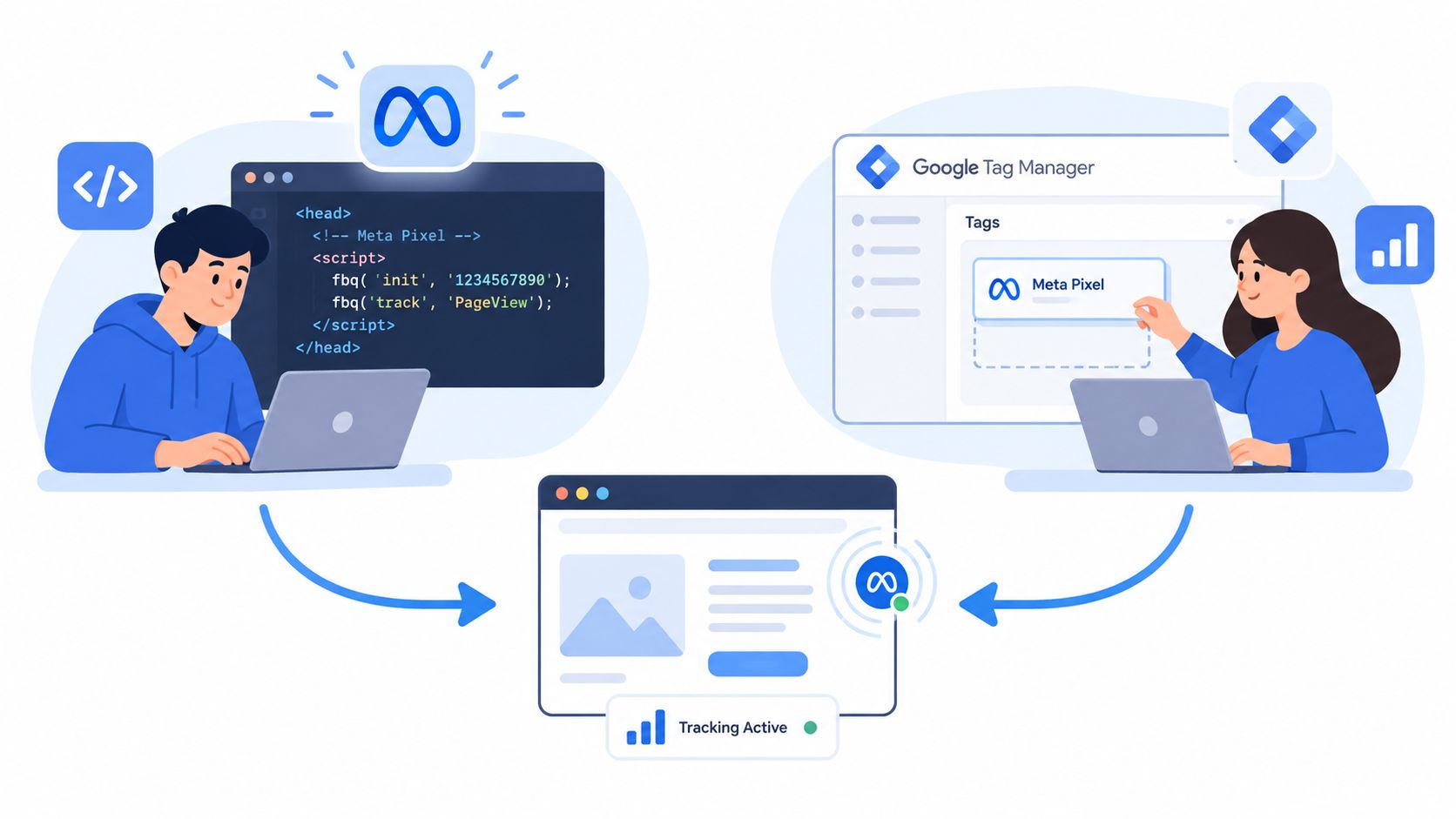
Choose a single owner for browser deployment: direct code, Google Tag Manager, or your platform integration. Don't leave a theme installation active while adding equivalent GTM tags and assuming the systems will sort themselves out.
For Shopify, WooCommerce, BigCommerce, or WordPress, audit existing integrations before changing anything. For a custom stack, ask the developer to expose confirmed application events through the data layer rather than making the media buyer infer everything from button clicks.
The installation routes differ, but the event contract should remain consistent.
Build an Event Contract Before Publishing
Meta's reference documentation defines standard events sent through fbq('track'), including page views, product views, cart additions, checkout initiation, and purchases (Meta Pixel implementation and standard events).
Use the following as a proposed implementation contract. The parameter column describes what to map where relevant, not a claim that every field is mandatory for every event.
| Event | Recommended trigger | Parameters to map | Internal tag name example |
|---|---|---|---|
PageView |
Eligible page or application navigation | Page context | META_BROWSER_PageView |
ViewContent |
Product detail becomes available | content_ids, content_type, content_name, value, currency |
META_BROWSER_ViewContent |
AddToCart |
Cart update succeeds | Product identifiers, value, currency, num_items |
META_BROWSER_AddToCart |
InitiateCheckout |
Checkout session begins | Cart identifiers, value, currency, num_items |
META_BROWSER_InitiateCheckout |
AddPaymentInfo |
Payment information is accepted | Relevant checkout context | META_BROWSER_AddPaymentInfo |
Purchase |
Confirmed order becomes available | Value, currency, product identifiers, num_items |
META_BROWSER_Purchase |
Lead |
Submission succeeds | Relevant form context and justified value | META_BROWSER_Lead |
CompleteRegistration |
Registration succeeds | Registration context, content_name where useful |
META_BROWSER_CompleteRegistration |
Deploy Through GTM With Explicit Triggers
- Centralize the Pixel ID. Store it in a constant variable rather than maintaining independent copies throughout the container.
- Connect application events. Create data layer variables for the agreed payload and use Custom Event triggers for confirmed actions.
- Separate labels from event names. Your GTM tag can follow an internal naming convention; the event sent to Meta should retain the intended standard name.
- Preview before publishing. Inspect the trigger, variable values, consent decision, and outgoing request during the same transaction.
Avoid using a Purchase button click as proof of payment. Likewise, a thank-you page needs protection against repeat visits being treated as new business activity.
In Ads Manager, select the intended data source and conversion event at the ad set level. Keep reporting columns aligned with that outcome, including purchase conversion value where relevant. A clean tag name helps maintenance, but it doesn't fix a wrongly selected optimization event.
When Browser Signals Are Not Enough Anymore
Use failure scenarios to decide what the backend must observe independently. Don't justify CAPI with a blanket claim that it recovers everything the browser misses.
The important distinction is between delivery loss, identity limitations, and permission restrictions. They require different responses.
| Scenario to test | Example | What to investigate |
|---|---|---|
| Ad-blocking | A visitor completes checkout while tracking requests are blocked | Whether an eligible backend event exists independently |
| Consent rejection | A customer declines marketing tracking and still buys | Whether both delivery channels respect that decision |
| Safari ITP | A returning customer has limited browser identity continuity | Whether permitted matching information is available |
| Aborted page loading | The customer leaves before gtm.js completes |
Whether the business action was confirmed outside the page lifecycle |
| Device switching | An ad click and purchase happen on different devices | Whether permitted customer information supports matching |
These are test cases, not interchangeable explanations for every reporting discrepancy. An absent browser event and an unattributed conversion aren't the same thing.
Compare What Each Channel Can Know
For a product view, the browser is the natural observation point. For payment confirmation, the backend should own the commercial definition. For a sales-qualified lead, the relevant information may not exist until someone updates the CRM.
Meta describes CAPI as supporting website events, app events, offline conversions, and Business Messaging conversions, including downstream context such as new-customer purchase classifications and qualified-lead outcomes (Conversions API event coverage).
That creates a useful distinction for lead-generation accounts. The initial Lead event can describe successful submission, while a later server event describes a different outcome. Don't resend the original submission under a new name merely to manufacture an apparently stronger funnel.
More server events aren't automatically better. Send the events that describe real business progress and that your team can explain.
CAPI also isn't an identity guarantee. A backend can confirm that an order exists without establishing which advertising interaction deserves credit.
Operationally, evaluate each event against its source of truth. Ask whether the action occurred, whether sending it is permitted, and whether you have useful matching context. That's a better investment decision than assuming every gap between Ads Manager and your ecommerce dashboard is a broken Pixel.
Building a Server-Side Conversions API Pipeline
Choose the deployment route your team can maintain after launch. A custom endpoint offers control, but that control comes with responsibility for retries, payload validation, credentials, monitoring, and privacy enforcement.
CAPI Deployment Options at a Glance
| Option | Best For | Main Trade-Off |
|---|---|---|
| GTM Server-Side with Stape or GCP infrastructure | Teams that want centralized routing and transformation | Requires container, infrastructure, and consent ownership |
| Platform-native integration or gateway | Shopify, WooCommerce, or BigCommerce teams prioritizing maintainability | Less freedom over event generation and transformation |
| Direct server-to-server implementation | Custom commerce stacks and CRM workflows | Engineering owns the delivery lifecycle |
For route selection and implementation planning, use the Meta Conversions API guide alongside your stack's integration settings. Evaluate the actual payloads, not just whether an integration advertises CAPI support.
Make Event Identity a Backend Contract
For an action sent through both channels, use the identical event name and shared identifier. Pixel uses eventID; CAPI uses event_id. Generate the identifier once when the business action occurs, persist it with the record, and reuse it unchanged across both requests (Meta's CAPI implementation guidance).
A practical build sequence is:
- Create the record. Confirm the order or lead and attach its measurement identifier.
- Expose browser context. Make the same identifier available to the eligible browser event.
- Construct the server payload. Include the event name, identifier, actual action time, value, currency, content identifiers, and source URL where applicable.
- Map permitted matching fields. Review
em,ph,fn,ln, andexternal_id; document normalization and hashing responsibilities rather than assuming the connector handles every field. - Validate reconciliation. Complete a controlled action and inspect Test Events to establish that the browser and server copies merge rather than inflate conversion totals.
Enable Advanced Matching with permitted customer information. Meta scores server-event Event Match Quality from 0 to 10, so inspect it by event type instead of using total event volume as the implementation scorecard, as described in the implementation guidance above.
Keep value and currency definitions identical across payloads. If finance excludes a component from measured revenue, don't let the browser include it while the server excludes it.
For teams also measuring search, The Advertising Suite's resource on how to measure revenue accurately with Google Ads is a useful companion topic. Keep each platform's implementation distinct while applying the same internal revenue definition.
Testing, Debugging, and Monitoring Implementation Health
A production implementation needs an acceptance test, a review cadence, and an owner. Otherwise, a checkout release or integration change can alter measurement without anyone on the buying team noticing.
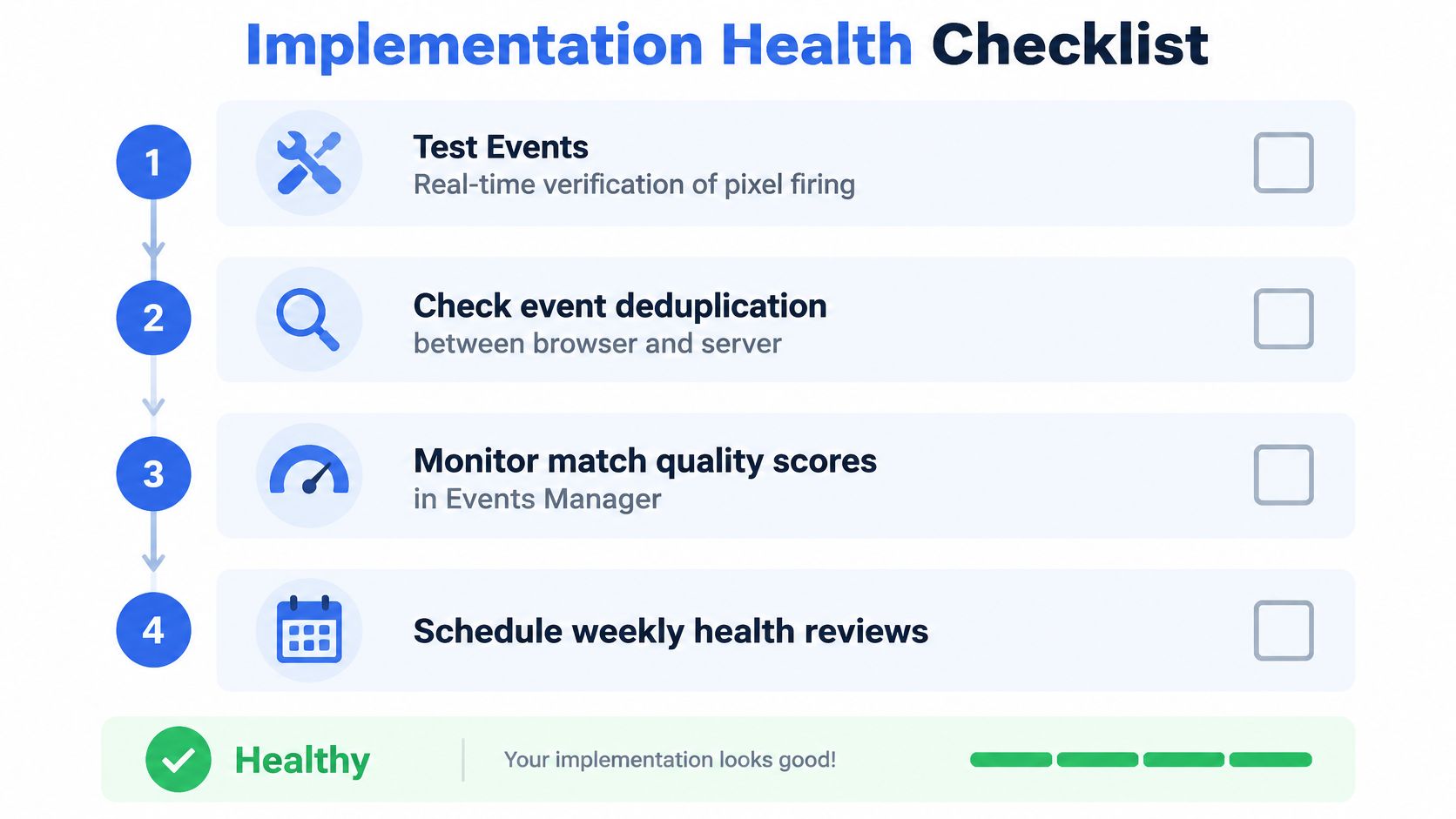
Use this checklist as the framework for those reviews.
Diagnose the Record, Not Just the Dashboard
Start in Events Manager Test Events with a controlled journey. Inspect the event name, connection method, identifier, value, currency, and permitted matching fields. Then review Diagnostics for actionable warnings rather than treating the absence of warnings as proof of accuracy.
Use GTM Preview, browser developer tools, and the Meta Pixel Helper Chrome extension to investigate client-side behavior. Server logs should provide the corresponding business record, outgoing payload, delivery result, and retry history.
| Symptom | Investigation | Corrective action |
|---|---|---|
| Browser and server Purchase copies don't merge | Compare exact event names | Correct the mapping and casing |
| Copies carry different identifiers | Trace where each identifier is generated | Restore generation at the shared business action |
| Server copy arrives unexpectedly late | Inspect queue processing and original action time | Repair delivery delays and preserve the actual event time |
| Purchase value differs by channel | Compare payload construction with the order record | Apply the agreed revenue definition |
| Match quality changes after a release | Compare permitted matching fields before and after deployment | Repair missing fields without expanding collection indiscriminately |
Don't confuse a deduplication timing problem with an attribution-window problem. Investigate delivery latency and event timing separately from the campaign's attribution settings.
Make Health Reviews Repeatable
Track Event Deduplication Rate, where available, as an operating KPI alongside match quality and parameter completeness. Don't impose an invented universal threshold; investigate changes against your own stable implementation and expected channel coverage.
A weekly review should include:
- A controlled conversion. Repeat the actual customer journey, including the checkout or form confirmation.
- A permission check. Exercise accepted, declined, and changed consent states.
- A release comparison. Review ecommerce, CMP, tag manager, and backend changes.
- A commercial reconciliation. Compare eligible business records with event delivery, then investigate attribution separately.
A video walkthrough can supplement the written acceptance checklist.
Document the process in your data quality assurance workflow. For a parallel review of search measurement, Scéaled's paid search analytics guide provides another relevant resource without requiring Meta and analytics reports to match mechanically.
Consent Mode and Privacy-Aware Tracking
Consent is a shared operating state, not a browser-only setting. Use “consent mode” here to mean your implementation's permission controls, not an assumption that enabling a Google feature automatically governs Meta.
Meta describes CAPI as a channel for website, app, CRM, and offline events used for measurement, optimization, and attribution. It isn't a privacy exemption: server delivery can still process personal data requiring a lawful basis (Conversions API and governed event delivery).
Define the State Machine
Use explicit pending, granted, denied, and withdrawn states. Both the browser and server need access to the applicable decision, including when it changed.
The diagram provides a conceptual state model. Delayed opt-in doesn't guarantee full recovery of earlier activity.
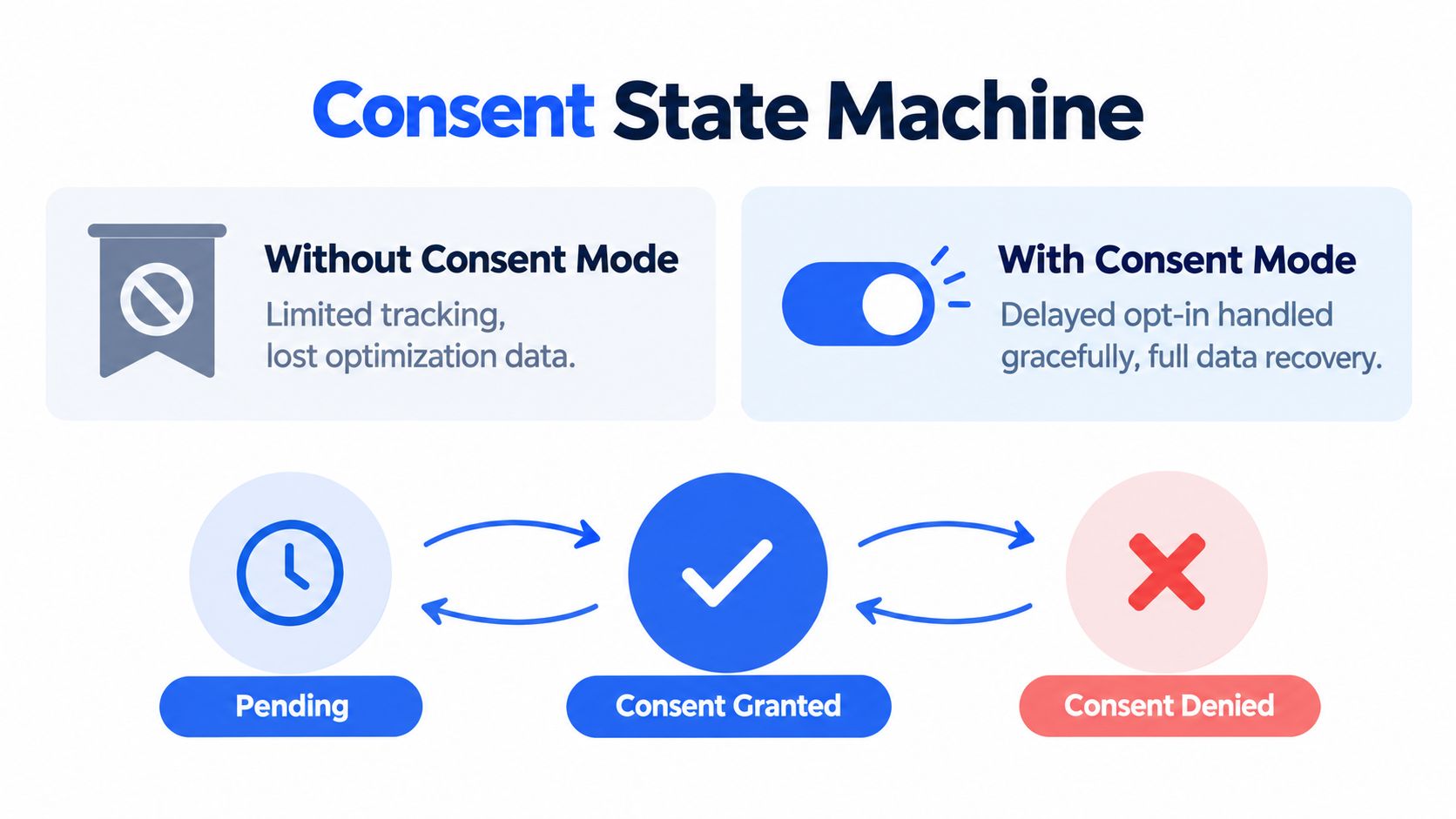
Where your approved policy requires prior opt-in, gate the Pixel initialization path, including fbq('init'), until permission exists. After delayed acceptance, initialize the eligible measurement flow without automatically replaying historical actions.
For abandoned checkouts and queued server events, record the applicable permission context and re-evaluate eligibility before dispatch. Withdrawal should stop subsequent disallowed sends, including retries that would otherwise continue independently.
Regional Consent Postures for Meta Tracking
The following are proposed engineering defaults for legal review, not jurisdiction-wide legal conclusions.
| Region | Default Posture | CAPI Behavior |
|---|---|---|
| EU and UK | Strict prior-permission posture where required | Block personal-data marketing events until approved conditions are met |
| North America | Jurisdiction-specific controls rather than blanket permission | Apply reviewed opt-out, restriction, and preference rules |
| Brazil | LGPD-reviewed permission and lawful-basis configuration | Send only events allowed under the approved regional policy |
| Global stores | Conservative fallback when location or status is uncertain | Hold or suppress events until eligibility is established |
Bring GDPR, CPRA, and LGPD decisions into the configuration review with qualified counsel. Geography alone shouldn't substitute for a documented policy.
- Review identifiers independently. Decide eligibility for hashed email, IP address,
fbp, andfbcrather than stripping one field and assuming the payload is now acceptable. - Hash where required. Verify transformation before transmission, but don't treat hashing as permission to collect or send.
- Test the server directly. Decline tracking, complete an order, and inspect backend dispatch logs as well as browser requests.
Governance check: If the browser blocks an event but the backend sends equivalent personal data anyway, your consent architecture isn't consistent.
Assign ownership for these rules. The media buyer can specify the measurement need, but legal and engineering must approve and implement the permitted behavior.
Wiring Pixel Data into Ad Workflows and Scaling
Measurement and launch operations need the same discipline, but they solve different problems. The event pipeline describes customer outcomes; campaign naming and UTMs describe how you organized and acquired traffic.
Meta recommends a redundant setup that sends the same website events through Pixel and CAPI so the signals can be compared and reconciled (Meta's CAPI best practices). Preserve that event contract when expanding into more accounts, markets, and creative batches.
Keep Reporting Labels Separate From Measurement Identity
Use an enforced naming pattern such as market_objective_product_audience_creative for internal reporting. Keep stable campaign, ad set, and ad identifiers alongside readable names in your reporting specification.
UTMs support traffic classification and cross-platform investigation. They don't replace Meta's event matching, determine attribution by themselves, or belong in the shared purchase identifier.
For agency operations, maintain an account-level launch sheet containing the intended data source, optimization event, revenue definition, naming template, and UTM specification. Connect that sheet to your first-party data strategy, especially where CRM outcomes inform commercial reporting.
Excellorix's discussion of how AI transforms Meta advertising is relevant to the wider automation conversation. Keep the operating boundary clear: faster campaign execution doesn't validate the measurement beneath it.
Before releasing a scaled launch, require:
- Pixel verified. Confirm the intended browser events and parameters.
- CAPI merged. Validate the paired conversion journey.
- Consent gated. Test the applicable permission states.
- Deduplication healthy. Resolve unexplained overlapping conversions.
- Naming enforced. Check ad and ad set labels alongside UTMs.
- Test Events passed. Save evidence of the approved journey and assign a monitoring owner.
Scale from a validated configuration, not from an inherited assumption that tracking still works.
Rapid Ads offers bulk creative uploads, enforced ad and ad set naming conventions, automatic UTM tagging, and auto-disable controls for unwanted Advantage+ creative enhancements. Once your measurement pipeline passes its acceptance checks, visit Rapid Ads to standardize campaign launches across accounts without repeating the same manual setup.