You're probably in the same loop most high-volume Meta teams get stuck in. New creatives are ready. Copy is approved. The campaign structure is mapped. Then the actual launch turns into half a day inside Ads Manager, clicking through loading spinners, waiting for previews to render, fixing naming mistakes, checking whether placements pulled the right asset, and reopening ads because Meta changed a setting you already turned off.
That bottleneck doesn't show up neatly in reporting, but it affects everything. Slow launches reduce testing velocity. Messy naming ruins breakdowns. Manual uploads create enough friction that teams test fewer variants than they should. A creative management platform matters less as a design tool and more as operational infrastructure for getting creative into market without wasting buyer time on admin.
Table of Contents
- Beyond the Meta Ads Manager Grind
- What Exactly Is a Creative Management Platform
- Core CMP Features That Solve Meta Ads Bottlenecks
- Workflow Transformation A Side-by-Side Comparison
- How to Evaluate the Right Creative Management Platform
- Your First 90 Days An Implementation Roadmap
- The Performance Marketer's CMP Checklist
Beyond the Meta Ads Manager Grind
If you launch at scale, the problem isn't making one ad. It's making the hundredth ad without your process breaking.
A lot of CMP content talks about cross-channel asset libraries and collaborative design flows. That's fine for enterprise overviews, but it misses the part Meta buyers deal with daily. The pain is operational. One batch of ads can mean hours of repetitive setup, manual field checks, and correction work after upload.
According to Rocketium's discussion of CMP workflows, most mainstream CMP content ignores Meta-specific workflow automation for bulk creative deployment, yet it is often here that many performance teams lose time. The same source highlights a common gap between Meta's manual setup process and bulk workflows that can shrink a 6 to 8 hour job into a 5 to 13 minute one when the tooling is purpose-built for the platform.
That difference changes how you buy media.
The faster a team can launch cleanly, the more often it can test without lowering standards.
The teams that struggle most aren't usually weak at strategy. They know how to structure ABO versus CBO, how to separate prospecting from retargeting, and how to read CPA drift. They get slowed down by execution drag. When every launch requires one-by-one uploads, repeated copy pastes, ad set-by-ad set sorting, and manual review of Meta defaults, campaign throughput falls.
Typical failure points look familiar:
- Upload friction: Assets are added one ad at a time, then checked one ad at a time.
- Naming drift: Buyers improvise naming under deadline pressure, and reporting turns inconsistent by the end of the week.
- Placement mismatch: Feed assets and vertical assets get mixed, then someone notices after delivery starts.
- Setting reversion: A buyer disables an enhancement, publishes, and later finds that Meta's defaults didn't stay where they were set.
A creative management platform earns its keep when it removes those failure points inside the launch workflow itself, not when it merely stores files more neatly.
What Exactly Is a Creative Management Platform
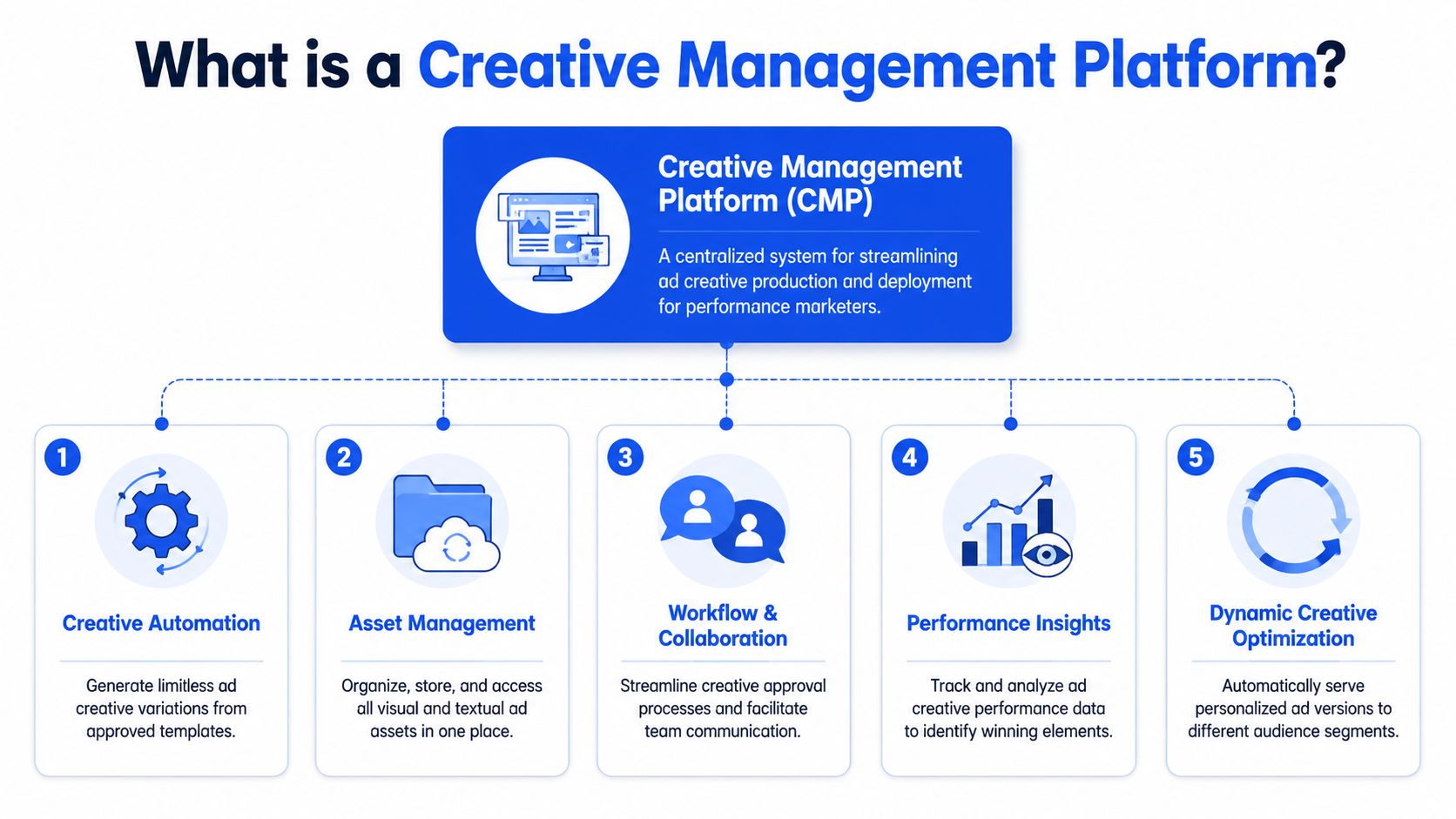
A creative management platform is best understood as the control panel for your creative production and deployment system. It sits between raw assets and live ads. Instead of treating design, naming, review, formatting, and publishing as separate tasks spread across folders, sheets, and Ads Manager tabs, it turns them into one operating flow.
The practical definition
For a Meta team, a CMP isn't just a place to store images. It should do four jobs well. It should keep assets organised, turn approved templates into many launch-ready variations, coordinate approvals and edits, and connect creative decisions back to performance.
That's why this category keeps expanding. A market projection published by OpenPR says the global Creative Management Platforms market is projected to rise from $1,487.96 million in 2026 to $3,945.97 billion by 2033, with a projected 14.95% CAGR. The projection reflects how central these tools have become for workflow management, digital asset handling, collaboration, and analytics.
The five parts that matter in practice
Not every platform handles all of these well. That's where buyers often get disappointed.
| CMP function | What it should do for a Meta team | What weak tools do instead |
|---|---|---|
| Asset management | Keep approved images, videos, headlines, primary text, and variants searchable in one place | Act like a prettier folder system |
| Creative automation | Turn templates and inputs into large sets of launch-ready variations | Still require manual resizing and repetitive edits |
| Workflow and collaboration | Let designers, buyers, and approvers work from the same source of truth | Push comments and approvals back into Slack and spreadsheets |
| Performance insights | Surface creative-level learning that informs the next batch | Stop at publishing and leave analysis elsewhere |
| Dynamic optimisation support | Help teams test multiple combinations cleanly | Offer static exports with no testing logic |
A useful way to think about it is this: Ads Manager is where delivery happens. A creative management platform is where launch operations become repeatable.
Practical rule: If the platform doesn't reduce the number of decisions a buyer has to make during launch, it's probably a library, not a real CMP.
The strongest setups also remove dependence on one “Meta person” who knows all the quirks. When campaign operations live in a shared workflow, teams can scale volume without creating chaos.
Core CMP Features That Solve Meta Ads Bottlenecks
The generic feature list is never enough. What matters is whether the feature removes a known point of friction inside Meta workflows.
Bulk creation beats one by one uploads
The biggest operational gain comes from bulk creative handling. If you're launching across multiple hooks, angles, formats, countries, or offers, one-by-one creation inside Ads Manager is the wrong environment.
This isn't just a convenience issue. According to Celtra's analysis of creative management platforms, CMPs drive a 30 to 40% reduction in ad production time by automating versioning and resizing. The same source ties that to a 15 to 25% increase in campaign freshness frequency, with fresher creative improving ROAS by 8 to 12%.
For Meta buyers, that maps directly to actual campaign behaviour. Faster production means you can rotate in new tests before fatigue gets obvious in CTR and CPA. It also means you don't hold back on testing because the setup burden is too annoying.
What works:
- Batch asset ingestion: Drop all approved assets and copy into one workflow instead of opening each ad individually.
- Template-driven variation: Build a repeatable ad structure once, then swap hooks, headlines, or creatives as variables.
- Bulk publish logic: Push a full test matrix live without touching every ad row manually.
What doesn't work:
- Pseudo-bulk workflows: Tools that still force buyers to confirm each ad individually.
- Creative generation without publishing control: Good for mockups, weak for actual launch operations.
- Export-heavy flows: If the platform hands work back to Ads Manager for final setup, the bottleneck still exists.
Naming conventions are an operations feature not admin work
Teams usually discover naming problems too late. The account works for a while, then reporting becomes unreliable because every buyer abbreviates differently under pressure.
If you're running multiple markets or multiple offers, naming conventions need to be enforced upstream. Ad names, ad set names, UTM structures, and campaign taxonomy should come from rules, not memory.
Clean naming is what makes creative testing measurable. Without it, your account fills with ads you can't compare properly two weeks later.
A strong CMP should let you lock naming logic to variables such as market, angle, creator, aspect ratio, offer, funnel stage, or launch date. That reduces human error and keeps reporting usable when the account gets busy.
This matters even more when creative volume rises. The operational lift isn't the name itself. It's what the name enables later in reporting, QA, and iteration.
Creative control matters when Meta adds its own layer
Meta's automation features can help in some contexts. They can also lead to alterations in how a creative is presented if your setup isn't controlled carefully.
That's where many teams get frustrated. They think they launched one version, but the live ad carries enhancements or presentation changes they didn't intend. In a high-volume account, checking this manually across many ads is a poor use of buyer time.
A CMP worth using should preserve creative intent by making default handling explicit. If your team wants certain enhancements off, that shouldn't rely on repeated manual babysitting inside Ads Manager.
Asset routing and formatting need to be automatic
Mixed-format launches are another common choke point. One campaign batch often includes square feed assets, vertical Reels assets, flexible creative combinations, and copy variants that need to stay aligned.
When that sorting happens manually, mistakes show up fast. Vertical videos get paired with the wrong ad setup. Feed images land in the wrong ad group. Review takes longer because someone has to check placement logic ad by ad.
Good systems handle this upstream. They identify formats, route assets into the right structures, and keep creative organisation intact.
For teams creating localised campaigns at scale, the data layer matters too. A LinkedIn example covering structured CSV setup for city-specific Meta ads shows how rows need clear fields like campaign name, ad set name, daily budget, geo locations, image URL, primary text, and headline. Tools that automate that preparation reduce the chance of manual field errors before publish.
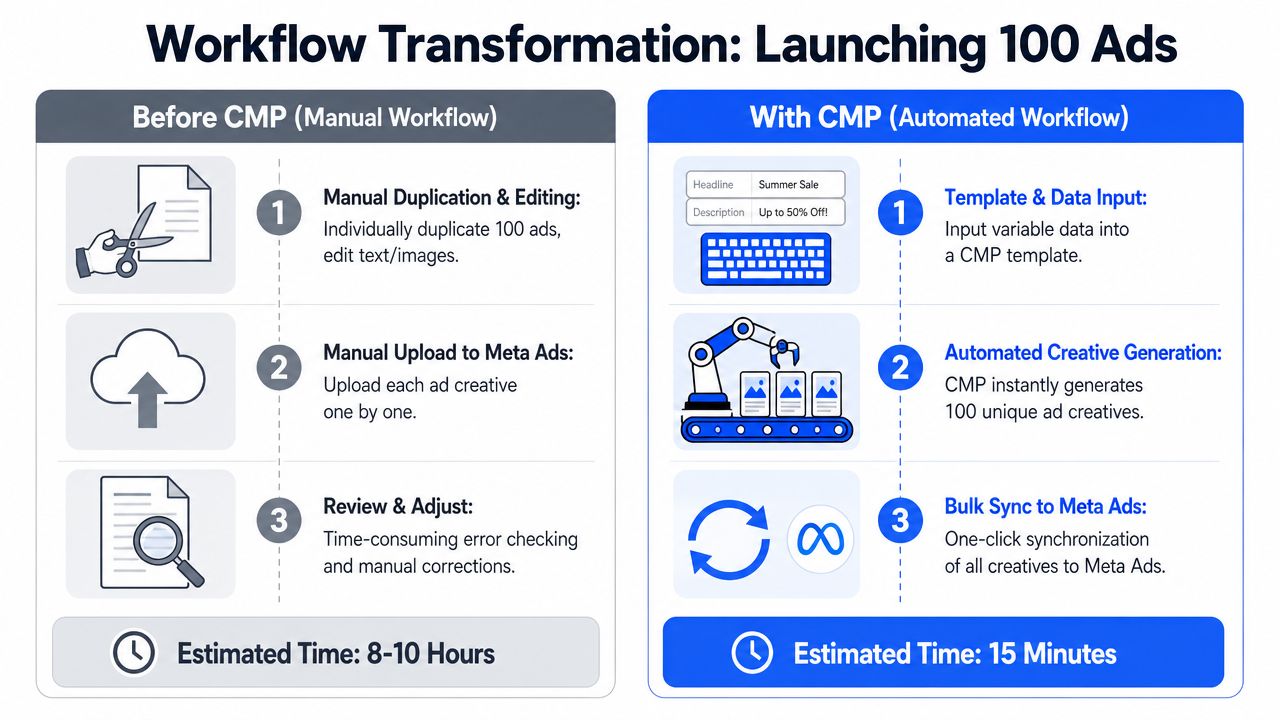
Workflow Transformation A Side-by-Side Comparison
The difference between manual launch and CMP-driven launch is easiest to understand when you walk through the same job both ways.
Manual workflow inside Ads Manager
Take a launch of 100 ads across several ad sets with mixed image and video assets.
A buyer starts by uploading files manually, creating or duplicating ad sets, pasting copy into each ad, checking naming, adding URLs and UTMs, reviewing previews, and confirming settings. Somewhere in the middle, Ads Manager slows down, previews fail to load, or a duplicated ad inherits something that now needs fixing.
Then the review pass begins. Did the right 9:16 assets land in the right ad set? Did all headlines paste correctly? Did naming stay consistent? Did any default setting change during duplication?
That's why launch work drags. The time isn't spent on strategy. It's spent on repetitive confirmation.
A practical comparison from the market is useful here. Apogee's bulk upload guide for Meta ads says brands testing 50+ creatives per week consistently outperform those launching only 5. That's the strategic reason workflow matters. Slower launch systems suppress test volume before performance ever has a chance to improve.
Later in the process, seeing the workflow in action helps clarify what buyers are trying to remove from their day-to-day operations.
CMP workflow for the same launch
Now take the same 100 ads through a proper CMP workflow.
The team starts with approved assets, approved copy blocks, and a defined structure for campaign, ad set, and ad naming. Creative variants are grouped in bulk. Format detection and routing happen automatically. UTM rules are applied globally. Publishing is handled as a batch instead of a line-by-line task.
The launch becomes more like operations management than ad assembly.
| Task | Manual workflow | CMP workflow |
|---|---|---|
| Asset handling | Upload each file into individual ads or repeated duplicates | Ingest assets in bulk and map them once |
| Copy setup | Paste and check per ad | Apply approved copy blocks across many ads |
| Naming | Type or edit manually under deadline pressure | Apply rule-based naming automatically |
| QA | Review ad by ad inside Ads Manager | Review structure before publish, then spot-check |
| Publishing | Repetitive clicks through the interface | Batch publish from one workflow |
The result isn't only speed. It's consistency. Teams make fewer unforced errors, reporting stays cleaner, and launch capacity no longer depends on who has the patience to sit in Ads Manager for hours.
How to Evaluate the Right Creative Management Platform
A lot of tools look good in a demo because every demo is built around ideal conditions. The critical test is whether the platform removes friction from a launch you already run every week.
Check integration depth not just export features
The first question is simple. Does the tool only prepare assets, or does it control the launch workflow into Meta?
That distinction matters. Plenty of platforms are good at creative generation but weak at campaign execution. If the final mile still happens inside Ads Manager, your buyers still inherit the worst part of the process.
Native Meta bulk upload doesn't fully solve this either. According to AdsUploader's write-up on Meta bulk uploads, Meta Ads Manager's Import & Export feature has a file size limit of approximately 2 MB, which usually caps uploads at several hundred ads per file. That creates a practical bottleneck for agencies and teams launching 100 to 200+ ads across multiple markets in one workflow.
So ask sharper questions:
- Does it publish directly into Meta, or only export data?
- Can it control campaign, ad set, and ad-level setup?
- Can it apply naming and UTM rules without manual clean-up later?
Test speed on a real launch scenario
Most buyers underestimate UI speed until they compare tools directly.
You don't need a polished proof of concept. Use a real launch. Take a batch with mixed formats, several copy variants, and multiple ad sets. Then watch where the time goes. If the platform adds new approval steps, hidden sync delays, or a clunky review process, it may instead relocate the bottleneck.
A good CMP should feel faster than Ads Manager within the first hour of use. If it doesn't, the team won't adopt it properly.
Make multi-account control part of the buying decision
Agencies and operators handling several brands need more than bulk upload. They need account separation, role clarity, and a way to keep standards consistent without rebuilding the process every time.
Look for these traits:
- Multi-account management: You should be able to move between client or brand accounts without rebuilding workflow rules.
- Role separation: Designers, operators, and approvers shouldn't all need the same level of access.
- Reusable operating logic: Naming systems, launch templates, and copy structures should transfer cleanly.
Pricing matters too, but only after workflow fit. A cheap tool that still forces manual rescue work costs more than it looks.
Your First 90 Days An Implementation Roadmap
Most CMP rollouts fail for one reason. The team buys software before it defines the operating rules the software is supposed to enforce.
Days 1 to 30 lock the operating system
Start with naming. Decide how campaigns, ad sets, ads, and UTMs will be structured. Keep it simple enough that buyers will use it, but detailed enough to support reporting across offers, markets, formats, and testing angles.
Then define ownership. Someone approves templates. Someone controls final launch. Someone maintains copy libraries and link rules. If those responsibilities stay fuzzy, the platform becomes another shared tool that everyone touches and no one manages.
Days 31 to 60 run a controlled pilot
Don't migrate the whole account structure at once. Pick one repeatable workflow, such as weekly creative testing for prospecting or localised variants for one offer, and run it through the new process.
Compare the old and new workflow on practical outcomes:
- Launch reliability: Did ads go live cleanly?
- Reporting clarity: Did names and tracking stay consistent?
- Team effort: Did buyers spend less time on setup and correction work?
Use the pilot to identify where the process breaks. Usually it's not the platform. It's sloppy inputs, unclear naming, or missing approval standards.
Days 61 to 90 standardise and expand
Once the pilot is stable, document the launch sequence. Keep it short. A one-page SOP is better than a long internal wiki nobody opens during a deadline.
Then expand by workflow, not by enthusiasm. Add more campaign types, more markets, or more team members only after the first motion is dependable. The point of a creative management platform is repeatability. If every launch still feels custom, adoption hasn't really happened.
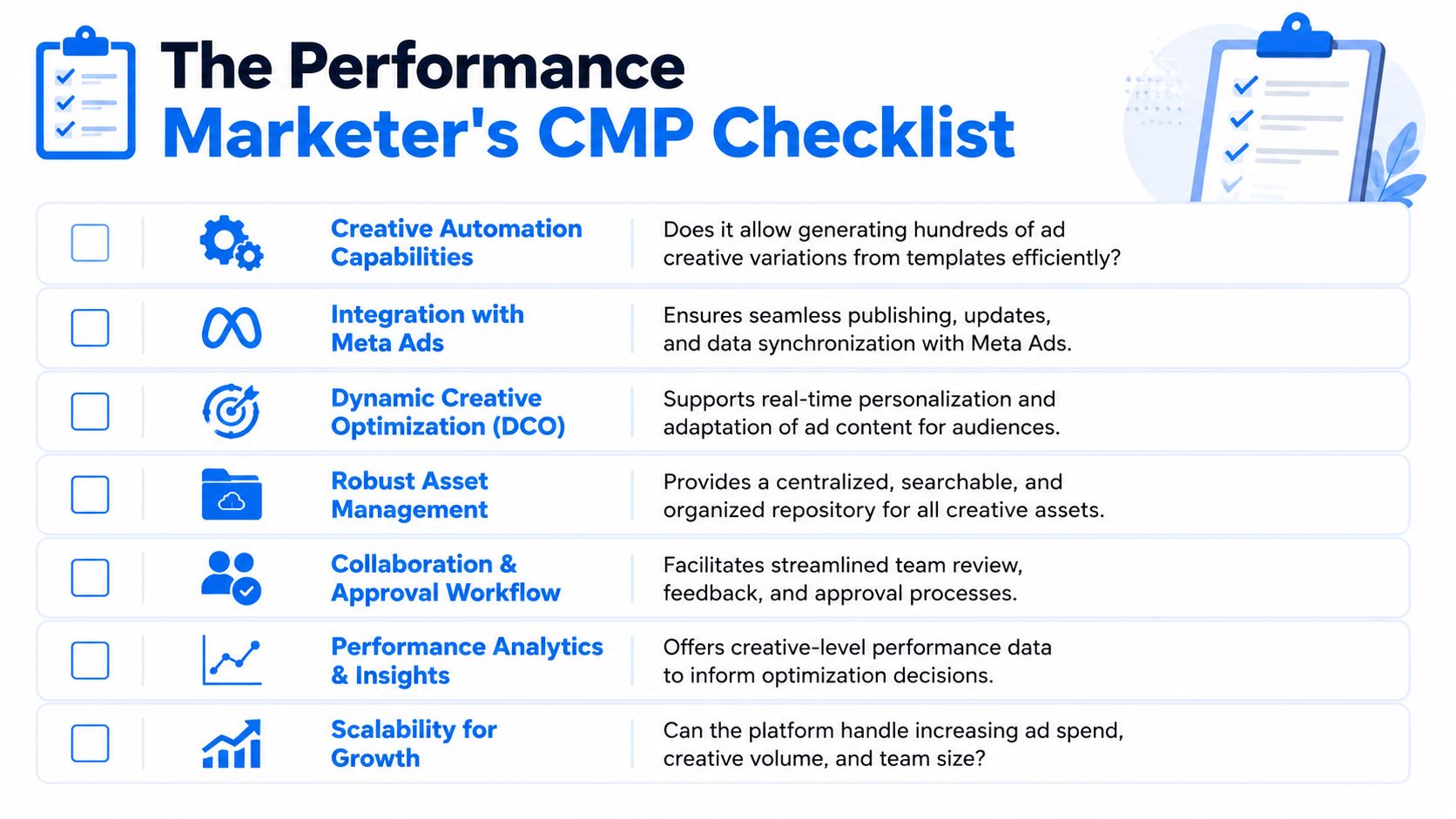
The Performance Marketer's CMP Checklist
The easiest way to judge a creative management platform is to stop asking whether it has “features” and ask whether it reduces launch friction in Meta.
Use this checklist before you commit:
- Bulk launch capability: Can the platform take a large batch of creatives, copy, and destination URLs and turn them into live ads without one-by-one intervention?
- Meta-native workflow control: Does it handle real publishing and ad structure management, not just asset export?
- Naming enforcement: Can it apply rules at campaign, ad set, and ad level so reporting stays clean?
- Asset routing: Can it separate square and vertical assets without manual sorting headaches?
- Creative intent protection: Can the team control how Meta-specific settings behave so approved creative doesn't drift during launch?
- Approval clarity: Can designers, operators, and reviewers work in one flow instead of bouncing between tools?
- Multi-account practicality: Can an agency or in-house group manage several ad accounts without rebuilding everything?
- Usability under pressure: Is the interface faster than Ads Manager during a live production day?
The best CMP isn't the one with the longest feature list. It's the one your buyers will still trust on a high-volume launch day.
A lot of teams don't need more creative ideas. They need a cleaner system for getting approved ideas into market quickly, consistently, and without introducing avoidable errors. That's where a creative management platform pays off.
If you want a tool built around the exact Meta workflow problems covered here, Rapid Ads is worth a close look. It's particularly strong for bulk uploading, enforcing naming conventions, managing multiple ad accounts, and stopping Advantage+ settings from drifting during launch, which makes it a practical fit for media buyers and agencies pushing large creative volumes through Meta every week.