The standard advice on conversion tracking on Facebook is backwards. You're told to install Conversions API, watch reported purchases rise, and treat that rise as proof that tracking is fixed. It isn't. More events received is not more people matched, and more people matched is not more incremental sales. Conversions API is a data-quality pipe, not a privacy bypass and not a guarantee that Meta can credit an order to an ad.
Treat every higher purchase count as a claim. That claim has to survive your order database, your deduplication logic, your match quality, and one consistent attribution window before it earns a budget change. If it can't, you're scaling an accounting artifact, not demand.
Table of Contents
- How to Install the Pixel and Conversions API
- How to Deduplicate Pixel and Server Events
- Attribution Windows and Aggregated Event Measurement
- Three Checks Before You Trust a Purchase Count
- Fixes When Purchases Do Not Match Orders
- Scale Spend Only After the Stream Agrees
How to Install the Pixel and Conversions API
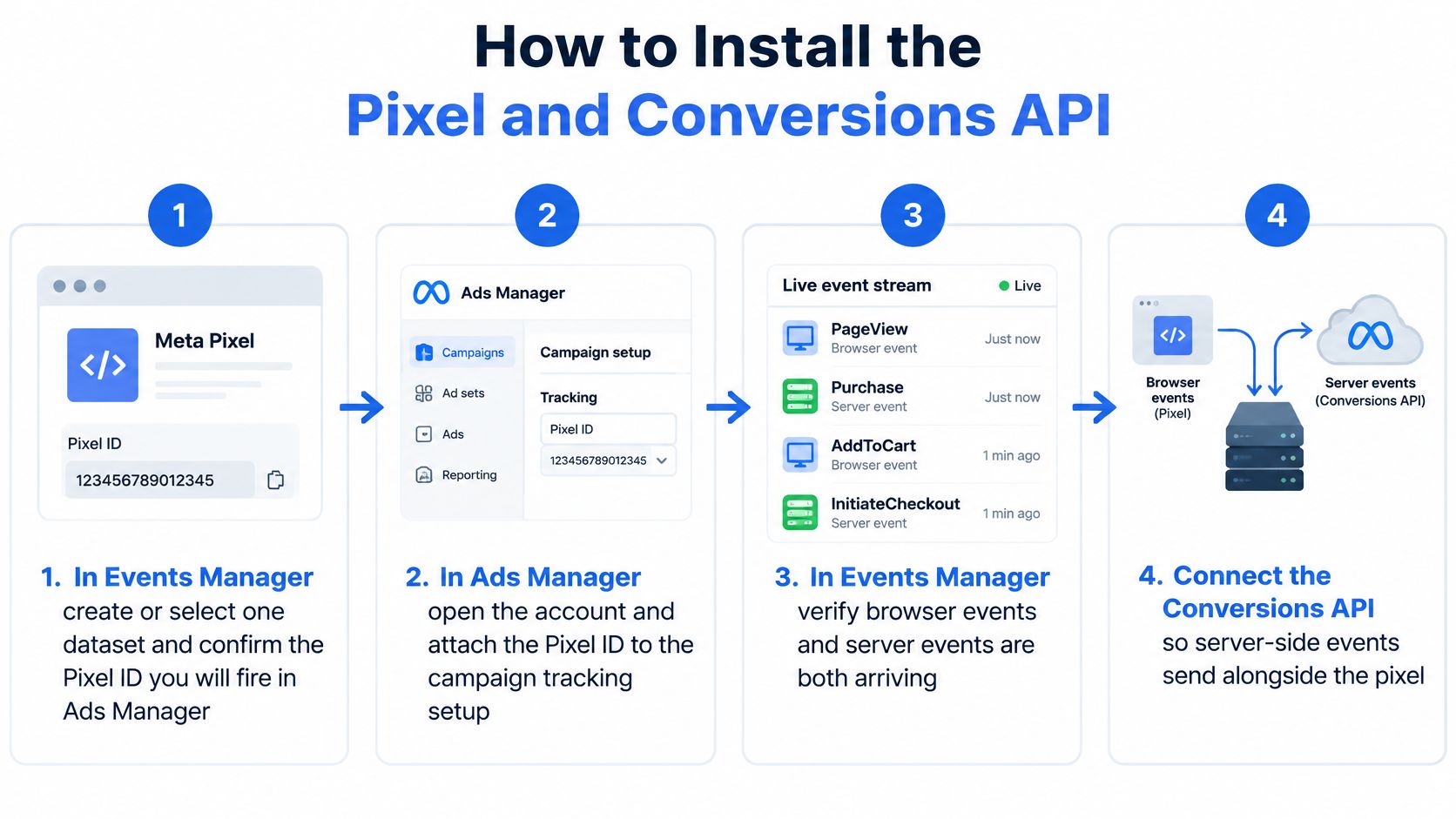
Run the Meta Pixel and Conversions API as two paths into one dataset, not as competing setups. The browser path captures page context quickly. The server path gives you redundancy when the browser fails. For broader context on why that redundancy matters for attribution, Tagada's guide to server-side tracking for accurate attribution is worth reading alongside your implementation notes.
The Dual-Pipe Install in Order
Number the work and attach the failure each step prevents.
Create or select one dataset in Events Manager. Confirm the Pixel ID you'll fire in the browser is the same dataset your server will use. This prevents browser and server events landing in separate datasets where they can't deduplicate or support the same optimization event.
Lock a funnel taxonomy and don't rename it mid-flight. For ecommerce use PageView, ViewContent, AddToCart, InitiateCheckout, Purchase. For lead gen use Lead at the committed step. Send the correct action_source and event source URL on every event. Renaming events breaks optimization history, custom audiences, and LAL seeds built on the old names.
Install the Pixel on every landing page and checkout step that can produce those events. That includes pages reached from both ABO and CBO ad sets. Fire Purchase or Lead only after the success state, not on the button click. Firing on click counts abandoned payments and failed form submissions as conversions.
Generate a Conversions API access token for that dataset. Send the same events from your server, CRM, or offline source. Meta processes server events in the same way as Pixel, SDK, MMP, offline, and CSV events, so a Purchase confirmed by a payment webhook belongs in the same stream as the browser Purchase. This prevents offline and CRM conversions from sitting outside the dataset you optimize against.
Send the full payload on every event. Include value, currency as an ISO code, event_time, client IP, and user agent. Add whatever consented identifiers you hold, including hashed email or phone, fbc, and fbp. Thin payloads arrive but don't match, and unmatched events can't support attribution or delivery optimization in the way matched events can.
Set Purchase value to the actual order total. Use the number you'll later reconcile against orders, not a placeholder like 1.00. A placeholder makes ROAS and value optimization meaningless even when the event count looks right.
Remove the second tag if two implementations fire the same event. If Google Tag Manager and a hardcoded Pixel both fire Purchase, turn one off. Duplicate browser fires inflate purchases before the server copy even arrives.
The Meta Conversions API best practices documentation makes the design principle clear. Use the Pixel and Conversions API together, send permitted customer and context signals, and validate delivery, coverage, match quality, and deduplication in Events Manager. Browser-only tracking leaves gaps from ad blockers, browser restrictions, connectivity failures, and page-load errors.
Operating rule: The server path is redundancy for events you're allowed to send. It isn't a replacement you switch on and forget.
Validate Before Any Budget Change
Open Test Events in Events Manager. Enter the browser test code, complete one real Purchase or Lead, and confirm one browser event and one server event share event_name, numeric value, ISO currency, and event_time. If times or values differ, fix the payload before you touch budgets.
Read match quality and deduplication on that test. Then reconcile Purchase or Lead totals to your order or lead database daily. When a gap opens suddenly, split it by browser, country, device, and checkout path. A country-specific gap points to consent or a localized checkout. A device-specific gap points somewhere else entirely.
Don't announce that Conversions API lifted conversions until that reconciliation holds for several days. A one-day spike in Events Manager is often a duplicate fire, a second tag, or a delayed server batch. Your CPA decision should wait for the order database to agree.
How to Deduplicate Pixel and Server Events
The same Purchase sent by the browser and the server is two events unless you give Meta a deduplication key, and a doubled purchase count halves CPA. That's the whole problem. Everything else is implementation.
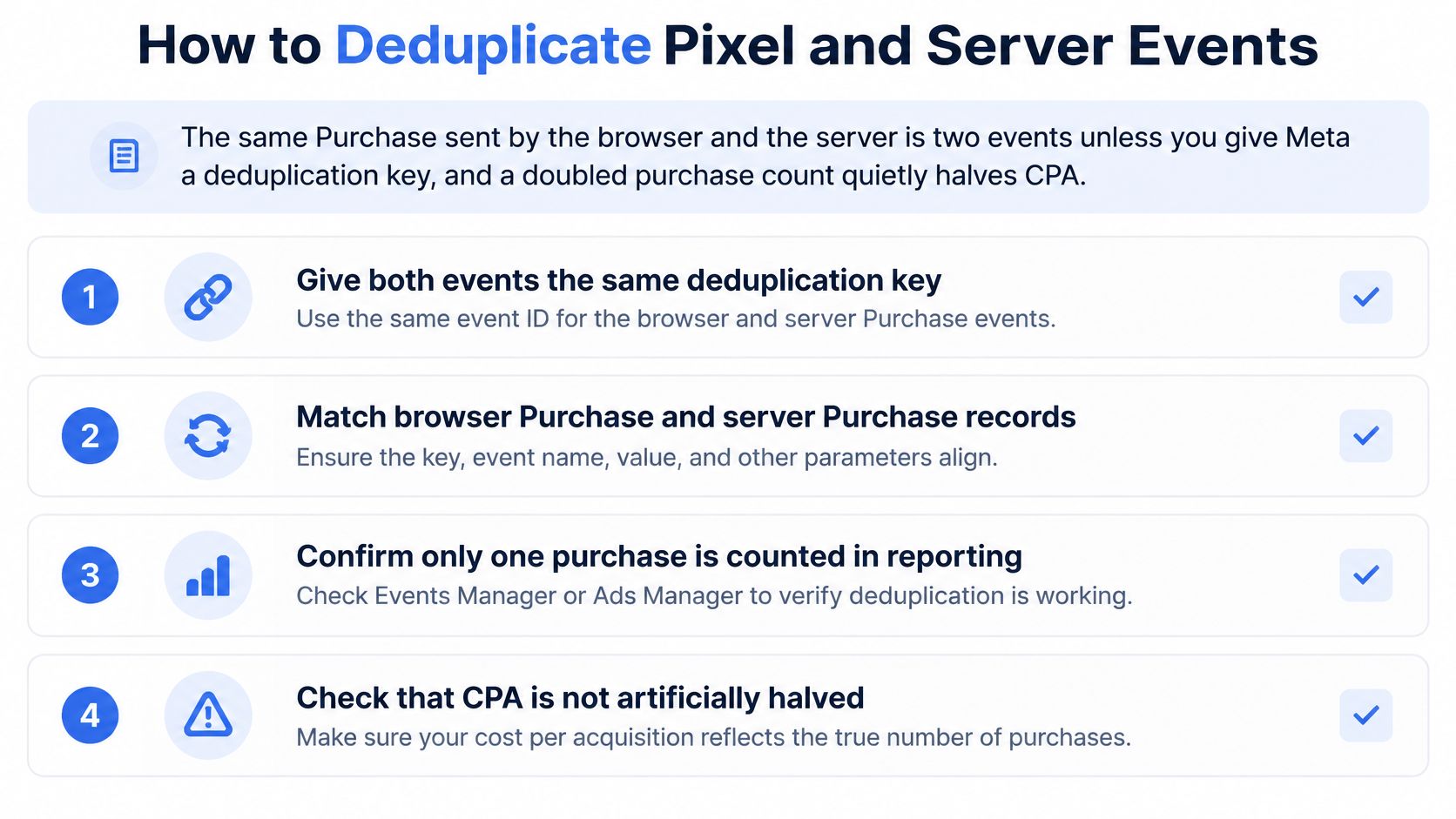
Generate one ID per real order or lead at the moment the conversion is committed. Don't let each tag invent a random ID. Pass that exact string as event_id on the Pixel event and on the Conversions API request, with the identical event_name. Meta keeps the event that arrives first and drops the duplicate when the keys match.
One Order Walked Through Both Paths
Say order 100482 completes for 86.40 USD. Your system creates event_id as order_100482. The thank-you page fires a browser Purchase with that ID, value 86.40, and currency USD. When the payment webhook confirms, your server sends the same Purchase with the same event_id, value, and currency.
In Events Manager you should see both events received and one deduplicated. If you see two counted Purchases, the keys didn't match. Check for whitespace, different prefixes, a regenerated ID on page refresh, or a server payload that used the payment intent ID while the browser used the order ID. Near-duplicate payloads with different IDs won't collapse.
The Meta deduplication help documentation states that browser and server events should use the same event_name and the same unique event_id for each transaction, and that Meta can also use matching event_name plus external_id or fbp as an alternative route. It also says Meta keeps the first event and discards the duplicate when events are otherwise similar.
| Match route | Fields that must be identical | Result if they match |
|---|---|---|
| event_name plus event_id | The same event name and the same unique event_id | Meta keeps the first event and drops the duplicate |
| event_name plus external_id | The same event name and the same external_id | Alternative when checkout cannot share one event_id |
| event_name plus fbp | The same event name and the same fbp value | Alternative path; similar payloads with different IDs do not collapse |
The backup keys help when a third-party checkout can't share one event_id cleanly. They're not a reason to skip the primary key where you control both paths. One transaction-level ID, created once and passed twice, is easier to audit than matching logic spread across systems.
Watch the walkthrough below, then prove the result in your own Events Manager rather than assuming your integrations reconcile.
Timing matters too. Send the server event as soon as the webhook lands. If the server copy is delayed, the browser event stands alone for reporting and a late copy creates reconciliation noise, even when Meta eventually deduplicates it. Batch uploads that arrive hours later make same-day CPA reads unreliable.
Confirm deduplication in Test Events with a real transaction. Look for browser and server events paired under one kept event. Then check the deduplication rate in Events Manager over a full day, because one clean test doesn't prove that every checkout path, payment method, and upsell flow passes the same ID.
A deduped server event improves transmission of events you're allowed to send. It doesn't create attribution for users who refused tracking.
Attribution Windows and Aggregated Event Measurement
There's no single Facebook conversion number. There are several numbers, each produced by a reporting rule you selected. If you don't record the rule, you can't compare the results.
| Setting | What gets credit | Where it is set | Comparison risk |
|---|---|---|---|
| 1-day click | A conversion within 1 day after an ad link click | Ad set, Optimization and delivery | Undercounts longer consideration and makes CPA look worse |
| 7-day click | A conversion within 7 days after an ad link click | Ad set, Optimization and delivery | Not comparable with 1-day click ad sets in the same campaign |
| 1-day view | A conversion within 1 day after an impression, no click required | Ad set, Optimization and delivery | View-through credit inflates retargeting and branded demand |
| 28-day click | A conversion within 28 days after a click, where available | Compare columns in Ads Manager | Historical CPA breaks if the window changed and the label did not |
Attribution is selected at the ad set level under Optimization & delivery, according to the Meta attribution settings help page. Two ad sets in one campaign can therefore use different settings and produce non-comparable CPA or purchase totals for the same site, same day, and same orders.
Set a House Rule and Label It
Pick one window for internal decisions. Write it into the reporting label, the dashboard title, and the export filename. A column called Purchases is not a definition. A column called Purchases, 7-day click, account timezone is.
Never stack a 1-day click ABO test against a 7-day click CBO scaling campaign and declare a winner on CPA. The CBO campaign has a longer credit window, so it will collect conversions the ABO test cannot claim. You'd be comparing reporting rules, not creative or audience quality.
Where you need a broader view across channels, Quikly's framework to compare attribution models for your store helps you place Meta's rule-based credit next to other models without pretending any one of them is the full customer journey. Use Ads Manager's compare function across 1-day view, 1-day click, 7-day click, and, where available, 28-day click to see how much of your reported performance is window choice.
A CPA improvement after a window change isn't an optimization win. It's a longer ruler.
Retire the Legacy AEM Checklist
Many audits still chase the old Aggregated Event Measurement workflow. The current Meta Aggregated Event Measurement documentation states that advertisers no longer need to prioritize eight conversion events per domain for web conversion optimization. It also states that value sets aren't required to use value optimization, and domain verification isn't required specifically for event configuration, although verification may still be needed for other purposes.
Stop auditing whether Purchase is ranked in a legacy eight-event list. Audit whether the optimization event arrives with value, currency, and the parameters Purchase or Lead optimization expects. That's what blocks spend now.
Modeled and aggregated results exist because privacy restrictions removed some directly observed signals. After App Tracking Transparency, some conversions couldn't be observed at person level, so reporting had to estimate part of the total. That doesn't make modeled numbers fake, but it does mean you must record whether modeled results are included before comparing CPA across markets or periods.
Before any cross-market comparison, document four fields: attribution window, timezone, click versus view rules, and whether modeled results are included. If one market report uses 7-day click in the ad account timezone and another uses 1-day click in a local reporting timezone, the CPA gap may be bookkeeping, not performance.
Three Checks Before You Trust a Purchase Count
Pull three numbers for yesterday, in one timezone and one window: Ads Manager purchases, Events Manager received events, and orders in Shopify, your CRM, or your lead database. If you've never lined them up side by side, you don't know which number you've been optimizing.
| Question | Where to look | Pass looks like | Do not conclude |
|---|---|---|---|
| Was the event received? | Events Manager versus orders or leads, same timezone and window | Counts align before any bid change | A lower Ads Manager total means sales fell |
| Was it matched to a person? | Event match quality, fbc, fbp, hashed email or phone | More than one clean customer parameter, IDs kept from the first page view | High delivery percentage means strong matching |
| Did the ad cause it? | Fixed attribution setting, then Conversion Lift or a geo holdout when volume allows | Incremental conversions, not credited conversions | Attributed ROAS is causal ROAS |
Received Is an Implementation Question
Received means Meta got the event. Compare backend orders or leads with Events Manager before touching cost caps or budgets, as the Meta best practices guidance for conversion measurement directs. A gap here reveals implementation loss or duplication, not weak creative.
Browser debugging helps you find where loss starts. If you need a practical walkthrough of the browser-side check, our guide to the Facebook Pixel Helper for event validation covers how to confirm what the page fired. But a clean browser fire still doesn't prove the server copy arrived, matched, or deduplicated.
Matched Is an Identity Question
Matched means Meta tied the event to a person. A high delivery rate isn't match quality. One customer-information parameter may be insufficient, and some visitors can't be matched because they don't have a Meta account. No payload fixes that second group.
Capture fbc and fbp on the first page view and preserve them through checkout, including across subdomains and payment redirects. Normalize email and phone before hashing, because malformed source values produce hashes that can't match. Trim spaces, lower-case email, and format phone consistently before you hash anything.
Caused Is an Experiment Question
Caused means the ad produced a conversion that wouldn't otherwise have happened. Attributed ROAS doesn't answer that. Conversion Lift does, by comparing a test group exposed to ads with a control group that isn't exposed. Holdouts and geo tests answer it in other ways, especially where retargeting or branded demand inflates credited conversions.
The pipes themselves are broad. The Pixel records browser actions. Conversions API can send server, CRM, app, messaging, and offline events into the same dataset. Breadth helps you record more of the funnel, but it doesn't change consent.
Meta's Conversions API consent guidance makes that boundary explicit. Conversions API must still comply with consent requirements, including Europe's ePrivacy rules and Apple's App Tracking Transparency framework. A server hit can't lawfully restore person-level credit that a user withheld.
Don't scale an ad set until each check has a pass or a named gap. "Received, matched at a thin rate, causality untested" is an honest status. "Tracking is fixed because purchases went up" is not.
Fixes When Purchases Do Not Match Orders
Start with the doubled-purchase symptom because it wastes money fastest. If Events Manager shows roughly twice your orders, budget decisions are already being made on a CPA that's about half the true number. Classify the gap before you change spend.
| What you see | Usual cause | Fix |
|---|---|---|
| Purchases about 2x orders | Pixel and server both counted, or Purchase fired on the button and the thank-you page | One event_id per order on both paths; fire only after payment success |
| Events Manager far below orders | Browser-only Pixel, blocked script or failed page load | Add Conversions API for the same event_name and confirm server receipt |
| High delivery, poor match quality | One customer parameter, or email and phone hashed before normalising | Store fbc and fbp on the first page view; trim and lower-case email, then hash |
| Value optimisation will not spend | value or currency missing or not an ISO code | Send numeric order value and currency on Purchase before raising budget |
| iOS purchases collapse, orders do not | ATT opt-out and modeled reporting after iOS 14.5 | Compare with the order database; a reported drop is not automatically a sales drop |
Diagnose in the Order That Wastes the Least Spend
Split the gap by browser, country, device, and checkout path for the day the lines diverged. A gap concentrated in one browser suggests blocking or a tag failure on that browser. A gap in one country suggests consent configuration or a localized checkout. A gap across everything suggests a release broke the event itself.
For purchases at about double orders, open Test Events and look for one browser event and one server event sharing event_name and event_id. If they don't share the ID, you've found it. Also check whether Purchase fires on the pay button and again on the confirmation page. That pattern survives deduplication because the two fires often carry different IDs.
For Events Manager far below orders, check whether server events exist at all. Browser events with no server twin usually mean the Conversions API token, dataset, or webhook path is broken, or the integration was never connected to the checkout you use. Confirm server receipt in Events Manager, not just a successful response in your own logs.
Where your reporting stack pulls net sales from the store platform, Chartsy's explainer on understanding BigCommerce net sales is a useful reminder to define whether refunds, discounts, and taxes are inside the revenue number you're reconciling against. Reconcile Purchase value to the same revenue definition every day. Otherwise you'll chase a value gap that's really a finance definition.
The iOS Pattern Isn't a Dead Pixel
A sudden iOS-only drop, with Android and the order database flat, is consistent with opted-out traffic and modeled reporting. A 2024 academic study of Facebook advertising from September 2020 through October 2022 found that after ATT adoption associated with iOS 14.5, the observed number of conversions fell sharply while cost per conversion increased by nearly 50%. The researchers cautioned that the results reflected both advertising performance and measurement error, because Facebook could no longer reliably log conversions for users who denied tracking permission.
That caution is the operating lesson. A decline in reported conversions doesn't necessarily equal an equivalent decline in actual sales or leads. Check the order database first. If orders held, don't cut a working campaign to fix a measurement artifact.
Low match quality with healthy delivery usually means one weak parameter or a hash built from badly formatted data. Add clean parameters before you add events. Missing value or currency is a separate failure: the event name can be correct while value optimization still can't spend properly.
A legacy domain still managed around eight prioritized events is an outdated playbook. Current rules don't require that ranking or a value set, but the chosen optimization event still has to arrive complete. Reallocating audit time from ranking to payload completeness closes more gaps.
Hold budget changes until the gap is classified as loss, duplication, match failure, or attribution-window mix. Our guide to Meta Ads reporting for reconciliation workflows helps if your dashboard blends those categories into one purchase column. Each category has a different fix, and three of the four shouldn't change your bids at all.
Do not optimize against an unclassified gap. You'll tune delivery to your tracking bug.
Scale Spend Only After the Stream Agrees
Scale an ad set only when four checks pass for the optimization event: Events Manager Purchase or Lead totals match the order or lead database for the same timezone and window, deduplication shows one kept event per order, match quality uses more than one clean customer parameter, and every ad set in the comparison shares one attribution window. Hold budget while a gap is still unclassified.
Then separate credit from cause. Between March 2022 and November 2024, Meta's analysis of 307 Conversion Lift studies involving 54 advertisers found that rule-based attribution had a median 31% undervaluation of incremental conversions, as reported in this summary of Meta's Conversion Lift analysis. A modest reported ROAS can hide real lift. A high retargeting ROAS can be credited demand rather than incremental sales.
Run Conversion Lift, a geo test, or a holdout after the stream is fixed, not instead of the fix. If you're deciding which design fits your volume, our explainer on incrementality testing and holdout design sets out the trade-offs. Rapid Ads is an Official Meta marketing partner, and in one comparison 100 creatives took 1h 57m by hand while Rapid Ads launched the same ads in 8m 39s. The Rapid Launch plan includes AI ad set grouping and ad copy, auto-naming conventions, and copy templates with CSV import, which keeps ad labels aligned with event reports when you launch across accounts.
Lock event names, UTM parameters, and ad set naming before the next large launch. Daily reconciliation only stays possible when the labels in Ads Manager map cleanly to the events in Events Manager and the orders in your database.
Once your Pixel and Conversions API events reconcile to real orders, the remaining bottleneck is launching clean, consistently named ads without setting drift across accounts. Rapid Ads handles bulk uploading, enforced naming conventions, UTM consistency, and multi-account launches so your reporting labels stay aligned with the event stream you just fixed. Visit Rapid Ads to launch your next batch with the naming and structure your measurement depends on.