You know the feeling. Ads Manager is open, the last creative pack still isn't uploaded, a CBO just reverted a setting you swear you saved, and someone on Slack is asking why the naming is different in two accounts. At that point, the problem isn't creativity, it's configuration drift, and every duplicated campaign is a small, expensive bet that the next launch will behave exactly like the last one.
Configuration templates fix that by turning launch setup into a parameterized prototype instead of a one-off copy job. That's the same shift network and infrastructure teams made when they moved from manual configs to reusable templates with validation, drift control, and rollback. In Meta Ads terms, that means campaign defaults, ad-set defaults, naming tokens, UTM macros, and Advantage+ controls stop living in someone's memory and start living in a repeatable system.
Table of Contents
- Why Configuration Templates Matter When You Ship 100 Ads a Day
- Anatomy of a Meta Ad Configuration Template
- Naming Conventions That Survive 200 Ads Across Five Markets
- Building the Template Workflow From CSV to Live Ads
- Versioning, Validation, and Rollback for Ad Templates
- Five Failure Modes Templates Prevent And How to Catch Each
- A 14-Day Rollout Plan for One Account Then an Agency
Why Configuration Templates Matter When You Ship 100 Ads a Day
At 11 p.m., the buyer is usually not optimizing. They're uploading the 80th creative, checking whether the same CBO cap got applied again, and fixing a naming typo that only surfaced after the client saw a screenshot. That's not a creative problem, it's a source-of-truth problem.
Cisco's template workflow makes the same point in a different domain. Their guidance starts with a working device backup, inserts placeholders, and saves the result as a reusable template, which turns a static config into a parameterized workflow. Zabbix takes the same approach for monitoring, with template-driven defaults for update intervals, history, and trends, so a fleet can behave consistently without each item being hand-tuned. Meta launch work needs the same discipline.
The number that matters here is time. If one batch of 100 ads takes 6–8 hours of one-by-one uploads, manual naming, UTM tagging, and setting checks, that's the baseline the template stack has to attack. The waste isn't just clicking, it's re-litigating the same decisions every time a new ad set or market goes live.
Practical rule: if a launch decision should be the same every time, it belongs in the template. If it should vary by market, audience, or creative pack, it belongs in a placeholder.
A proper Meta configuration template doesn't just store copy. It carries the campaign objective, the CBO or ABO choice, special ad category handling, audience rules, placements, cost and bid caps, schedule logic, naming tokens, UTM structure, and an Advantage+ default that doesn't get re-checked ad by ad. That's the point. You're not building a prettier spreadsheet, you're building a launch system that can survive scale.
Anatomy of a Meta Ad Configuration Template
The cleanest way to think about a Meta template is as a stack of fixed defaults and runtime variables. Nokia's template model is useful here because it distinguishes between fixed templates and flexible ones with operator-editable parameters, and Meta launches behave the same way. Some fields should never change from launch to launch. Others need to stay open so the template can adapt to a country, audience, or asset pack.
Template field layers in Meta Ads Manager
At the campaign level, the template should hold the objective, the buying type, and any special ad category flag. Those are structural choices, not creative choices. If a team keeps changing them manually, they're not iterating, they're leaking governance.
At the ad set level, the template should own the audience, placements, cost cap or bid cap, schedule, and exclusions. This creates drift. One buyer edits the audience, another forgets the exclusion list, and a third changes the schedule while duplicating the set for a second market.
At the ad level, the template should store primary text, headline, CTA, URL structure, and the Advantage+ creative enhancement toggle. The URL should be built with placeholders for campaign, ad set, and ad naming so reporting stays readable when dozens of ads are live.
Each placeholder should map to one runtime input, one audience ID, one country code, one creative pack name. If a placeholder can mean two things, reporting gets messy the moment the first 200 ads hit live status.
Here's the simple rule: keep stable settings in the template, keep true variables as inputs. That's how you stop a launch from turning into a cleanup project.
| Layer | Example fields | Parameterize? | Risk if hardcoded |
|---|---|---|---|
| Campaign | Objective, CBO vs ABO, special ad category | Usually no | Wrong buying structure across launches |
| Ad Set | Audience, placements, cost cap, bid cap, schedule, exclusions | Yes, for site or market differences | Reused targeting that no longer fits the market |
| Ad | Primary text, headline, CTA, URL, UTM values, Advantage+ toggle | Yes, for creative pack and naming inputs | Broken tracking, stale creative settings |
Naming Conventions That Survive 200 Ads Across Five Markets
A naming convention does two jobs at once. It helps you read the account, and it helps you debug the account when the screenshot is the only thing the client forwards. That's why the cheapest-looking schema often costs the most later.
The agency-favorite pattern, account-market-objective-audience-creative, is readable and traceable, especially when multiple buyers touch the same account. The downside is length. It gets unwieldy fast, and once a launch expands into several markets, the names start swallowing the interface.
The DTC-friendly pattern, market-product-format-launchdate, is shorter and easier to scan, which helps when one person owns the whole account. The trade-off is that it can get vague on audience and objective, especially when the same product runs into prospecting, retargeting, and retention lanes.
A tokenised Rapid Ads-style scheme with curly-brace placeholders is the cleanest for scale because it auto-fills at upload. That matters when the same creative pack is duplicated across accounts, because the naming logic doesn't depend on a tired operator remembering the convention at midnight.
How the three patterns hold up
| Schema | Can you slice by country fast? | Can a client read it? | Survives duplication? | Stays unique at 200 ads? |
|---|---|---|---|---|
| Account-market-objective-audience-creative | Yes | Usually | Yes | Yes |
| Market-product-format-launchdate | Sometimes | Yes | Sometimes | Sometimes |
| Tokenised placeholder scheme | Yes | Yes, if the tokens are sensible | Yes | Yes |
The right choice depends on the operating model. Solo buyers usually benefit from shorter names because they live in the account all day. In-house teams need more legibility because multiple stakeholders open the same screenshots. Agencies need the most structure, because the naming system has to survive handoffs, duplicated creative packs, and client-level reporting.
A good convention is never about looking elegant. It's about whether you can find the right campaign in 10 seconds and explain it in one sentence.
Building the Template Workflow From CSV to Live Ads
The fastest way to build a launch template is to start with a winning ad set, not with a blank sheet. Export the structure from Ads Manager, then treat that export as the baseline config. That keeps you anchored to an actual launch pattern instead of an imagined best practice.
From there, the sequence should be boring on purpose. Normalize the naming tokens, insert the UTM macros, and lock the ad-set defaults before you touch the creative packs. Google's SRE workbook recommends generating configuration from templates and then validating the output immediately, because parsing alone doesn't catch many failures. The same logic applies here. A CSV that imports cleanly can still produce a bad launch.
Use a fixed UTM pattern such as campaign, ad set, and ad name tokens in the URL so the reporting layer inherits the same structure every time. If the naming convention changes, the tracking pattern should change with it. That's where teams avoid the classic “why do these two ads look identical in reporting?” problem.
A practical launch order looks like this:
- Pull a proven baseline. Use the last good ad set as the template source, not a random draft.
- Set the essentials. Objective, buying type, placements, audience exclusions, and the Advantage+ default belong here.
- Attach the naming rules. Force the naming tokens at upload so nobody has to fix them after publish.
- Group creatives by asset type. Keep 1:1 and 9:16 assets separated where they need different placements.
- Batch upload and validate. Check that the generated output matches the template before it goes live.
What kills launch speed isn't uploading. It's manual sorting, naming cleanup, and re-checking the same defaults every time an ad set is cloned.
The time savings come from removing handoffs, not from clicking faster. A process that used to take 6–8 hours per 100 ads can collapse into 5–13 minutes per 100 ads when the template owns the repetitive work and the upload layer handles the bulk pass. That's the point of workflow design, the buyer should spend time deciding what to test, not re-entering settings that never should've been open to drift.
Versioning, Validation, and Rollback for Ad Templates
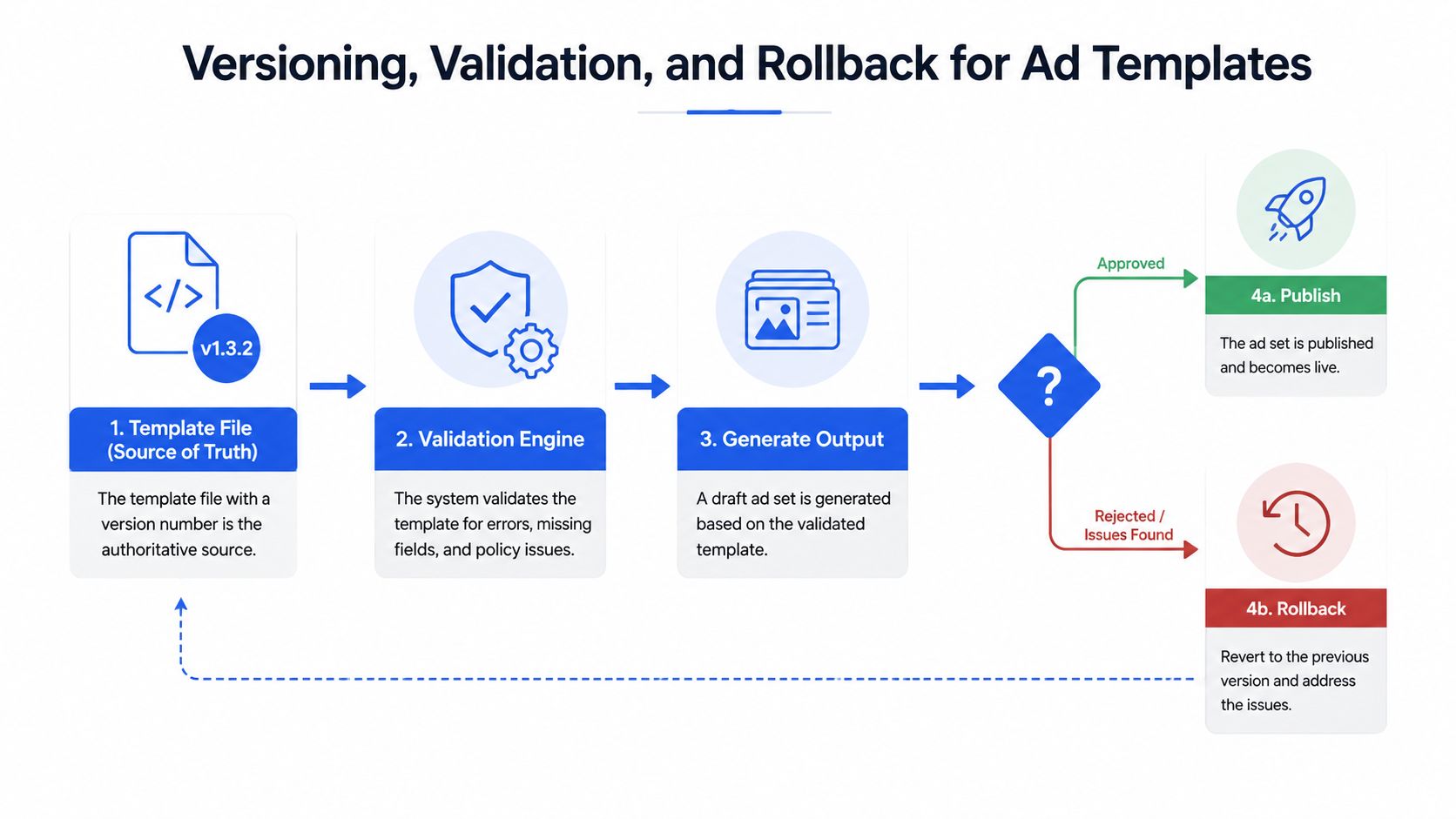
Templates only work if they're treated like real configuration, not like a folder of last month's winners. Google's SRE workbook is clear on this point, generated config should be validated before publish, because syntactic success isn't the same as operational safety. The Meta equivalent is simple, the template is the source of truth, and the launched ad set is the output.
The strongest operational model is Draft → Validated → Live. Dynamics 365 uses that kind of validation flow for reusable configuration templates, and the same lifecycle makes sense for ad deployment because it forces explicit review before anything can spend. If a field is wrong in Draft, that's cheap. If it's wrong after launch, that's budget.
The three safeguards that actually matter
Pin one template version to each launch. If a campaign is built from Template v14, don't let someone swap in v15 after creative approval. Version pinning keeps the launch auditable.
Snapshot the generated config before publish. Keep the compiled ad set record, ideally the JSON-equivalent structure you pushed. That gives you a known-good state when someone asks what changed.
Maintain a rollback path to the last stable defaults. If the new structure misbehaves, the team should be able to return to the previous template without rebuilding the account from scratch.
The reason agencies skip this is obvious, Ads Manager lets them. That convenience becomes expensive when a default flips, a cap changes, or a live template pushes a bad assumption into multiple ad sets at once. In systems terms, templates are not just a productivity layer, they're a blast-radius control.
If you can't say which template version created a live ad set, you don't have governance, you have memory.
That's why versioning belongs inside the template itself. It isn't paperwork. It's how you stop a single bad edit from becoming a full-funnel incident.
Five Failure Modes Templates Prevent And How to Catch Each
The most expensive Meta mistakes are rarely dramatic. They're small, boring, and easy to miss until performance slips. Templates help because they make the dangerous defaults visible before launch, not after the first spend cycle.
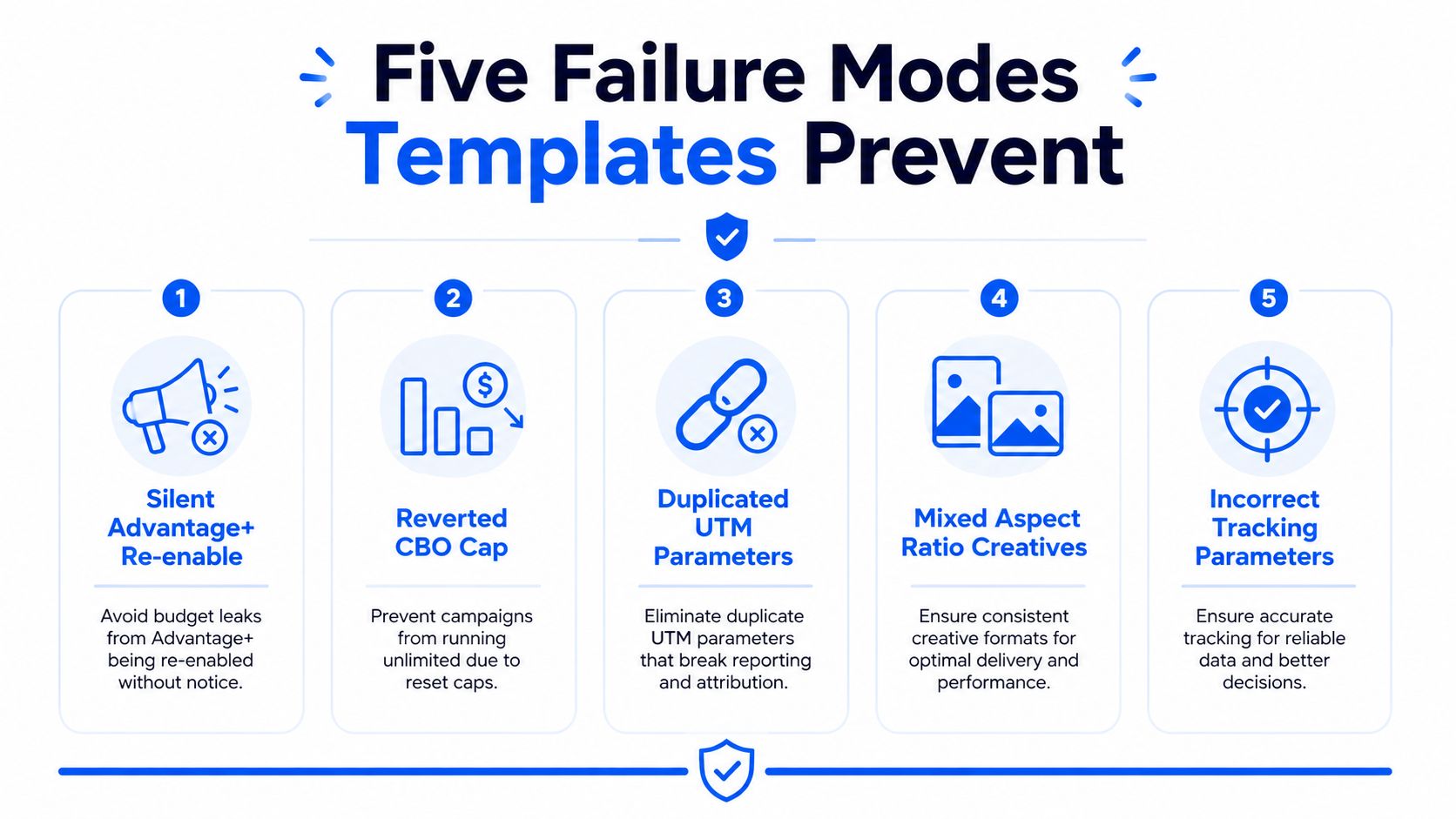
Silent Advantage+ re-enable. The symptom is familiar, the CreativeEnhancement badge shows up again, and the ad no longer behaves like the version you approved. The root cause is usually manual upload or a setting that got nudged during duplication. The fix is to make the Advantage+ toggle a template default, not an afterthought.
Reverted CBO cap. You see budget pacing drift or a cap that looks different from the last approved build. This usually happens when the launch copies an old structure and someone assumes the cap held. Put the cap in the campaign template and validate it before publish.
Duplicated UTM parameters. Reporting starts to get messy, especially when query strings collide or values repeat across fields. The root cause is manual URL editing. A template should generate the UTM pattern from one naming source, not let every ad writer improvise.
Mixed 1:1 and 9:16 creatives in the same flow. The symptom is wasted sorting time or an asset that lands in the wrong placement logic. This usually comes from bulk uploads without routing rules. Keep aspect ratio handling inside the template workflow so the asset type and destination stay aligned.
Orphan ad sets after a bulk delete. These are the leftovers nobody intended to keep. They're easy to miss, especially in busy accounts. A template-driven rollout should include a cleanup rule, because stale structures distort reporting and clutter the account.
The takeaway is simple. The template should block the mistakes that a tired buyer is most likely to make at speed. Anything less and you're just moving the error from upload time to spend time.
A 14-Day Rollout Plan for One Account Then an Agency
Days 1 to 3 are for the audit. Pull the current live account, identify the winning structure, and choose the baseline that will become the master template. Don't try to codify every edge case yet, just capture the pattern that already works.
Days 4 to 7 are for the rules. Lock naming, UTM structure, Advantage+ auto-disable, and aspect-ratio routing into the template. If you're using a platform with duplicate and copy workflows, use them to reproduce the structure cleanly across the next launch.
Days 8 to 10 are the test. Run the old workflow and the templated workflow in parallel, then log the time difference and the cleanup burden. If the templated path still needs rescue work, the template is too loose.
Days 11 to 14 are the lock-in. Make the template the only launch path for that account, then replicate it across a second account while keeping client structure isolated. Agencies should keep access clean with team seats rather than shared logins, because the launch system only works when responsibility is clear.
The right rollout isn't “go template everywhere.” It's “prove one account, standardize the logic, then scale the same launch pattern across the next one.”
If you want to validate the workflow before you commit to a full stack change, start with a single account and a finite batch. Rapid Ads offers a forever-free plan with 10 uploads and no card required, which makes it easy to test bulk uploads, naming rules, Advantage+ auto-disable, and multi-account workflows on real launches. Try Rapid Ads and build the first template around a campaign you already trust.