Search for advice on a rejected Meta ad and the same two moves come back: appeal the decision, or delete the ad and clone it into a fresh campaign. Both assume the rejection belongs to one creative. Meta's enforcement structure treats it differently. Repeat violations can extend penalties to associated users, Pages and business portfolios, which means the same unsubstantiated claim duplicated across six markets isn't six ad problems. It's one portfolio problem with six symptoms, and fixing it ad by ad leaves the pattern running.
The instinct to resubmit carries a cost the rejection notice never shows. Each clone drags the flagged element into another ad set, another account, another market, and every one of them adds a line to the account's violation history. Buyers who treat policy as an upload-time checkbox keep finding out that the expensive part of a rejection arrives weeks later, when a business portfolio goes under review and every connected account slows down at once.
What follows is built from Meta's published standards and its enforcement reporting rather than from folklore. The lesson that holds across every category is that the cheapest rejection to prevent is a category error, and the most expensive is the one you repeat.
Table of Contents
- Prohibited and Restricted Categories at a Glance
- How Ad Review Works and Why Approval Is Not Final
- Targeting and Special Ad Category Rules
- Creative and Claims Rules That Trigger Rejection
- Enforcement Levels From Ad Removal to Account Disablement
- Appeals and When to Recreate a Rejected Ad
- Portfolio Audit After a Repeat Violation
- Compliance Checklist and Pre-Launch Workflow for Bulk Launches
Prohibited and Restricted Categories at a Glance
Four questions classify almost any campaign: what the product is, who it's aimed at, what the copy promises, and whether the offer touches housing, employment, credit or politics. Answer them before you open Ads Manager, not after the first rejection.
| Category | Status | Typical trigger | See section |
|---|---|---|---|
| Deceptive practices | Prohibited | Misleading claims, fake functionality, sensational language | Creative and Claims Rules |
| Discriminatory practices | Prohibited | Targeting or copy that implies a protected attribute | Targeting and Special Ad Category Rules |
| Adult content | Prohibited | Nudity or sexual activity in creative | Creative and Claims Rules |
| Sensitive personal data requests | Prohibited | Asking for criminal history or sexual orientation without permission | Creative and Claims Rules |
| Medical and healthcare | Restricted | Unrealistic outcomes, restricted products | Creative and Claims Rules |
| Financial products and services | Restricted, Special Ad Category | Credit, loans or investment offers without declaration | Targeting and Special Ad Category Rules |
| Housing | Restricted, Special Ad Category | Housing offers with blocked audience controls | Targeting and Special Ad Category Rules |
| Employment | Restricted, Special Ad Category | Job offers with blocked audience controls | Targeting and Special Ad Category Rules |
| Social issues, elections or politics | Restricted, Special Ad Category | Political or social-issue ads without declaration | Targeting and Special Ad Category Rules |
The distinction is absolute. A prohibited ad or request fails however it's framed. No disclaimer, creative rewrite or narrow audience rescues a lead form that asks for sexual orientation without prior permission, or a creative that depicts sexual activity. A restricted ad can run, but only with the right category declaration, the restricted audience controls, or the documentation Meta asks for. Most unexpected rejections live in the restricted half, because the advertiser assumed the product was the whole question.
The four prohibited rows share a trait: they're inferences about people. Deceptive practices cover fabricated functionality and claims a normal buyer would feel misled by. Discriminatory practices cover both creative and audience selection, so a clean ad set with a proxy exclusion still fails. Adult content and sensitive data requests are the two most mechanical rejections on the list, which also makes them the easiest to catch before submission.
The restricted rows are where category discipline pays. Medical and healthcare offers get judged on outcomes and product eligibility rather than intent. Financial, housing and employment campaigns each carry a declaration requirement plus a set of audience controls that disappear the moment the category is applied, and the political row adds authorisation and disclaimer obligations on top.
Classification rule: if the offer touches housing, employment, credit or politics, assume the Special Ad Category applies and prove otherwise.
Run every new ad set against that table before you duplicate it. A category error is the cheapest rejection to prevent and the most expensive to inherit at scale, because duplication turns one misclassification into fifty.
How Ad Review Works and Why Approval Is Not Final
Meta's review doesn't fire once at upload. It starts whenever an advertiser creates or edits an ad, and it can read the creative's image, video and text alongside the targeting information, the destination URL or Facebook Page, the selected Special Ad Categories and the advertiser's permissions, as the Meta Business Help Center documents.
The sequence looks tidy on paper.
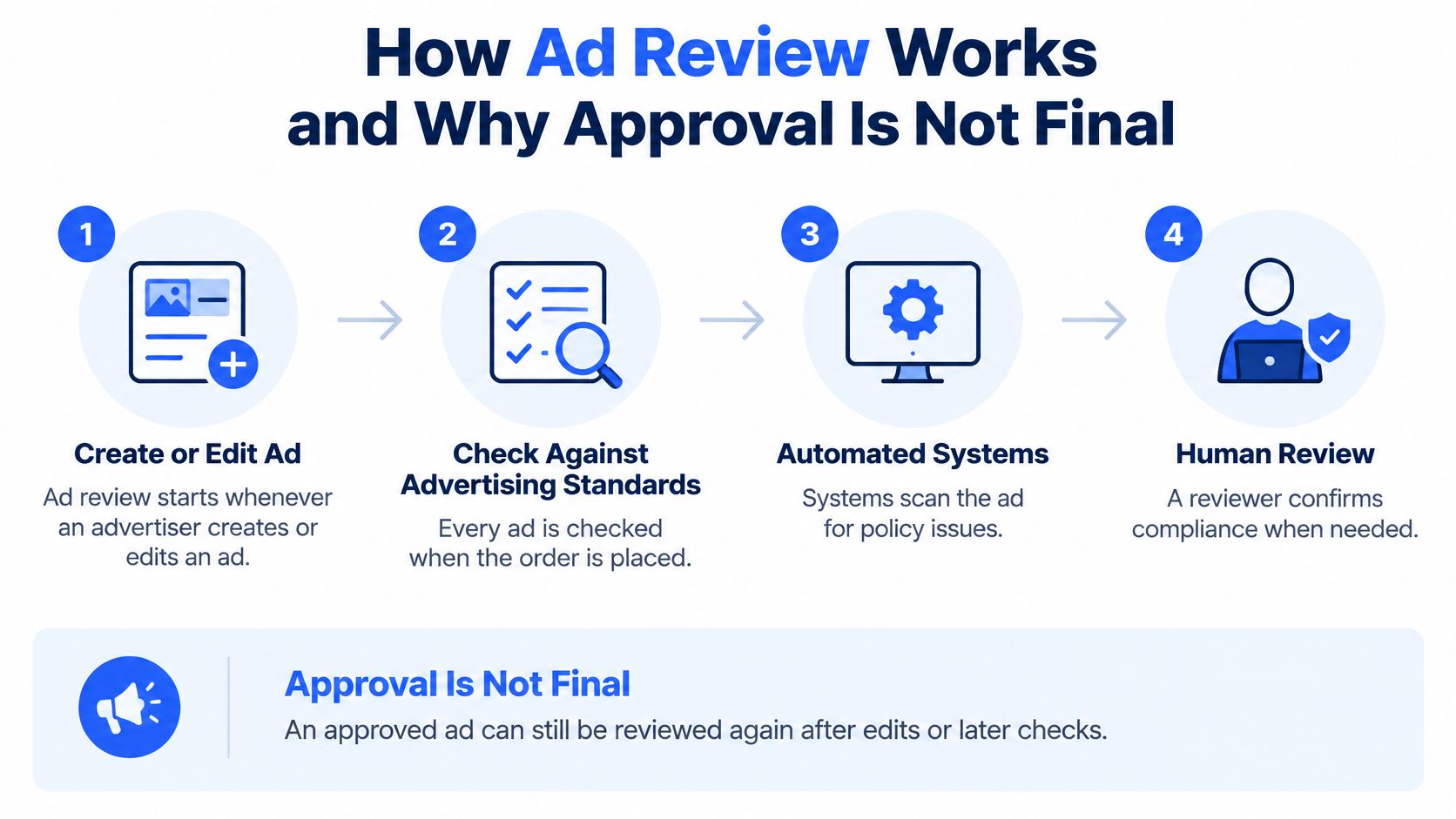
In practice it's an automated gate with a human backstop. Meta states that every ad is reviewed against its Advertising Standards when the advertiser places an order, using automated systems and, in some cases, manual review, per its Advertising Standards documentation.
The approval you see is a snapshot
Approval isn't a status you earn once. An ad can be re-reviewed after it starts delivering, and Meta notes it may not be checked against every policy before impressions are served. That single fact should reorganise how a team launches: the first green tick certifies one version of one asset at one moment, and any change to copy, landing page, targeting or category can send it back through the gate as effectively new material.
The same logic scales past the ad. Advertiser accounts can be restricted for violating the Advertising Standards, the Community Standards or other platform terms, which moves the exposure from a creative to a business entity that may cover dozens of ad accounts and client Pages.
Launch assumption: anything you edit is a fresh submission, so edit deliberately and log the change.
For EU delivery there's an extra layer that has nothing to do with creative quality. Meta must enable users to identify certain information about an ad, including the person or organisation on whose behalf it's presented and, when different, the entity paying for it. Incomplete beneficiary or payor fields are a reviewable defect on their own.
That's why every ad needs a submission record: the creative, the copy, the destination URL, the targeting parameters, the declared category and the advertiser identity, kept in a form that doesn't change. When a rejection lands three weeks later, the record tells you which version was submitted and whether the flagged element is the headline, the landing page or the declaration. Without it, the appeal becomes a guess.
Targeting and Special Ad Category Rules
The trigger is the offer, not the wording in the ad. Meta requires a Special Ad Category whenever an ad concerns housing, employment, financial products or services, or social issues, elections or politics, and selecting the wrong one, or leaving it unselected when the campaign qualifies, can lead to disapproval, according to Meta's Special Ad Category guidance.
The controls a declared category removes
For housing, employment and financial-product campaigns, Meta limits audience selection in markets including the United States, Canada and certain European countries. The controls that go missing are the ones most media buyers use by default:
- Age and gender. Standard splits are unavailable, so persona testing that relies on 25 to 34 female against 45 to 54 male stops being an option.
- ZIP or postal code. Sub-market geo targeting is blocked, which kills the city-and-neighbourhood testing most local lead-gen accounts are built on.
- Exclusions. Removing the exclusion tool is the change that breaks the most cloned templates.
- Lookalike and saved audiences. Both are restricted or unavailable in these categories.
- Advantage+ audience. Campaigns in these Special Ad Categories don't have access to it, so an automated build that assumes it's available will fail at the ad set level.
A template cloned from a standard campaign carries a 1% lookalike, a past-purchaser exclusion and a saved retargeting audience. In a declared housing campaign those assets either get stripped or block the ad, and the buyer sees a generic disapproval. Validate category status before duplicating a campaign or applying the usual LAL and exclusion stack. The mechanics of each individual control are worth revisiting before that audit; this breakdown of Meta Ads targeting options covers what each setting does at the ad set level.
Discrimination rules apply outside those categories
The non-discrimination requirement isn't scoped to the four declared categories. Advertisers can't use audience tools to wrongfully reach or exclude people on the basis of race, ethnicity, colour, national origin, religion, age, sex, sexual orientation, gender identity, family status, disability, or medical and genetic conditions, and a certification gate confirming you understand that policy can appear before approval.
The practical work sits in the proxy problem. A postcode list or an interest cluster that stands in for a protected attribute reads as clean inside Ads Manager and as a violation outside it. Document legitimate geographic or eligibility constraints in writing, then check whether automated targeting has produced an outcome the declaration doesn't permit.
Creative and Claims Rules That Trigger Rejection
A rejected ad costs one edit. The same claim stamped into a template and cloned across a batch costs far more, because repeated violations are what shift enforcement from the ad level toward the account and its linked assets. Six patterns account for most creative rejections, and each has a rewrite that keeps the offer intact.
| Pattern | Why it fails | Compliant alternative |
|---|---|---|
| Guaranteed results in days | Unrealistic expectation and misleading claim | Describe documented product features and offer terms |
| Are you struggling with debt? | Implies a personal attribute to the viewer | Compare repayment options for consolidation loans |
| Officially approved by regulators | Unsubstantiated authority claim | Name the verifiable certification and its issuer, or drop the claim |
| Only 2 left, act now | Sensationalised urgency | Show the stock level pulled from the catalogue feed |
| Free trial in the ad, paid plan on the page | Landing page inconsistent with the offer | Match the offer wording on the page to the creative |
| Suggestive swimwear crop with sexual framing | Adult content | Use wider framing and a neutral pose |
Why second-person copy fails with clean targeting
The personal-attributes rule operates on the copy side of the review. An ad may not assert or imply that the person reading it has a particular medical condition, financial hardship, family structure or other sensitive trait, per Meta's advertising policy guidance. "Are you struggling with debt?" asserts the hardship. "Compare repayment options for consolidation loans" describes the product. The rejection notice rarely identifies which element failed, so a template headline can carry the same violation into every ad set built from it.
The general checklist runs alongside it, barring misleading claims, unrealistic expectations, deceptive practices, fake functionality, sensationalised language and certain restricted products. Substantiation and landing-page consistency therefore carry as much weight as the image itself.
The two checks the table can't show
The first is the visible asset. Text overlays, lifestyle framing and cropping all carry policy meaning that the headline does not, and a neutral product photo cropped into a suggestive composition becomes an adult-content rejection. Confirm dimensions and safe zones per placement before a batch is built, since a crop that changes the meaning of a shot is preventable with a spec sheet. PostSyncer's Instagram ad specs guide lists the ratios and pixel requirements for each placement.
The second is the destination. An asset can look compliant while the landing page makes a claim the ad never supported, and Meta reviews them together. Keep a claims register for each product: every claim, its source document, and where it appears on the page. For US-facing offers, the substantiation bar also comes from outside Meta, and this guide to the FTC's advertising guidelines explains the standard most claims have to clear.
Substantiation test: if you can't name the document behind a number, the number doesn't go into the batch.
Run the register against every new headline, primary text and destination before it enters a batch. Catching a claim there is a five-minute edit. Catching it after 40 ad sets inherit it is a portfolio event.
Enforcement Levels From Ad Removal to Account Disablement
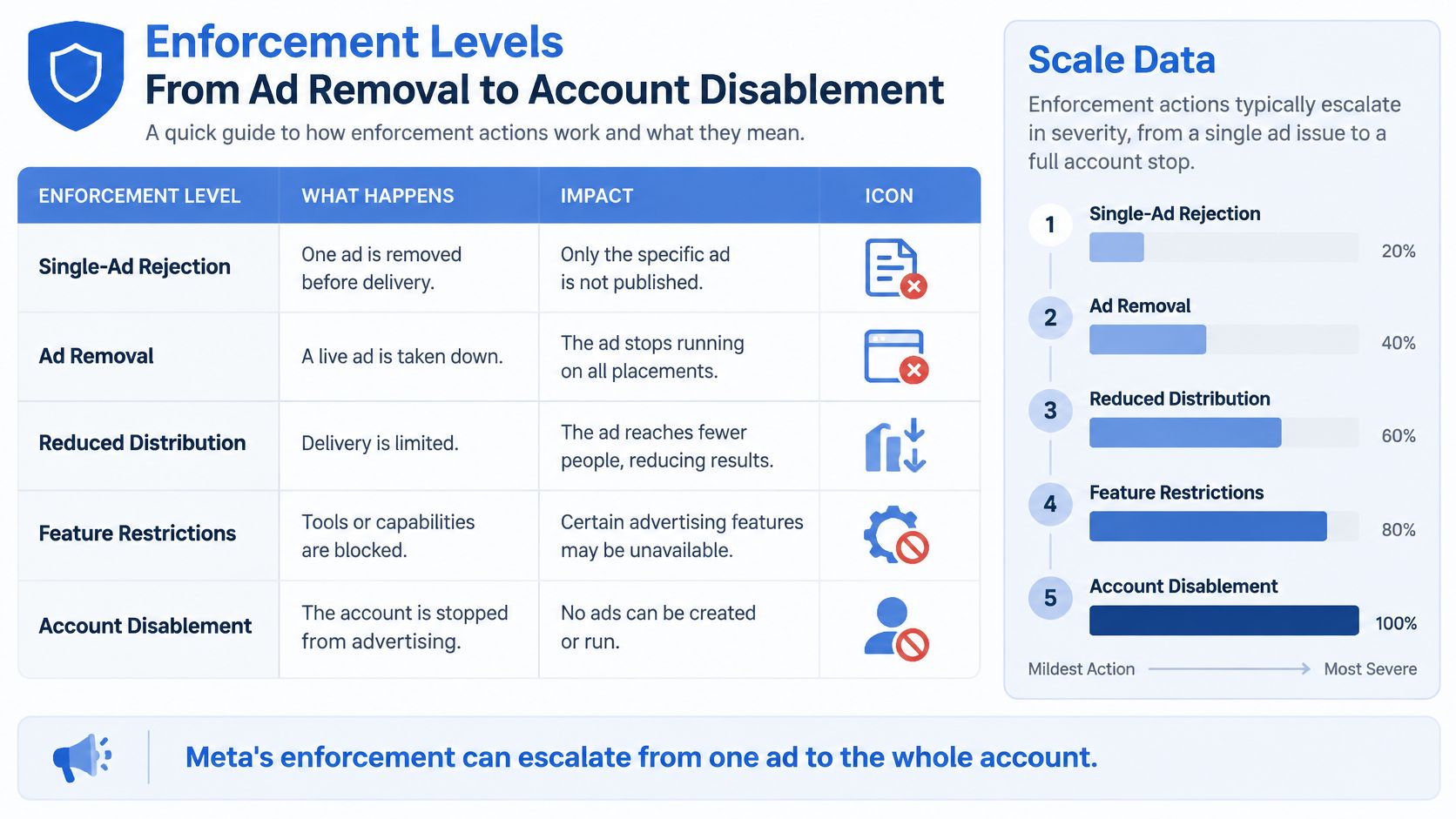
Meta does not treat every violation the same way. A single rejected ad sits at the bottom of an enforcement ladder that tops out at an account that cannot spend, and each rung carries a different trigger and a different recovery path.
| Enforcement level | Typical trigger | Scope | Recovery path |
|---|---|---|---|
| Ad removal or rejection | Single violation at review | One ad | Edit and resubmit, or appeal with evidence |
| Reduced distribution | Repeated or borderline violations | Ad or ad set | Remove the flagged element, then request review |
| Feature limitation | Continued violations | Account features | Appeal with evidence once violations stop |
| Advertiser verification | Identity or permission signals | Advertiser identity | Complete verification |
| Account restriction | Repeated or serious violations | Ad account | Appeal with objective evidence and audit the portfolio first |
| Account disablement | Severe or repeated violations | Ad account and linked Pages or portfolio | Appeal where evidence supports a false positive, and audit linked assets |
The top of that ladder is portfolio-shaped. Meta's prohibited commercial practices policy sets out enforcement that can include ad removal, reduced distribution, advertising-account restrictions, feature limitations, advertiser verification or account disablement, and repeat violations can extend penalties to associated users, Pages and business portfolios. That last clause is what turns a copywriting problem into an asset problem: the unit Meta escalates against is the connected structure, not the individual ad.
Where the removal volume actually sits
Meta's report covering the first half of 2025 shows the scale. User complaints led to the removal of 207,141 ads categorised as fraud and deception, and 33,051 of those were later restored after complaint review, according to the DSA transparency report. In the same period, 46,245 social-issue, election or political ads were removed with 10,653 restored, 45,336 discriminatory-practice ads were removed with 9,526 restored, 20,357 medical and healthcare ads were removed with 2,080 restored, and 26,472 adult-nudity or sexual-activity ads were removed with 7,563 restored.
Read the totals as a risk profile rather than a severity ranking. Fraud and deception produced roughly 4.5 times the removals of political or social-issue ads in that period, and the restoration rates diverge just as sharply: about 16% for fraud, 23% for political, 21% for discriminatory, 10% for medical and 29% for adult content. A low restoration rate tells you the appeal after a rejection in that category rarely lands. A higher one tells you a meaningful share of those decisions get overturned on review.
That combination matters for how a team budgets its compliance time. More than four times the removal volume with a low reversal rate of about 16% means deception-adjacent claims, income promises, pricing framing and fabricated functionality are where preflight effort earns the most. Medical and healthcare restores even less often at roughly 10%, but at a tenth of the volume it absorbs far less enforcement capacity. The categories that look most sensitive politically draw a smaller share of removals than the fraud queue, which is where repeat strikes accumulate fastest and where an account's history hardens against it.
A rejection is a category signal. The second one in the same category is a portfolio event.
Appeals and When to Recreate a Rejected Ad
The fastest way to clear a rejection is to delete the ad and rebuild it from the same asset. That's also the fastest way to collect the same rejection twice, because an unchanged creative resubmitted into the same account gets the same automated verdict and adds another line to the account's history.
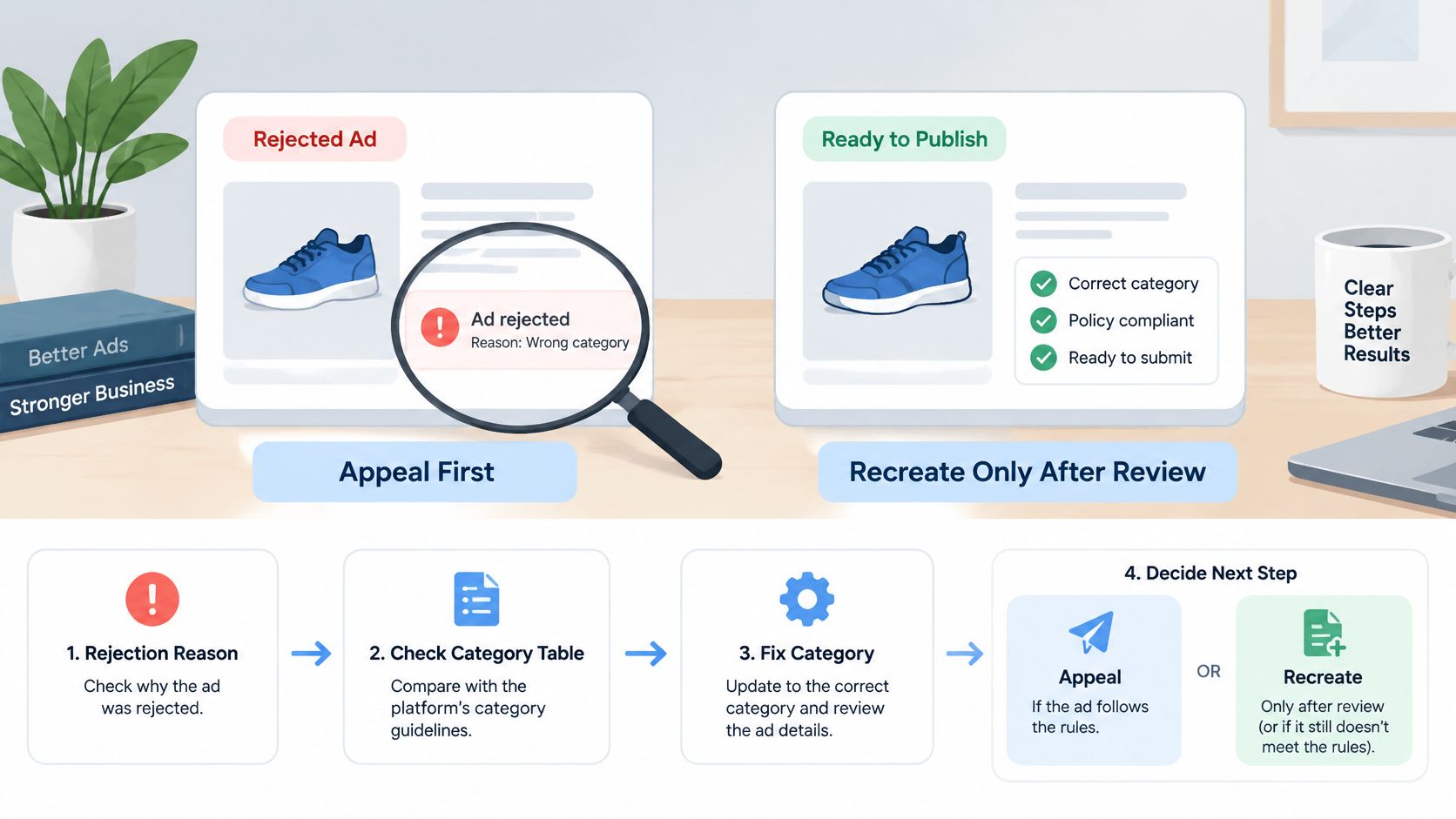
Work the decision in order rather than reaching for the rebuild button.
- Read the reason and map it to a category. A misdeclared Special Ad Category is corrected and resubmitted, never appealed. If the cited policy is a targeting or declaration rule, the appeal is wasted motion.
- Check whether education applies before escalating. Meta's January to April 2025 assessment found more than 7.1 million Facebook users and over 730,000 Instagram users were eligible to view an educational module after content removal; among those who started it, completion exceeded 80% on Facebook and nearly 85% on Instagram, and more than 2 million users had strikes removed, per the biannual transparency report. That programme sits under Community Standards, so treat it as direction of travel rather than a guarantee that an advertising restriction gets reversed.
- Appeal only with objective evidence. Landing-page disclosures, claim substantiation, licensing documents, or a clear explanation of why a targeting configuration is legitimate. Emotional appeals and volume of tickets don't move a reviewer.
- Change the flagged element before resubmitting. Identical creative produces repeated automated signals, and repetition is the input that escalates an account up the enforcement ladder.
- Stop if the same rejection appears in another market or account. At that point the issue is structural and the next step is an audit of every asset sharing the element.
Product-level rejections behave differently from copy-level ones, because the fault is often in the catalogue feed, the merchant centre data or the product page rather than the ad. 3228 Digital UK's guide to product rejections on Facebook works through those commerce-side checks in the order that resolves them fastest.
Log every appeal with the date, the rejection reason, the evidence attached and the outcome. Six weeks of those entries turns a run of false positives into a documented case for escalation, and it stops the same rejection being re-argued by three different buyers.
Portfolio Audit After a Repeat Violation
A repeat violation is the moment to stop treating Meta's decision as an ad-level problem. The audit below covers every asset that shares the rejected element, and it runs once, across the whole business, rather than per rejection notice.
- List every asset carrying the element. Ad accounts, Pages, linked Instagram accounts, business portfolios and every duplicated ad set with the same claim, creative or landing page. Duplication is the reason a single claim reaches six figures of spend.
- Pull rejection history per asset and group it by enforcement level. Mark the earliest date a pattern appears, not the most recent. Meta's own guidance for bulk launches is to treat approval as non-final and retain immutable records of the submitted creative, copy, destination URL, targeting parameters and advertiser identity, which is what the Meta Business Help Center recommends. Those records are the only way to match a rejection to the version that caused it.
- Reconcile the claims register and category declarations in every market. One unsubstantiated claim copied across five countries repeats the same violation at scale, and the fix is one edit at the source, not five appeals.
- Confirm the identity signals. The Page, the paying entity, the EU organisation shown to users, and the admin roles on the portfolio. Verification requests stall delivery when the entity data doesn't match.
- Pause the flagged ad sets and test the replacement in one controlled ad set. Restore the wider batch only after the changed element clears review, so a failed fix costs one ad set instead of forty.
- Record the result per asset with an owner and a date. Decide for each restriction whether an evidence-led appeal is warranted. Reduced distribution on one ad set needs a fix. Account restriction or disablement needs an appeal plus a documented clean-up of connected assets.
Never open a new account to bypass a restriction. Penalties can extend to associated users, Pages and portfolios, so the workaround enrols the replacement in the same exposure.
Compliance Checklist and Pre-Launch Workflow for Bulk Launches
Ten checks, run in the order a buyer really touches them, decide whether a batch ships or waits.
| Check | What clears it |
|---|---|
| Category | Special Ad Category confirmed for every ad set, and re-confirmed after any edit |
| Targeting | No restricted controls in a regulated campaign, no proxy exclusions standing in for a protected attribute |
| Copy | Every claim mapped to a substantiation file |
| Creative | Visible text, overlays and framing checked for adult, sensational or misleading content |
| Landing page | Destination matches the offer, the price and the disclosures |
| Identity | Page, paying entity and, for EU delivery, the organisation shown to users |
| Records | Submitted creative, copy, URL, targeting and identity stored per ad |
| Post-publication | Re-review notices, restrictions and sudden delivery drops monitored, with a pause-and-revise route ready |
| Structure | Similar ad sets consolidated so each can reach the event volume it needs |
| Portfolio | The same claim checked across every market and account sharing the asset |
The structural row deserves its own emphasis because it's a delivery problem that masquerades as a policy problem. Meta treats an ad set as learning limited when it's unlikely to receive about 50 optimisation events in the week following its last significant edit, as Meta's learning phase guidance explains. Fragmented builds that spread conversion volume across twenty small ad sets stall in learning, and the buyer reads the resulting delivery drop as a penalty. Consolidate before you scale, and stop editing budgets, bids and targeting across many small ad sets mid-flight.
Preview each asset in the placements you're buying before it goes out. Facebook ad preview shows where a crop, overlay or truncation changes what the creative says, which is the cheapest way to catch a placement-specific rejection.
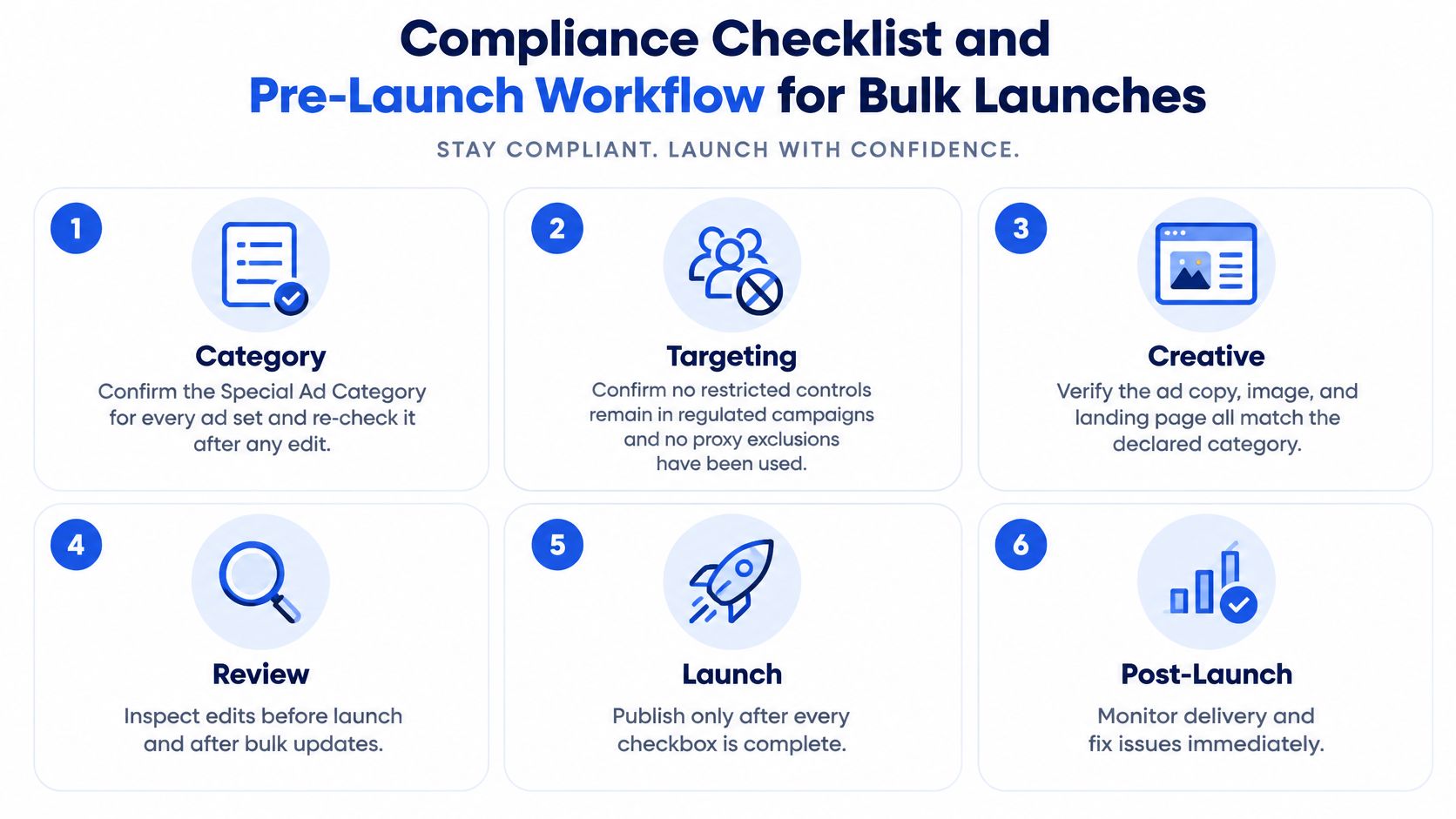
Release rule: a batch clears only when every check has a named owner and a logged result.
Naming discipline is what makes the records row real at volume. Naming rules that run on every ad set and creative mean a rejection can be traced to the exact submitted asset instead of a guessed variant; Rapid Ads, an Official Meta marketing partner, applies your convention across a whole upload so the trail survives a 200-ad launch.
Rollout order matters more than the checklist itself. Start with the highest-spend live ads, run them against the category table and the claims register, then make the checklist a mandatory gate before anything new launches. Trial it on one small batch first so the owners, not the spreadsheet, absorb the friction.
The decision at the end is simple. Scale the accounts where every batch clears, and hold expansion wherever a recurring rejection pattern is still open, no matter how well those campaigns are performing. A restricting account is worth less than a slightly slower launch.
Rapid Ads removes the mechanical friction this workflow creates: bulk creative and copy upload, naming rules applied to every ad set and creative, and an Advantage+ auto-disable that keeps unwanted creative enhancements switched off so the asset that clears review is the asset that ships. It's an Official Meta marketing partner trusted by over 3,626 media buyers and brands, and the free tier covers your first 10 ad creatives with no card required. Visit Rapid Ads to put a recorded, repeatable launch process behind your next batch.