Reels video and overlay ads accounted for nearly 25% of Facebook ad impressions in Q3 2024, up from 12% in Q3 2023, according to Tinuiti's Digital Ads Benchmark Report. That's a substantial change in the inventory advertisers buy, not proof that those impressions produce better customers.
For teams managing Facebook ad placements at scale, the useful question isn't which surface has the cheapest impressions. It's which combination of placement, creative and optimization event produces profitable incremental outcomes. That requires separating delivery mechanics from creative fit, and reported conversions from business results.
Table of Contents
- Placement Specs and Safe Zones at a Glance
- Choosing and Setting Placements in Ads Manager
- Judging Placement Benchmarks by Cost per Outcome
- Matching Creative Types to Each Placement
- Validating Reels and Stories Results Before Scaling
- Confirm Your Placement Set Before You Scale
Placement Specs and Safe Zones at a Glance
A placement is the surface where an ad appears, such as Facebook Feed or Instagram Stories. You configure placements at the ad-set level, and eligibility follows the objective, format, optimization event and promoted object.
Inventory can span Facebook, Instagram, Messenger, WhatsApp, Threads and Audience Network. Don't confuse platform availability with format compatibility: an eligible platform doesn't mean every creative format can run on every surface.
Placement specs, safe zones and video in-view thresholds
Meta's creative specifications recommend 1080 × 1920 pixels for Stories and 1440 × 2560 for Reels, with H.264 video, progressive scanning and AAC audio. The table combines those specifications with Meta's placement-specific in-view guidance, which sets thresholds of 100%, 50% or 25% across the listed environments.
| Placement | Aspect ratio | Recommended size | Video in-view threshold |
|---|---|---|---|
| Facebook Feed | 1:1 or 4:5 | Verify pixel dimensions in placement preview | 50% |
| Instagram Feed | 1:1 or 4:5 | Verify pixel dimensions in placement preview | 25% |
| Facebook Stories | 9:16 | 1080 × 1920 | 100% |
| Instagram Stories | 9:16 | 1080 × 1920 | 100% |
| Facebook and Instagram Reels | 9:16 | 1440 × 2560 | 50% |
| Messenger Inbox | Verify selected format | Verify in placement guidance | 50% |
| Audience Network in-stream | Verify selected video format | Verify in placement guidance | 50% |
| Audience Network rewarded video | Verify selected video format | Verify in placement guidance | 100% |
| Audience Network native, banner and interstitial | Verify selected unit | Verify unit-specific dimensions | 25% |
| Facebook Marketplace | Verify selected format | Verify in placement guidance | Verify playback rule |
| Facebook Search | Verify selected format | Verify in placement guidance | Verify playback rule |
Verification entries aren't interchangeable specifications. Resolve them against the selected format in Ads Manager before exporting assets. An in-view threshold describes playback conditions, not attention, completion or conversion quality.
For Reels, the creative specifications linked above advise leaving approximately 14% of the top, 35% of the bottom and 6% of each side free of critical text and logos. Keep your designed call to action clear of those interface zones too, rather than positioning it beneath the platform's controls.
Build for the usable frame
A square asset can be technically deliverable without using the vertical screen effectively. Preview the product, price, captions and branding together, because a crop that preserves the subject can still remove the offer.
For a broader production reference, MyImageUpscaler's guide to social media image dimensions for 2025 can help organize your export checklist. Use Meta's placement preview as the final check for the actual campaign configuration.
Practical rule: Asset acceptance isn't creative readiness. Approve the rendered ad, not just the uploaded file.
List the placements supported by your objective, then build a 4:5 Feed master and a 9:16 Stories/Reels master. Use placement-level asset customization instead of asking automatic cropping to make the design decisions.
Choosing and Setting Placements in Ads Manager
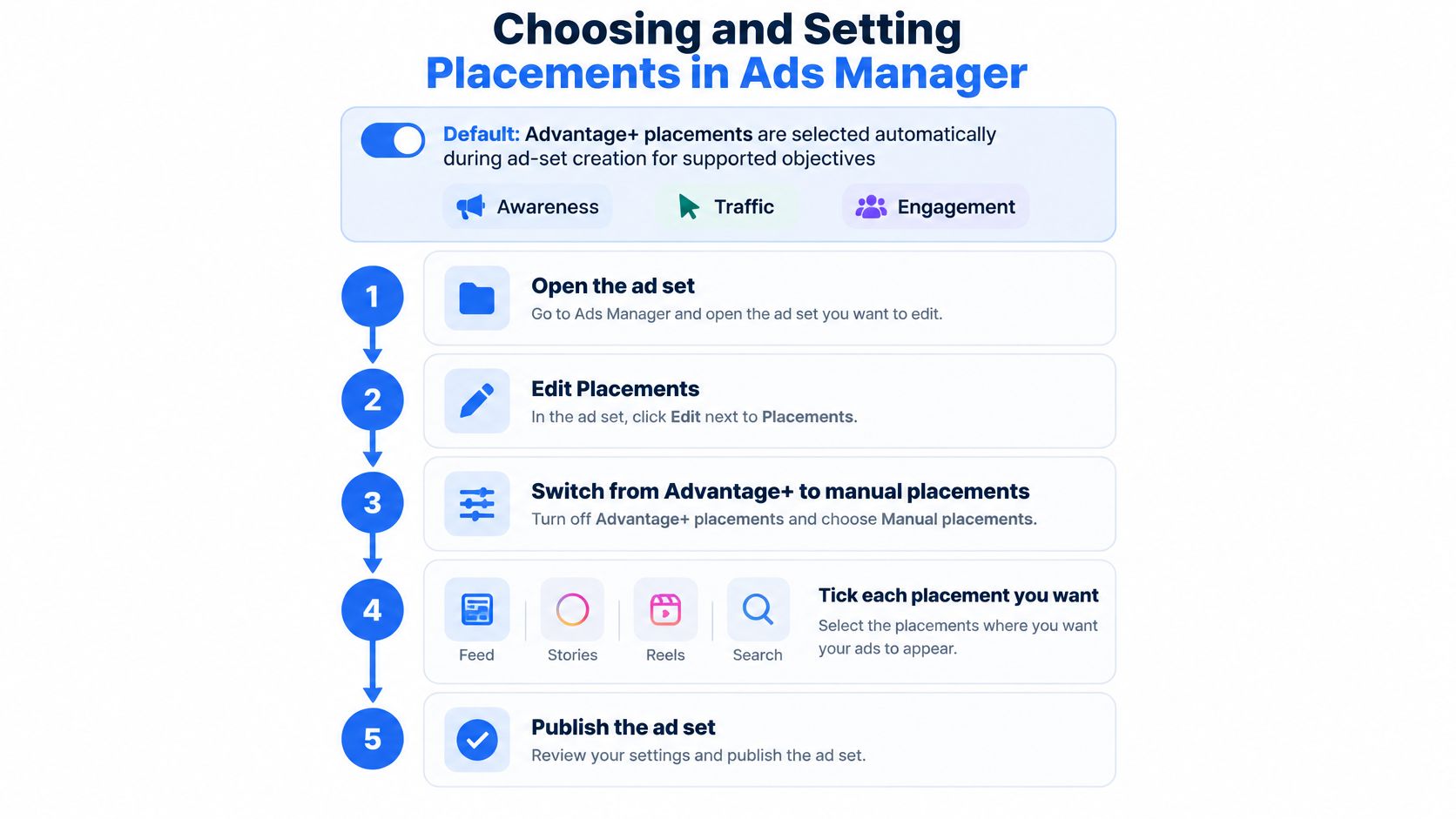
Advantage+ placements are selected by default during ad-set creation for supported objectives including Awareness, Traffic and Engagement, according to Meta's placement setup guidance. Manual placements are the alternative when you need a controlled inventory set.
The control belongs to the ad set, not the individual ad. Before building a test around exclusions, check that your account and objective still expose the controls described below, since interface availability can change.
Configure the inventory deliberately
- Open the ad set. Go to its Placements section, rather than searching for placement exclusions inside the ad creative editor.
- Select Manual placements. Switch from Advantage+ placements when the experiment requires a restricted set.
- Expand the available controls. Review devices and operating systems, platforms, and individual placements. Select only the surfaces required by the test.
- Apply necessary exclusions. Remove Audience Network or Messenger when your measurement or brand requirements call for it. Placement exclusions aren't a substitute for content-suitability controls.
- Check the breadth of the set. Meta recommends Advantage+ placements or at least six manually selected placements, rather than unnecessarily narrowing delivery.
- Confirm eligibility. A checked box doesn't guarantee impressions. Record the objective, optimization event and promoted object, then inspect actual delivery after launch.
- Publish and inspect spend. Set an initial placement review at 48 hours as an operational checkpoint, not a deadline for declaring a winner. Allow for conversion lag before changing budgets.
The visual summarizes the core interface sequence; the eligibility and reporting checks still need an owner.
Advantage+ versus manual placements by control point
In Meta's placement experiment, ad sets using Advantage+ placements produced an average cost per action 11.7% lower than ad sets using manual settings. Treat that as a test benchmark, not an account-level forecast.
| Control point | Advantage+ placements | Manual placements |
|---|---|---|
| Default for Awareness, Traffic and Engagement | Yes | No, must be selected |
| Delivery scope | Meta allocates across eligible Facebook, Instagram, Messenger, WhatsApp, Threads and Audience Network | Only selected eligible surfaces |
| Level of control | Ad-set setting | Ad-set setting, with device, platform and placement choices |
| Meta-reported cost per action | 11.7% lower on average | Baseline in the same experiment |
| Minimum recommended setup | Not applicable | At least six placements |
Test the modes using comparable ad sets with the same audience, budget, optimization event, creative and bid strategy. Monitor conversion quality alongside CPA, because cheaper actions don't establish equivalent business value.
For repeatable launches, document which settings should be automated and which require approval. The operational distinction in automating Facebook ad launches matters here: automating configuration shouldn't mean surrendering experimental control.
Keep Advantage+ placements separate from Advantage+ creative enhancements in your checklist. They address different decisions, where an ad runs versus how its creative may be altered.
Judging Placement Benchmarks by Cost per Outcome
Reported placement benchmarks, 2025 and 2026
The Reels, Feed and Stories cost figures below come from Applica's placement benchmark discussion, which reports $6.50 CPM and 1.8% conversion rate for Reels, $11.50 and 2.8% for Feed, and $34.68 CPM with 4.19% link CTR for Stories.
| Placement | CPM | Conversion or click metric | Source context |
|---|---|---|---|
| Facebook Reels | $6.50 | 1.8% conversion rate | 2026 benchmark |
| Facebook Feed | $11.50 | 2.8% conversion rate | 2026 benchmark |
| Facebook Stories | $34.68 | 4.19% link CTR | Didn't establish whether clicks became leads or sales |
| Facebook Feed | Not reported | 9.43% of impressions, 21.29% of clicks | Strike Social, U.S. 2025, nearly 60M impressions |
| Facebook Reels Overlay | Not reported | 64.59% of impressions, 23.90% of clicks | Strike Social, same dataset |
| All Facebook Reels video and overlay | Not reported | Nearly 25% of impressions, up from 12% | Tinuiti Digital Ads Benchmark, Q3 2024 |
Strike Social's U.S. campaign analysis covers nearly 60 million impressions in 2025, with Feed generating 9.43% of impressions and 21.29% of clicks, versus Reels Overlay's 64.59% and 23.90%. Tinuiti's figures describe inventory share, not purchase efficiency.
These aren't matched experiments. Their objectives, geographic coverage and attribution conditions aren't established as equivalent, so don't merge them into a placement ranking.
The break-even calculation needs a denominator
Feed's higher reported conversion rate doesn't automatically offset its higher CPM. But you also can't calculate CPA from CPM and a click-based conversion rate without CTR.
If conversion rate means purchases divided by clicks, the relationship is:
CPA = CPM ÷ (impressions per CPM unit × CTR × click-to-purchase rate)
Consequently, dividing CPM directly by the reported conversion percentage isn't a valid purchase-cost estimate. It mixes impression pricing with an unspecified conversion denominator.
At identical CTR, compare CPM divided by click-to-purchase rate to establish relative acquisition economics. If CTR differs, or the benchmark uses landing-page sessions rather than clicks, the conclusion changes. Feed could still justify a higher acquisition cost through stronger order contribution, fewer refunds or better repeat purchasing, but you need those outcomes in your own records.
A placement benchmark is a hypothesis generator. It isn't permission to move budget.
Run an outcome-based comparison
Meta's placement-targeting documentation makes eligibility conditional on campaign configuration, including optimization goal and promoted object. Check delivery before interpreting a missing result as creative failure.
- Export the placement breakdown across complete conversion cycles, including the lag between click and purchase.
- Calculate purchase CPA, purchase rate and revenue per impression. Specify whether purchase rate uses clicks, sessions or impressions.
- Subtract product and fulfillment costs. Compare contribution after advertising, not ROAS alone.
- Test an exclusion against a control. For example, remove Audience Network from the test group while preserving the control's inventory. Choose a duration that accommodates conversion lag.
- Accept higher CPM only with downstream evidence. Look for improved purchase economics, not more engagement.
Hold creative, audience, event, attribution and budget constant wherever the experimental design allows. Keep prospecting separate from retargeting, and segment country-level results rather than letting market mix determine the apparent winner.
Use Facebook CTR benchmarks to diagnose response to the ad. Use post-click value to decide whether that response deserves more spend.
Matching Creative Types to Each Placement
Creative fit changes what you're testing. If Feed receives a purpose-built asset while Reels receives an awkward crop, the result doesn't isolate placement quality.
Meta's placement and format guidance shows that image, video, carousel and collection availability isn't identical across surfaces. Check compatibility before briefing production, particularly when a concept depends on multiple cards or a product collection.
Static image and video
Static image
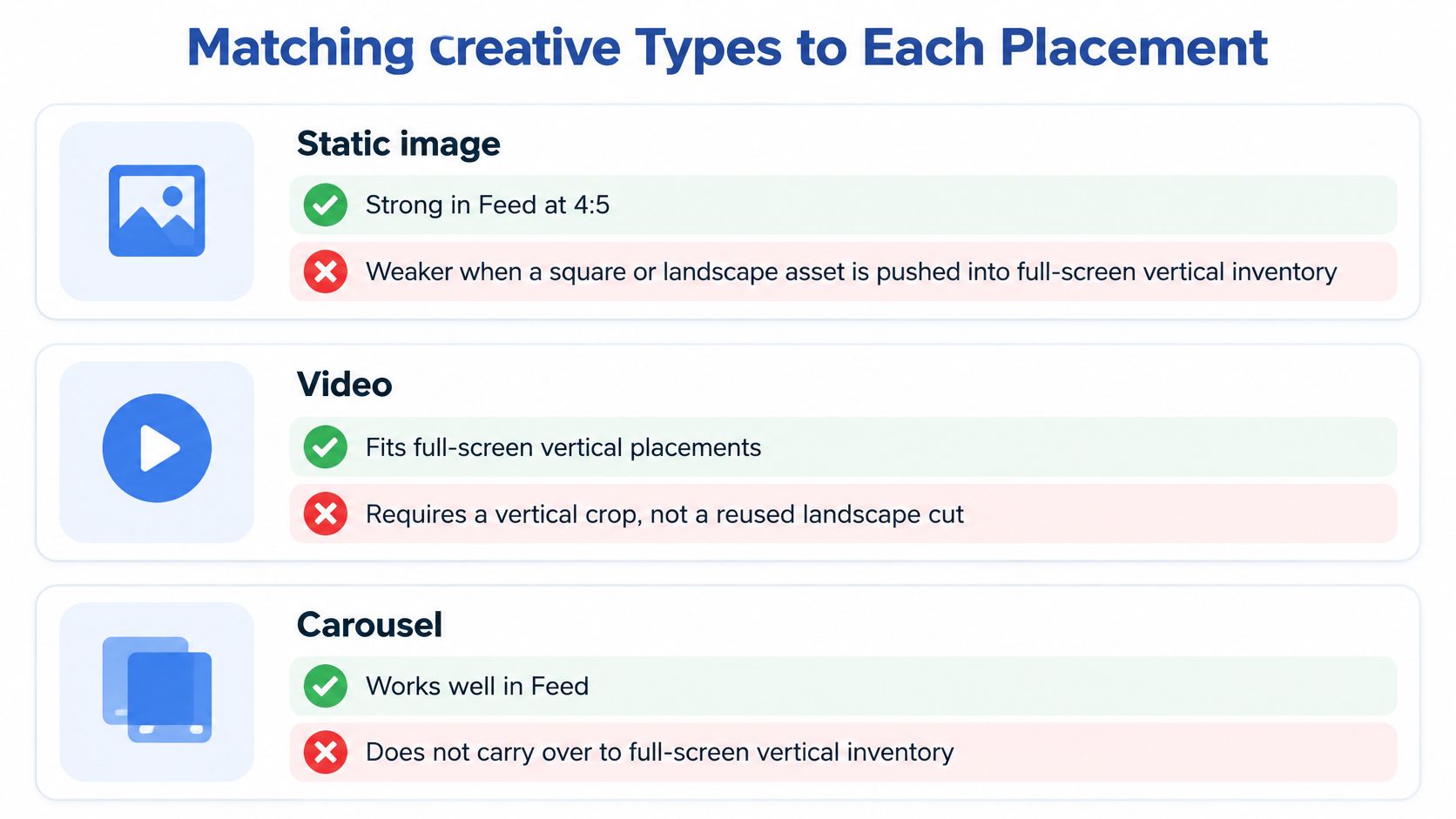
- Pro: A Feed-native composition gives the product, offer and supporting copy a clear visual hierarchy without requiring playback.
- Con: Reusing a square or wide-format image in full-screen vertical inventory can leave the central message undersized or force an unsuitable crop.
- Recommended use: Facebook Feed for a product-and-offer concept with enough detail to reward inspection.
- Avoid: Stories or Reels delivery using an unadapted horizontal design with small text.
Video
- Pro: A vertical sequence can demonstrate the product, show the result and deliver the offer within a full-screen composition.
- Con: A horizontal edit may lose hands, product context or captions when cropped. Playback qualification also differs between Feed and fully in-view environments.
- Recommended use: Reels for a purpose-built vertical demonstration with a visually understandable opening.
- Avoid: Stories when the opening depends on off-frame detail or narration that carries all the meaning.
Treat sound-off comprehension as a production requirement. The viewer should understand the product and promise from the visuals and captions, even when the soundtrack isn't available.
For teams exploring alternative demonstration concepts, Dreamini AI video studio is a resource to evaluate during production. Keep the same approval gate for any generated material: product accuracy, legible captions, substantiated claims and a usable placement preview.
The visual below summarizes the creative-fit trade-offs, but carousel eligibility still needs checking for the actual placement.
Multi-card formats and external inventory
Carousel and collection
- Pro: Multiple products, benefits or stages can carry more information than a single-frame concept.
- Con: You can't assume the same format, sequence or experience will transfer to every vertical placement.
- Recommended use: An eligible Feed placement when comparison or product discovery is central to the offer.
- Avoid: Any placement whose format preview can't reproduce the essential sequence or collection experience.
Audience Network assets
- Pro: Unit-specific assets let you test additional inventory without pretending it's another social Feed.
- Con: Native, banner, interstitial and rewarded-video contexts need separate interpretation. Playback qualification doesn't establish purchase intent.
- Recommended use: A controlled outcome test with unit-specific previews and verified post-click events.
- Avoid: Reusing a successful Feed ad without checking rendering and downstream traffic quality.
Keep separate Feed and vertical production variants. That lets you compare creative concepts without allowing crop quality to become the hidden variable.
Validating Reels and Stories Results Before Scaling
Placement reporting is descriptive, not automatically causal. When Meta changes the delivery mix, a lower reported CPA can reflect different inventory, attribution or creative treatment rather than additional buyers.
PPC Land's Instagram coverage reports that Reels absorbed 51% of Instagram user time and more than half of Instagram ad placements in Q2 2026, while Stories and Search lost share of user time year over year. The coverage also describes limited independent validation of Reels performance claims, which rely heavily on Meta or Meta-commissioned research, and discusses a 2026 academic study finding that interactive Meta ads could expose personal data from users who interacted with them.
Use that as a reason to strengthen validation, not as proof that every reported Reels conversion is unreliable. Privacy exposure and attribution accuracy are distinct concerns, and neither can be resolved by a placement breakdown alone.
The investigation should connect engagement, attribution and actual orders.

Validate in a fixed order
- Separate placement and asset ratio. Maintain an asset map so a new crop or edit doesn't get mistaken for an audience effect.
- Inspect attribution components. Compare click-through and view-through results where reporting allows, and record the attribution window before comparing exports.
- Reconcile with server-side events. Check event coverage, deduplication and order records. Server-side events improve the evidence available; they don't independently prove which placement caused the purchase or reveal every modeled conversion.
- Compare blended efficiency. Review total revenue against total marketing spend alongside platform ROAS. Investigate when the platform improves but business-level contribution doesn't.
- Run a geo or audience holdout. Use comparable groups and assess total purchase contribution before expanding a placement that appears unusually efficient.
Don't treat video engagement as a substitute for this process. Video completion rates can help diagnose whether people reach the demonstration or offer, but completion doesn't establish incremental sales.
For a complementary video reference, keep the same attribution and outcome checks in view.
Scaling criterion: Increase spend when incremental contribution improves, not merely when the attribution report becomes more flattering.
Automatic placements deserve budget when they help produce profitable additional demand. ROAS remains useful, but profit and a credible counterfactual decide whether the apparent improvement is real.
Confirm Your Placement Set Before You Scale
Treat the budget increase as a go or no-go gate, with a named owner for every unresolved item. A strong blended CPA shouldn't override missing creative previews, incompatible formats or an untested attribution assumption.
The launch gate
- Eligibility approved: Use the configuration checks under Choosing and Setting Placements in Ads Manager. Confirm that the objective, format and optimization event support the intended inventory, then inspect actual delivery.
- Creative approved: Use the reference under Placement Specs and Safe Zones at a Glance. Confirm Feed and vertical variants, preserve critical content and approve each intended preview.
- Placement mode recorded: Document Advantage+ or manual selection for each test. For manual delivery, check the recommended breadth rather than narrowing inventory without a reason.
- Validation designed: Apply the holdout procedure under Validating Reels and Stories Results Before Scaling. An efficient-looking placement needs a testable business outcome before a substantial budget increase.
- Naming checked: Include audience, market, intended placement set and asset ratio in the naming convention. Distinguish intended placement labels from actual delivery, which still requires breakdown reporting.
Accelerate repetition, not approval
Once the setup passes, repetitive launch work is the appropriate target for automation. At Rapid Ads, our naming rules run on every ad set and creative, helping keep placement and ratio labels consistent across markets.
In one comparison, 100 creatives took 1h 57m to launch by hand, while Rapid Ads launched the same ads in 8m 39s. That comparison describes launch time, not campaign performance.
Use the saved time to inspect rendered assets, reconcile purchases and maintain the control group. Faster publishing is valuable only when the campaign being repeated is the campaign you intended to test.
Rapid Ads lets you bulk-upload Meta creatives and apply consistent naming across ad sets and assets, reducing repetitive work around placement-specific launches. Visit Rapid Ads to build a repeatable launch workflow while keeping eligibility checks, creative approvals and outcome validation under your team's control.
