You've just pushed a new CBO prospecting campaign live. The creative names look organised in Ads Manager, the destination pages load, and Meta is reporting purchases. Then GA4 opens a different story: some traffic sits under facebook, some under Facebook, some under an unexpected medium, and part of the campaign lands in Unassigned. Creative-level ROAS is no longer a decision tool. It's a spreadsheet cleanup exercise.
That's what a poorly governed UTM tag URL does. The URL may still send users to the right landing page, while inconsistent values split acquisition reports and hide which ad, audience, or offer deserves more budget. At scale, tagging isn't a minor publishing task. It's part of your measurement infrastructure.
Table of Contents
- Why Your UTM Tag URL Matters More Than You Think
- Anatomy of a Clean UTM Tag URL
- Naming Conventions That Keep GA4 Reports Clean
- Building and Applying Your UTM Tag URL in Meta Ads
- Common Mistakes That Break Attribution and How to Fix Them
- Validating and Scaling Your UTM Workflow With Confidence
Why Your UTM Tag URL Matters More Than You Think
A single Meta ad rarely exists in isolation. A typical account contains prospecting and retargeting campaigns, ABO tests, CBO structures, lookalike audiences, broad audiences, and multiple creative formats. Once you multiply those layers across markets and contributors, every manually typed parameter becomes a potential reporting split.
The problem usually appears after launch. One buyer uses facebook as the source, another uses meta, and a third copies an older template containing Facebook. Someone writes paid-social for the medium, while another uses cpc. GA4 treats those values as separate inputs, so the same platform can appear as several sources or channel combinations. Google's campaign parameter guidance recommends unique source values, consistent campaign names, and content values that distinguish creative variants.
Practical rule: Treat every UTM value as a controlled field, not free text.
The commercial consequence is straightforward. If campaign and creative dimensions fragment, you can't reliably compare a winning video against a losing static, or a retargeting ad against a prospecting ad. Meta may still optimise delivery inside Ads Manager, but your broader reporting layer becomes harder to reconcile with spend, revenue, and landing-page behaviour.
The fix isn't adding more parameters indiscriminately. It's creating a taxonomy that survives hundreds of ads, then enforcing it during production. Source, medium, campaign, content, and term need defined jobs, approved formats, and a validation step before publishing.
Anatomy of a Clean UTM Tag URL
A UTM-tagged destination combines the landing-page URL with campaign parameters. Google's URL builder documentation describes campaign parameters as key-value pairs joined by ampersands. The first parameter follows a question mark, and each additional parameter follows an ampersand.
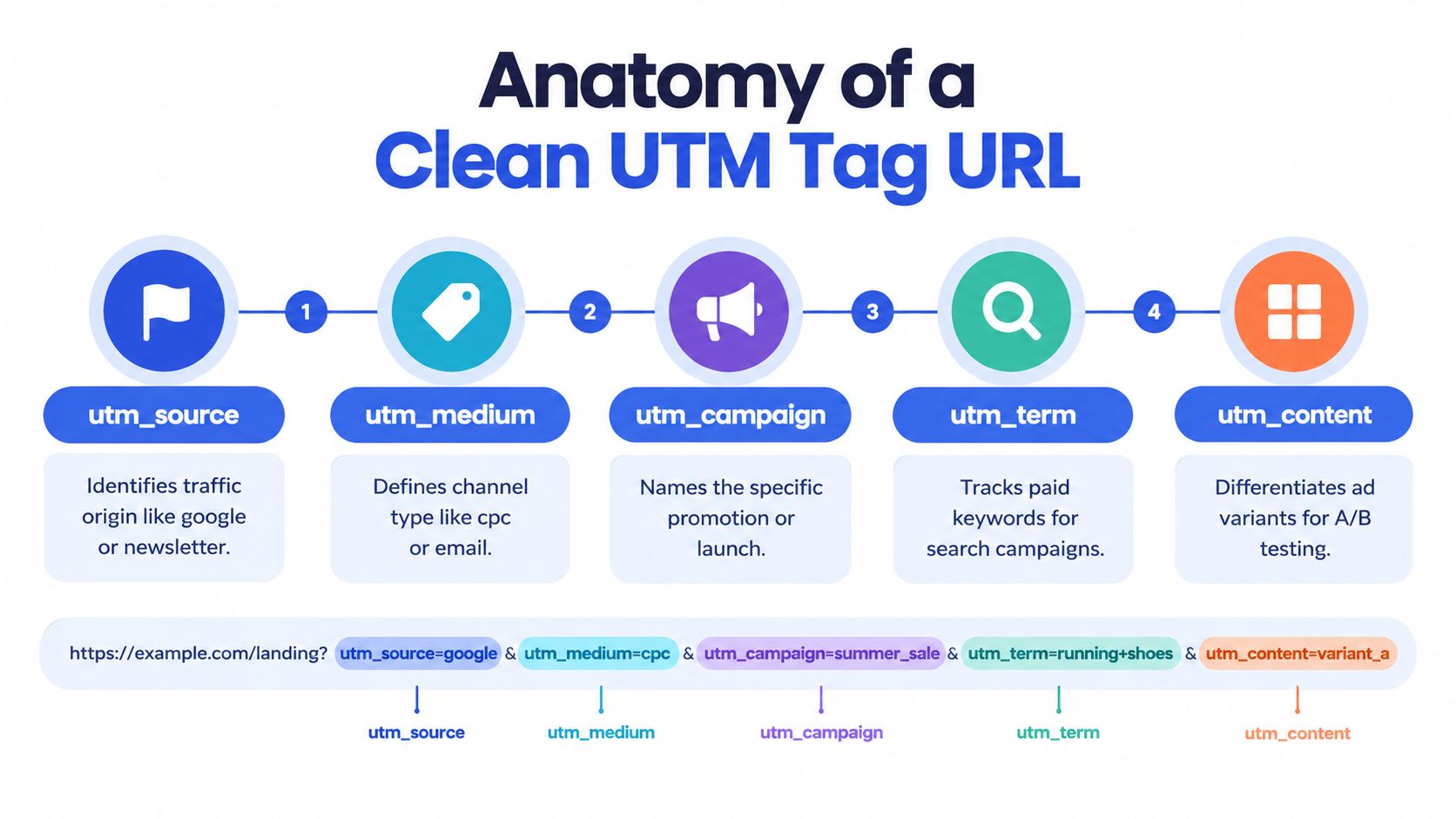
For Meta, the five core fields have distinct responsibilities:
utm_sourceidentifies the traffic origin. Use a stable platform value such asfacebookif that's your approved taxonomy.utm_mediumidentifies the channel type. A paid social value should match the channel naming used in your GA4 reporting approach.utm_campaigngroups the promotion or campaign structure. It should map to one exact campaign naming convention.utm_contentseparates creative variants, such as a video angle, static concept, or format.utm_termcan hold an audience, ad set, or other controlled identifier in a Meta workflow, although its traditional role is paid-search keyword tracking.
A clean example might look like this:
`
The parameter order isn't the main issue. The values are. Avoid spaces, unexplained abbreviations, and changing labels that make the same campaign appear under multiple rows. If the destination already contains query parameters, append the UTM string with an ampersand rather than starting a second question mark.
The basic structure has expanded in GA4-era workflows. Google's documentation also references newer fields such as utm_id and utm_source_platform, which can help reconcile campaign records across systems. Use those extensions only when your reporting model supports them. More fields don't compensate for weak governance.
Naming Conventions That Keep GA4 Reports Clean
The naming system should be boring, documented, and difficult to misuse. Performance teams often focus on campaign names in Meta while treating UTMs as an afterthought. That creates a mismatch between what buyers see in Ads Manager and what analysts see in GA4.
Start with lowercase values and one separator. Hyphens are usually readable in reports and URLs, so a campaign might be summer-sale-prospecting rather than Summer Sale Prospecting, summer_sale_prospecting, or ss-prosp. The University of Minnesota UTM guidelines also highlight the value of consistent taxonomy, external-only tagging, and automation where teams create links at scale.
UTM Naming Rules for Meta to GA4
| Parameter | Do This | Avoid This |
|---|---|---|
utm_source |
Use one approved platform value, such as facebook |
Mixing facebook, Facebook, and meta without a defined reporting reason |
utm_medium |
Align the value with your GA4 channel grouping, such as paid-social |
Inventing a new medium for every campaign |
utm_campaign |
Use one exact campaign name across all ads in that campaign | Adding ad names or audience labels that split campaign reporting |
utm_content |
Make the value unique to the creative or format, such as ugc-hook-a |
Reusing video for every video variant |
utm_term |
Store a controlled audience or ad set identifier when useful | Writing inconsistent audience descriptions manually |
The most important distinction is between campaign identity and creative identity. Campaign belongs in utm_campaign. Creative belongs in utm_content. If you put the ad name into both fields, you lose the ability to roll creative results up to the campaign cleanly.
Use stable IDs where names can change. Meta-specific templates can include dynamic values such as {{campaign.name}}, {{ad.name}}, {{adset.name}}, {{campaign.id}}, and {{ad.id}}. The Meta UTM template guidance recommends considering numeric IDs because names can be edited while IDs remain stable.
For agencies, store approved values in a shared taxonomy or database. The database should define allowed sources, mediums, campaign formats, audience labels, creative labels, and ownership rules. Rapid Ads can apply custom naming conventions at ad and ad set level during bulk workflows, which is useful when a team is publishing 100 to 200 ads and needs naming and tracking values to remain aligned. That doesn't replace governance, but it removes a major manual failure point.
Building and Applying Your UTM Tag URL in Meta Ads
Meta applies URL parameters at the ad level, not the campaign level. That matters because the ad is where the final destination, creative, and dynamic tracking values come together. The Meta Ads URL parameter workflow recommends keeping the destination URL clean and adding the tracking string in the relevant URL Parameters or Tracking field.
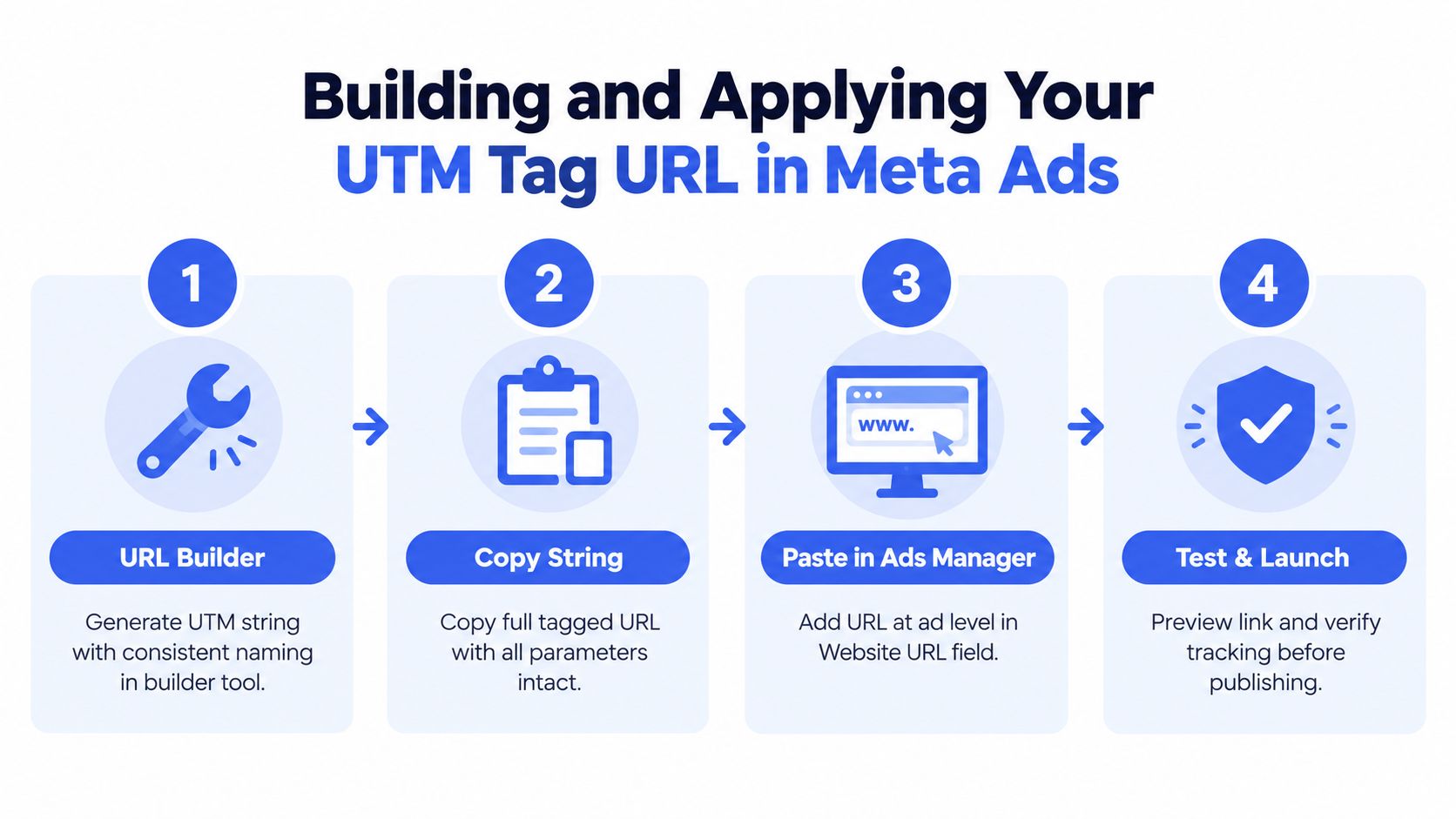
Use this publishing sequence:
- Define the values before touching Ads Manager. Confirm the approved source, medium, campaign label, creative convention, and audience or ad set identifier. Don't invent a new spelling inside the publishing screen.
- Build the string with a URL builder. A builder reduces malformed separators and makes the complete URL easier to review. For example, your template can use the fixed values
facebook,paid-social, and the campaign name, then populate creative and audience fields dynamically. - Place the parameters at ad level. In Ads Manager, keep the website destination in the Website URL field and add the UTM string in the URL Parameters or Tracking area. Meta appends the parameters to the click destination when the ad runs.
- Use dynamic macros where manual values would drift. Templates using
{{campaign.name}},{{adset.name}}, and{{ad.name}}can inherit live Meta naming. Adding{{campaign.id}}or{{ad.id}}gives reporting a stable identifier when names change. - Preview the final click. Check that the page loads, the query string remains intact, and the creative points to the intended landing page. Don't assume a successful publish means the tracking string is correct.
Manual tagging works for a small test. It becomes fragile when you're uploading multiple images, videos, copy variants, and placements across several ad sets. Copy-pasting a string into each ad invites one missing ampersand, one stale campaign name, or one creative value copied into every row.
A bulk workflow is safer when it preserves the relationship between asset, ad name, ad set, placement, and UTM content. Rapid Ads supports bulk uploads, automatic UTM attachment, CSV copy import, and routing for 1:1 and 9:16 creative assets. It also includes an auto-disable function for Advantage+ creative enhancements, which helps prevent settings from reverting during high-volume publishing. The useful principle is broader than any one tool: generate tracking from structured inputs, then validate the rendered result before launch.
For a visual walkthrough of the process, use the Meta UTM setup video.
Common Mistakes That Break Attribution and How to Fix Them
Most attribution failures don't look like broken links. The landing page loads, Meta records clicks, and the error appears later as a confusing acquisition report.
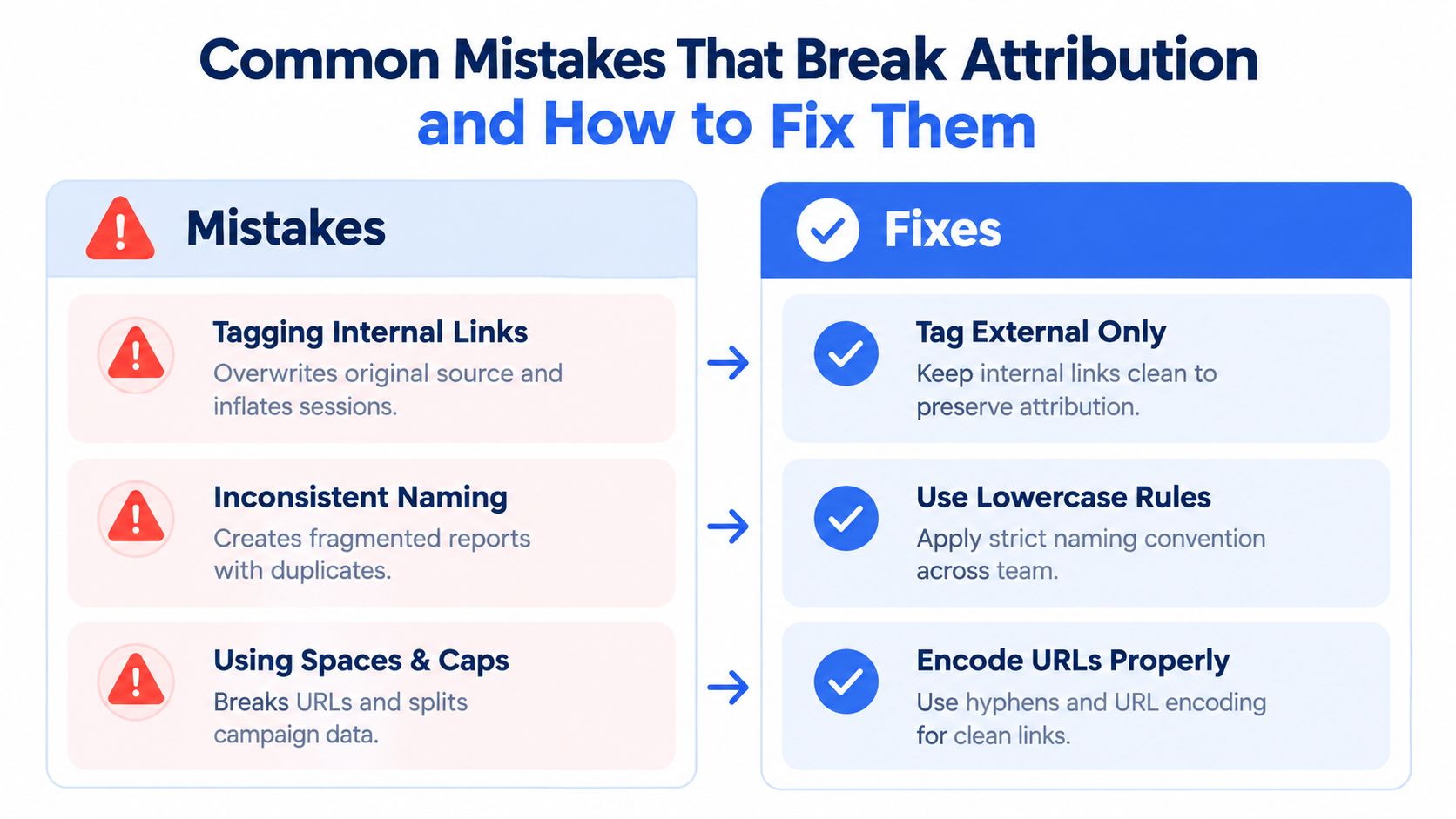
The errors that create misleading reports
Internal links with UTMs can overwrite the original session attribution. If a user arrives from a Meta ad and then clicks an internally tagged navigation link, analytics may treat that later link as a new campaign source. The Adobe UTM best-practice guidance recommends reserving campaign parameters for external traffic.
Inconsistent casing creates separate values. Facebook and facebook aren't interchangeable in analytics reporting, so one platform can split across multiple source rows. Enforce lowercase at the builder or validation stage rather than asking every buyer to remember it.
Duplicate source and medium combinations usually indicate taxonomy drift. A team may use several medium labels for the same paid social channel, leaving GA4 grouping and comparisons harder to interpret. Map each approved medium to your channel structure before campaigns launch.
Long or manually edited URLs create truncation and syntax risk. University guidance recommends placing important parameters early when platforms may truncate long URLs, and using builders or automation to reduce entry mistakes. Keep the essential source, medium, and campaign values near the start of the string.
Sensitive campaign data in parameters creates a privacy consideration. UTMs can appear in browser history, screenshots, server logs, and referrer headers, so don't place personal data, customer identifiers, or confidential audience descriptions in them. The privacy-first UTM guidance explains why campaign metadata can still be useful in consent-aware and server-side measurement without turning the query string into a user profile.
Store approved values centrally. A governed database or controlled sheet should act as the source of truth, while builders and bulk tools should draw from those values instead of accepting unrestricted manual text.
Validating and Scaling Your UTM Workflow With Confidence
Validation should happen before you scale spend, not after GA4 data has accumulated. Click a test ad or preview link from Meta, confirm the destination, and inspect the final URL for the expected source, medium, campaign, content, and identifier values. Then check GA4 Realtime and the traffic acquisition report for the incoming session.

Use a launch checklist that someone else can audit:
- Taxonomy: Values are lowercase, hyphenated, approved, and mapped to the correct GA4 channel grouping.
- Structure: The URL uses one question mark, ampersands between parameters, and no accidental spaces.
- Placement: UTMs are applied to external Meta destinations, not internal navigation links.
- Identity: Campaign and creative fields describe different reporting levels.
- Coverage: Every ad has the required parameters and a unique creative value where needed.
- Verification: Meta preview and GA4 Realtime show the expected destination and source data.
- Governance: Templates, CSV imports, bulk uploads, and multi-account workflows use the same naming rules.
- Monitoring: Review Unassigned traffic and unexpected source or medium rows after launch.
The final standard is simple: a buyer should be able to identify the campaign, creative, and audience from the URL without guessing, while an analyst should be able to roll those values into clean GA4 reports. That's how creative testing becomes measurable rather than anecdotal.
Rapid Ads helps Meta teams attach standardised UTM parameters during bulk uploads, enforce ad and ad set naming conventions, manage multiple accounts, route creative formats, and keep Advantage+ settings from changing unexpectedly. Visit Rapid Ads to replace repetitive tagging and publishing work with a controlled workflow built for high-volume launches.
