Performance marketers still lose 100+ hours a month to manual Meta Ads work, from one-by-one uploads to naming cleanup to fixing settings that revert on their own. That operational drag matters because Meta performance now depends less on micromanaged targeting and more on signal quality, creative throughput, and stable campaign structure. If your team burns time inside Ads Manager, you ship fewer tests, react slower to fatigue, and give the algorithm worse inputs.
That's the core reason meta advertising best practices have shifted. The edge isn't in knowing what CBO or retargeting means. It's in building workflows that keep tracking clean, creative volume high, and campaign changes disciplined enough for Meta to learn from. Teams that scale well usually do boring things exceptionally well: structured naming, bulk uploads, controlled automation, and fewer unnecessary resets.
This list focuses on 10 practices that help performance marketers reclaim time and protect efficiency while scaling. Some are operational. Some are measurement-driven. All of them connect directly to how Meta distributes spend, learns from conversion signals, and evaluates creative.
Table of Contents
- 1. Enforce Consistent Naming Conventions Across Ad Sets and Creative Assets
- 2. Implement Bulk Creative Upload with Aspect-Ratio Auto-Detection and Routing
- 3. Use Campaign Budget Optimisation with Spend Allocation Rules and Per-Ad-Set Caps
- 4. Disable and Lock Advantage+ Creative Enhancements to Preserve Performance Benchmarks
- 5. Structure Campaigns by Objective and Funnel Stage, Not by Product or Geography
- 6. Implement Automated Pausing Rules and Ad-Set-Level Spending Thresholds
- 7. Use Lookalike Audiences and Custom Audiences in Sequence, Not in Parallel
- 8. Batch Creative Testing with Structured Variant Groups and Holdout Analysis
- 9. Rapid Ads Platform and Operational Enforcement
- 10. Quick Metrics and Efficiency Gains Summary
- Meta Ads Best Practices: 10-Point Comparison
- Next Steps From Insight to Impact
1. Enforce Consistent Naming Conventions Across Ad Sets and Creative Assets
Why naming becomes a performance issue
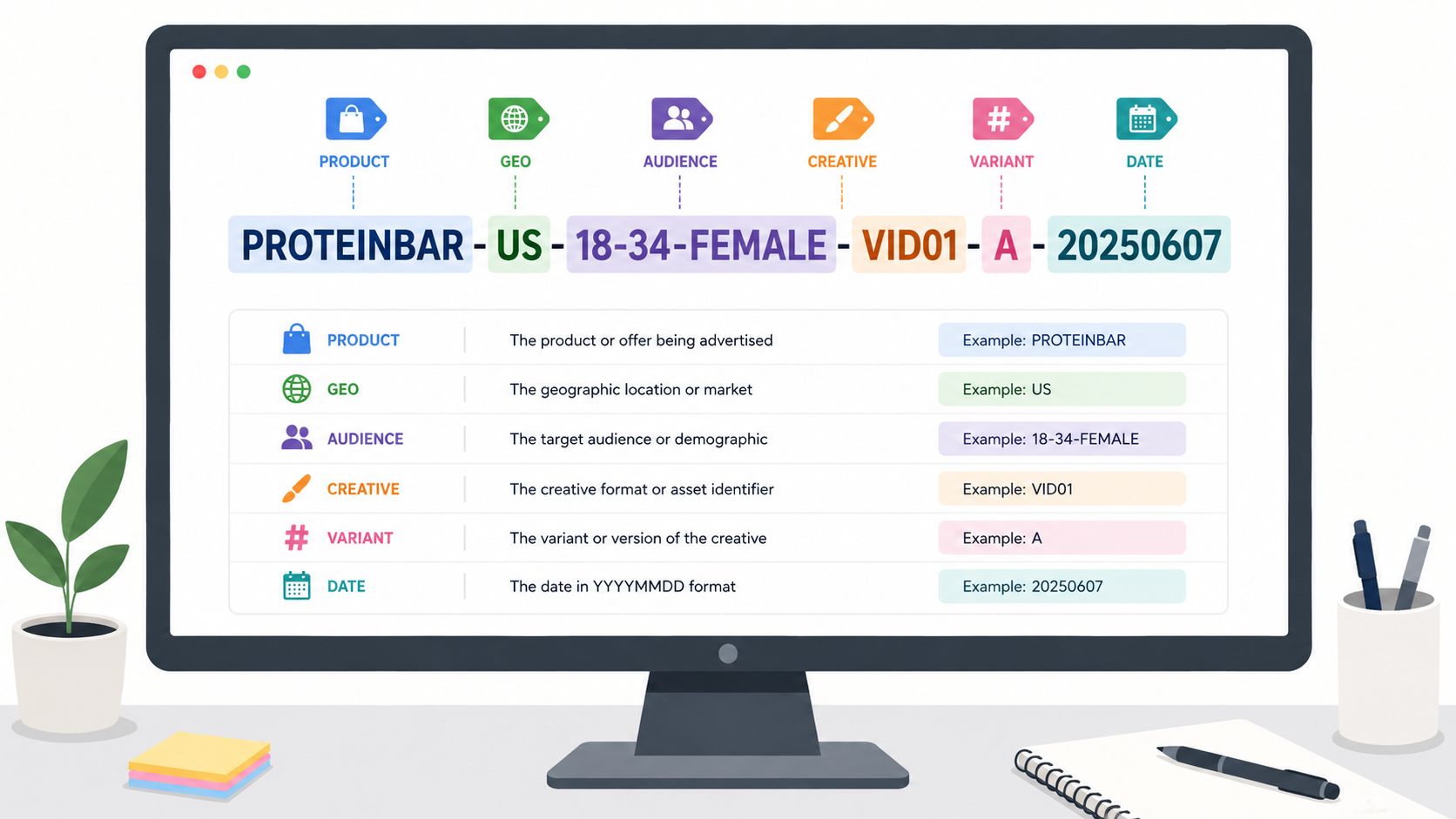
Once an account has dozens of ad sets across products, offers, geos, and funnel stages, poor naming stops being a hygiene problem and becomes an optimisation problem. If your media buyer can't isolate all cold US video tests for one SKU in a single filter, decisions get delayed and reporting gets rebuilt manually outside Ads Manager.
You see this most clearly in agency setups and multi-market ecommerce accounts. “Ad 1” and “New Test” force someone to click into asset-level detail that should have been visible from the list view. That slows down creative analysis, audience comparison, and bulk edits.
Practical rule: if a performance variable affects how you might analyse or pause an ad later, it belongs in the name.
A naming pattern that survives scale
A useful pattern is machine-readable and boring on purpose. Something like WINTER_COAT-US-COLD-VIDEO-HOOK_A-2024-11-01 works because each segment maps to a filtering need inside Ads Manager. The same logic applies at ad set level: CLIENTNAME-PRODUCT-GEO-TOF-UGC-V1.
Three details matter more than often recognized:
- Put the broadest identifier first: Start with product, offer, or campaign family so Ads Manager search narrows results quickly.
- Use ISO dates:
YYYY-MM-DDsorts cleanly across exports and saved views. - Encode the hypothesis: Add
PRICE_FOCUS,BENEFIT_FOCUS,UGC, orDEMOso you can compare narrative angles without opening previews.
A dropshipper testing GADGET_X-US-EARLY_ADOPTER-STATIC-BENEFIT_FOCUS against GADGET_X-US-EARLY_ADOPTER-STATIC-PRICE_FOCUS can compare ROAS and CPA side by side immediately. A DTC agency can filter every TOF image ad across multiple clients in seconds if naming is standardised before launch.
Rapid Ads is useful here because naming conventions can be enforced during bulk creation instead of relying on buyers to remember them ad by ad. That matters when you're launching at volume and don't want reporting quality to depend on who uploaded the batch.
2. Implement Bulk Creative Upload with Aspect-Ratio Auto-Detection and Routing

Route creative by placement intent, not by upload order
A launch with 12 products, 4 message angles, and 3 base formats produces 144 assets before localizations, retargeting variants, or copy tests. That volume turns asset routing into a performance problem, not just an ops task. If 9:16 video lands in feed-only ad sets or 1:1 images are pushed into Reels-heavy delivery, reporting stops reflecting creative quality and starts reflecting placement mismatch.
Meta's own placement guidance supports building assets for the surfaces where they will serve, with different recommendations for feeds, Stories, and Reels in the Meta Ads Guide to Ad Formats. The practical implication is straightforward. Bulk upload only works if the system can identify each asset's dimensions and send it to the right destination without manual sorting at the ad level.
A workflow that reduces routing errors before spend starts
The cleanest setup is to upload mixed creative in one batch, detect aspect ratio automatically, then map each file to the ad set or placement group built for that format. Teams using Rapid Ads usually implement this as an ops rule, not a buyer preference: 1:1 and 4:5 assets route to feed-focused groups, 9:16 assets route to Stories and Reels, and files that fail detection are held for review instead of published by default.
That changes two things materially. It cuts launch time. It also protects test validity, because asset performance is compared inside the placement environment it was designed for.
A practical workflow looks like this:
- Batch by offer or test cell: Keep all assets for one product, angle, or promo in the same upload so routing, naming, and analysis stay aligned.
- Use dimension-coded filenames: Labels such as
SKU123_1080x1080,SKU123_1080x1350, andSKU123_1080x1920reduce avoidable misclassification. - Route by detected ratio: Send square and portrait feed assets to feed-oriented ad sets, and reserve full-screen vertical for Stories and Reels.
- Quarantine exceptions: Hold files with unusual crops, unclear dimensions, or duplicate names for manual approval.
- Bundle close variants carefully: Meta supports combining multiple creative assets within a single ad setup, but only group siblings that test the same core concept. The Meta Marketing API creative reference is useful here for understanding how asset combinations are structured technically.
The non-obvious gain is analytical. If a team uploads 50 images and videos across feed, Stories, and Reels without routing rules, poor results can come from crop loss, weak hooks, or placement mismatch, and those causes look identical in top-line CPA. With aspect-ratio routing in place, analysts can isolate the underlying variable faster.
Rapid Ads is particularly useful at scale because the enforcement happens during bulk creation. A media buyer can upload a mixed folder once, apply routing logic in bulk, and launch with fewer manual edits inside Ads Manager. That matters in high-volume accounts where shaving even a minute off each asset setup compounds into faster test cycles, cleaner placement analysis, and fewer preventable formatting errors.
3. Use Campaign Budget Optimisation with Spend Allocation Rules and Per-Ad-Set Caps
Where CBO creates an actual efficiency gain
Campaign Budget Optimisation works best when Meta is choosing between ad sets that are close substitutes. In practice, that means the same objective, the same optimisation event, similar audience size, and comparable creative intent. If one ad set targets prospecting broad, another targets recent site visitors, and a third pushes a different offer, the budget algorithm is not solving one allocation problem. It is mixing several.
Meta's own guidance on campaign budget optimisation and ad set spend controls supports that setup logic: consolidate where delivery signals are comparable, then use spending controls when you need harder budget boundaries at the ad set level (Meta Business Help Center on campaign budget optimisation).
The operational point is simple. Consolidation improves signal density. Controls preserve test coverage.
How to stop CBO from overfeeding a single ad set
Pure CBO often produces the same failure pattern in scaling accounts. One ad set gets early conversions, absorbs a disproportionate share of spend, and leaves the rest underexposed. That can improve short-term blended CPA while weakening the account's testing rate and making future scale harder.
Per-ad-set caps reduce that risk. Use campaign-level budget to let Meta reallocate spend toward stronger ad sets, but set ad set spend limits where you need minimum test volume or want to contain early volatility.
A workable structure looks like this:
- Keep optimisation events identical: Group ad sets only if they optimise for the same conversion outcome.
- Set caps for exploration, not permanent restriction: Use ad set spend limits to protect learning across angles, audiences, or geos during the first spending window.
- Review caps on a fixed cadence: Reassess after enough spend or conversion volume has accumulated, then relax limits on validated winners.
- Avoid structural resets: Editing campaign architecture too often can disrupt delivery stability and make period-over-period comparisons less reliable.
A practical trade-off for scaling teams
The trade-off is not CBO versus control. The better choice is CBO with explicit budget rules.
If you remove caps entirely, Meta can find efficiency faster, but the account may learn too narrowly. If you cap too tightly, test coverage improves, but the algorithm has less room to move budget toward stronger inventory. Performance teams should decide which error costs more in the current phase: overconcentration or underallocation.
Rapid Ads is useful here because the control can be enforced in bulk instead of ad set by ad set inside Ads Manager. A buyer scaling 20 to 50 ad sets can apply the same spend ceiling logic across a launch batch, then adjust those limits in one pass after the first review window. That shortens setup time and reduces the common error where only some ad sets inherit the intended cap structure.
For example, a prospecting campaign might use CBO at the campaign level, cap each new ad set until initial spend is distributed evenly enough to compare CPA, CTR, and conversion rate, then raise caps only on ad sets that hold efficiency after the first allocation cycle. That workflow preserves Meta's automation where it helps and adds constraints where analysts need cleaner evidence.
4. Disable and Lock Advantage+ Creative Enhancements to Preserve Performance Benchmarks
Why control matters more than convenience
Advantage+ creative enhancements are useful when you're deliberately asking Meta to remix assets. They're a problem when you're trying to preserve a benchmark, compare variants cleanly, or keep brand treatment identical across campaigns. If Meta changes crop, overlay behaviour, or presentation, your “same ad” often isn't the same ad anymore.
That matters most in two cases: when you're running formal creative tests and when you're cloning proven winners into new ad sets. If the original asset won because of exact framing, exact text placement, or a specific visual hierarchy, silent enhancement changes muddy the result.
When to leave enhancements off
Use a control mindset. If you're testing the impact of Advantage+ enhancement itself, run one clean control with enhancements off and one explicit test with enhancements on. If you're not testing that variable, keep it off across both variants.
Common cases where locking matters:
- Brand-governed accounts: Logos, legal copy, or product framing can't drift.
- Winner replication: You want the same ad to behave the same way in a new budget environment.
- Holdout testing: Benchmark assets need to remain stable so you can measure lift accurately.
Rapid Ads has a practical advantage here because it can auto-disable unwanted Advantage+ creative enhancements and keep them disabled during bulk workflows. In standard Ads Manager use, settings drift is a real issue, especially when teams duplicate ads across accounts and assume the same toggles stayed off.
The hidden cost of uncontrolled enhancements isn't just visual inconsistency. It's losing confidence in what actually caused the result.
5. Structure Campaigns by Objective and Funnel Stage, Not by Product or Geography
Accounts with fewer campaign shells usually produce cleaner learning
Over-splitting is one of the most common scaling errors in Meta Ads. Teams separate campaigns by product line, country, city, or audience segment because reporting looks tidy. Performance usually gets worse. Each extra campaign creates another budget bucket, another learning cycle, and another place where conversion signal gets too thin to guide delivery well.
A better default is to group campaigns by business objective and funnel stage. Keep acquisition, retargeting, and high-intent conversion distinct because they serve different jobs, use different audiences, and tolerate different CPA levels. Push product, market, and messaging variation lower in the structure unless a clear constraint exists, such as different currencies, legal requirements, inventory rules, or meaningfully different economics.
Meta's own guidance on campaign consolidation points in the same direction. The platform recommends simpler account structures with larger audience pools and enough conversion volume for the delivery system to optimise effectively, especially when advertisers use the same optimisation event across products or markets in Meta's Advantage+ shopping and campaign setup documentation.
What this looks like in practice
For a brand selling multiple categories across several countries, a cleaner structure often looks like this:
- Cold acquisition campaign: Broad audiences and prospecting inputs built to find new demand.
- Warm retargeting campaign: Visitors, engagers, and other mid-funnel users who already know the brand.
- High-intent conversion campaign: Cart, checkout, lead form openers, or other users close to the decision point.
That structure makes trade-offs easier to manage. Acquisition can tolerate wider audience definitions and more creative testing. Retargeting needs tighter frequency control and shorter feedback loops. High-intent conversion often needs stricter exclusions, stronger offer sequencing, and closer monitoring of marginal CPA.
The operational benefit shows up fast.
With fewer campaigns, budget decisions happen at the level that matters: prospecting versus retargeting, or scale versus efficiency. Reporting also improves because performance comparisons stop being diluted across dozens of low-spend campaign shells.
Product and geography still matter. They just belong lower down by default.
If one country has materially different shipping times, payment behaviour, or average order value, split it. If one product category has a different optimisation event or sales cycle, split it. If none of those conditions apply, keep the campaign shared and isolate differences in ad sets, ads, naming, and reporting views.
Rapid Ads is especially useful here because the platform can enforce this structure during bulk campaign creation instead of relying on team memory. A media team can map one campaign template to funnel stage, then route creative variants, country versions, and product messages into the correct ad sets in bulk. That reduces accidental fragmentation, which is common when teams duplicate yesterday's campaign for each SKU or region.
A practical workflow looks like this:
- Create campaigns by funnel stage and optimisation goal.
- Build ad sets for meaningful audience or market differences only.
- Route product-specific and geo-specific creative at ad level where possible.
- Review spend concentration weekly. Merge low-signal ad sets that are not operationally necessary.
This approach also makes scaling decisions clearer. If cold acquisition is missing target, the issue is usually creative quality, offer strength, landing-page conversion rate, or event quality. It is less often solved by adding another campaign for each product or country. Separate structures can hide that diagnosis because weak signals get mistaken for market-level differences.
The goal is not maximal consolidation. It is enough consolidation to preserve signal, speed up learning, and keep budget control aligned with actual funnel economics.
6. Implement Automated Pausing Rules and Ad-Set-Level Spending Thresholds
Rules should cut preventable waste after a fair test window
Meta's own guidance on the learning phase centres on getting enough optimisation events before judging delivery stability, which is why early pausing often costs more than it saves. Ad sets that are stopped on day one or two can fail because of normal variance, not because the audience, offer, or creative is weak, as outlined in Meta's learning phase documentation.
The practical implication is simple. Pausing logic should combine maturity, spend, and outcome thresholds. A single trigger such as CPA above target is too noisy on low volume, especially in cold acquisition where conversion lag is longer and cost swings are wider.
A simple rule framework
A workable setup usually has three checks:
- Maturity check: Exclude ad sets that are still new or have not produced enough conversion signal.
- Spend check: Require spend to exceed a defined multiple of target CPA or target cost per qualified lead before any pause can fire.
- Outcome check: Compare CPA, ROAS, or cost per result against the target tied to that funnel stage.
That structure produces cleaner decisions than flat account-wide rules. Warm retargeting ad sets can carry tighter thresholds because feedback loops are shorter. Cold prospecting usually needs more runway, a higher spend allowance, and more tolerance for delayed conversion reporting.
A useful operating standard is to set ad-set-level spend caps before launch, then let automated pausing sit above that cap logic. The cap limits exposure. The rule handles underperformance once enough evidence exists. Together, they reduce two common scaling failures: oversized losses from one unstable ad set, and premature pauses that remove potential winners.
Rapid Ads adds value in the enforcement layer. Teams can apply the same pausing template across large launch batches, map different thresholds by funnel stage, and push updates without rebuilding rules ad set by ad set. In practice, that matters more than the rule itself. Many accounts already have rules. Fewer apply them consistently across every new test, market, and account.
A simple workflow looks like this:
- Set a target CPA or ROAS by funnel stage.
- Define the minimum spend or result volume required before pausing is allowed.
- Apply tighter thresholds to warm audiences and looser thresholds to cold testing.
- Push the same rule set across all relevant ad sets in bulk through Rapid Ads.
- Review exceptions weekly, then adjust thresholds based on actual conversion lag and close-rate quality.
Operator note: If a buyer would not pause the ad set manually at that spend level and age, the automated rule should not pause it either.
The objective is not maximum automation. The objective is controlled loss, faster triage, and more consistent capital allocation across hundreds of ad sets.
7. Use Lookalike Audiences and Custom Audiences in Sequence, Not in Parallel
Audience flow matters more than audience count
Too many accounts run cold lookalikes, retargeting pools, and custom audiences side by side without enough exclusions. The result is overlap, internal competition, and muddier frequency patterns. Meta can handle broad discovery better than it used to, but that doesn't make sloppy audience flow harmless.
A cleaner approach is sequential. Prospect first. Feed converters and engagers back into seed creation. Retarget people who showed intent but didn't convert. That keeps each stage focused on a different job.
A workable sequencing model
For most ecommerce or lead-gen accounts, the sequence looks like this:
- Stage one: Broad or seed-based cold acquisition.
- Stage two: New lookalikes built from qualified converters or high-quality leads.
- Stage three: Retargeting for site visitors, checkout abandoners, or high-intent engagers.
The operational detail many buyers skip is exclusion logic. Every stage should explicitly exclude people handled by later stages where appropriate. Otherwise the same user can sit in multiple active pools and distort both delivery and interpretation.
This recommendation also fits the broader shift in Meta advertising best practices. Strong signal inputs matter more than narrow manual audience construction. Sequenced custom audiences and lookalikes still have a role, but mainly as signal refinement layers around a broader acquisition engine.
A practical example: a consumer electronics brand can prospect with broad and top-seed audiences, then build fresh lookalikes from actual purchasers of one SKU, then retarget users who viewed product pages but never bought. That sequence produces cleaner reporting than launching every audience type at once and letting them cannibalise each other.
8. Batch Creative Testing with Structured Variant Groups and Holdout Analysis
Test message families before polishing formats
Creative failure usually happens at the message level, not the edit level. If five ads all make the same weak claim, changing the crop or swapping static for video rarely fixes the result. A more reliable testing order is angle first, execution second.
That pattern shows up repeatedly in practitioner discussions. Buyers often report larger performance swings from changing the core promise, objection handling, or proof structure than from changing format alone, as discussed in this Facebook Ads community thread on angle versus format.
For performance teams, that changes the workflow. Start with inputs that expose customer language: review themes, sales-call notes, support logs, landing-page heatmaps, and organic posts with unusually high saves or shares. Then group variants by narrative family so the test answers a clear question, such as whether urgency beats social proof, or whether outcome-led messaging beats pain-point framing.
How to batch creative tests without polluting the readout
A structured batch needs separation between concept tests and execution tests. If a single ad set mixes unrelated hooks, formats, offers, and CTAs, spend fragments too early and the winning signal is hard to interpret. The cleaner setup is to test one variable hierarchy at a time.
A practical framework looks like this:
- Group by concept family: Put all price-focused variants in one group, all problem-solution variants in another, and all testimonial-led variants in a third.
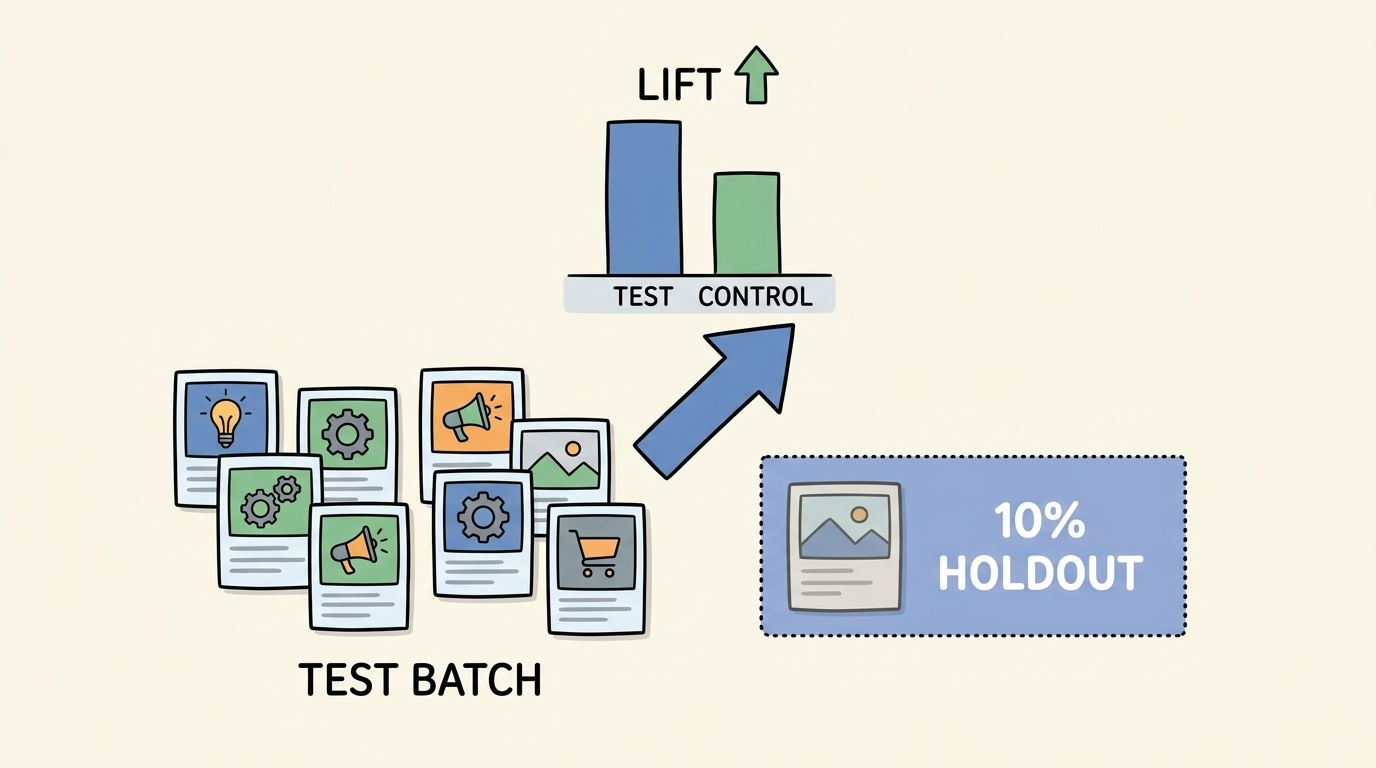
- Keep one control live: Use a stable benchmark ad so each batch is measured against the current account baseline.
- Limit format spread inside each group: Test one or two formats per angle family first, then expand the winning angle into more placements and edits.
- Tag every variant consistently: Name assets by angle, hook, format, and iteration so bulk reporting stays readable inside Rapid Ads and Meta Ads Manager.
- Review at the group level before the ad level: If three variants built on the same narrative all underperform, cut the angle instead of endlessly revising thumbnails.
This is where real operating discipline matters. In Rapid Ads, teams can bulk-upload a batch, apply naming templates such as ANGLE_HOOK_FORMAT_V1, route square, vertical, and horizontal assets into the correct placements, and compare concept families without rebuilding the structure by hand each time. That reduces one of the biggest scaling problems in Meta testing: inconsistent setup that makes week-to-week results impossible to compare.
Add a holdout so scaling decisions are not based on internal competition alone
Relative winners are not always incremental winners. An ad can beat other ads in the same ad set while adding little net lift against what the account would have produced anyway. Holdout analysis helps solve that.
Meta's own experiments framework is designed for this type of measurement, including A/B tests and conversion lift studies documented in the Meta Business Help Center overview of experiments. The practical use case is straightforward: keep a small control condition, or isolate a benchmark audience segment, so you can measure whether the new batch creates additional conversions rather than just redistributing spend among similar creatives.
For scaled accounts, this produces better cut rules. If a new testimonial batch improves click-through rate but leaves cost per purchase flat against the control, the likely issue is curiosity without stronger buying intent. If holdout results show lift but only in one placement, the next move is narrower deployment, not full-account rollout.
Use early creative diagnostics, but do not confuse them with final winners
Early engagement metrics are screening tools. They are useful for killing weak hooks fast, especially in video, but they should not outrank downstream conversion data. Meta's guidance on creative testing emphasises separating top-of-funnel attention signals from business outcome signals in the final decision process, as outlined in Meta's performance creative guidance for advertisers.
For cold acquisition, shorter videos still tend to give cleaner first-pass readouts because the hook is exposed quickly. Amplify Marketers also recommends short-form creative for cold traffic, especially when the first few seconds carry the main claim, in its Meta creative best practices summary.
The non-obvious implication is operational. Batch testing should narrow ideas fast, then re-test only the surviving angles against a control and, where possible, a holdout. That is slower than uploading dozens of unrelated ads at once, but it produces cleaner scaling decisions and fewer false positives.
9. Rapid Ads Platform and Operational Enforcement
Where platform enforcement helps
At scale, the hard part usually isn't knowing best practice. It's enforcing it across rushed launches, freelancers, multiple ad accounts, and repeated duplication. Naming conventions drift. Advantage+ toggles come back on. UTM tags get missed. Ad sets get cloned without the same safeguards.
That's where a purpose-built workflow layer helps more than another reporting dashboard. Rapid Ads is useful when the failure point is operational consistency inside Meta launch work, not strategy theory. Bulk uploads, reusable templates, naming enforcement, and multi-account management directly address the parts of Meta execution that Ads Manager still handles badly.
Examples inside a scaled workflow
Three common use cases stand out:
- Bulk creative deployment: Upload large creative batches, apply naming templates, tag variants, and group assets into ad sets without rebuilding structure manually.
- Advantage+ control: Keep unwanted creative enhancements off by default so winning ads don't mutate between accounts or relaunches.
- Multi-account rollout: Agencies can push a repeatable campaign model across clients without recreating every naming, routing, and setup choice from scratch.
This is also where Rapid Ads fits naturally into meta advertising best practices rather than sitting outside them. If your process depends on human memory for every upload, the process won't survive volume. If the platform enforces the standard, teams spend more time on budgets, angles, and landing pages instead of repair work inside Ads Manager.
10. Quick Metrics and Efficiency Gains Summary
The metrics that actually matter
Meta's median conversion rate was 8.78% across industries in a recent benchmark review, but that number is less useful for operators than the gap between your account and the economics required to scale profitably, according to WordStream's paid social benchmark analysis. Performance teams need a smaller set of checks: conversion rate strong enough to support paid acquisition, customer value high enough to absorb rising CPMs, and measurement reliable enough to trust optimisation decisions.
Use benchmark ranges as a diagnostic baseline, not as a target copied into every account. If onsite conversion rate is weak, audience expansion and bid adjustments usually produce marginal gains at best. If LTV:CAC is too tight, cleaner media buying will improve reporting discipline but not fix the business model.
Rapid Ads changes the operational side of that equation. Teams can sort creatives, ad sets, and launch batches by naming pattern, publish date, and account status, then identify which variables correlate with stable CPA and which only generated short-lived spikes. That workflow matters because scaling problems often start with poor comparability, not poor ideas.
Where overloaded teams should focus first
Creative longevity remains a practical efficiency signal. An ad that holds spend and stays live across multiple budget cycles has already cleared a stricter test than a high-CTR creative that faded after three days. In Rapid Ads, that makes longevity useful as a library filter. Keep proven assets grouped by angle, format, and launch cohort so relaunch decisions rely on historical stability, not memory.
A workable priority order is:
- Fix measurement first. Meta recommends using Pixel with Conversions API to improve event coverage and match quality, especially after signal loss from browser and device-level privacy controls, as outlined in Meta's Conversions API documentation.
- Standardise execution next. Naming rules, bulk uploads, and template-based routing reduce setup variance and make account comparisons usable.
- Control spend allocation. Apply CBO, caps, and automated rules only after campaign structure is clean enough to produce interpretable results.
- Scale testing with controls. Batch variants by angle and format, then review holdout or baseline comparisons before replacing incumbents.
The sequence matters. Teams that automate budget decisions before fixing measurement often accelerate waste. Teams that test more creative before enforcing naming usually create more data, but less insight.
One more checkpoint is Event Match Quality. If match quality is low or event hierarchy is inconsistent, Meta receives weaker optimisation signals, and reported winners can differ from actual revenue drivers. Separate primary purchase events from lead or micro-conversion events, then audit that setup before increasing budgets.
Meta Ads Best Practices: 10-Point Comparison
| Item | 🔄 Implementation Complexity | ⚡ Resource Requirements & Efficiency | ⭐ Expected Outcomes / Key Advantages | 📊 Measured Impact | 💡 Ideal Use Cases / Tips |
|---|---|---|---|---|---|
| Enforce Consistent Naming Conventions Across Ad Sets and Creative Assets | Low–Medium: requires upfront governance and templates | Low ongoing effort; initial time investment saves manual work later | Instant filtering and machine-readable labels; scalable reporting and accurate attribution | 60–70% reduction in time on manual reporting/creative audits | Define convention in a shared doc, use ISO dates, enforce templates |
| Implement Bulk Creative Upload with Aspect-Ratio Auto-Detection and Routing | Medium: needs asset prep and tagging rules | High time savings on uploads; requires organized file structure | Auto-routing to placements; fewer format errors; faster testing cycles | 70–80% reduction in upload time; accelerates time-to-winner by days | Pre-name files with aspect ratios, preview auto-detections before publish |
| Use Campaign Budget Optimisation (CBO) with Spend Allocation Rules and Per-Ad-Set Caps | Medium: set caps, bidding strategy and monitoring | Efficient scaling; reduces daily manual budget work | Dynamic spend shift to top performers while guarding against over-allocation | 20–35% improvement in campaign ROAS reported | Set per-ad-set caps 1.5–2.5x estimated budget, monitor first 7 days |
| Disable and Lock Advantage+ Creative Enhancements to Preserve Performance Benchmarks | Low–Medium: toggle + platform-level lock required | Requires active management; bulk lock reduces ongoing checks | Preserves creative intent, improves test interpretability and reusability | 15–25% more stable week-over-week ROAS; 60–70% less troubleshooting time | Lock winning creatives, audit settings weekly, disable by default in bulk uploads |
| Structure Campaigns by Objective and Funnel Stage, Not by Product or Geography | Medium: reorganise campaigns and naming conventions | More efficient learning and budget use; needs ad-set granularity | Faster learning, simpler scaling, less fragmented budgets | 25–40% reduction in time-to-statistical significance | Use ad-set naming for product/geo, consolidate unless geos differ greatly |
| Implement Automated Pausing Rules and Ad-Set-Level Spending Thresholds | Medium: build rules, exclusions and tuning cadence | Saves manual review time; requires periodic tuning | Objective, scalable pausing removes zombie spend and preserves budget | Saves 3–5 hrs/week on reviews; 5–8% higher average ROAS | Exclude learning phase, set conservative thresholds, review paused sets weekly |
| Use Lookalike Audiences (LAL) and Custom Audiences in Sequence, Not in Parallel | Medium–High: set sequencing, exclusions and refresh windows | Reduces overlap and preserves seed quality; requires audience maintenance | Clearer attribution, lower CPMs for later stages, less audience fatigue | 30–45% reduction in cost-per-conversion; 20–35% improvement in fatigue metrics | Define time windows, ensure seed >100 converters, automate exclusions |
| Batch Creative Testing with Structured Variant Groups and Holdout Analysis | Medium: configure flexible ads, holdouts and tracking | Increases testing velocity; requires reliable pixel/tracking | Faster winner identification, true lift measurement, reduced novelty bias | Testing velocity increases 4–5x; fewer false-positive wins | Keep persistent control, aim for >50 conv/week, use placement-level insights |
| Rapid Ads Platform: Operational Tools and Enforcement | Medium: platform adoption and template standardisation | Centralises enforcement; saves setup hours; needs change management | Prevents config drift, enforces standards, streamlines bulk actions | Teams report multiple hours saved per launch and more stable ROAS | Mandate template use, allow overrides for edge cases, maintain audit logs |
| Quick Metrics and Efficiency Gains Summary | Low: summary of consolidated results | Highlights cumulative savings across practices | Aggregate operational and performance improvements for scale | Consolidated: 60–80% time/upload savings, 20–45% ROAS gains, 4–5x testing velocity | Start with naming and bulk upload; pair CBO + caps + pausing; validate creatives with holdouts |
Next Steps From Insight to Impact
The fastest path to better Meta performance usually isn't another audience experiment. It's removing avoidable friction from execution. If your team is still uploading creatives one by one, cleaning names after launch, rebuilding fragmented campaigns, and manually checking whether settings reverted, you're wasting the exact time you need for creative research and decision-making.
Start with the two changes that improve almost every account immediately: naming discipline and bulk creative operations. Naming sounds administrative, but it changes how quickly you can analyse winners by hook, angle, format, offer, geo, or funnel stage. Bulk upload workflows matter just as much because they compress launch time and reduce setup mistakes that distort tests before they even start.
Once the account is operationally cleaner, move to structure. Consolidate campaigns around objective and funnel stage instead of splitting everything by product or market. Use CBO where ad sets are solving the same conversion problem, then apply ad-set guardrails so one early favourite doesn't absorb all the spend before you've learned enough. If the account keeps resetting learning because people are constantly duplicating and restructuring, fix that process before blaming targeting or creative fatigue.
Then tighten budget protection. Automated pausing rules work best when they behave like a risk manager, not a panic button. Exclude the learning phase, require meaningful spend, and only pause when poor performance is persistent enough to justify the action. Rules should save you from zombie spend, not eliminate every ad set that has a bad day.
Creative is where most scaled accounts still have the most upside. But the better tests aren't random. Build batches around angles, not cosmetic edits. Use customer language from reviews, support logs, and organic posts to define message families. Keep a stable control in market. Watch hook quality early, especially for short-form video. If the opening doesn't work, the rest of the edit rarely matters.
Measurement underpins all of this. If reporting is undercounting conversions or events are firing in conflicting ways, Meta can't optimise cleanly and your team can't trust account readouts. That's why server-side tracking, event hierarchy, and cleaner signal inputs are now part of performance operations, not just analytics hygiene.
The common thread across all 10 practices is enforcement. Many already know some version of these principles. The gap is consistency. Good Meta advertisers don't just choose better tactics. They build systems that make good tactics easier to repeat across every campaign, account, and launch window.
Rapid Ads fits best at that enforcement layer. It won't replace judgement on offer strategy or creative direction, but it does reduce the operational drag that keeps strong teams from moving at full speed. If your bottleneck is repetitive launch work inside Ads Manager, that's where reclaiming time has a direct effect on ROAS. More clean launches, more test throughput, fewer preventable errors.
Rapid Ads is a practical fit if your team is launching Meta campaigns at scale and Ads Manager is slowing everything down. It's built for bulk uploads, naming convention enforcement, multi-account management, Flexible Ads setup, and keeping unwanted Advantage+ creative enhancements disabled, which makes it useful for agencies, ecommerce operators, and media buyers who want cleaner execution without the usual click-heavy workflow.