
You're staring at another morning of Ads Manager tabs, half-finished uploads, mismatched UTMs, and a retargeting campaign that changed behavior overnight. The creative team wants more tests, the account lead wants cleaner reporting, and Meta has already pushed another round of defaults that don't quite match what you set yesterday. At scale, fb ads automation isn't a convenience. It's the only way to keep the account from turning into a pile of disconnected decisions.
Table of Contents
- The Reality of Running Meta Ads at Scale in 2026
- Audit Your Baseline Before You Automate Anything
- Build a Schema for Naming, UTMs, and Labels That Actually Survives
- Bulk Creative Workflows Without Losing Creative Control
- Native Automated Rules, Budget Caps, and the Numbers That Actually Work
- Multi-Account Launches, Team Seats, and When to Add a Third-Party Platform
- Reporting, Reallocation, and the Automation Governance Checklist
The Reality of Running Meta Ads at Scale in 2026
A media buyer opens the day with 200 ads waiting to go live across three accounts, two markets, and a client who wants the launch before noon. Creative is split between static, video, and flexible variants, the naming convention is already drifting, and one account has Advantage+ toggled in a place nobody remembered to check. By lunch, the work isn't media buying anymore, it's damage control.
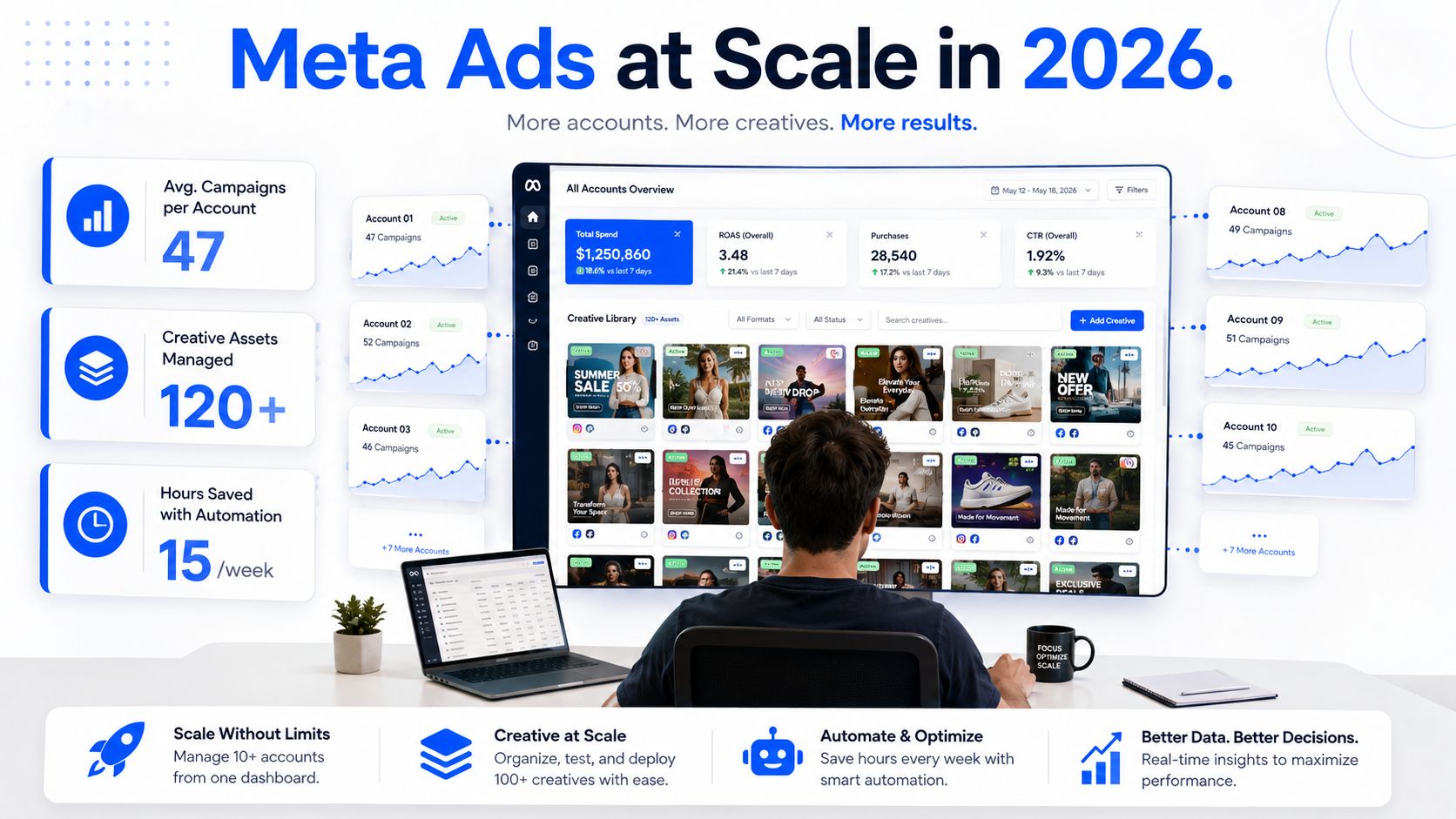
That's the operating environment now. By 2025, 82% of Facebook advertisers were using Meta's Advantage+ automation suite, which makes automation the dominant workflow rather than a niche tactic, and AI bidding was reported to deliver 27% higher ROAS than manual campaigns in the same reporting set, according to Shno's Facebook ads statistics round-up. Meta's generative AI tools were also being used by over 4 million advertisers to create more than 15 million AI-enhanced ads per month as of late 2025 in that same source, which tells you where the platform is heading. The manual account manager is now the exception.
What actually changes when automation becomes the default
The win isn't just less clicking. Automation absorbs repetitive bid changes, budget shuffles, creative generation, and fatigue checks that used to break focus across a workday. In accounts with high creative velocity, the benefit is consistency. Rules don't get tired, and they don't forget to check the same metric for the fourth time.
The trade-off is obvious to anyone who has spent time in the account after a weekend. Meta's defaults are helpful until they start behaving like hidden operators, especially when settings drift, naming is loose, or conversion windows aren't aligned. If you don't govern the machine, it'll still make decisions. It just won't make them on your terms.
Practical rule: use automation for repeatable actions, not for judgment. Let the system move spend, rotate creatives, and catch anomalies. Keep the decision about what counts as signal in human hands.
Audit Your Baseline Before You Automate Anything
Every automation stack looks elegant until it's built on bad numbers. If you connect rules to a messy account, you're not automating performance management, you're accelerating confusion. The first job is to establish your own baseline, not Meta's generic defaults.
Start with a clean export and a real comparison window
Export 30 to 90 days of campaign data first, because that gives you enough history to compare new rules against actual account behavior rather than short-term noise, as recommended in this workflow guide on automating Facebook campaigns. Pull CPA, ROAS, CTR, and frequency, then split them by audience segment, placement, and campaign type. If the account spans several objectives, keep the comparison windows aligned so you're not measuring one set of campaigns on a different time frame than another.
The point is to document what “normal” looks like before the system starts acting on your behalf. Platform defaults are not your baseline. Your baseline is the average that reflects your actual offer, your actual audience, and your actual attribution setup. If a rule is built against the wrong baseline, it'll misclassify winners and losers from the start.
Best practice: write down the conversion window each campaign is optimizing against before any rules go live. If that window shifts later, the rule logic has to shift with it.
Audit the tracking layer before the rules do anything
The same pre-automation pass should include a Pixel and Conversion API audit, plus event matching validation. If tracking is incomplete, the rule engine will optimize against partial signal and spend can drift into the wrong places. That problem gets worse when ad sets are scaled quickly because the noise hides the mistake for longer.
A simple pre-launch checklist keeps the control layer intact:
- Check event delivery: confirm the Pixel and CAPI are firing on the right events.
- Verify naming discipline: make sure campaign, ad set, and ad names follow one pattern.
- Set kill-switch conditions: define when a campaign gets paused or budget gets capped.
- Confirm attribution windows: keep reporting and rule logic aligned.
- Test on a small batch first: one account or a small cluster of ads is enough to expose errors early.
The big mistake is treating automation like a shortcut around setup. It isn't. It's a multiplier, and it multiplies whatever structure you already have.
Build a Schema for Naming, UTMs, and Labels That Actually Survives
The ugliest automation failures usually start as reporting issues. A rule fires correctly, but six weeks later nobody can tell which market, angle, or audience the result came from because the account was named like a scratchpad. If the naming map isn't strict, automation becomes hard to trust and even harder to scale across accounts.
Use one naming pattern across campaign, ad set, and ad
A stable convention should encode the same elements every time, market, objective, audience type, creative angle, and date. That sounds boring because it is. Boring is good here. Boring means a junior buyer can launch without guessing, and a rule can target objects without confusion.
A practical pattern looks like this:
Campaign
Market, objective, funnel stage, date
Ad set
Audience type, placement or segment, offer focus
Ad
Creative angle, format, version
The exact characters matter less than the consistency. If one account uses “UK” and another uses “United Kingdom,” or one team writes “LAL” while another writes “lookalike,” your automation and reporting will split the logic into fragments.
Keep UTMs and labels attached to the same logic
UTMs need the same discipline as names. Build a template that auto-fills source, medium, campaign, content, and term so the attribution tool or GA4 report stays readable when volume ramps. Don't let ad-level UTM edits drift away from the campaign naming map, or your reports will stop reconciling with Ads Manager.
Labels matter too, especially for automation governance. Use them to separate Advantage+ campaigns, retargeting pools, and LAL audiences so rules can target the right objects every time. A label is only useful if it means the same thing in every account. If one buyer uses labels for funnel stage and another uses them for creative type, the system loses the ability to segment cleanly.
Hard rule: if a label can mean two things, it means nothing. Keep each tag tied to one operational purpose, then enforce it in the launch workflow.
The goal here isn't neatness for its own sake. It's making sure automation can still be interpreted when the account has dozens of live campaigns and no one remembers which ad set was duplicated from where.
Bulk Creative Workflows Without Losing Creative Control
fb ads automation starts paying back time in a way you can feel immediately. The old workflow is painful, drag assets in one by one, paste copy into each ad, sort by format, then cross-check whether the right enhancement settings stayed off. The newer workflow treats creative as a structured batch, not a pile of individual jobs.
The bulk pipeline that keeps velocity without blurring the test
A practical creative system starts with a structured asset library, then moves into a template matrix for variants, then into campaign assembly, and finally into rules-based launch and fatigue rotation. That six-stage approach is laid out in this ad creation automation guide, which also identifies five reliably automatable pieces, variant generation, asset tagging and naming, campaign assembly, budget rules, and fatigue detection. That's the right order because it protects test clarity before it increases speed.
The most useful bulk operations are the ones that reduce repetition without changing the meaning of the test:
- Drag and drop assets in batches: images, videos, and copy can be loaded together instead of one ad at a time.
- Route by aspect ratio: 1:1 feed assets and 9:16 Reels or Stories assets should land in the right ad sets automatically.
- Generate copy from templates: reusable copy blocks keep tone and angle consistent across large batches.
- Import from CSV or Sheets: useful when your team scripts creative variations outside Ads Manager.
- Bundle into Flexible Ads: multiple images and videos can be grouped so Meta tests variations inside one workflow.
That last point matters. Flexible Ads let Meta dynamically compare assets within a single launch structure, which is useful when you need volume but still want some control over how variation is packaged.
Protect the creative from silent setting drift
The operational pain point that keeps showing up in live accounts is Advantage+ creative enhancements. Manual uploads can sometimes leave you babysitting a setting that should have stayed off, and the downside is creative drift you didn't approve. Some platforms, including Rapid Ads, add an auto-disable layer for Advantage+ creative enhancements so the original creative setup stays intact during bulk publishing. That kind of safeguard is valuable when the creative team is trying to preserve message fidelity across dozens of ads.
The trade-off is interpretability. The more variations you stack into the same test, the easier it is to hide what worked. Mixing static and video variants inside one sloppy test can make the reporting clean on paper while obscuring the winning element in practice. Automation helps volume, but it only helps learning if the test structure stays disciplined.
Native Automated Rules, Budget Caps, and the Numbers That Actually Work
Meta's native Automated Rules are straightforward once you strip away the menu clutter. You define a trigger, an action, and a target, then tell Ads Manager what to do when the condition is met. That can mean pausing delivery, adjusting budget, or sending a notification when a threshold is crossed, as described by LeadsBridge's automation overview.
Start conservative and let the rule prove itself
The smartest early setup is deliberately boring. Practitioner guidance recommends limiting automated bid changes to 10 to 20% and daily budget increases to 50% until the rule's impact is validated, according to this fb ads automation workflow guide. Those caps reduce the odds that a single noisy day throws the account off balance. Bigger changes can come later, after the rule has survived a real traffic cycle.
The highest-value tasks to automate are usually the same ones every team complains about manually: bid adjustments, budget reallocation, creative rotation, and fatigue detection. They're repetitive, time-sensitive, and easy to miss when you're managing multiple accounts. But they only stay useful if the rule is allowed to watch enough data before acting.
A sensible first rule matrix looks like this:
| Trigger | Action | Target |
|---|---|---|
| CPA rises above threshold | Pause or reduce budget | Ad set |
| Frequency climbs with weak return | Alert or rotate creative | Ad |
| ROAS holds above floor | Increase budget within cap | Campaign or ad set |
| Spend climbs with no conversion signal | Pause delivery | Ad set |
Use timing discipline, not just metric thresholds
The worst mistake is letting rules react to a short window with no context. The same source recommends running native automations for about 2 weeks before layering additional tools, then reviewing the impact daily at first and weekly after that. That gives the system enough time to show whether the rule is helping or just responding to noise.
Frequency monitoring belongs in the same decision tree. A rule that only looks at ROAS can miss creative fatigue until the decline is already expensive. Kill-switch logic should be based on compound signals, not a single spike. If spend rises, frequency climbs, and return softens together, the account deserves intervention. If only one of those moves, the rule needs more patience.
Practical rule: use pause rules to protect waste, budget rules to reward winners, and alerts to catch uncertainty. Don't let one metric do all three jobs.
Multi-Account Launches, Team Seats, and When to Add a Third-Party Platform
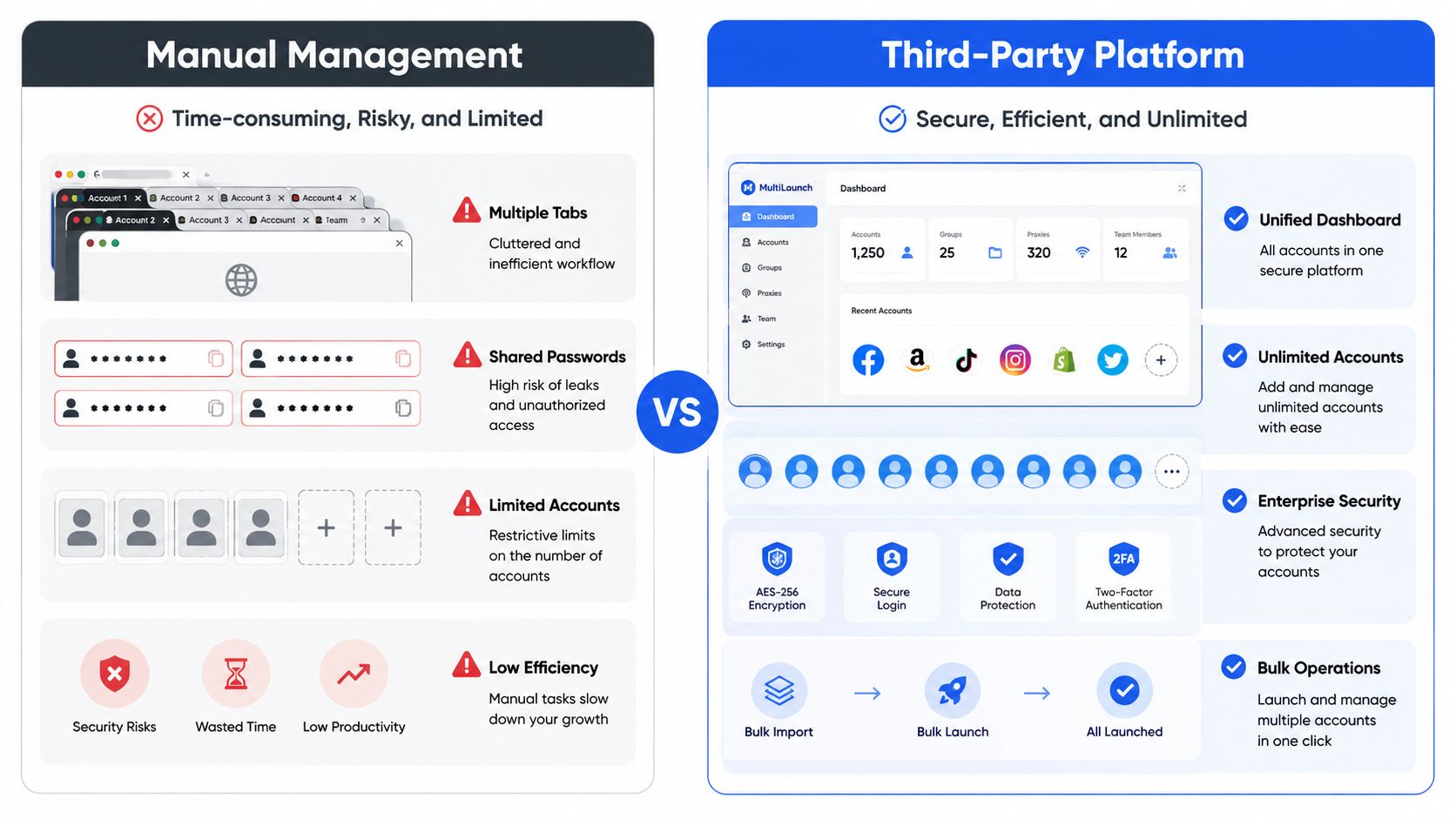
Native Ads Manager can handle a lot, but it starts to feel cramped once a team is pushing repeated launches across multiple accounts. The friction isn't just scale, it's coordination. Shared access, repetitive uploads, and cross-account consistency all become harder to keep clean at the same time.
Native control versus platform control
If you're launching a modest number of ads each week, staying native is often fine. Meta gives you campaign-level, ad set-level, and ad-level automated rules, plus the ability to schedule notifications and budget changes inside Ads Manager. That's enough for a lot of in-house teams with one or two accounts.
The gap shows up when launch volume becomes a workflow problem. A dedicated platform is worth considering when the team needs bulk creative uploads, enforced naming conventions, AI copy generation, team seats, or a single place to manage multiple ad accounts. Rapid Ads fits that operational use case because it's built around bulk launching, automatic UTM tagging, naming enforcement, multi-account management, and team access without shared logins. It also handles aspect-ratio routing and Advantage+ creative control in a way that reduces manual babysitting during launch.
Choose the platform based on operational pain, not feature lists
A third-party platform only helps if it removes a real bottleneck. The useful questions are practical:
- Does it handle bulk uploads reliably? If uploads break, the time savings disappear.
- Can it enforce naming automatically? If not, reporting will still drift.
- Does it support team seats cleanly? Shared access is where many agency workflows get messy.
- Can it manage multiple accounts from one dashboard? That's where the labor savings compound.
- Does it protect creative settings during launch? A tool that saves time but changes the ad you meant to run is not a win.
The contrarian point is simple. More automation can reduce interpretability if the test design is sloppy. A platform won't fix weak naming, mixed creative structures, or inconsistent attribution windows. It can make a disciplined process much faster, but it can also make a bad process move faster.
Reporting, Reallocation, and the Automation Governance Checklist
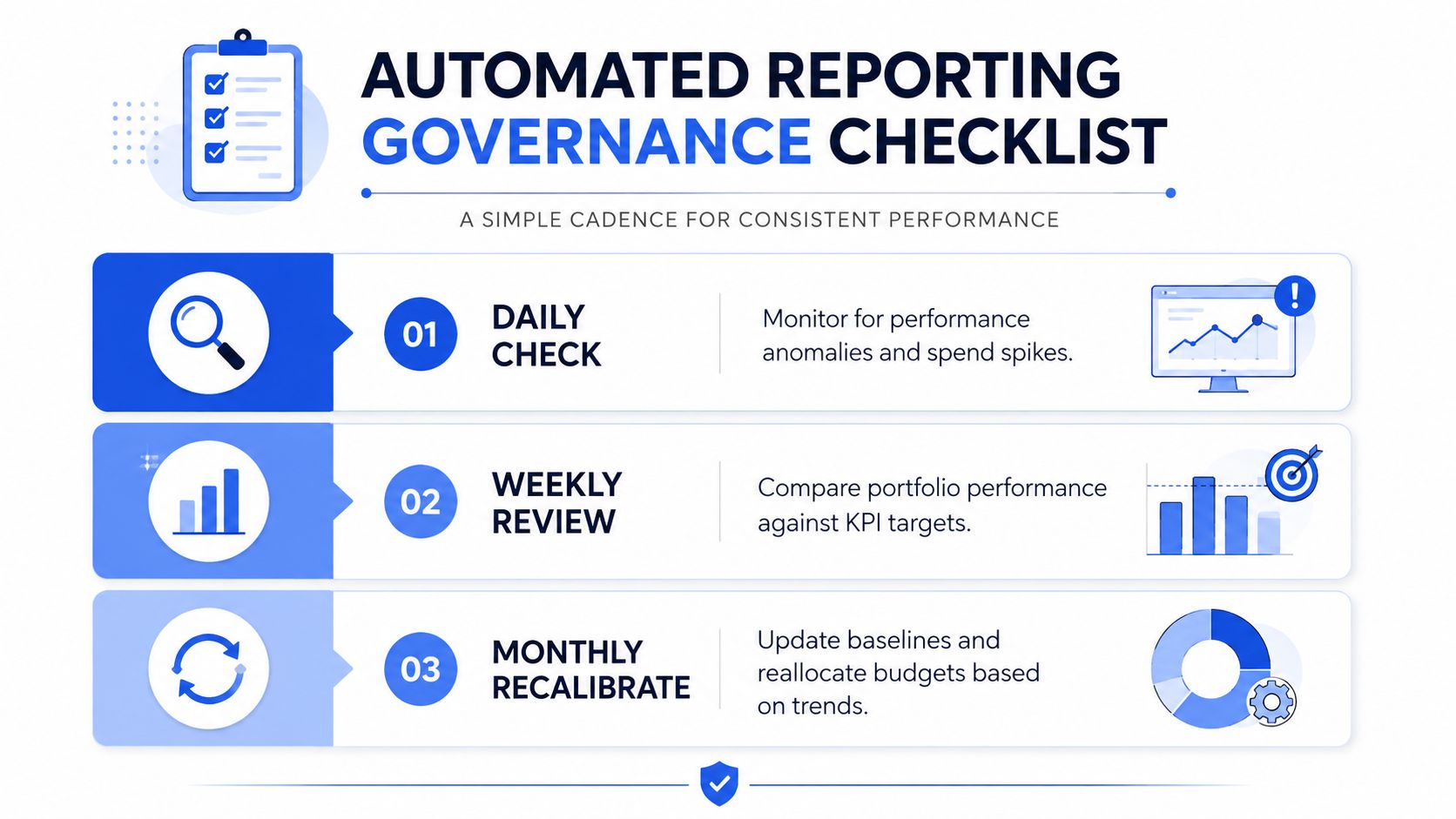
Automation only works if the reporting layer tells the truth. Daily checks should catch obvious anomalies, weekly reviews should compare portfolio movement against targets, and monthly recalibration should reset the baseline when the account changes shape. Without that cadence, rules keep firing long after the account has moved on.
Watch for the failures that automation hides
The most common breakpoints are predictable. Settings revert, ROAS chase loops overreact to one good day, and creative fatigue gets scaled instead of rotated. Each of those failures looks like progress for a short period, then turns into wasted spend or unreadable reporting.
The best governance checklist is short and enforceable:
- Naming consistency: verify that campaign, ad set, and ad names still follow the same schema.
- UTM coverage: confirm that every live ad is tagged correctly.
- Advantage+ settings audit: check for silent changes before they reach spend.
- Rule threshold review: make sure no threshold has drifted too close to noise.
- Kill-switch testing: confirm that pause logic still works when it should.
Pixel and CAPI validation belong in the same review cycle. If event matching quality slips, the automation may still “work,” but it'll work on the wrong signal. That's when budget reallocation starts rewarding the wrong ad set and punishing the right one.
Turn automation into a governed system
The point of governance is not more rules, it's fewer surprises. If reporting is clean and the audit trail is visible, you can reallocate spend with confidence instead of guessing which dashboard lies less. That's the difference between an account that scales and an account that merely runs faster.
If your current stack still depends on hand-entered names, manual UTM edits, and constant Advantage+ babysitting, clean that up before you add more rules. Rapid Ads is built for the launch side of that problem, with bulk uploads, naming control, team access, and settings protection that keep the account from drifting while volume goes up. Visit Rapid Ads if you want a launch workflow that stays clean while you scale creative and spend.



