A hand-built 100-ad launch usually consumes six to eight working hours, and the upload is only part of that bill. In one comparison, publishing 100 creatives one at a time in Ads Manager took 1 hour 57 minutes, while Rapid Ads launched the same ads in 8 minutes 39 seconds.
The 100-day frame predates the ad platform. Franklin D. Roosevelt took office on March 4, 1933, with about 25% of the American workforce unemployed, and between March 9 and June 16 Congress passed 76 to 77 laws, including roughly 15 to 16 major New Deal measures, while Roosevelt issued 99 executive orders, as the FDR Library's action guide records. Urgent start, fixed window, countable outputs. Advertisers inherited the structure and dropped the discipline.
That borrowed frame pushes teams toward the wrong endpoint. Counting days to the publish click flatters a build and says nothing about whether any ad in the batch received enough delivery to be judged. Rapid Ads is an Official Meta marketing partner, and more than 2 million ads have been launched with Rapid Ads. That scale matters because the hard part is not assembling the upload file. It is deciding when a concept has earned a verdict.
U.S. social media advertising revenue reached $117.7 billion in 2025, up 32.6% year over year, according to IAB, so creative volume is no longer the scarce input. Auction delivery is. A credible 100-ad timeline therefore runs in two parts: the build, then the distribution required before a concept verdict means anything. The useful read is not “ads are live.” It is “ads are live, structured, named and delivered long enough to compare.”
Table of Contents
- How Long 100 Meta Ads Take to Launch
- Build the Creative Matrix Before Uploading
- Set Budget Architecture and Ad Set Count Early
- Where the Hours Go and Which Shortcuts Are Safe
- Naming and UTM Rules That Keep Reporting Clean
- Lock Advantage+ Enhancements Before Delivery
- Confirm Your Timeline Before Launch Day
How Long 100 Meta Ads Take to Launch
The measured slice of a launch is smaller than most buyers assume, and the unmeasured slice is where the budget goes. The comparison above times one thing only: the click path from finished asset to live ad. 1 hour 57 minutes by hand against 8 minutes 39 seconds in bulk is a 92.6% reduction, and both numbers belong to the provider that ran the test. Time the same job on your own account before you put either figure in a capacity plan or a client estimate.
| Measure | Manual Ads Manager | Bulk launch |
|---|---|---|
| Timed upload and publish of 100 creatives | 1h 57m | 8m 39s |
| Publish 100 ads in one batch | Not possible as a single action, 100 separate publishes | Under 10 minutes (provider figure) |
The stopwatch covers upload and publish. Everything around it stays untimed: naming 100 ads to a convention, attaching UTM values, confirming Advantage+ creative state, and checking statuses after publish. Those tasks scale with batch size, not with upload method, so they hit manual and bulk builds equally. A team that names ads one by one adds the same minutes whether the upload took two hours or nine. The practical reading of the table is that automation compresses one step in a chain, and the chain is only as fast as the steps nobody timed.
What the clock excludes: creative production, internal approval and the learning phase after publish. For a 100-ad batch, the third item dwarfs the first two.
That last point is the one buyers underprice. A launch isn't finished when the ads go live. It's finished when each concept has enough delivery to produce a verdict you'd act on, and that window is set by budget and CPM, not by how fast the upload ran. A batch published in nine minutes and a batch published in two hours enter the same auction on the same terms. Shaving the build earns nothing unless the saved hours go into delivery planning: how much spend each concept needs before its read is valid, and how many days that spend takes to accumulate at your CPM.
If the bottleneck is asset supply rather than ad assembly, how to mass-produce AI images covers generating a batch of raw creative quickly, which moves the constraint back to sorting and naming.
Baseline check. Open your last 100-ad batch, find the timestamp of the first asset upload and the timestamp of the first ad going live, and subtract. Then run one 20-ad batch through a bulk workflow and time the same interval, scaled up by five. The gap between the two is your real automation gain, and it's the only figure worth quoting to a client. Quote it alongside a second number: the days each concept needs in delivery before you trust its read. The first number is the build. The second is the launch.
Build the Creative Matrix Before Uploading
A 100-ad build is a research design before it's an upload task. Meta's own documentation frames the flexible ad format as a way to group multiple images, videos and text assets into one ad and let delivery pick the combination per placement and audience, which means a 100-ad build can carry distinct hypotheses instead of 100 near-identical files (Meta Marketing API documentation).
The worked matrix is 10 concepts × 5 executions × 2 placements = 100 ads. Concepts are the argument: a hook, a demonstration, an offer, a testimonial. Executions are the surface: visual treatment, copy length, aspect ratio. Keep the two axes separate in the naming or you'll spend the analysis phase arguing about which one moved the number.
| Structure | Ad objects | Assets per ad | Use when |
|---|---|---|---|
| 100 single-asset ads | 100 | 1 | Each hypothesis needs isolated spend or reporting |
| 10 Flexible ads with 10 assets each | 10 | 10 | Assets share one hypothesis, budget and approval |
| 20 Flexible ads with 5 assets each | 20 | 5 | Balance delivery variety against clean reporting |
Flexible holds up to 10 images and videos per ad, and Meta's delivery system decides whether to serve a single image, a video or a carousel for each placement. It's available at ad level only for Traffic, Engagement, Sales and App Promotion objectives, and it can't be selected while Advantage+ catalog ads is the creative source, so Sales campaigns need that toggle off first (Meta Business Help Center).
Choose the ad object count before the assets
Asset volume and ad object count are different numbers, and only the second one drives reporting. Ten Flexible ads holding ten assets each gives you ten rows in Ads Manager and 100 files in the auction. That's a cleaner dataset than 100 rows, provided every asset in a bundle argues the same case.
The trade-off is control. Separate ads win when a hypothesis needs its own budget, its own approval trail or its own line in a client report.
Name for aggregation, not for the upload
Encode concept, format, market and iteration in both the ad name and the ad set name, in a fixed order with a fixed delimiter. Then a single filter returns a complete hypothesis across every execution it produced, and asset-level results stop being confused with delivery-level results.
One constraint shapes the launch sequence. Changing creative counts as a significant edit that can push an ad set back into the learning phase, so publish the coherent test set in one pass and resist mid-flight swaps. The concept-versus-execution split in this creative testing framework is worth settling before you build, and if the account is already the problem rather than the creative, diagnose underperforming Facebook ad accounts before adding a hundred more ads to it.
Before publishing, count ad objects and the ad sets each concept produces. Not uploads.
Set Budget Architecture and Ad Set Count Early
The ad set count is the first decision, because it fixes the budget mode and the edit flexibility for the entire launch. Meta's best-practice guidance sets 70 ad sets per campaign as the operational threshold for Advantage+ campaign budget: above it, the edits you can make after publishing become limited, which means the structure has to be right before bulk publishing rather than corrected afterwards (Meta Business Help Center).
Below that ceiling the same documentation recommends entering campaign-setting changes in bulk to limit time spent in the learning phase. With 100 ads spread across a dozen markets, that single habit protects more delivery than any bidding tweak.
| Ad sets per campaign | Budget mode | Post-publish edits | Main risk |
|---|---|---|---|
| 1 ad set | Ad set budget (Advantage+ campaign budget needs at least two ad sets) | Full edits | No cross-ad-set spend reallocation |
| 2 to 69 ad sets | Advantage+ campaign budget | Full edits | Over-fragmented delivery if budgets are thin |
| 70 or more ad sets | Advantage+ campaign budget | Limited edits after publish | Structure cannot be easily corrected once live |
Why the budget mode follows the count
Advantage+ campaign budget spreads one campaign-level budget across ad sets in real time and pushes spend toward the opportunities Meta predicts are strongest. Meta recommends it for campaigns with at least two ad sets, so a single ad set runs on its own ad set budget with no cross-set reallocation at all. If you want the campaign budget to do the work, two ad sets is the floor, not a preference.
The spend-limit trap
Minimum and maximum ad set spend limits, entered as a percentage or a dollar amount, exist for control, and they cost you reach. Meta warns that spend limits can stop the campaign budget from exploiting the best available opportunities and advises using them sparingly (Meta Business Help Center). Stack a floor, a ceiling, a cost cap and a bid cap on the same ad set and the constraints compound: the ad set spends less than expected, or never delivers.
Practical rule: configure the controls on one duplicated ad set, confirm it delivers, then copy that exact configuration across markets. Never hand-build the same four caps twelve times.
Duplication behaviour matters here. The ad set level guide explains how budgets and caps inherit when you clone a structure, which is the difference between a clean market rollout and twelve slightly different experiments.
Decide the architecture, the caps and the ad set count before the first asset goes near the uploader.
Where the Hours Go and Which Shortcuts Are Safe
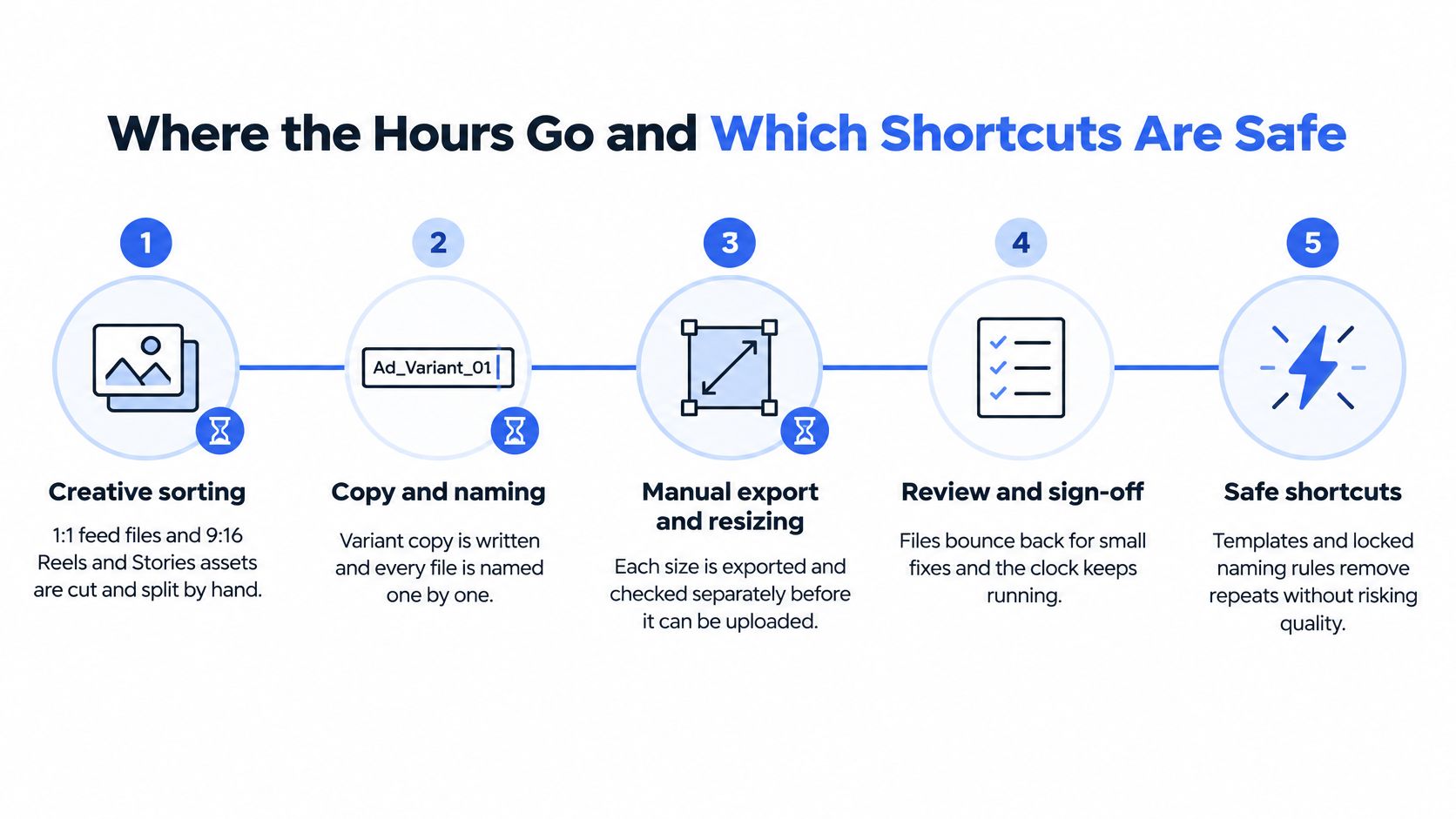
Walk the build in production order and the time sinks stop being mysterious. Creative sorting eats the first block: 1:1 feed files and 9:16 Reels and Stories assets get cut, renamed and split by hand. Copy and naming eats the second, because ad names get re-typed per ad. Ad set grouping eats the third, one budget, location, age range and cap at a time. Then UTM tagging, then the enhancement check, then publish and verification.
| Stage | Work involved | Main time sink | Compression lever |
|---|---|---|---|
| Creative sorting | Cut, rename and split assets by concept and ratio | Manual file handling of 1:1 and 9:16 assets | Automatic aspect-ratio routing |
| Copy and naming | Write or import copy and build ad names | Re-typing names for every ad | Naming templates and CSV copy import |
| Ad set grouping | Group ads and set budgets, locations, ages and caps | Configuring each ad set separately | Bulk grouping with copied settings |
| UTM tagging | Attach campaign, content and medium values | Manual entry errors that split one test | Dynamic UTM values from ad names |
| Enhancement check | Confirm Advantage+ creative state | Settings reverting silently | Persistent enhancement settings |
| Publish and verify | Publish and check names and statuses | Review after publish | One batch publish, then a sample audit |
The build is not the expensive part
Launching 100 ads and obtaining 100 meaningful tests are different achievements, and the second one is rare. A 2026 analysis of 368 ads across 15 direct-to-consumer brands found that 80% never reached 100,000 impressions, while the top 10% of creatives absorbed 68% of spend (The Interconnections benchmark analysis). The same dataset put the CTR decline at roughly 5.5% by the first 250,000 impressions, with a 19.6% CPA increase appearing only between 500,000 and 1,000,000 impressions.
Those two numbers reset how you read a launch. Most of a 100-ad batch will never earn a verdict, and the fatigue everyone fears arrives far later in the impression curve than the panic suggests. Replacing a low-delivery ad feels like solving creative fatigue when the actual problem is that the ad was never distributed.
Safe shortcuts and unsafe ones
Safe: publishing a coherent test set in one batch, reusing naming templates, importing copy from CSV, auto-routing aspect ratios into the correct ad sets, and duplicating validated ad set structures across markets. Rapid Ads publishes a whole batch to Meta Ads with one click, which turns the publish stage from 100 actions into one and leaves the audit as the only remaining step.
Unsafe: swapping creative mid-flight (a significant edit that restarts delivery exploration), adding ads one at a time to a live ad set, and pushing budget changes across many ad sets without a bulk logic pass. Each one resets the clock you're trying to measure.
Decision rule: judge at concept level, not ad level. Once a concept clears a delivery floor of 100,000 impressions across its executions, consolidate, pause or scale on the aggregate. Below that floor, the honest verdict is "unknown", not "underperforming".
Run the delivery math before you launch
Impressions equal spend divided by CPM, multiplied by 1,000. A $1,000 test at a $10 CPM buys roughly 100,000 impressions, which is one concept reaching the floor and nothing more. Ten concepts at that threshold need ten times the budget, or a longer window. This is the arithmetic that decides whether 100 ads can produce evidence or only activity, and it's cheaper to run it before the upload than after.
Order of operations, then: matrix and budget architecture first, because both are expensive to undo once the ads are live.
Naming and UTM Rules That Keep Reporting Clean
At 100 ads, measurement quality becomes a data-engineering problem. Inconsistent campaign parameters split one experiment into several analytics dimensions, and you end up comparing half a concept against half of another. Google Analytics recommends one unique campaign name that matches the platform campaign name exactly, a unique content value for each displayed creative or format, and strict case-sensitive naming, since Meta and meta are stored as different values (Google Analytics Help).
The schema that survives a 100-ad deployment:
utm_source=metautm_medium=paid_socialutm_campaign={{campaign.name}}utm_content={{ad.name}}
Dynamic values matter more than they look. When analytics pulls the campaign and ad names straight from the platform, the join key between Meta delivery exports, landing-page sessions, conversions and downstream revenue stays intact without anyone retyping it.
The ad name carries the structure
Use four controlled lowercase tokens in a fixed order with a fixed delimiter: market, concept, format, version. A UK testimonial creative in 9:16 at its second iteration becomes uk-testimonial-9x16-v2. Filter on any single token and you get a complete group; filter on two and you get the cell you want to compare.
Casing has to be enforced by the system, not by an editor's memory. One capital letter in a market token creates a phantom segment that looks like a new market in every report for the rest of the quarter.
Validation before launch, aggregation after
Three checks before anything goes live. Every ad has a non-empty, unique identifier. Duplicated creatives carry intentional content values, not copy-pasted ones. Platform names match analytics names exactly, character for character.
After launch, aggregate by concept and format first, then placement, then individual ad. Starting at ad level buries the causal signal from creative themes under placement noise.
Where 100 to 200 ads run across markets, enforce the convention at ad and ad set level through the platform rather than through a spreadsheet. This guide to Facebook ads naming conventions sets out token orders that hold up under that volume.
Lock Advantage+ Enhancements Before Delivery
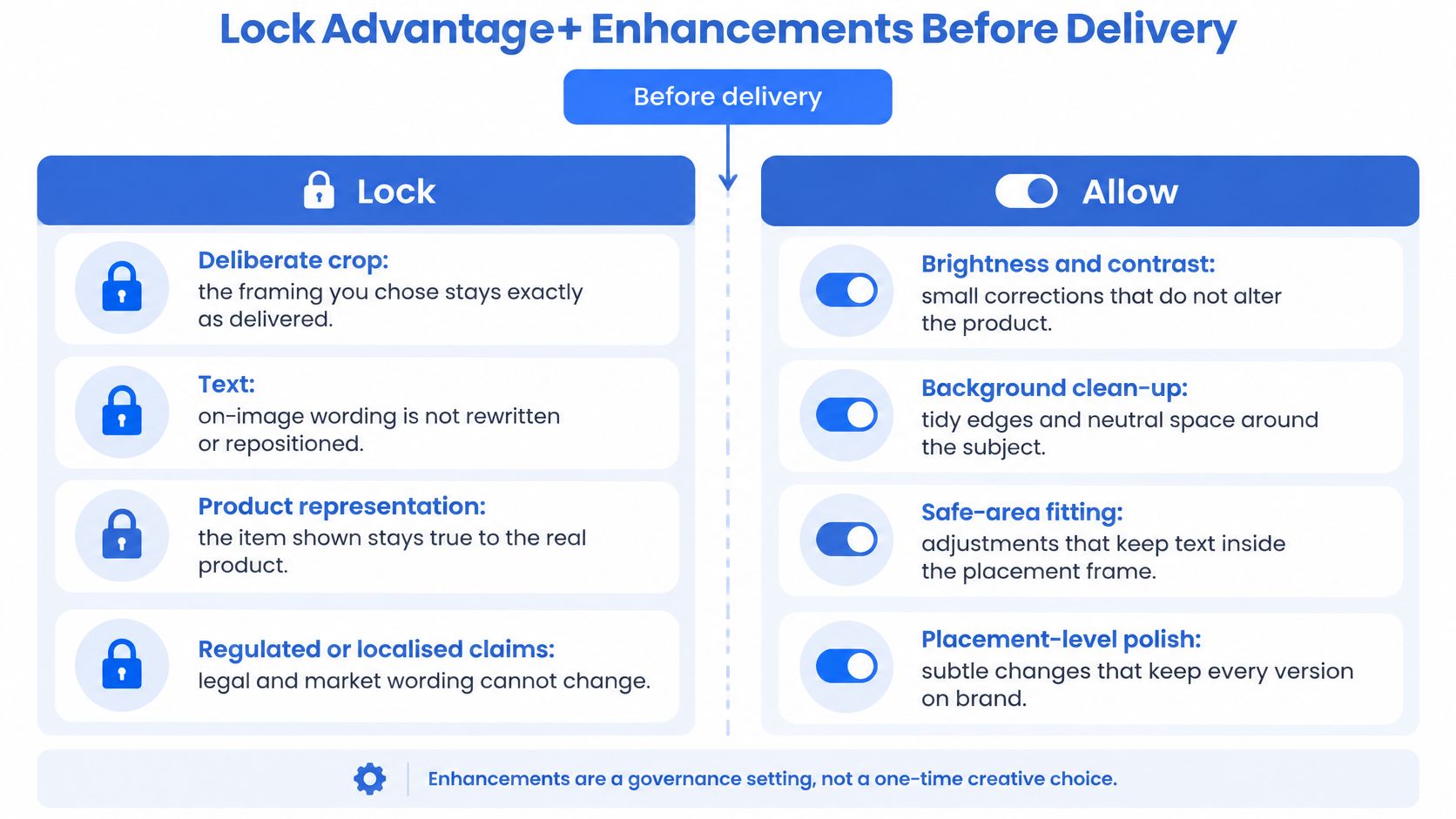
Advantage+ creative enhancements are a governance setting, not a one-time creative choice, and treating them as the latter is how a deliberate crop becomes an automated one three days into a launch. Meta's guidance lists multiple independent enhancement types and confirms that some are enabled by default, while each can be switched off later (Meta Business Help Center).
The decision splits cleanly in two.
What to lock
Anything that changes the proposition or the evidence. Deliberate crop and framing, on-image text, product representation, and any regulated or localised claim in a market where wording is legally constrained. If an account manager approved a specific visual hierarchy, that hierarchy is part of the test.
What to allow
Auction-level optimisation that leaves the proposition untouched: brightness and contrast correction, background clean-up, safe-area fitting so text stays inside the placement frame, and placement-level polish. These change how an asset renders, not what it claims.
The post-publish path in Ads Manager
- Open the Ads tab in Ads Manager.
- Select the relevant ads.
- Click Edit, then open the Advantage+ creative section.
- Click Edit again.
- Turn off individual enhancements, or customise them.
During creation the equivalent path is Set up creative, then Enhancements, then disable or customise the applicable options before clicking Done.
This matters more than it did two years ago. Industry coverage reports that Meta has moved Sales, App and Leads campaigns toward Advantage+ defaults, narrowing the practical gap between manual and automated setups (AdGenz analysis). When the default is on, the audit is the control.
Verify, don't assume. After bulk creation and before delivery, check the final Advantage+ configuration on a sample of ads across each market and format. A silent revert doesn't undo one decision, it undoes that decision across dozens of ads at once.
Persistent enhancement settings remove the repeat check from the manual workflow entirely, which is the difference between a launch that holds its creative intent and one that drifts.
Confirm Your Timeline Before Launch Day
Run this checklist before the next 100-ad launch, in this order.
- Count the structure. Ad objects, ad sets and concepts from the matrix. If the ad set count sits at or above 70, restructure now rather than after publishing, when edits are limited.
- Match budget mode to the count. One ad set means ad set budgets. Two or more opens Advantage+ campaign budget. Confirm the spend limits are deliberate and few.
- Validate naming and UTMs on one batch. Unique identifiers on every ad, case-consistent platform and analytics names, no duplicated content values.
- Audit Advantage+ state on a sample from each market and format, post-creation and pre-delivery.
- Set the delivery floor per concept, 100,000 impressions is the working threshold, and agree in advance that nothing gets consolidated or paused below it.
Then map each step against the opening table. Steps one and two are planning time, steps three and four are build time, step five is the delivery window that follows publish. Add the three columns and you have your team's own 100 ad timeline, split into hours you control and days the auction controls.
Test the workflow on a real subset first. Twenty creatives through the new process, timed against the manual baseline you recorded, tells you more about your launch capacity than any vendor comparison, including the 8 minute 39 second figure. Measure the trial batch, then commit the full hundred.
Rapid Ads was built for the part of this timeline that's pure repetition: drag in a batch of images and videos, group them into ad sets, apply naming conventions and UTMs automatically, and publish the whole set to Meta in one click, with Advantage+ creative enhancements locked off so they stay off after delivery. If the build hours in your own baseline are the bottleneck rather than the delivery window, start on the free tier with 10 uploads and time a real batch against your manual numbers before you scale to 100. Visit Rapid Ads to see how the bulk workflow handles naming, aspect-ratio routing and multi-account launches.