At 1080 × 1350 px and 1080 × 1920 px, Instagram video advertising has settled into two production standards that matter far more than a sprawling placement checklist. The first serves Feed, the second fills Stories and Reels. The operational decision for a 2026 campaign isn't which of six nearly identical exports to upload. It's whether your team has built the right 4:5 and 9:16 creative families before Meta Ads Manager starts distributing spend.
These are the working Instagram video ad dimensions to brief, export, name, and QA. Meta accepts more than one ratio in several environments, but accepted doesn't mean strategically useful. A file can pass upload validation and still waste screen space, expose text to interface overlays, or force a buyer into manual cropping after launch.
Table of Contents
- The Two Creative Families Behind Instagram Video Ads
- Primary Aspect Ratios Explained
- Master Spec Reference for Every Instagram Placement
- Feed Video Ads in Practice
- Stories and Reels as an Immersive Pair
- Explore, Video, and Carousel Slots
- Recommended Export Settings by Placement
- Why 1440 px Masters Are the New Baseline
- Common Spec Mistakes That Hurt Delivery
- How Rapid Ads Streamlines Multi-Placement Campaigns
- Pre-Launch QA Checklist for Media Buyers
The Two Creative Families Behind Instagram Video Ads
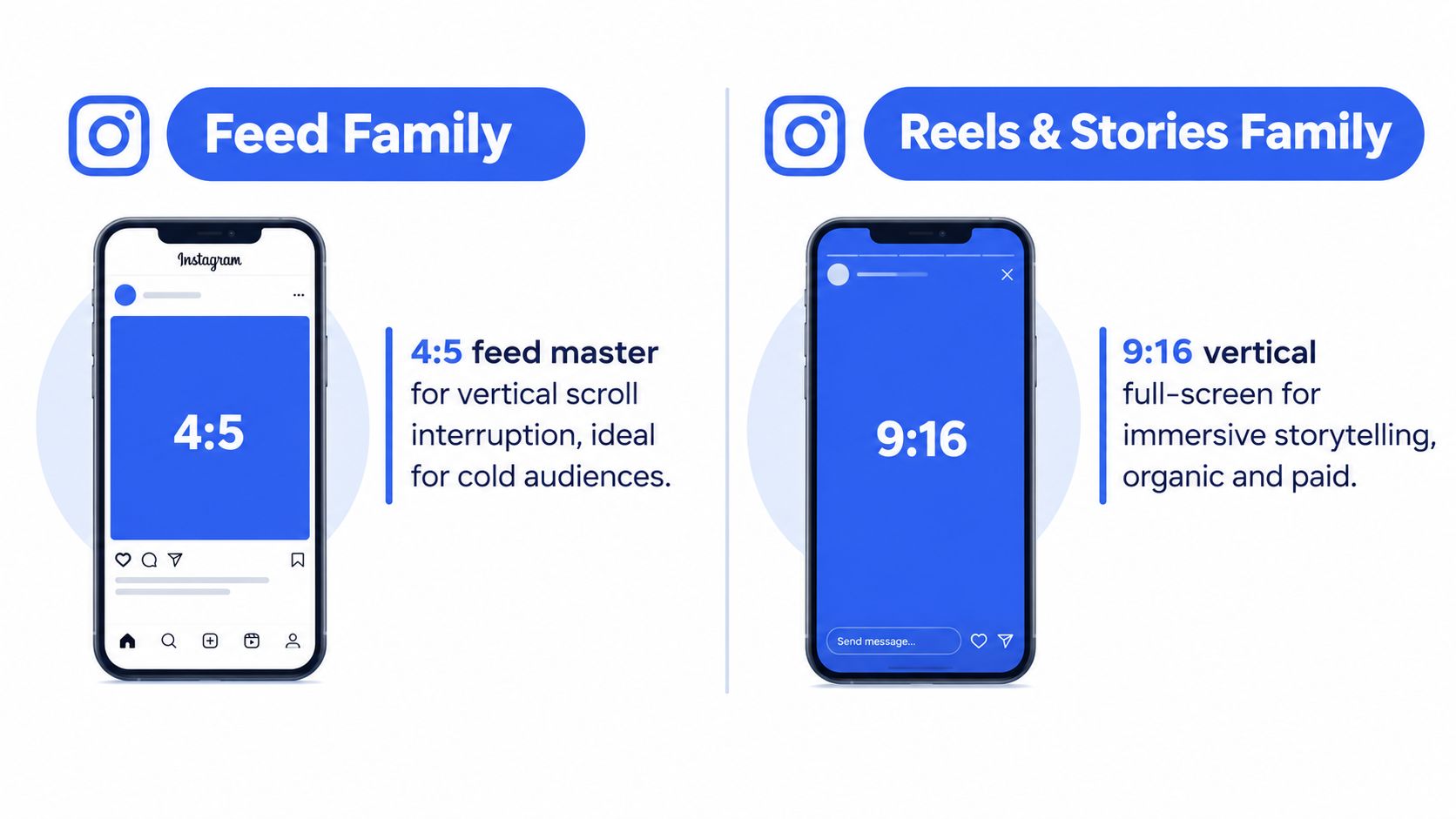
Instagram video buying in 2026 is built around two production families, not a long placement checklist. The Feed family uses a 4:5 master, commonly 1080 × 1350 px. The immersive family uses 9:16, commonly 1080 × 1920 px, for Stories and Reels. Meta ad sizing guidance supports 4:5 as the preferred Feed target and 9:16 as the full-screen format for immersive placements.
The next production baseline is resolution. Keep these ratios, but prepare higher-resolution 1440 px masters when the workflow supports them. Many cheat sheets still stop at delivery dimensions, even though a stronger source file gives the platform more detail to work with during processing and placement adaptation. Ratio determines framing. Master quality determines how much detail survives that process.
Use this production model:
- Feed master: Build 4:5 for vertical scrolling in Feed.
- Immersive master: Build 9:16 for full-screen Stories and Reels.
- Fallback asset: Keep 1:1 for existing square footage, carousel cards, or account constraints.
Meta Ads Manager can distribute assets across placements, particularly with Advantage+ placements enabled. That automation increases the cost of weak framing. A single asset may receive delivery across several surfaces before a crop, overlay, or subject-position problem is detected.
The 2026 placement reference also organizes current production around semi-vertical Feed creative and fully vertical immersive creative.
Operational rule: Export by placement family first. Let Ads Manager distribute only after each family has passed crop, safe-area, and resolution checks.
Separate families simplify filenames, creative reporting, and troubleshooting. Your media plan should specify the family before the editor opens the timeline.
Primary Aspect Ratios Explained
Three ratios handle most Instagram video buying: 4:5, 1:1, and 9:16. Treat them as two production families, with square as a controlled fallback, rather than as interchangeable export options.
4:5 at 1080 × 1350 px is the practical Feed target. Its taller frame occupies more of a vertical scroll than square creative while remaining suited to Feed. For 2026 production, keep a higher-resolution 4:5 master when the workflow supports it, then export the placement-ready version required by the account and campaign setup.
1:1 at 1080 × 1080 px is the compatibility option. Use it for an existing square asset, carousel video cards, or a creative system built around consistent card dimensions. Meta's Instagram Feed ad guide confirms support for multiple aspect ratios, including square and vertical formats. Support makes 1:1 usable, not automatically efficient.
9:16 at 1080 × 1920 px is the full-screen family for Stories and Reels. Meta's Story placement guidance recommends this ratio and also describes support for Feed-style ratios from 1.91:1 through 4:5. That acceptance does not deliver the same screen coverage. Select 9:16 when the creative must fill the immersive frame.
Set the ratio in this order:
- Select the placement family. Use 4:5 for Feed and 9:16 for Stories and Reels.
- Retain 1:1 for a defined constraint. Existing square footage and carousel systems qualify. Upload compatibility alone does not.
- Review Meta's previewer. Interface controls can cover text, while a poorly positioned subject can leave unused space even when the file passes validation.
Wide video may be accepted in some Feed environments, but it is a weak default for mobile-first delivery. The wrong canvas creates a framing problem that bidding cannot correct.
Master Spec Reference for Every Instagram Placement
Treat the table as a trafficking reference, not a creative brief. For 2026 planning, two production families cover most delivery: 4:5 for Feed and 9:16 for full-screen placements. Meta's placement documentation supports multiple Feed ratios, but acceptance is only the technical baseline. Build the canvas around the placement that must carry the message.
| Placement | Aspect Ratio | Pixel Dimensions | Max Duration | Max File Size |
|---|---|---|---|---|
| Instagram Feed video | 4:5 recommended, 1:1 supported | 1080 × 1350 px, or 1080 × 1080 px | Platform and account dependent | 4 GB commonly specified |
| Instagram Stories video | 9:16 recommended | 1080 × 1920 px | Up to 60 seconds in cited placement guidance | 4 GB |
| Instagram Reels ad | 9:16 | 1080 × 1920 px | Sources commonly cite up to 90 seconds | 4 GB |
| Explore video environment | Placement dependent, 9:16 for immersive delivery | 1080 × 1920 px where full-screen | Placement dependent | Placement dependent |
| Carousel video card | 1:1 commonly used | 1080 × 1080 px | Placement dependent | 4 GB commonly specified |
| Collection video asset | 1:1 commonly used | 1080 × 1080 px | Placement dependent | 4 GB commonly specified |
The duration fields require a live account check. Stories and Reels delivery guidance distinguishes image Stories, which auto-advance after 5 seconds, from video Stories, which can run longer. Guides cite limits of up to 60 or 120 seconds, depending on format. Use the active placement setup rather than copying one limit into every brief.
File limits are guardrails. Meta commonly accepts MP4 and MOV, with a 4 GB ceiling referenced in current Meta video specifications. MP4 remains the practical default for most pipelines, while codec, audio, and bitrate belong in the export specification.
For 2026, retain a higher-resolution 1440 px master when production permits, then generate placement-ready derivatives at the dimensions above. The master preserves room for reframing and downsampling. Upload compatibility still does not make an asset suitable as the campaign's primary creative.
Feed Video Ads in Practice
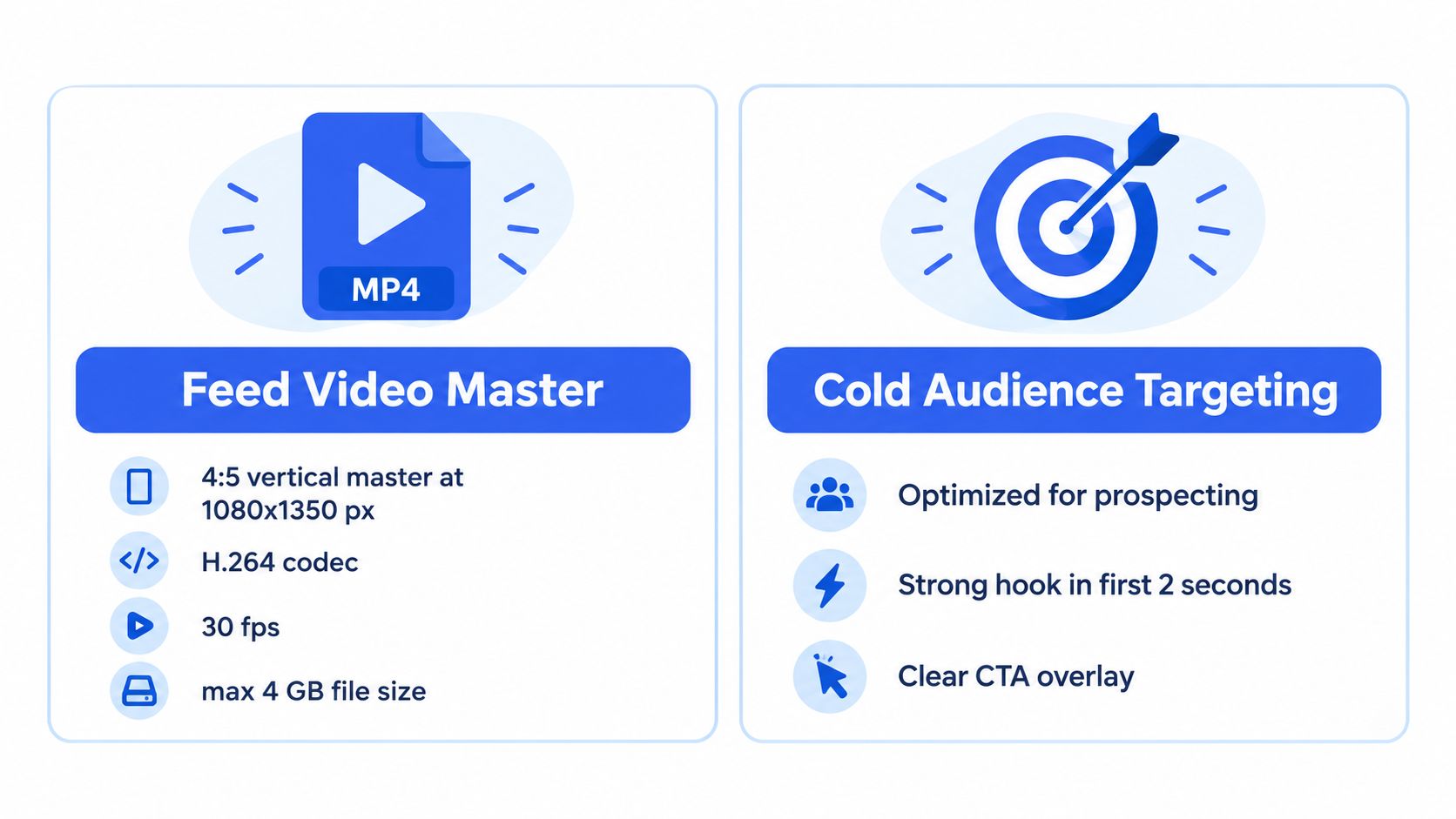
Feed is where the 4:5 decision earns its place. Start net-new production at 1080 × 1350 px, then create a square 1080 × 1080 px version only when the campaign needs one. Current guidance positions 4:5 as the performance-focused Feed target, while 1:1 remains a reliable supported fallback.
For a direct-response cut, keep the opening frame legible before the viewer reaches the caption. Put essential text and product context inside the central composition, not against the lower edge where account information and calls to action can interfere. Meta's renderer may accept the file, but your preview should decide whether the message survives the interface.
A workable production sequence looks like this:
- Edit the 4:5 master first: Frame the product and opening claim for vertical Feed.
- Duplicate to square only when needed: Reposition the subject rather than allowing an automated crop to decide.
- Review every placement preview: Check thumbnail, first frame, captions, and CTA visibility.
- Name the asset for reporting: A filename such as
feed_45_campaign_iteration_1080x1350.mp4makes the intended use visible before upload.
The file container matters too. Current Meta-oriented guidance commonly lists MP4 or MOV, while MP4 is the practical default for production pipelines. Keep the file under the commonly cited 4 GB ceiling, even though a normal performance creative should be far smaller.
Don't let the existence of square legacy assets dictate your new production standard. If the campaign is Feed-led and the footage is being edited from scratch, 4:5 is the cleaner starting point.
Stories and Reels as an Immersive Pair
Stories and Reels should share a production family in 2026: 9:16 at 1080 × 1920 px. The canvas is the operational standard for full-screen vertical delivery, while higher-resolution 1440 px masters are becoming a sensible source format for teams that want more room for resizing and compression. The delivered export still needs to match the placement specification.
The shared format does not mean identical edits. Interface controls occupy parts of the frame, so keep the product, proof points, captions, and CTA inside a deliberate safe area. Check the actual placement preview in Ads Manager. An editing-program canvas cannot show every overlay or crop condition.
| Spec | Stories | Reels |
|---|---|---|
| Recommended canvas | 9:16 | 9:16 |
| Recommended dimensions | 1080 × 1920 px | 1080 × 1920 px |
| Common file formats | MP4 or MOV | MP4 or MOV |
| Common file ceiling | 4 GB | 4 GB |
| Duration guidance | Up to 60 seconds in cited guides, with guide variation | Sources commonly cite up to 90 seconds |
| Production approach | Short, fast-moving vertical cut | Vertical cut adaptable to continuous discovery |
The duration ceiling is a submission rule, not a creative target. Reels guidance cites a 90-second maximum, while cold-audience testing usually benefits from a shorter opening and faster proof. Treat 15 seconds as a practical test reference, not a universal law. A longer cut can earn its length when the first seconds establish relevance or the audience already knows the brand.
Stories often need a faster handoff to the CTA because the viewer is moving through a sequence. Reels can support a more gradual reveal when the opening creates enough curiosity to hold attention.
Creative control: Build one 9:16 master, then version the opening, overlay copy, and CTA for Stories and Reels only when campaign data or the message requires it.
One vertical master reduces duplicated timelines. Placement-specific versions preserve control where delivery context changes the edit.
Explore, Video, and Carousel Slots
Explore delivery generally comes from broader placement selections rather than a separate production brief. For full-screen Explore surfaces, a 9:16 master can align with Reels, so the workflow does not need another creative family. Confirm the rendered preview in Ads Manager, because the placement setting, not the file label, determines how Meta handles the asset.
The former IGTV and Video tab structure should not dictate today's exports. As noted earlier, current specification coverage is increasingly placement-specific. Operationally, the useful split is between immersive 9:16 video and feed-oriented 4:5 video, with square formats reserved for card systems and selected collection executions.
Carousel video cards require separate framing. Each card has its own crop and sequence, so 1:1 at 1080 × 1080 px remains the practical baseline for square cards. If the campaign uses 4:5 cards, build them at 1080 × 1350 px. Do not place a Feed export into a carousel and accept an uncontrolled crop.
Use this production sequence:
- Produce the Feed version first: Set the product framing and message hierarchy.
- Rebuild each card: Adapt the opening frame to the card's role instead of shrinking the full master.
- Check sequencing: The first card must provide enough context to earn a swipe.
- Separate immersive assets: A 9:16 Reels file is not automatically a carousel asset.
Collection formats may accept square video, but technical compatibility does not define the creative target. Placement context sets the frame, while ad set configuration determines whether Meta can use the asset as intended. Keep the two creative families organized, then create card-specific versions only when the format requires them.
Recommended Export Settings by Placement
Dimensions control framing, not delivery quality. Set the production baseline at H.264 in an MP4 container. MOV is also commonly accepted under current Meta video specifications, but the container does not replace placement-specific testing.
Avoid inventing a universal bitrate, frame rate, audio bitrate, or colour-space rule. Those values depend on the source footage, editing workflow, and upload environment. The editor should provide a reproducible preset, then the buyer should review the rendered ad in Meta's preview and on a real mobile device.
| Placement | Codec | Container | Bitrate | Frame Rate | Notes |
|---|---|---|---|---|---|
| Feed video | H.264 is the practical default | MP4 or MOV | Use the post-production preset approved for the source footage | Match source and account workflow | Export at 4:5 first |
| Stories | H.264 is the practical default | MP4 or MOV | Use a mobile delivery preset that survives recompression | Match source and account workflow | Preserve full 9:16 coverage |
| Reels | H.264 is the practical default | MP4 or MOV | Use a mobile delivery preset and inspect fine detail after upload | Match source and account workflow | Keep overlays away from UI |
| Higher-resolution master | H.264 or the workflow codec approved by production | MP4 or MOV where supported | Validate upload size before trafficking | Match source and account workflow | Use 1440-pixel guidance selectively |
AAC is a common production choice, but no single audio profile is established here as mandatory. The same caution applies to frame rate and colour space. Match the source where possible, preserve clean motion, and confirm the result after Meta processes the file.
The operational checks are straightforward: use an accepted container, keep the file within the 4 GB ceiling cited in Meta video specifications, and export the canvas required by the placement. A higher-resolution master can preserve detail through compression, but it cannot correct a misplaced headline, unsafe UI area, or poorly rebuilt crop.
Treat 4:5 and 9:16 as separate creative families. Use the appropriate master for each placement, then validate the uploaded result rather than relying on the filename or export preset alone.
Why 1440 px Masters Are the New Baseline
A 1080-pixel master still supports the common working sizes of 1080 × 1350 px Feed and 1080 × 1920 px Stories and Reels. For 2026 production, however, specification guidance also points to 1440 × 2560 px for 9:16 and 1440 × 1800 px for 4:5. That makes 1440 px a practical source standard for detailed vertical footage, even when delivery files are later reduced.
The benefit is operational. A larger source gives compression more detail to retain around small text, product surfaces, and fast motion. The recent 2026 specification guidance also flags a stricter minimum-width consideration for Reels ads running 30 seconds or longer. Resolution and duration therefore need to be reviewed together during production, rather than treated as separate checklist items.
Use a placement-based decision rule:
- Choose 1080 px: Short, Feed-only bursts where fast uploads and lightweight review matter.
- Choose 1440 px: Campaigns with Reels, detailed product visuals, or longer Feed edits.
- Maintain both families: A higher-resolution master does not replace separate 4:5 and 9:16 framing.
The trade-off is file weight. Larger masters may take longer to upload and process, while some placements show little visible gain. The sensible operating standard is to create 1440 px masters when the placement mix and image detail justify them, then downscale deliberately for lighter delivery assets. This preserves a higher-detail source without forcing every trafficking file to carry unnecessary weight.
Common Spec Mistakes That Hurt Delivery
The costly mistakes are usually operational. A file can pass upload checks and still deliver poorly because its framing, safe zones, or duration does not suit the placement.
A square 1:1 file may upload cleanly, but it uses less Feed height than 4:5. For a new Feed campaign, square is therefore a production shortcut, not the default performance format. Keep it for established square systems or carousel requirements. Do not retain it merely because an old template is available.
Video shot horizontally creates a similar compromise. Instagram accepts multiple Feed ratios, yet a wide file can leave unused space or require masking in a mobile Feed. The Instagram ad size reference explains that accepted ratios may still be masked to Feed-friendly formats. Review the rendered placement, not only the green upload confirmation.
File limits cause a separate error. Placement mechanics differ between Stories and Reels, as noted earlier, and technical ceilings should not dictate creative length. A product demo may fit within the platform's limits while still losing attention before its message is complete. Treat duration as a message and retention decision, not a box to tick.
The auction can't rescue a badly framed asset. Fix the canvas, safe zones, and opening before changing bids or audience settings.
Before launch, route each asset into the correct 4:5 or 9:16 family, inspect crops across placements, and keep exports practical for upload and processing. Reserve long-form cuts for messages that require them. Compatibility earns approval; deliberate framing protects delivery.
How Rapid Ads Streamlines Multi-Placement Campaigns
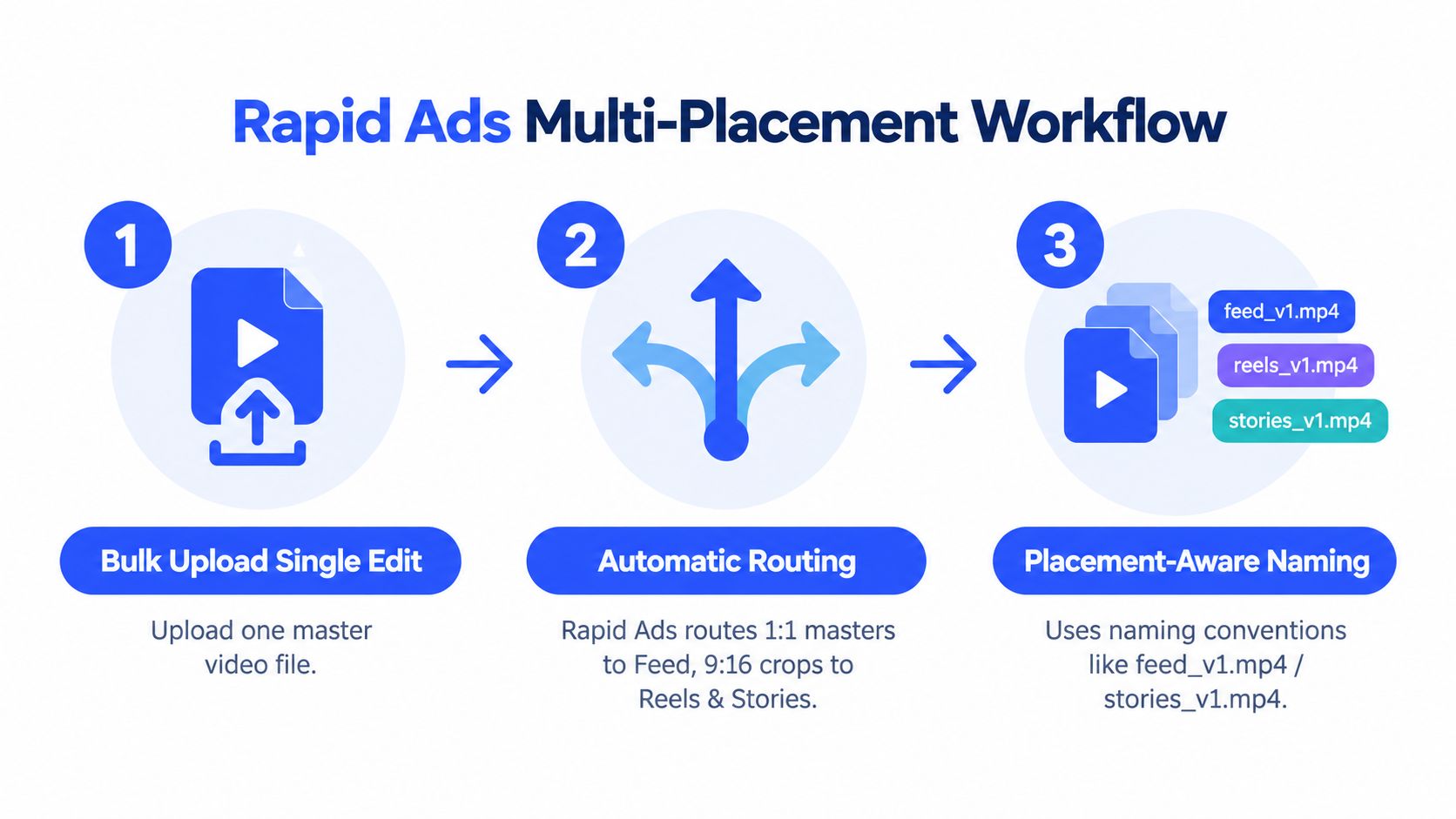
Rapid Ads routes uploaded creatives by aspect ratio, giving buyers one workflow for the two operational families, 4:5 Feed and 9:16 immersive placements. It supports bulk uploading, placement-aware filenames, and multi-account management, so each export remains identifiable during trafficking.
Use this sequence:
- Upload the edit set: Add the Feed and immersive exports together.
- Name files explicitly: Include the ratio and version in every filename.
- Verify routing: Confirm that 4:5 assets reach Feed groups and 9:16 assets reach Stories or Reels.
- Review Advantage+ settings: Disable Advantage+ when the brief requires Feed-only delivery or controlled creative handling.
Automation handles sorting and upload repetition. The buyer still controls placement settings, checks whether the correct 4:5 or 9:16 version was routed, and completes the Ads Manager preview before launch. That division matters: software reduces trafficking errors, while final rendered review confirms the asset behaves correctly in each placement.
Pre-Launch QA Checklist for Media Buyers
Run this check before publishing:
- Canvas: Feed is 4:5 at 1080 × 1350 px or 1:1 at 1080 × 1080 px. Stories and Reels are 9:16 at 1080 × 1920 px, with 1440 × 2560 px considered for higher-resolution masters.
- File: Use MP4 or MOV, keep the file under the commonly cited 4 GB ceiling, and confirm the chosen codec works in your production pipeline.
- Duration: Verify the live placement limit. Sources commonly cite up to 90 seconds for Reels, while Stories guidance commonly cites up to 60 seconds.
- Framing: Check captions, product detail, CTA, thumbnail, and interface safe zones in Meta's previewer.
- Naming: Confirm the filename includes placement family, ratio, campaign, and version.
The asset should render cleanly at 100% in the Meta previewer, and the naming convention should match the placement tag. If either check fails, don't publish and hope delivery hides it.
Rapid Ads gives media buyers a bulk workflow for uploading, naming, routing, and managing Instagram video assets across accounts, including separate 4:5 and 9:16 creative families. Visit Rapid Ads to test a placement-aware launch process before your next Meta campaign goes live.
