You're probably dealing with some version of the same mess most lead-gen teams hit on Meta. The campaign is live, CPL looks acceptable in Ads Manager, forms are coming through, and yet the sales team says half the leads are junk or already cold by the time anyone calls.
That's the operating environment for Facebook Lead Ads in 2026. The challenge isn't just getting more form fills. It's keeping lead intent intact from ad click to CRM, then scaling creative output without wrecking naming discipline, routing logic, or follow-up speed.
Table of Contents
- What Facebook Lead Ads Actually Do in 2026
- Building the Campaign in Ads Manager
- Designing the Instant Form for Real Conversions
- Wiring CRM Webhooks and Lead Routing
- Tracking and Reporting Without Data Gaps
- Scaling With Bulk Creative Workflows
- Optimization, Troubleshooting, and the Speed-to-Lead Lever
What Facebook Lead Ads Actually Do in 2026
Facebook Lead Ads are still the one Meta format built around on-platform submission. A user taps the ad, the Instant Form opens inside Facebook or Instagram, and the lead can submit contact data without ever hitting your landing page. That friction change is the whole point. It usually creates a different conversion path than traffic or website campaigns because Meta handles the form render and much of the data capture natively.
This format isn't new. Meta launched Facebook Lead Ads roughly a decade ago, and by 2024 industry guides already described the format as mature. Meta also changed the product itself when it removed background images from existing Instant Forms starting July 11, 2024, which is a useful reminder that the lead-ad surface keeps evolving even when the core mechanic stays the same (LeadsBridge guide to Facebook lead generation ads).
The trade-off buyers actually manage
The upside is obvious. Less friction, fewer drop-offs between click and submit, and no dependency on a mobile landing page that may load badly or break attribution.
The downside is just as real:
- You get speed, not perfect intent. Prefilled forms are convenient, but they can pull in stale phone numbers or low-commitment submissions.
- Meta owns more of the conversion surface. That's good for completion rate. It's worse if your qualification process lives on a website flow.
- Your raw lead data has an expiry problem. Meta lead ads remain directly downloadable for about 90 days after submission, so delayed processing is a systems failure, not an admin issue (DashOps summary of the Meta 90-day lead retention limit).
Practical rule: Treat Facebook Lead Ads as a lead capture layer, not a complete acquisition system.
A traffic campaign sends people out to your site, where you control every field, script, and event. A lead campaign moves that trade-off in the other direction. You gain completion efficiency, but the optimization work shifts downstream into form design, routing, qualification, and response time.
That's why mature accounts don't judge Facebook Lead Ads by CPL alone. They judge them by what happens after the submit button.
Building the Campaign in Ads Manager
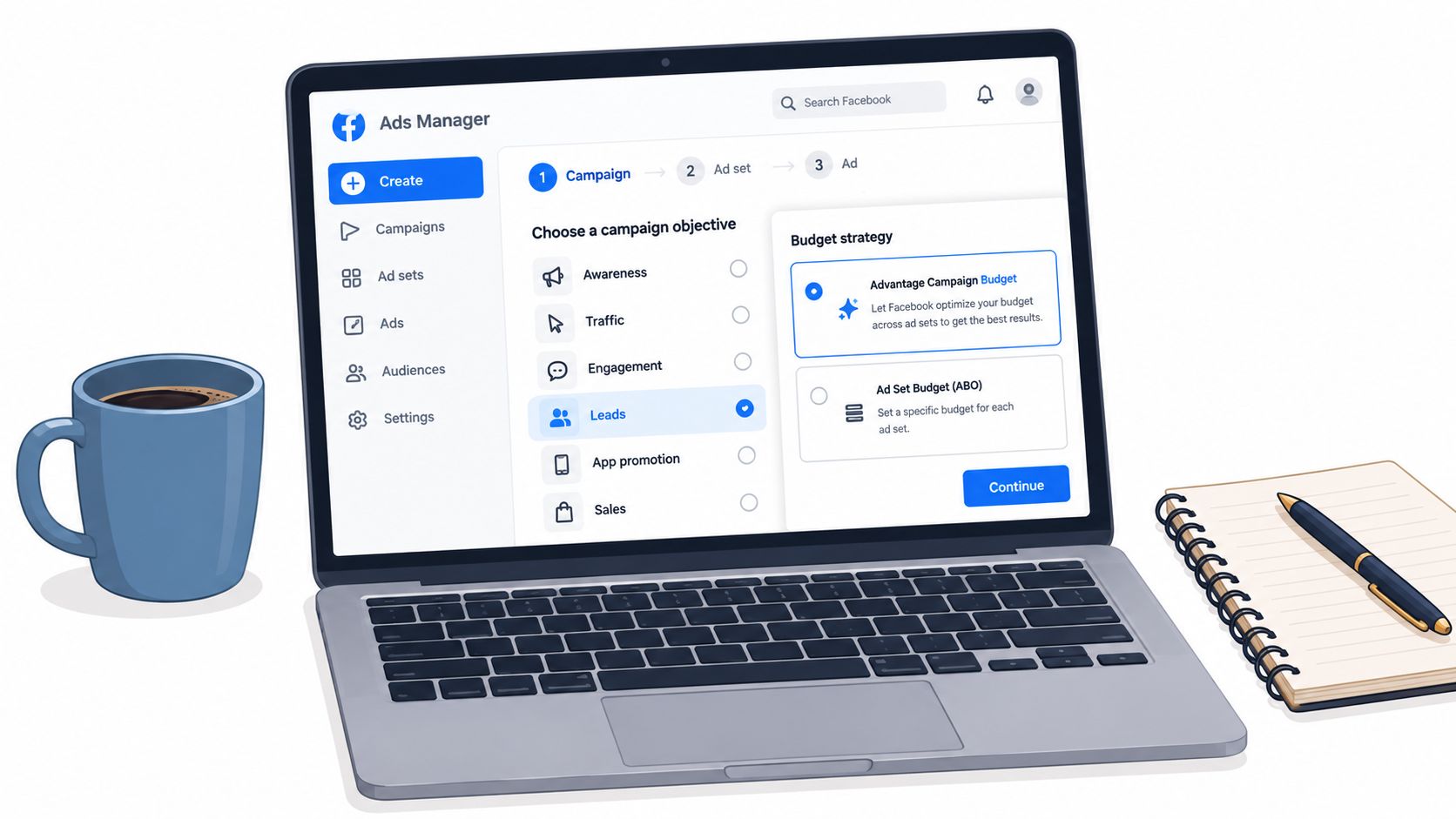
The cleanest build starts with the Lead objective in Ads Manager. Not traffic. Not sales with a workaround. If the job is to collect on-platform leads, use the objective designed for that path.
At campaign level, the first real choice is budget structure. Advantage Campaign Budget works when you already know the audience model and want Meta to push spend toward the strongest ad set. If you're testing audience clusters in isolation, ABO is usually cleaner because it keeps one ad set from swallowing delivery before you've learned anything.
Campaign and ad set decisions that matter
Naming is where a lot of teams create their own reporting problems. Encode the pieces you'll need later. A campaign name like META_LEADS_US_CORE_OFFER_Q4 is more useful than “Lead Test 7”. At ad set level, include audience type and geo. At ad level, tie the creative name to the hook or angle so CRM and UTM reporting can reconcile later.
Audience structure depends on account maturity:
- Broad with anchors works when the offer is strong and you've got enough conversion history to trust delivery.
- Interest stacks still make sense when the market is narrow or when you need to enforce category relevance early.
- Lookalikes from 1% to 5% are useful when your seed quality is real, especially if the source is actual qualified lead data rather than all form fills.
A lot of media buyers jump straight to CPL comparison before checking the front half of the funnel. That's backward. In 2025 benchmark data covering 726 U.S.-based campaigns, Facebook Lead Ads averaged 2.59% CTR, 7.72% conversion rate, and $27.66 CPL across industries (WordStream 2025 Facebook ads benchmarks). If click-through is weak, fix creative or audience fit before obsessing over the form.
Conversion location, placements, and bidding
At ad set level, choose Instant Form as the conversion location if the campaign is meant to stay on-platform. Don't accidentally build a lead objective around website conversion behavior if your ops stack is set up for native forms.
Placements are usually best left close to account default unless you have a proven reason to split them. Lead form availability is handled within Meta's supported surfaces, so the more common mistake is over-controlling placements too early and starving delivery.
For bidding, it is best to start with Highest Volume. A CPL goal can help when you already understand your acceptable economics, but tight controls often reduce delivery once you try to scale. Cost caps look disciplined in the plan. They often become the thing that prevents spend from moving.
If the account is still in discovery, constrain variables with structure, not with aggressive bid controls.
That means controlled naming, clear audience splits, and one obvious conversion path.
Designing the Instant Form for Real Conversions
A common failure pattern looks like this. The campaign launches cleanly, CPL looks fine for the first few days, and sales still hates the leads. The problem is usually the form. Instant Forms can create a lot of volume fast, but form design decides whether that volume turns into booked calls, qualified pipeline, or a queue full of bad numbers.
The practical job of the form is simple. Get enough information to route and prioritize the lead, without adding so much friction that good prospects stop submitting. Lead quality and speed-to-lead matter more than raw form completion rate, especially if the account is set up to push leads into a CRM and trigger follow-up within minutes.
Match form type to sales process
Meta gives you a low-friction path and a higher-intent path. The trade-off is real.
If the team has fast SDR coverage, solid call handling, and a tolerance for filtering, a higher-volume form can work. If reps are chasing ghost leads or spending half the day on junk submissions, use the higher-intent setup and ask one or two questions that help qualification.
A short form can improve platform CVR and still hurt the actual business outcome. Agencies miss this when they optimize to CPL alone.
Field choices affect routing as much as conversion
Meta can prefill standard contact fields such as EMAIL, PHONE, FULL_NAME, FIRST_NAME, and LAST_NAME. Custom questions require a key, label, and, for choice fields, options. That structure matters if you are building multiple forms and need clean CRM mapping across campaigns, offers, and markets (Zernio Meta lead form documentation).
For one client, I would rather have phone plus one real qualifier than five soft questions sales never uses. The rule is straightforward. Every field should change one of three things: lead routing, lead priority, or rep context.
Use the table that way:
| Form Field | Completion Impact | Lead Quality Effect | Routing Note |
|---|---|---|---|
| Usually low friction when prefilled | Good for nurture, weaker for urgent sales follow-up if unverified | Map as primary contact, then validate downstream | |
| Phone | Higher friction than email | Stronger for fast call workflows, but quality depends on profile accuracy | Route to call-first sequences only if formatting passes validation |
| Full name | Minimal friction | Useful for CRM readability, limited qualification value | Good default if reps need quick context |
| Custom budget range | Adds friction | Strong qualification signal | Use explicit option mapping in CRM |
| Postcode or ZIP | Moderate friction | Useful for service-area filtering | Route by region or rep territory |
| Product or service interest | Moderate friction | Improves handoff quality | Useful for multi-offer teams |
Keep the question count tight
A practical ceiling is 3 to 5 fields if the goal is to hold conversion rate while still getting usable sales context, as noted earlier from LeadSync's form best-practice guidance.
That does not mean every form should be minimal. It means dead fields need to go.
A workable structure for most accounts looks like this:
- Contact fields: enough for the rep or automation to reach the lead immediately
- One qualifier: budget, location, timeline, service need, or product interest
- Consent language: clear enough for SMS, phone, or email follow-up if outreach starts right away
For agencies launching dozens or hundreds of creatives, consistency matters as much as brevity. Standardize the qualifier set and naming logic across forms so the same answer means the same thing in the CRM, whether the lead came from ad 3 or ad 300. That protects creative testing because the team can compare lead quality by ad, ad set, and audience without cleaning up form chaos later.
Use friction on purpose
Extra questions should earn their place.
If ZIP code determines territory assignment, keep it. If budget range changes who gets called first, keep it. If a question exists because someone once asked for more data, cut it.
The thank-you screen also does more work than people give it credit for. If the next best action is to call, book, or visit a landing page, put that action there clearly. Good lead programs do not stop at submission. They move the prospect into the next step while intent is still high.
Wiring CRM Webhooks and Lead Routing
A lead submits at 2:14 PM. If that record sits in a queue, lands in the wrong pipeline, or reaches a rep without the qualifier that explains intent, the campaign can still look fine in Ads Manager while revenue quality falls apart.
That is why routing deserves the same attention as audience structure and creative naming. For lead ads, speed-to-lead and clean payload mapping usually matter more than squeezing a slightly lower front-end CPL.
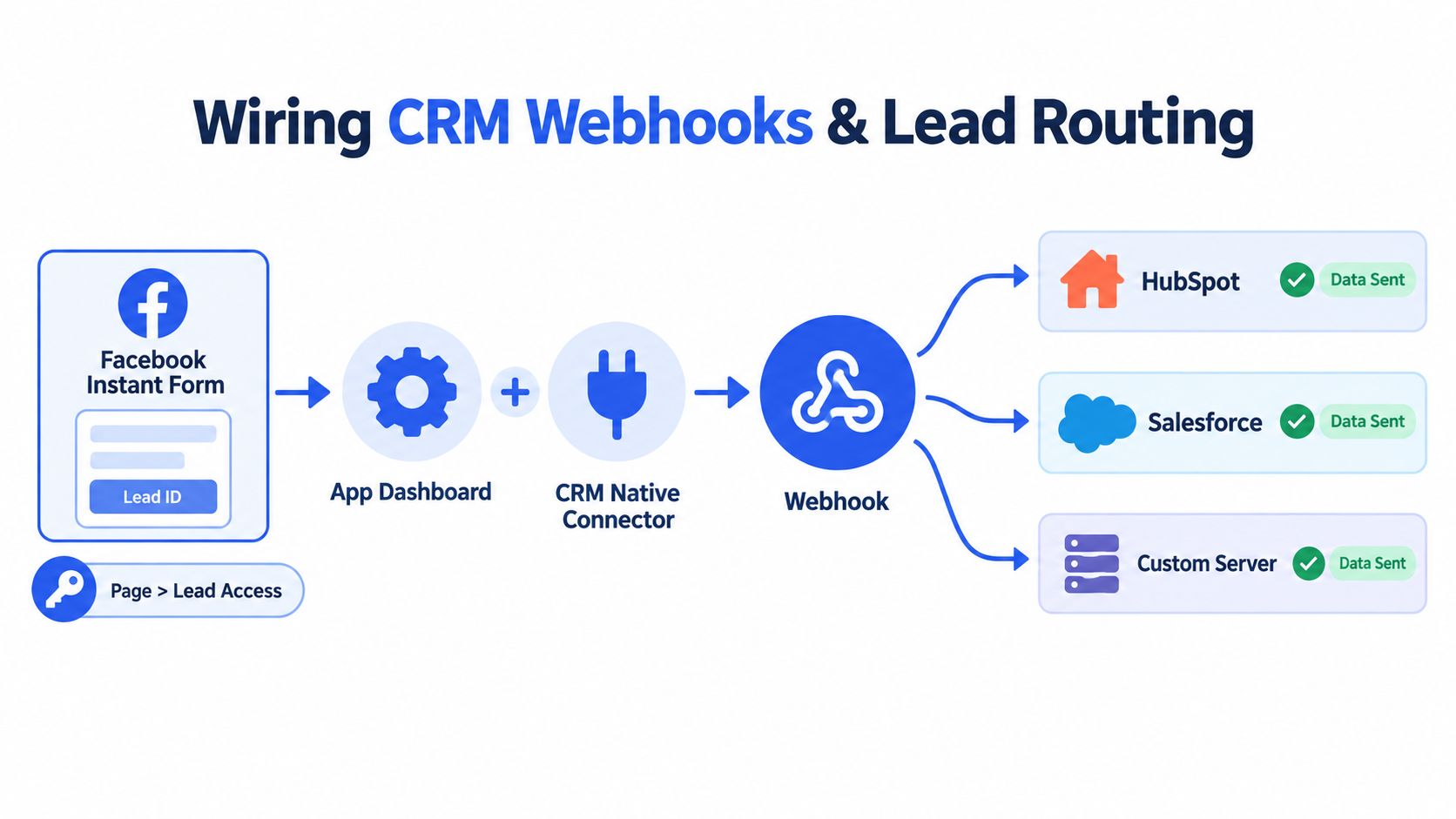
Meta's documented CRM integration path is straightforward. To set up direct lead delivery, a developer needs a webhook endpoint, a Meta developer app ID, and the app must be subscribed to the Page using the Page object and the leadgen field (Meta CRM integration documentation for lead ads). That is the delivery layer behind native CRM syncs, custom lead routing, and any serious speed-to-lead workflow.
Map the payload like you plan to report on it later
Every form should map explicitly into the CRM. Middleware should not guess which field belongs where, especially if the account is launching high volumes of creatives and duplicate forms.
At minimum, pass through:
- Lead identity fields
- Custom question responses
- Campaign metadata, including campaign ID, ad set ID, and ad ID
- UTM properties
- Form name or form ID
- Submission timestamp
That set does two jobs. Sales gets enough context to act fast, and ops keeps the metadata needed to compare accepted leads by ad, ad set, audience, and creative. If naming discipline breaks here, bulk launches become a reporting mess later.
Native connectors can shorten setup time. HubSpot, Salesforce, Zoho, Zapier, and Make are all workable options. The trade-off is control. A native integration is faster to launch, but a custom webhook usually gives cleaner field handling, better retry logic, and more flexibility when you need conditional routing by geography, service line, language, or qualification answer.
Validate everything before writing to production objects. One mismatched field key across ten forms is annoying. The same mismatch across two hundred creative variants can wipe out source-level reporting and send low-intent leads to the wrong rep pool.
A quick visual of the routing logic helps when you're explaining the stack to ops or dev.
Build for speed first, then fairness
Fast routing is not a nice-to-have. It is part of lead quality.
A practical setup usually includes:
- Instant push instead of scheduled polling
- Immediate SMS or email acknowledgment
- Round-robin or territory assignment
- Retry logic for failed webhook deliveries
- Fallback ownership if no rep acts quickly
The right routing model depends on the sales motion. Local service accounts usually need ZIP or radius-based assignment. Multi-location brands often route by state, store, or franchise owner. Higher-ticket offers benefit from answer-based routing, where budget, product interest, or timeline changes who gets the first call. Teams with uneven rep capacity may need weighted distribution instead of a pure round robin.
Fast lead gen with slow routing turns Meta into a list source. Fast lead gen with correct routing gives the sales team a real chance to convert intent while it is still fresh.
Tracking and Reporting Without Data Gaps
Lead ads create a reporting problem because Meta records the native lead event inside its own environment, while your website and CRM may record later stages elsewhere. If you don't separate those layers, your dashboard ends up mixing platform delivery data with incomplete downstream signals.
The three paths that matter
You've really got three tracking methods to work with:
| Method | Where It Fires | Best Use |
|---|---|---|
| Browser pixel | On your site, typically after redirect or thank-you-page load | Useful for post-submit website actions and page-level behaviour |
| Conversions API | Server-side from your CRM or backend systems | Best for confirmed lead and qualified lead events with stronger reliability |
| Meta Lead Ads event | Inside Meta when the Instant Form is submitted | Best for delivery-side reporting and core lead-volume monitoring |
The browser pixel still has a role. If your thank-you screen pushes users to a landing page, the pixel can capture the next action. The weakness is obvious. Website-based measurement can miss part of the journey because the actual form submission happened on-platform, not on your site.
What to put in the dashboard
Meta's first-party lead event should sit in every reporting view because it is the only event tied directly to the ad delivery system. Then layer CRM-confirmed events on top so you can distinguish raw leads from accepted leads.
A lot of teams stop at “Lead” and wonder why optimization drifts. The stronger approach is to send back at least:
- Lead for all valid submissions
- Qualified lead or sales-accepted stage once the CRM confirms it
- Later revenue stages if your sales cycle supports it
Recent benchmark coverage makes the same point from a different angle. Facebook Lead Ads can still generate relatively inexpensive leads, with $27.66 average CPL and 7.72% conversion rate in 2025, while a newer analysis reported $27.39 median CPL, 2.70% CTR, and 8.54% CVR in 2026. The more interesting issue isn't “cheap leads.” It's whether those leads become real pipeline or just inflate CRM noise (Rocket Launch Media Meta ads benchmark report).
Naming is part of measurement
Reporting falls apart faster from poor naming than from missing charts.
Campaign, ad set, and ad names should encode objective, audience type, and creative variant. If the ad is called HOOK3_UGC_Testimonial_Reel_US, then utm_content should match it exactly. Once volume lands, that naming discipline becomes the difference between useful creative analysis and a spreadsheet cleanup project.
Scaling With Bulk Creative Workflows
Most lead-gen teams don't stall because they can't raise budget. They stall because they can't launch enough clean creative variations without turning Ads Manager into a week-long admin task.
That's why the scalable part of Facebook Lead Ads is usually the creative workflow, not the campaign architecture. Once the account has a stable structure, the next bottleneck is throughput.
Keep the account structure stable
For scaling, I'd rather hold the campaign logic steady and push testing into ads. That often means one campaign with a clear budget model, a disciplined ad set structure, and broad or stacked LAL audience logic where the account can support it.
Then build a bulk sheet around the fields you need:
- Campaign name
- Ad set name
- Ad name
- Primary text variants
- Headline
- Description
- Image or video URL
- URL tags including utm_source, utm_medium, utm_campaign, utm_content
The important part isn't just upload speed. It's preserving intent. If ten ads are just near-duplicates with cosmetic copy changes, you didn't create a real test matrix. You created clutter.
Bulk launch without breaking naming discipline
Tooling matters. Media buyers use options like Meta Marketing API scripts, Madgicx, or Rapid Ads when the pain point is bulk uploading, enforcing naming conventions, managing multiple ad accounts, and keeping unwanted Advantage+ creative changes switched off during large launches.
A practical workflow looks like this:
- Build the naming system first.
- Match
utm_contentto ad name exactly. - Group creatives by hook, not just by format.
- Upload in batches large enough to matter, but small enough to diagnose.
- Review form-start behavior and lead quality before changing budgets.
Independent benchmark coverage also points to the same operational reality. Lead-generation campaigns have been reported at 2.59% CTR, and one 2026 benchmark summary noted $1.92 CPC, 2.59% CTR, and a 20.94% year-over-year rise in CPL for lead campaigns. Better engagement doesn't remove the need for tighter controls on intent and post-click operations (Focus Digital Facebook ads CTR benchmarks 2026).
Bulk launch speed only helps if the structure stays readable after ad number 100.
Optimization, Troubleshooting, and the Speed-to-Lead Lever
Monday morning, Ads Manager says CPL improved over the weekend. By Tuesday, the sales team is saying half the leads were junk and the rest took too long to hit the CRM. That is the failure mode with Facebook Lead Ads. The account looks healthier inside Meta while revenue quality gets worse outside it.
The job is to optimize for qualified contact rate and response speed, then protect that system when you scale creative volume.
When lead volume drops, diagnose in this order
Start with the ad, not the form.
If CTR falls first, the issue is usually creative fatigue, weaker message match, or an audience you have pushed too hard. In ABO, that often shows up in one ad set before the rest. In CBO, the budget can keep flowing to the least-damaged pocket and hide the problem for a few days. Either way, weak click-through means the hook needs attention before you touch form logic.
If clicks hold but leads fall, inspect the Instant Form path next. Open the live form on mobile. Check every screen, every custom question, the privacy policy link, and the thank-you screen. Small mistakes matter here. One awkward qualifier, one confusing consent line, or one broken hidden field can cut completion rate without throwing an obvious warning in Ads Manager.
Then test the handoff.
Submit a real lead. Watch it travel through the webhook, middleware, CRM, routing rule, owner assignment, and first contact trigger. Meta can report the lead correctly while your ops stack drops it, delays it, or writes it into the wrong pipeline stage. That gap gets misread as a media problem all the time.
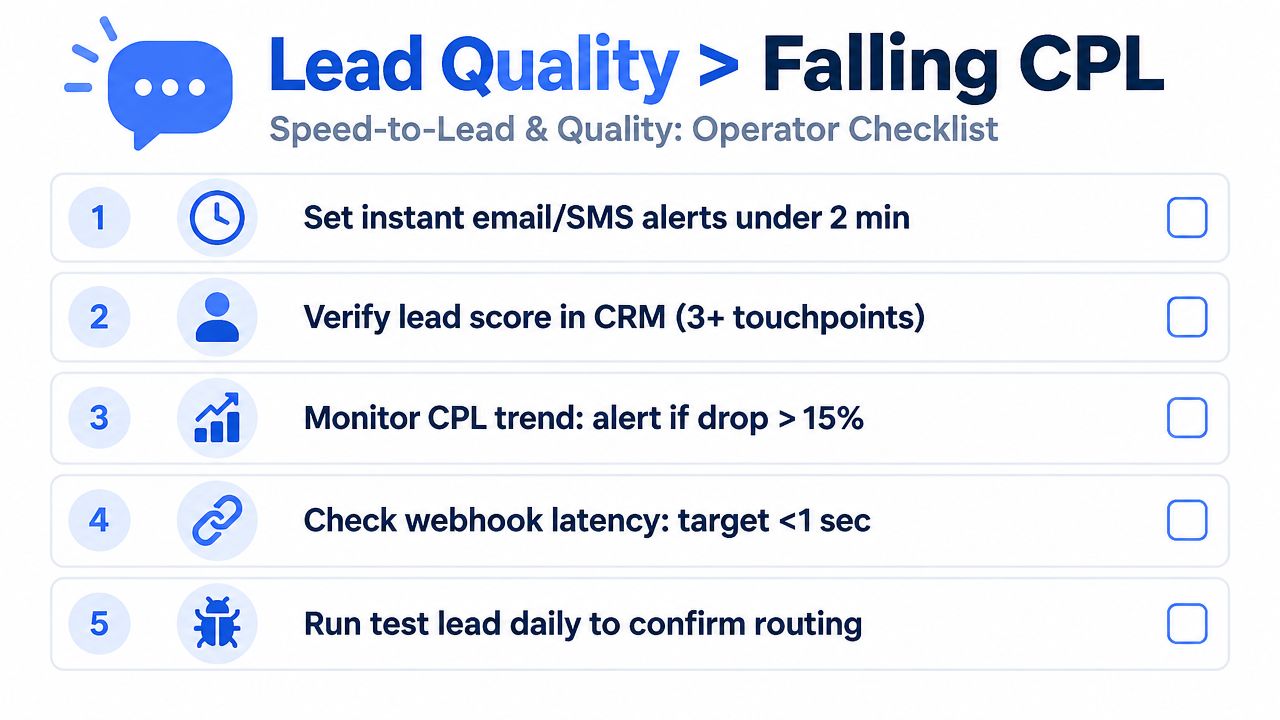
A lead sitting for 30 minutes is a different asset than a lead called in 2 minutes.
The levers that improve lead quality
Lead quality usually improves when the ad and form create clearer intent.
That can mean:
- One qualifying question that sales uses
- Disqualification logic for geos, budget ranges, or use cases you do not serve
- Audience exclusions for recent leads, bad-fit CRM statuses, or known low-value segments
- Offline feedback back into Meta so the platform learns from held, qualified, and closed outcomes instead of raw form fills
- Faster routing through webhook or native CRM sync so reps work fresh demand, not stale records
As noted earlier in the CRM section, faster response times materially change lead outcomes. That is why I treat speed-to-lead as a core optimization metric, right next to CPL and lead-to-meeting rate. If your routing stack is slow, cheaper traffic does not fix the unit economics. It just creates cheaper delays.
What usually works and what usually doesn't
Patterns repeat across accounts, even when the vertical changes.
What works:
- Cleaner hooks that set expectations before the form opens
- Short forms with one meaningful qualifier
- Real-time CRM sync through webhook or native connector
- Immediate SMS or email acknowledgment
- Rep assignment rules based on actual capacity and working hours
- Naming conventions that match UTMs and survive downstream reporting
- Bulk launches grouped by angle, not just by format, so you can spot quality shifts by hook
What fails:
- Judging success on raw CPL alone
- Adding extra form questions because sales asked for “more info,” then never using the answers
- Waiting for manual exports
- Letting CBO push spend into stale winners while new ads never get enough delivery to prove out
- Launching 50 to 100 creatives with inconsistent ad names, broken
utm_content, and no way to tie lead quality back to the original hook
Benchmark references help with context, but only as context. As noted in the form-design section, use your account's CVR and CPL against the earlier cross-industry reference as a rough frame, not a target. A short form for home services, a high-consideration B2B demo form, and a finance lead form can all be “efficient” at very different CPLs because intent depth, follow-up speed, and close rates are different.
A seven-step operator checklist for this week
If I were tightening a lead-gen account today, I would run this:
- Check CTR and outbound click trends before editing the form. If attention is down, refresh the hook, offer framing, or audience.
- Audit the Instant Form screen by screen on mobile. Remove any field that does not change qualification, routing, or sales follow-up.
- Push a live test lead through the full stack. Confirm webhook delivery, CRM write, owner assignment, and auto-response.
- Time the handoff from submit to first touch. Measure it with a stopwatch, not a platform assumption.
- Review exclusions and feedback loops. Stop paying for repeat low-quality submitters, and send qualified outcome data back where possible.
- Refresh creatives by angle. Test new hooks, problem statements, or proof points. Do not bulk upload cosmetic rewrites and call it testing.
- Fix naming before scale. If ad name,
utm_content, form name, and CRM source fields do not line up now, reporting breaks fast once you are shipping hundreds of variants.
The accounts that hold up over time do three things well. They preserve intent from ad to form. They route leads fast. They keep naming discipline intact even when the team is launching at volume.
Rapid Ads is built for the part of this workflow that usually breaks under scale: launching and managing large volumes of lead-gen creatives without losing naming discipline, UTM consistency, or creative settings. If your team is bulk uploading ads across multiple ad accounts and trying to keep Facebook Lead Ads operationally clean, it's worth seeing how Rapid Ads fits into that process.
