Cheap leads are easy to manufacture on Meta. Useful leads aren't.
If you're running Facebook Ads for lead generation at any real scale, you've probably seen the pattern. CPL looks fine in Ads Manager. The campaign is "working." Then sales replies with the message every media buyer hates: these leads don't answer, don't qualify, or were never serious in the first place.
That gap usually isn't caused by one catastrophic mistake. It's caused by a stack of small operational decisions. Wrong campaign objective for the actual sales motion. Forms that are too easy or too long. Creative that gets clicks from the wrong people. Weak CRM routing. Slow follow-up. Messy testing that makes it impossible to tell what drove quality.
Experienced teams struggle here. Not on setup. On control.
Table of Contents
- Beyond Cheap CPLs An Introduction
- How I Evaluated What Actually Improves Facebook Ads for Lead Generation
- Campaign Architecture for High-Intent Leads
- Designing High-Converting Forms and Creatives
- Advanced Targeting and Bidding Strategies
- The Unskippable Tech Stack for Lead Quality
- Best Practices for Accelerated B2B Lead Generation on Meta in 2026
- The Scalable Optimization Workflow
- Common Lead Gen Pitfalls and How to Fix Them
Beyond Cheap CPLs An Introduction
The most dangerous Facebook lead gen account is the one that looks healthy on the surface.
It has stable spend. Leads come in daily. The dashboard shows enough volume to keep everyone calm. But once you compare Ads Manager against the CRM, the story changes. The lowest-CPL ad set often produces the worst pipeline. The broadest audience fills the form fastest but stalls after first contact. The creative with the strongest thumb-stop rate attracts people who liked the ad, not the offer.
That happens because Meta is very good at finding the path of least resistance. If your setup rewards form fills, it will find more form fills. If your setup rewards actual sales intent, it will work toward that instead. In B2B, that distinction matters even more because routing speed, qualification rules, and sales follow-up decide whether a lead becomes pipeline or dead weight. This article focuses on how to run facebook ads for lead generation when quality, handoff speed, and downstream qualification matter more than a cheap top-line CPL.
What I care about here is simple: campaign structure, form friction, CRM feedback, and speed-to-follow-up. Those four levers explain a surprising amount of the gap between accounts that generate pipeline and accounts that generate busywork. In my experience, the warning sign shows up long before revenue does: the account starts celebrating volume while sales begin distrusting the channel.
Cheap CPL is a traffic metric wearing a revenue costume.
The operational side decides whether your campaigns scale cleanly or turn into a lead-quality firefight. Campaign structure controls who sees what. The form determines how much friction you introduce. Creative filters attention before a prospect ever clicks. Tracking and CRM routing decide whether Meta gets enough clean feedback to optimize for people who become opportunities instead of people who just complete a form.
A lot of teams know each of those pieces individually. Fewer teams run them as one connected loop.
That's the playbook that tends to hold up under spend. Not hacks. Tight architecture, deliberate friction, reliable signal, and a workflow that doesn't collapse once the account gets busy.
How I Evaluated What Actually Improves Facebook Ads for Lead Generation
I did not treat CPL as the primary score. For B2B teams, that metric is too easy to game and too weak to trust on its own.
The lens throughout this article is operational and downstream: how fast the lead reached a rep, whether the lead matched qualification criteria, whether sales accepted it, and whether Meta received enough post-submission feedback to improve. A cheaper lead that waits an hour in a queue is often worse than a more expensive lead routed correctly in seconds.
So the decision aid is straightforward:
| Evaluation criterion | Why it matters |
|---|---|
| Lead quality | Tells you whether demand is real or just cheap |
| Speed to contact | Protects value before intent cools |
| Qualification rate | Shows whether forms and targeting are filtering usefully |
| Sales-accepted lead rate | Connects ad performance to actual pipeline handling |
| CRM feedback loop | Determines whether Meta learns from quality, not just volume |
When trade-offs appeared, I favored systems that shorten time to a qualified conversation. That usually means less audience fragmentation, more disciplined routing, and fewer vanity wins inside Ads Manager.
Campaign Architecture for High-Intent Leads
Account structure matters more in B2B than many teams expect because the wrong structure doesn't just waste budget. It slows learning, muddies feedback, and makes it harder to move from lead volume to qualified pipeline.
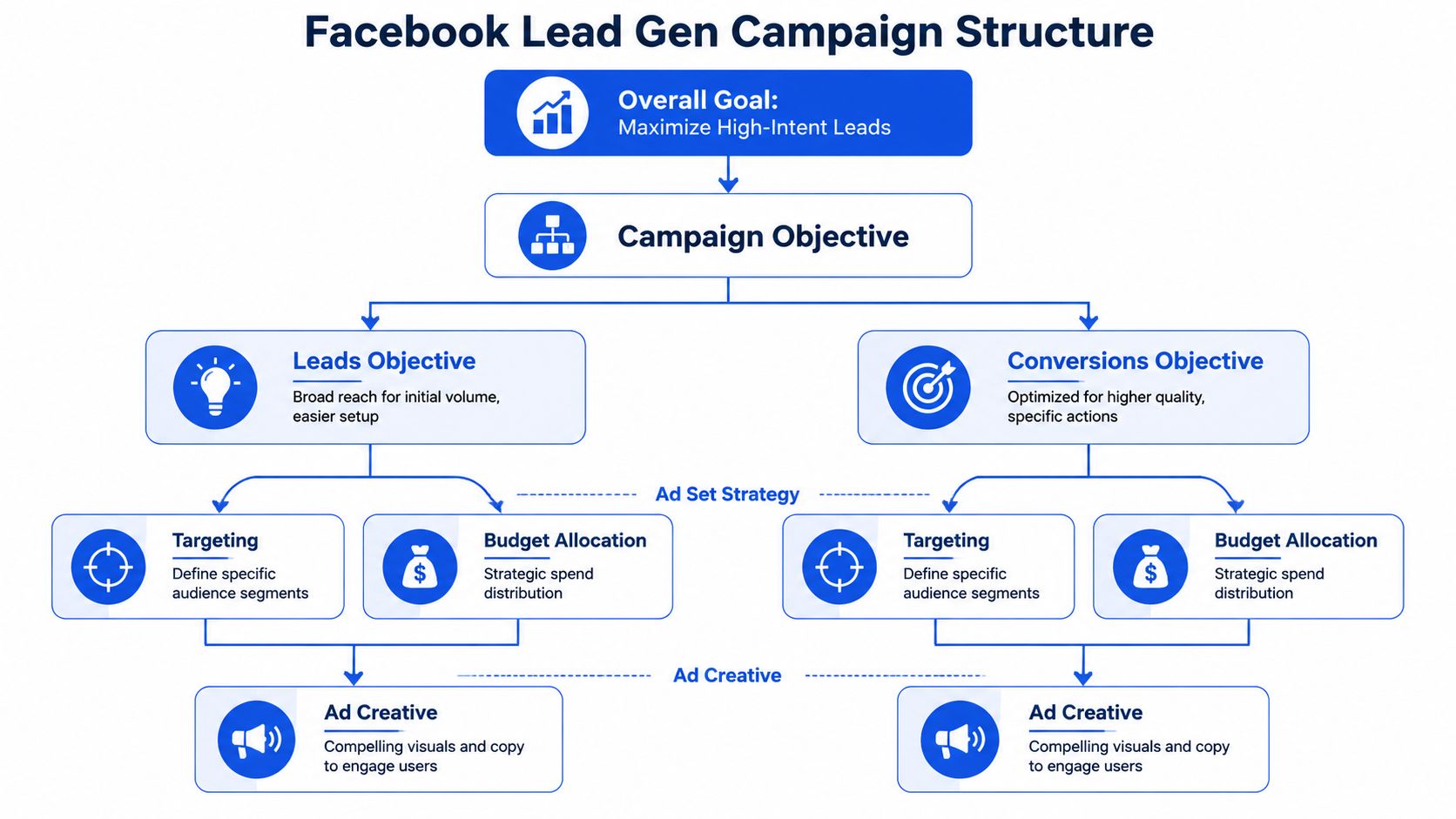
In 2026, the clearest pattern in B2B Meta lead generation is not that Meta lacks volume. It is that quality control determines whether the volume becomes useful. One 2026 B2B lead-generation panorama reported Meta Ads as the channel with the highest lead conversion rate at 4.68%, but also the lowest share of qualified leads at 26.8%, with 35.8% of leads marked disqualified in this Pulse/Valor report. That is exactly why architecture has to do some filtering work before sales absorbs the cost.
For higher-ACV B2B offers, I usually separate campaign roles much earlier than teams expect. One prospecting campaign should exist to discover new demand, one retargeting campaign should convert warm intent, and one re-engagement campaign should revive earlier visitors, form openers, or stalled leads. Blending those jobs into one campaign often speeds up spend but slows down qualification because messaging, frequency tolerance, and conversion intent are completely different.
A lean B2B account in 2026 usually needs fewer moving parts, not more. Broad or lightly constrained prospecting, one or two warm-intent retargeting pools, clean exclusion logic, and a small number of creatives per audience tend to outperform overbuilt trees of tiny ad sets. Current guidance also leans toward broader consolidation and fewer fragmented ad sets, along with Higher Intent instant forms for sales-touch flows and 9:16 video for mobile-heavy placements in this 2026 Meta optimization guide. When B2B teams scale spend, the first thing I see break is usually not targeting. It is structure drift: duplicate tests, overlapping warm pools, and too many ad sets starving each other of usable signal.
A practical framing for funnel choice:
| Funnel path | Lead volume expectation | Lead quality expectation | Best use case |
|---|---|---|---|
| Instant Form | Highest | Most variable | Fast response teams that can qualify aggressively |
| Landing page | Moderate | Stronger | Offers that need proof, pricing context, or pre-qualification |
| Demo request / scheduler | Lowest | Highest intent | High-ACV B2B where sales time is expensive |
Choose the objective based on sales friction
Most lead gen teams default to the Leads objective because it reduces friction and gets volume moving fast. That works when the sales team can absorb noise, qualify quickly, and close from conversation quality rather than pre-qualification.
It breaks when each bad lead creates real operational cost.
For lower-ticket or faster-response offers, Instant Forms under the Leads objective can work well. For higher-consideration services, demo requests, finance, B2B, or anything with a long sales cycle, I usually prefer a website conversion path when the landing page does real filtering. A website visit forces more intent. It also gives you more control over message sequencing, proof, and qualification.
A simple rule helps:
| Sales motion | Better default |
|---|---|
| Fast follow-up, low friction, broad qualification | Leads objective with Instant Form |
| Longer sales cycle, higher ACV, stronger qualification need | Website conversion path |
| New offer with little data | Start where you can get signal fastest |
| Mature funnel with CRM feedback | Optimize around downstream quality |
Use ABO for testing and CBO for scaling
ABO and CBO shouldn't compete. They should do different jobs.
ABO is for isolating variables. Use it when you're testing hooks, offers, formats, qualification questions, or audience hypotheses. You want control at the ad set level so one early winner doesn't absorb all delivery before you learn anything useful.
CBO is for budget concentration. Once you know which audience-creative combinations produce qualified leads, move those proven combinations into a scaling campaign and let Meta allocate among them.
My usual operating model looks like this:
- Testing layer in ABO: Separate ad sets by audience hypothesis. Keep the creative test clean. Don't mix broad, retargeting, and lookalikes inside one ad set if you're trying to learn.
- Scaling layer in CBO: Pull in validated ad sets only. If an audience needs different creative to stay efficient, split it before it enters the scaling campaign.
- Retargeting outside prospecting: Keep warm traffic in its own campaign. Prospecting and retargeting have different jobs, different frequency tolerance, and different messaging needs.
Practical rule: If you can't explain why an ad set exists in one sentence, it probably shouldn't exist.
Segment by audience before you segment by message
Audience design should reflect buyer context first and creative nuance second. In B2B, that usually means starting with role, market, pain point, and stage of awareness instead of building a maze of tiny message variants.
Start with audience buckets that reflect actual differences in buyer context:
- Cold broad: Good for finding scalable demand if your creative does the filtering.
- Cold interest or persona clusters: Better when the market is niche or the buying trigger is specific.
- Lookalikes from qualified CRM segments: Useful when your source list is clean enough to teach Meta what a good lead looks like.
- Warm retargeting: Website visitors, engaged video viewers, or prior lead form openers who didn't submit.
Then tailor the message to that audience's temperature. Cold traffic needs clarity and fast relevance. Warm traffic can handle more proof, stronger offers, and direct response copy. If you reverse that logic, Meta will still spend. It just won't spend well.
Designing High-Converting Forms and Creatives
The ad gets attention. The form decides whether that attention turns into a lead worth calling.
Instant Forms versus landing pages
This isn't a religious debate. It's a trade-off decision.
Instant Forms usually win on submission rate because they're native, fast, and low-friction. They're the right choice when speed matters, mobile completion matters, and your sales process can qualify efficiently after the lead submits.
Landing pages usually win on intent quality when the page does more than repeat the ad. If the page adds pricing context, category education, case-proof, FAQ handling, or scheduling friction, it filters casual clicks before they become sales problems.
Here's the comparison I use:
| Factor | Instant Form | Landing page |
|---|---|---|
| Submission friction | Lower | Higher |
| Setup speed | Faster | Slower |
| Message control | Limited | Much stronger |
| Qualification depth | Moderate | Strong |
| Mobile completion | Strong | Depends on page quality |
| Best fit | Volume with controlled follow-up | Higher-intent filtering |
For Instant Forms, keep the form short. Ask only what changes routing, qualification, or sales handling. Everything else is curiosity disguised as data collection.
A good form usually includes the basics, one or two qualification questions, and a thank-you screen with a clear next action. If the sales team books calls, make that next step obvious. If they qualify by phone, set expectations on timing.
What to change when form completion drops
A widening gap between form opens and form completions usually points to friction in the offer, wording, or form length. Low engagement before the click usually means the creative itself isn't relevant enough. That's one of the more useful diagnostics in Facebook lead gen because it tells you where the leak is.
When completions fall off, I don't start by rebuilding the whole campaign. I check these in order:
- Offer clarity. Did the ad promise something the form doesn't reinforce?
- Form length. Did someone add extra fields that don't affect qualification?
- Question quality. Are custom questions easy to answer and directly tied to sales need?
- Thank-you flow. Does the next step feel obvious and immediate?
- Creative-to-form continuity. Does the same language carry through?
If people open the form and abandon it, the friction is usually visible. Too many fields, vague value, or a next step they didn't expect.
For website paths, the same principle holds. If click volume is healthy but lead volume isn't, inspect continuity. The landing page should feel like the natural continuation of the ad, not a context switch.
Creative formats that pull qualified demand
Lead gen creative isn't just about CTR. It's pre-qualification.
Three formats keep showing up in strong accounts:
- Direct-to-camera videos: Best when the offer needs explanation, objection handling, or a strong human presence. Founders, operators, and closers often outperform polished voiceover ads because the message feels closer to a real sales conversation.
- Problem-solution statics: Strong for straightforward offers. One pain point, one outcome, one next step.
- Testimonial-led carousels: Useful when trust is the bottleneck. Each card can handle a different objection, use case, or customer type.
Platform fit matters. Portrait assets for Instagram Feed, vertical assets for Stories and Reels, and Facebook-specific variants often outperform a lazy one-size-fits-all rollout. That's not a creative luxury. It's basic delivery hygiene.
After the first batch launches, I look at 3-second video views, reactions, shares, and comments before CPL fully settles. Those metrics won't tell you whether a lead will close, but they do tell you whether the hook is doing its job.
Here's a walkthrough worth reviewing if your team is trying to increase testing velocity without turning setup into a full-time job.
The hard part isn't usually coming up with new angles. It's getting enough variants live, cleanly named, correctly formatted by placement, and launched without settings drift. That's where operational drag kills creative testing long before media theory does.
Advanced Targeting and Bidding Strategies
Targeting for B2B lead generation on Meta works best when it is disciplined rather than elaborate. The job is not to invent the cleverest audience tree. The job is to give Meta enough room to learn while protecting it from low-intent volume.
The first acceleration lever is CRM-seeded audience quality. Once you have enough downstream data, your best seed list is rarely all leads, it is usually a narrower group such as sales-qualified leads, booked demos that attended, opportunities created, or another stage that correlates with real sales progress. That list teaches Meta what commercial intent looks like, not just who fills out forms. I have seen quality improve faster after swapping a broad lead seed for a smaller sales-accepted seed than after any creative refresh.
The second lever is retargeting by intent depth. Treating every warm user the same is a common B2B mistake. A person who visited pricing, watched most of a product explainer, or opened a form has earned a different message than someone who bounced after one page view. In practice, I like separate warm pools for high-intent site actions, engaged video viewers, and abandoned form starters because those groups respond to different levels of proof and urgency.
A third lever is knowing when Advantage+ audience expansion helps and when it muddies the account. For broader categories or when your creative clearly filters for role and use case, expansion can uncover demand you would never model manually. For very niche B2B categories with thin source data, it can also drift into adjacent but commercially irrelevant traffic. My rule is simple: if the audience is already small and the offer is expensive to qualify, I would rather widen through creative and exclusions than force too many automated expansions at once.
Build audiences that reflect buying context
For broad consumer offers, broad targeting can work if your ad clearly filters for the right person. But broad is not the same as undirected. Your creative still needs to call out the use case, urgency, and pain point.
For more selective lead gen, especially B2B or local services with expensive sales handling, I prefer audiences built around buying context rather than category interest alone.
Examples:
- B2B software or services: Layer role-based traits with software affinity, adjacent operational pain points, and business-stage signals.
- High-consideration local services: Use geographic precision plus life-stage or homeowner-relevant context where applicable.
- Education or training offers: Match audience segments to outcome intent, not just topical interest.
The mistake is building an audience that could plausibly like the topic. You want an audience that plausibly needs the offer now.
Use CRM-informed audiences to improve lead quality
Lead quality usually improves when Meta learns from your downstream data, not just top-of-funnel form fills.
That means your seed audiences should come from qualified leads, booked appointments, sales-accepted leads, or closed customers, depending on volume and sales cycle. The closer your source audience is to revenue, the less likely Meta is to optimize toward people who tend to submit forms.
A few practical rules help:
- Exclude low-intent pools from prospecting once they've shown weak downstream behavior.
- Split remarketing by intent, not just recency. A person who watched a product explainer and a person who opened a form are not the same.
- Refresh source lists regularly so the audience reflects current customer quality, not stale account history.
- Avoid over-segmentation when B2B audience sizes are already thin. Too many tiny ad sets make learning slower and bidding less stable.
Better targeting starts after the lead submits. If the CRM says the lead is bad, Ads Manager needs to hear about it.
A good 2026 setup also depends on passing quality signals back through server-side tracking wherever possible. Pixel-only setups leave too much learning on the table once browser loss, consent friction, or cross-device behavior enters the picture. Once you can return qualified-stage feedback reliably, audience decisions get better because you're no longer guessing which lead pools deserve budget.
Bidding strategy should match account volatility
Most lead gen accounts start with Lowest Cost because it's simple and gives Meta freedom to find inventory. That's usually fine during early testing when you're still establishing baselines.
Once downstream quality data is available, bidding decisions should shift from pure cost control to quality-adjusted efficiency. If one campaign delivers cheap leads that rarely become sales-accepted and another delivers fewer but faster-qualified leads, the second campaign deserves more room even if the CPL looks worse on paper.
Use Cost Cap when you want to control lead cost without choking delivery too aggressively. It works best when you already know your acceptable CPL range and the account has enough conversion signal.
Use Bid Cap when you need tighter control and are willing to trade volume for predictability. That's more common in sensitive funnels where poor leads create major sales cost.
What doesn't work is setting aggressive caps without enough historical understanding of how the funnel behaves. The bid strategy should reflect account maturity, not wishful thinking. By this stage, success should be judged less by headline CPL and more by how quickly campaigns produce sales-accepted leads at a sustainable cost.
The Unskippable Tech Stack for Lead Quality
Lead quality problems often look like targeting problems from the outside. In B2B, they are often handoff and feedback problems underneath.
Tracking has to survive signal loss
The strongest lead gen setups use Meta Pixel plus the Conversions API, with the CRM connected before launch, because Pixel captures browser-side events and Conversions API sends server-side data that helps reduce signal loss and improve optimization quality as outlined in this technical lead ads guide.
That combination matters for three reasons:
- Attribution gets cleaner when browser-side loss doesn't erase key actions.
- Audience building improves because more qualifying behavior gets captured reliably.
- Optimization gets smarter when Meta receives stronger post-click feedback.
Running Pixel alone is one of the most common reasons an account struggles after privacy changes, browser restrictions, or inconsistent website tracking. If your lead gen model depends on website events, this isn't optional.
CRM routing must happen immediately
A B2B lead acceleration workflow should be explicit, not assumed. The minimum viable handoff from Meta to CRM is this: capture the lead instantly, attach source metadata, route the record to the right owner or queue, trigger immediate outreach, and preserve the campaign identifiers needed for later reporting.
At a minimum, the payload should include lead source, campaign name or ID, ad set, ad, form name or landing-page variant, timestamp, market or geography, product or segment field, and the qualification answers that change routing. Without that metadata, teams can still contact the lead, but they lose the ability to diagnose quality by funnel path and creative source.
A clean routing flow usually looks like this:
- Capture lead source and metadata from Instant Form or website submission.
- Route by market, product, segment, or owner inside the CRM without manual sorting.
- Trigger immediate outreach through email, call task, scheduler, or sales sequence.
- Stamp status updates consistently so qualified stages can be sent back to Meta.
The speed piece is not optional. One 2026 guide notes that leads contacted within 5 minutes are 21x more likely to convert than leads contacted after 30 minutes, and also cites a 9x advantage versus waiting more than an hour in these Meta ads best practices. I have seen this difference show up operationally even when the exact multiplier varies: accounts that sync instantly behave like demand capture systems, while accounts relying on manual cleanup behave like lagging databases.
Feed quality back into Meta
Many teams stop the loop too early. They send leads into the CRM and never return quality data to the platform.
That means Meta optimizes around the earliest visible action. Usually the form fill. Not the qualified meeting, not the opportunity, and not the closed deal.
When volume is limited, send back the earliest downstream event that still reflects commercial quality. In most B2B accounts, that is not closed-won. It is usually a qualified lead, sales-accepted lead, booked demo attended, or opportunity-created milestone. Those events happen sooner, give Meta more learning volume, and still protect the account from optimizing toward low-intent submissions.
A few signals matter more than others:
- Qualification status
- Booked call or demo
- No-show versus attended
- Opportunity created
- Disqualified reason
The sequence matters because each returned event reduces lag between media action and sales truth. First submission tells Meta who responds. Qualified-stage feedback tells Meta who fits. Opportunity feedback tells Meta who progresses. Once that loop is active, bidding and targeting decisions stop being guesswork and start reflecting actual sales economics.
Best Practices for Accelerated B2B Lead Generation on Meta in 2026
Acceleration in B2B does not mean forcing more leads through the same broken funnel. It means reducing the time between first click and first meaningful sales action while protecting qualification standards.
The practical best practices are narrower than most playbooks suggest. Consolidate account structure so budget is not trapped in tiny ad sets. Use creative to do more filtering upfront. Choose Higher Intent instant forms when sales has to touch the lead. Route submissions into the CRM immediately. Then return qualified-stage outcomes back to Meta so the platform learns what a useful lead looks like.
Creative strategy also matters more than many B2B teams admit. Current Meta guidance keeps pointing toward short-form 9:16 creative because it fits the placements where delivery is most abundant, but the format only helps if the message names the role, pain point, or use case clearly in this 2026 optimization playbook. In niche B2B, vague educational creative often wins cheap engagement and weak sales conversations. I would rather run a more explicit ad that scares off casual clicks than a polished asset that flatters the dashboard.
For measurement, judge campaign health by speed to sales-accepted lead, not CPL alone. That framing surfaces key operating bottlenecks: bad routing, delayed follow-up, weak qualification questions, or retargeting pools that are too shallow to convert consistently. Once you look at the funnel that way, many so-called media problems reveal themselves as sales process lag.
The Scalable Optimization Workflow
Most lead gen accounts don't fail because the buyer ran out of ideas. They fail because the workflow can't support the number of tests required to keep performance stable.
Run one reporting view for media and sales
If Ads Manager says a campaign is winning and the CRM says it isn't, the CRM wins.
That doesn't mean you ignore platform metrics. It means you rank them properly. I separate metrics into two buckets:
| Leading indicators | Lagging indicators |
|---|---|
| Hook rate signals | Qualified lead rate |
| Form open rate | Lead-to-opportunity rate |
| Form completion rate | Booked meeting quality |
| CTR and engagement quality | Sales acceptance and close progression |
This keeps the team from overreacting too early or scaling too late. Media metrics tell you what to inspect. CRM outcomes tell you what to keep.
A lead gen account becomes easier to manage when every campaign has one job and every report has one version of the truth.
Use a fixed testing cadence
Random testing creates random conclusions.
A scalable workflow needs a schedule. Not because the schedule is magical, but because consistency stops the account from turning into a pile of overlapping edits.
A practical rhythm looks like this:
- Weekly creative review: Pause fatigue, review comments, identify angle gaps, queue replacements.
- Audience review: Check segment efficiency, overlap issues, and whether any audience is soaking up spend without quality.
- Offer and form review: Inspect open-to-completion gaps, thank-you flow, and qualification friction.
- Monthly funnel review with sales: Compare CPL against actual lead handling, disqualification reasons, and close progression.
The goal isn't to tweak constantly. It's to create a repeatable loop where each week has a clear decision set.
Operational discipline is a performance lever
This is the part many teams underestimate.
At small scale, messy naming conventions, inconsistent UTM tagging, duplicate ad set logic, and accidental setting changes are annoying. At larger scale, they become a reporting failure. You can't optimize what you can't read.
The same applies to Meta's creative automation defaults. If you're trying to run controlled tests and the platform keeps reintroducing Advantage+ creative changes, you no longer have a clean test. You have a moving target.
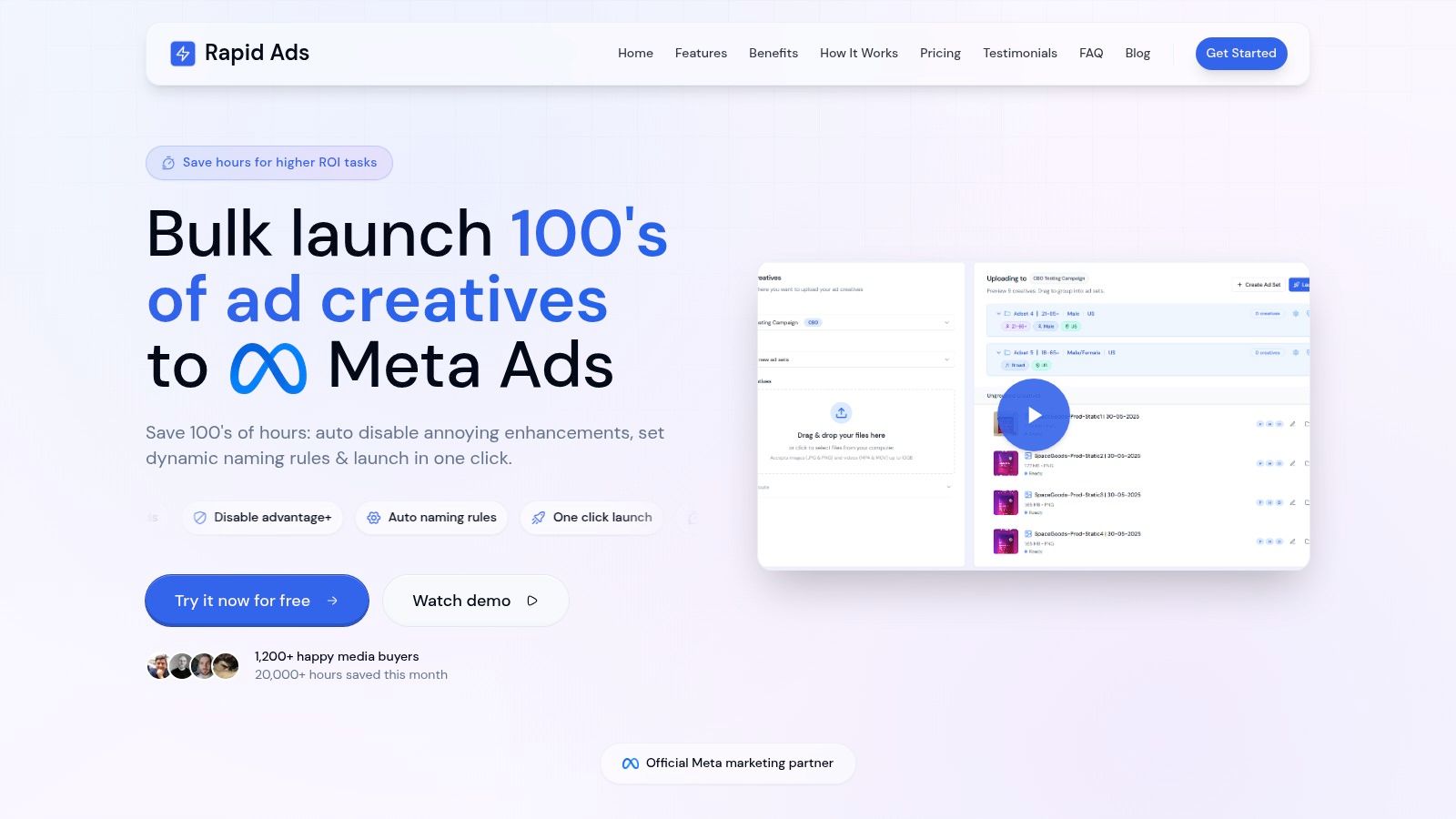
That operational drag is why a lot of serious teams move high-volume setup work out of native Ads Manager workflows when they're launching across multiple accounts, markets, or creative batches. The performance gain isn't just speed. It's preservation of test integrity.
Three things matter most here:
- Naming enforcement: Campaign, ad set, and ad names should encode audience, offer, creative angle, placement logic, and date logic in a consistent format.
- Bulk publishing control: High testing velocity only works if assets can be launched without one-by-one setup friction.
- Setting stability: If a platform imperceptibly changes enhancement settings, your reporting and creative conclusions get polluted.
This is why operations and performance aren't separate conversations in Facebook Ads for lead generation. They're the same conversation at scale.
Common Lead Gen Pitfalls and How to Fix Them
Experienced buyers usually lose lead quality in familiar ways.
- Optimizing to CPL only. Fix it by making qualified lead rate and downstream CRM stages part of the weekly scorecard.
- Using Instant Forms for every offer. Fix it by moving higher-friction sales motions to a website path when the landing page can qualify intent.
- Letting forms bloat. Fix it by stripping every field or question that doesn't change routing, qualification, or follow-up.
- Ignoring the form open to completion gap. Fix it by treating that gap as an immediate friction diagnostic instead of waiting for CPL to tell the whole story.
- Refreshing creative too slowly. Fix it by running a standing creative pipeline tied to audience segments, not occasional ad-hoc uploads.
- Relying on Pixel only. Fix it by implementing Conversions API alongside Pixel so optimization isn't running on incomplete feedback.
- Following up too slowly. Fix it by syncing leads into the CRM instantly and triggering immediate outreach.
- Blending cold and warm traffic in one structure. Fix it by separating prospecting from retargeting so messaging and spend control stay clean.
- Building audiences around vague relevance. Fix it by targeting buying context and feeding back qualified CRM data.
- Allowing account operations to get messy. Fix it by standardizing naming, launch workflows, and setting controls before volume increases.
If your team needs a deeper form-specific teardown, this guide has more from Orbit AI on improving Facebook lead gen forms without adding useless friction.
The teams that scale Facebook Ads for lead generation well aren't just better at buying traffic. They're better at protecting intent from click to close.
If your team is launching a high volume of Meta lead gen tests and Ads Manager is becoming the bottleneck, Rapid Ads is worth a look. It helps agencies and performance teams bulk upload creatives, keep naming conventions clean across accounts, prevent unwanted Advantage+ setting drift, and manage multi-account launch workflows without the usual click-heavy setup overhead.